Pular para o conteúdo
Odoo Menu
  • Entrar
  • Experimente grátis
  • Aplicativos
    Finanças
    • Financeiro
    • Faturamento
    • Despesas
    • Planilhas (BI)
    • Documentos
    • Assinar Documentos
    Vendas
    • CRM
    • Vendas
    • PDV Loja
    • PDV Restaurantes
    • Assinaturas
    • Locação
    Websites
    • Criador de Sites
    • e-Commerce
    • Blog
    • Fórum
    • Chat ao Vivo
    • e-Learning
    Cadeia de mantimentos
    • Inventário
    • Fabricação
    • PLM - Ciclo de Vida do Produto
    • Compras
    • Manutenção
    • Qualidade
    Recursos Humanos
    • Funcionários
    • Recrutamento
    • Folgas
    • Avaliações
    • Indicações
    • Frota
    Marketing
    • Redes Sociais
    • Marketing por E-mail
    • Marketing por SMS
    • Eventos
    • Automação de Marketing
    • Pesquisas
    Serviços
    • Projeto
    • Planilhas de Horas
    • Serviço de Campo
    • Central de Ajuda
    • Planejamento
    • Compromissos
    Produtividade
    • Mensagens
    • Inteligência Artificial
    • Internet das Coisas
    • VoIP
    • Conhecimento
    • WhatsApp
    Aplicativos de terceiros Odoo Studio Plataforma Odoo Cloud
  • Setores
    Varejo
    • Loja de livros
    • Loja de roupas
    • Loja de móveis
    • Mercearia
    • Loja de ferramentas
    • Loja de brinquedos
    Comida e hospitalidade
    • Bar e Pub
    • Restaurante
    • Fast Food
    • Hospedagem
    • Distribuidor de bebidas
    • Hotel
    Imóveis
    • Imobiliária
    • Escritório de arquitetura
    • Construção
    • Gestão de Imóveis
    • Jardinagem
    • Associação de proprietários de imóveis
    Consultoria
    • Escritório de Contabilidade
    • Parceiro Odoo
    • Agência de marketing
    • Escritório de advocacia
    • Aquisição de talentos
    • Auditoria e Certificação
    Fabricação
    • Têxtil
    • Metal
    • Móveis
    • Alimentação
    • Cervejaria
    • Presentes corporativos
    Saúde e Boa forma
    • Clube esportivo
    • Loja de óculos
    • Academia
    • Profissionais de bem-estar
    • Farmácia
    • Salão de cabeleireiro
    Comércio
    • Handyman
    • Hardware e Suporte de TI
    • Sistemas de energia solar
    • Sapataria
    • Serviços de limpeza
    • Serviços de climatização
    Outros
    • Organização sem fins lucrativos
    • Agência Ambiental
    • Aluguel de outdoors
    • Fotografia
    • Aluguel de bicicletas
    • Revendedor de software
    Navegar por todos os setores
  • Comunidade
    Aprenda
    • Tutoriais
    • Documentação
    • Certificações
    • Treinamento
    • Blog
    • Podcast
    Empodere a Educação
    • Programa de educação
    • Scale Up! Jogo de Negócios
    • Visite a Odoo
    Obtenha o Software
    • Baixar
    • Comparar edições
    • Releases
    Colaborar
    • Github
    • Fórum
    • Eventos
    • Traduções
    • Torne-se um parceiro
    • Serviços para parceiros
    • Cadastre seu escritório contábil
    Obtenha os serviços
    • Encontre um parceiro
    • Encontre um Contador
    • Agende uma Demonstração
    • Serviços de Implementação
    • Referências de Clientes
    • Suporte
    • Upgrades
    Github YouTube Twitter Linkedin Instagram Facebook Spotify
    +1 (650) 691-3277
    Faça uma demonstração
  • Preços
  • Ajuda
É necessário estar registrado para interagir com a comunidade.
Todas as publicações Pessoas Emblemas
Marcadores (Ver tudo)
odoo accounting v14 pos v15
Sobre este fórum
É necessário estar registrado para interagir com a comunidade.
Todas as publicações Pessoas Emblemas
Marcadores (Ver tudo)
odoo accounting v14 pos v15
Sobre este fórum
Ajuda

Remove access rights to a date

Inscrever

Seja notificado quando houver atividade nesta publicação

Esta pergunta foi sinalizada
users
2 Respostas
2276 Visualizações
Avatar
Bruno S

Hi,


We have an employee who will be leaving the company on December 31, 2025. 

Can we schedule the end of his license usage rights in advance on that date? Odoo V.17

 Thank you in advance for your feedback. 

Sincerely,

0
Avatar
Cancelar
faOtools

This app - https://apps.odoo.com/apps/modules/17.0/security_user_roles - lets you do so. The tool allows combining access groups in user roles and then assigning them to users. Such an assignment might be automatic based on the time rules. Thus, it is possible to remove a role for a particular period (e.g., 12/31/2025 - forever) or, conversely, add it for periods.

Bruno S
Autor

Hi,

Thank you very much for your answers. 

It's a shame there's simply no contract end date in Odoo that would automate all this. 

I'll look into external modules. 

Have a great day.

Avatar
Christoph Farnleitner
Melhor resposta

While there is no "click here - done" solution to your requirement, you can certainly achieve this by setting up an Automation Rule.

If you haven't already, go to Apps, remove the Apps filter and search for and install Automation Rules (technical name base_automation).

Once this is out of the way, enable the Developer Mode (https://www.odoo.com/documentation/17.0/applications/general/developer_mode.html) and navigate to Settings -> Technical --> Automation -> Automation Rules. Here, create a new Automation Rule, looking something like this*:

Name: (something speaking, such as) 
Archive Employee User on Contract expiration
Model: 
Contract
Trigger: 
State is set to - Expired
Before Update Domain: (leave as is)
Apply on: (now, this is the most tricky part - you need to be clear about your rules specifying in detail how 'leaving your company' is defined your database)
Match all of the following rules:
Employee > Current Contract > Status is in (Expired, Cancelled)


Action To Do:
Update Employee > User > Active to No (False)


Your final result may look something like this:
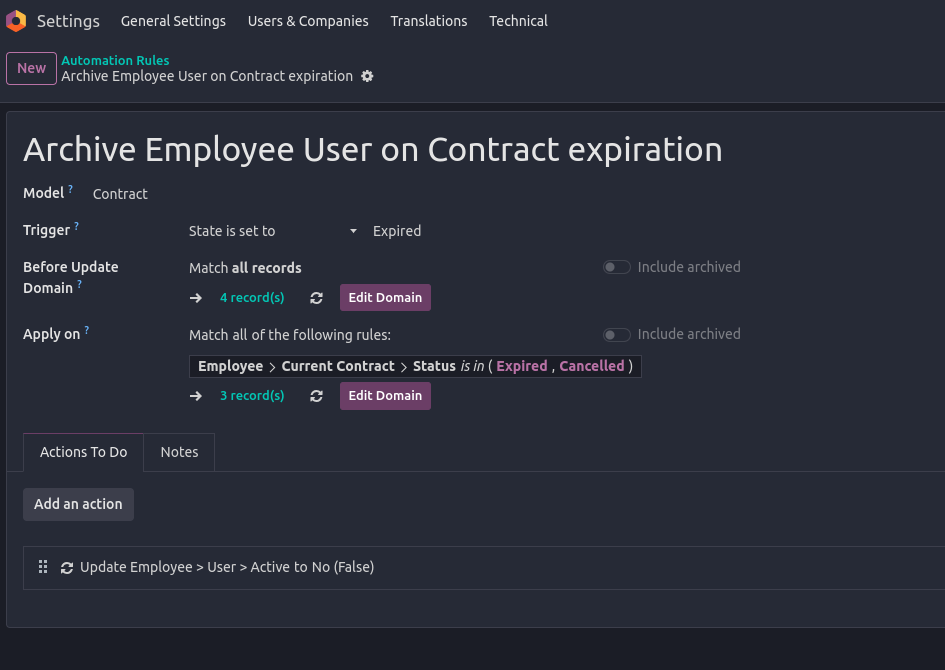


*) Note: The exact way of implementing this depends on how you manage your Employees and their Contracts, and as already stated, how you define a leaving Employee in your database.

In any case, the record(s) listed under Apply on should give you a clear indication of whom's contracts are falling under your current configuration.

I'd highly recommend you to try this Automation Rule in a Testing Environment (note: you will have to manually trigger the Automation Rule execution in a properly set up Test environment yourself since Scheduled Actions are not executed by default!).

Furthermore, don't set Actions To Do as long as you are not completely sure the rules specified don't lead to lock yourself out of your database or have any other unwanted side-effects on current employees!

--

In general, what above Automation Rule is meant to do is to Archive Users of Employees once the current Employees's Contract is expired/cancelled. This also means, in case you use multiple Contracts on Employees, you need to further on-wards ensure that new contracts are set up prior to ending existing ones.

Finally, in case you're not fully familiar with how Employee Contracts are managed, you should take a detailed look at the documentation available:

  • https://www.odoo.com/slides/slide/9654 (and other Human Resources videos)
  • https://www.odoo.com/slides/slide/6862 (about Automations)
  • https://www.odoo.com/documentation/17.0/applications/hr.html
1
Avatar
Cancelar
Avatar
Cybrosys Techno Solutions Pvt.Ltd
Melhor resposta

Hi,

In Odoo, there’s no built-in feature to automatically deactivate a user on a future date, such as December 31, 2025. Deactivation must typically be done manually by archiving the user on the day they leave.

However, there are several ways to manage this more efficiently. The easiest is to use a third-party module from the Odoo App Store—search for apps like “Auto Deactivate Users” or “Deactivate User by Date.” These allow you to set a deactivation date on the user profile or trigger it after inactivity.

If you prefer not to use external modules, you can create a scheduled automated action in Developer Mode to run Python code that deactivates users on a set date. For example:


env['res.users'].search([('login','=','user@example.com')]).write({'active': False})


Alternatively, create a calendar reminder or task for the admin to manually archive the user on the specified date.


Hope it helps

0
Avatar
Cancelar
Está gostando da discussão? Não fique apenas lendo, participe!

Crie uma conta hoje mesmo para aproveitar os recursos exclusivos e interagir com nossa incrível comunidade!

Inscrever-se
Publicações relacionadas Respostas Visualizações Atividade
Managing users access rights UI changed from last week Resolvido
users
Avatar
Avatar
1
set. 25
3796
What is exact difference between portal and public user in odoo? when We need to create a public user? Resolvido
users
Avatar
Avatar
Avatar
Avatar
3
jul. 25
11910
How can I view user login history in my Odoo Standard v18 database?
users
Avatar
Avatar
1
mai. 25
3884
What is the minimum number of users need to purchase ? Resolvido
users
Avatar
Avatar
Avatar
2
jan. 25
4691
How do I add a new user type field? Ex. In addition to Salesperson, we also want to have an Event Coordinator field. Resolvido
users
Avatar
Avatar
1
ago. 24
3339
Comunidade
  • Tutoriais
  • Documentação
  • Fórum
Open Source
  • Baixar
  • Github
  • Runbot
  • Traduções
Serviços
  • Odoo.sh Hosting
  • Suporte
  • Upgrade
  • Desenvolvimentos personalizados
  • Educação
  • Encontre um Contador
  • Encontre um parceiro
  • Torne-se um parceiro
Sobre nós
  • Nossa empresa
  • Ativos da marca
  • Contato
  • Empregos
  • Eventos
  • Podcast
  • Blog
  • Clientes
  • Legal • Privacidade
  • Segurança
الْعَرَبيّة Català 简体中文 繁體中文 (台灣) Čeština Dansk Nederlands English Suomi Français Deutsch हिंदी Bahasa Indonesia Italiano 日本語 한국어 (KR) Lietuvių kalba Język polski Português (BR) română русский язык Slovenský jazyk Slovenščina Español (América Latina) Español Svenska ภาษาไทย Türkçe українська Tiếng Việt

Odoo é um conjunto de aplicativos de negócios em código aberto que cobre todas as necessidades de sua empresa: CRM, comércio eletrônico, contabilidade, estoque, ponto de venda, gerenciamento de projetos, etc.

A proposta de valor exclusiva Odoo é ser, ao mesmo tempo, muito fácil de usar e totalmente integrado.

Site feito com

Odoo Experience on YouTube

1. Use the live chat to ask your questions.
2. The operator answers within a few minutes.

Live support on Youtube
Watch now