
Hi,
We have an employee who will be leaving the company on December 31, 2025.
Can we schedule the end of his license usage rights in advance on that date? Odoo V.17
Thank you in advance for your feedback.
Sincerely,

Hi,
We have an employee who will be leaving the company on December 31, 2025.
Can we schedule the end of his license usage rights in advance on that date? Odoo V.17
Thank you in advance for your feedback.
Sincerely,

While there is no "click here - done" solution to your requirement, you can certainly achieve this by setting up an Automation Rule.
If you haven't already, go to Apps, remove the Apps filter and search for and install Automation Rules (technical name base_automation).
Once this is out of the way, enable the Developer Mode (https://www.odoo.com/documentation/17.0/applications/general/developer_mode.html) and navigate to Settings -> Technical --> Automation -> Automation Rules. Here, create a new Automation Rule, looking something like this*:
Name: (something speaking, such as)
Archive Employee User on Contract expiration
Model:
Contract
Trigger:
State is set to - Expired
Before Update Domain: (leave as is)
Apply on: (now, this is the most tricky part - you need to be clear about your rules specifying in detail how 'leaving your company' is defined your database)
Match all of the following rules:
Employee > Current Contract > Status is in (Expired, Cancelled)
Action To Do:
Update Employee > User > Active to No (False)
Your final result may look something like this:
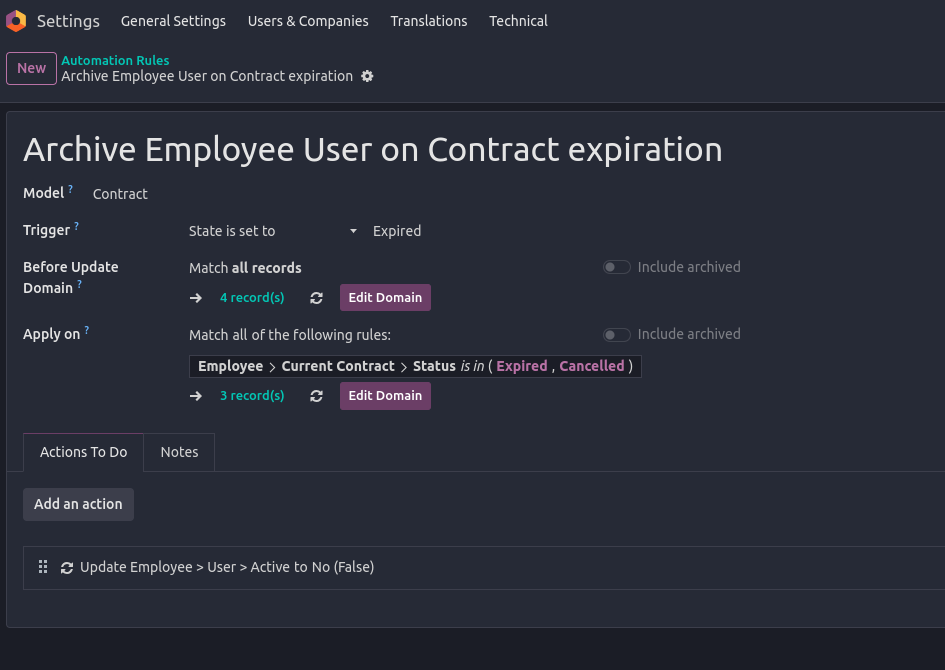
*) Note: The exact way of implementing this depends on how you manage your Employees and their Contracts, and as already stated, how you define a leaving Employee in your database.
In any case, the record(s) listed under Apply on should give you a clear indication of whom's contracts are falling under your current configuration.
I'd highly recommend you to try this Automation Rule in a Testing Environment (note: you will have to manually trigger the Automation Rule execution in a properly set up Test environment yourself since Scheduled Actions are not executed by default!).
Furthermore, don't set Actions To Do as long as you are not completely sure the rules specified don't lead to lock yourself out of your database or have any other unwanted side-effects on current employees!
--
In general, what above Automation Rule is meant to do is to Archive Users of Employees once the current Employees's Contract is expired/cancelled. This also means, in case you use multiple Contracts on Employees, you need to further on-wards ensure that new contracts are set up prior to ending existing ones.
Finally, in case you're not fully familiar with how Employee Contracts are managed, you should take a detailed look at the documentation available:

Hi,
In Odoo, there’s no built-in feature to automatically deactivate a user on a future date, such as December 31, 2025. Deactivation must typically be done manually by archiving the user on the day they leave.
However, there are several ways to manage this more efficiently. The easiest is to use a third-party module from the Odoo App Store—search for apps like “Auto Deactivate Users” or “Deactivate User by Date.” These allow you to set a deactivation date on the user profile or trigger it after inactivity.
If you prefer not to use external modules, you can create a scheduled automated action in Developer Mode to run Python code that deactivates users on a set date. For example:
env['res.users'].search([('login','=','user@example.com')]).write({'active': False})
Alternatively, create a calendar reminder or task for the admin to manually archive the user on the specified date.
Hope it helps
| 관련 게시물 | 답글 | 화면 | 활동 | |
|---|---|---|---|---|


|
1
9월 25
|
3862 | ||


|
3
7월 25
|
11983 | ||

|
1
5월 25
|
3941 | ||


|
2
1월 25
|
4751 | ||


|
1
8월 24
|
3375 |
1. Use the live chat to ask your questions.
2. The operator answers within a few minutes.

This app - https://apps.odoo.com/apps/modules/17.0/security_user_roles - lets you do so. The tool allows combining access groups in user roles and then assigning them to users. Such an assignment might be automatic based on the time rules. Thus, it is possible to remove a role for a particular period (e.g., 12/31/2025 - forever) or, conversely, add it for periods.
Hi,
Thank you very much for your answers.
It's a shame there's simply no contract end date in Odoo that would automate all this.
I'll look into external modules.
Have a great day.