Siirry sisältöön
Odoo Menu
  • Kirjaudu sisään
  • Kokeile ilmaiseksi
  • Sovellukset
    Talous
    • Kirjanpito
    • Laskutus
    • Kulut
    • Datataulukot (BI)
    • Asiakirjat
    • Allekirjoita
    Myynti
    • CRM
    • Myynti
    • Kassajärjestelmä myymälään
    • Kassajärjestelmä ravintolaan
    • Tilaukset
    • Vuokraus
    Verkkosivut
    • Verkkosivun Rakennustyökalu
    • Verkkokauppa
    • Blogi
    • Foorumi
    • Livechat
    • Verkko-oppiminen
    Toimitusketju
    • Varastointi
    • Tuotanto
    • Tuotteen elinkaaren hallinta (PLM)
    • Ostot
    • Huolto
    • Laatu
    Henkilöstöhallinto
    • Työntekijät
    • Rekrytointi
    • Vapaat
    • Arvioinnit
    • Suositukset
    • Kuljetuskalusto
    Markkinointi
    • Somemarkkinointi
    • Sähköpostimarkkinointi
    • Tekstiviestimarkkinointi
    • Tapahtumat
    • Markkinoinnin automaatio
    • Kyselyt
    Palvelut
    • Projekti
    • Työaikakirjaukset
    • Kenttähuolto
    • Asiakaspalvelu
    • Suunnittelu
    • Ajanvaraukset
    Tuottavuus
    • Viestintä
    • Tekoäly
    • IoT
    • IP-puhe
    • Tietokirjasto
    • WhatsApp
    Kolmannen osapuolen sovellukset Odoo-Studio Odoo-Pilvialusta
  • Toimialat
    Vähittäiskauppa
    • Kirjakauppa
    • Vaatekauppa
    • Huonekaluliike
    • Ruokakauppa
    • Laitteistokauppa
    • Lelukauppa
    Ruoka & Majoitus
    • Baari ja Pubi
    • Ravintola
    • Pikaruoka
    • Majatalo
    • Juomien jakelija
    • Hotelli
    Kiinteistöt
    • Kiinteistönvälitystoimisto
    • Arkkitehtitoimisto
    • Rakentaminen
    • Kiinteistönhallinto
    • Puutarhanhoito
    • Kiinteistönomistajien yhdistys
    Konsultointi
    • Tilitoimisto
    • Odoo-kumppani
    • Markkinointitoimisto
    • Lakitoimisto
    • Osaajahankinta
    • Tilintarkastus & sertifiointi
    Tuotanto
    • Tekstiili
    • Metalli
    • Huonekalut
    • Ruoka
    • Panimo
    • Yrityslahjat
    Terveys & Liikunta
    • Urheiluseura
    • Silmälasiliike
    • Kuntokeskus
    • Hyvinvointialan ammattilaiset
    • Apteekki
    • Kampaamo
    Kaupat
    • Yleismies
    • IT-laitteisto & Tuki
    • Aurinkoenergiajärjestelmät
    • Suutari
    • Siivouspalvelut
    • LVI-palvelut
    Muut
    • Voittoa tavoittelematon järjestö
    • Ympäristötoimisto
    • Mainostaulujen vuokraus  
    • Valokuvaus
    • Leasing-pyörät
    • Ohjelmistojen jälleenmyyjä
    Selaa kaikkia toimialoja
  • Yhteisö
    Opi
    • Kurssit
    • Dokumentaatio
    • Todistukset
    • Koulutus
    • Blogi
    • Podcast
    Kannusta kouluttautumaan
    • Koulutusohjelmat
    • Scale Up! Liiketoimintapeli
    • Vieraile Odoolla
    Hanki ohjelmisto
    • Lataa
    • Vertaile versioita
    • Julkaisut
    Tee yhteistyötä
    • Github
    • Foorumi
    • Tapahtumat
    • Käännökset
    • Ryhdy kumppaniksi
    • Kumppanipalvelut
    • Rekisteröi tilitoimistosi
    Hanki palveluja
    • Löydä kumppani
    • Löydä kirjanpitäjä
    • Varaa asiantuntijatapaaminen
    • Implementaatiopalvelut
    • Asiakasreferenssit
    • Tuki
    • Versionkorotukset
    Github Youtube Twitter Linkedin Instagram Facebook Spotify
    +1 (650) 691-3277
    Varaa demo
  • Hinnoittelu
  • Asiakaspalvelu
Sinun on rekisteröidyttävä, jotta voit olla vuorovaikutuksessa yhteisön kanssa.
Kaikki kirjoitukset Ihmiset Merkit
Tunnisteet (Näytä kaikki)
odoo accounting v14 pos v15
Tietoa tästä foorumista
Sinun on rekisteröidyttävä, jotta voit olla vuorovaikutuksessa yhteisön kanssa.
Kaikki kirjoitukset Ihmiset Merkit
Tunnisteet (Näytä kaikki)
odoo accounting v14 pos v15
Tietoa tästä foorumista
Apua

Remove access rights to a date

Tilaa

Saat ilmoituksen, kun tähän viestiin ilmaantuu aktiviteettia

Tämä kysymys on merkitty
users
2 Vastaukset
2348 Näkymät
Avatar
Bruno S

Hi,


We have an employee who will be leaving the company on December 31, 2025. 

Can we schedule the end of his license usage rights in advance on that date? Odoo V.17

 Thank you in advance for your feedback. 

Sincerely,

0
Avatar
Hylkää
faOtools

This app - https://apps.odoo.com/apps/modules/17.0/security_user_roles - lets you do so. The tool allows combining access groups in user roles and then assigning them to users. Such an assignment might be automatic based on the time rules. Thus, it is possible to remove a role for a particular period (e.g., 12/31/2025 - forever) or, conversely, add it for periods.

Bruno S
Tekijä

Hi,

Thank you very much for your answers. 

It's a shame there's simply no contract end date in Odoo that would automate all this. 

I'll look into external modules. 

Have a great day.

Avatar
Christoph Farnleitner
Paras vastaus

While there is no "click here - done" solution to your requirement, you can certainly achieve this by setting up an Automation Rule.

If you haven't already, go to Apps, remove the Apps filter and search for and install Automation Rules (technical name base_automation).

Once this is out of the way, enable the Developer Mode (https://www.odoo.com/documentation/17.0/applications/general/developer_mode.html) and navigate to Settings -> Technical --> Automation -> Automation Rules. Here, create a new Automation Rule, looking something like this*:

Name: (something speaking, such as) 
Archive Employee User on Contract expiration
Model: 
Contract
Trigger: 
State is set to - Expired
Before Update Domain: (leave as is)
Apply on: (now, this is the most tricky part - you need to be clear about your rules specifying in detail how 'leaving your company' is defined your database)
Match all of the following rules:
Employee > Current Contract > Status is in (Expired, Cancelled)


Action To Do:
Update Employee > User > Active to No (False)


Your final result may look something like this:
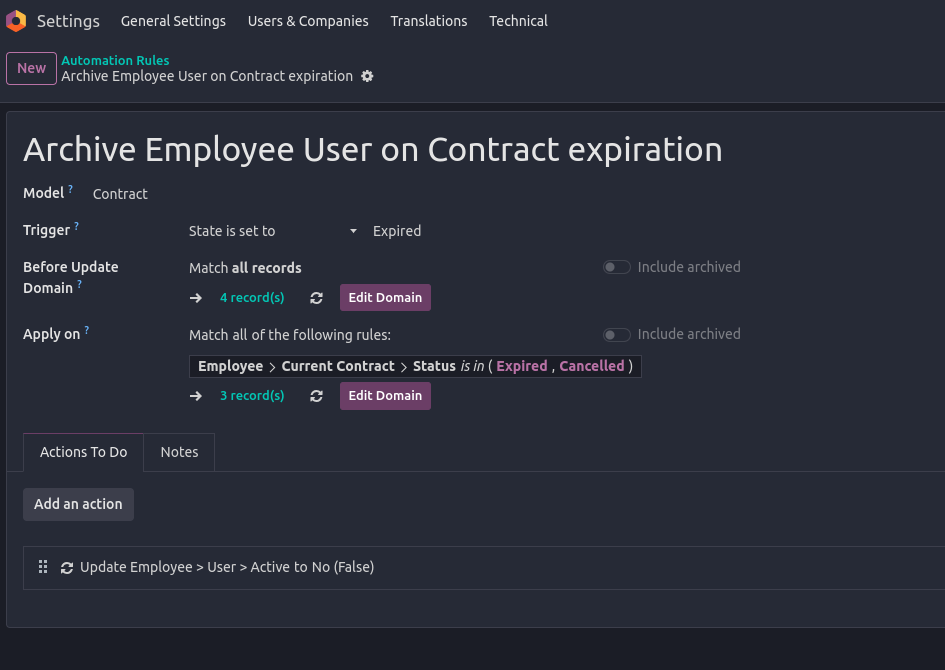


*) Note: The exact way of implementing this depends on how you manage your Employees and their Contracts, and as already stated, how you define a leaving Employee in your database.

In any case, the record(s) listed under Apply on should give you a clear indication of whom's contracts are falling under your current configuration.

I'd highly recommend you to try this Automation Rule in a Testing Environment (note: you will have to manually trigger the Automation Rule execution in a properly set up Test environment yourself since Scheduled Actions are not executed by default!).

Furthermore, don't set Actions To Do as long as you are not completely sure the rules specified don't lead to lock yourself out of your database or have any other unwanted side-effects on current employees!

--

In general, what above Automation Rule is meant to do is to Archive Users of Employees once the current Employees's Contract is expired/cancelled. This also means, in case you use multiple Contracts on Employees, you need to further on-wards ensure that new contracts are set up prior to ending existing ones.

Finally, in case you're not fully familiar with how Employee Contracts are managed, you should take a detailed look at the documentation available:

  • https://www.odoo.com/slides/slide/9654 (and other Human Resources videos)
  • https://www.odoo.com/slides/slide/6862 (about Automations)
  • https://www.odoo.com/documentation/17.0/applications/hr.html
1
Avatar
Hylkää
Avatar
Cybrosys Techno Solutions Pvt.Ltd
Paras vastaus

Hi,

In Odoo, there’s no built-in feature to automatically deactivate a user on a future date, such as December 31, 2025. Deactivation must typically be done manually by archiving the user on the day they leave.

However, there are several ways to manage this more efficiently. The easiest is to use a third-party module from the Odoo App Store—search for apps like “Auto Deactivate Users” or “Deactivate User by Date.” These allow you to set a deactivation date on the user profile or trigger it after inactivity.

If you prefer not to use external modules, you can create a scheduled automated action in Developer Mode to run Python code that deactivates users on a set date. For example:


env['res.users'].search([('login','=','user@example.com')]).write({'active': False})


Alternatively, create a calendar reminder or task for the admin to manually archive the user on the specified date.


Hope it helps

0
Avatar
Hylkää
Nautitko keskustelusta? Älä vain lue, vaan osallistu!

Luo tili jo tänään nauttiaksesi yksinoikeusominaisuuksista ja osallistuaksesi mahtavaan yhteisöömme!

Rekisteröidy
Aiheeseen liittyviä artikkeleita Vastaukset Näkymät Toimenpide
Managing users access rights UI changed from last week Ratkaistu
users
Avatar
Avatar
1
syysk. 25
3853
What is exact difference between portal and public user in odoo? when We need to create a public user? Ratkaistu
users
Avatar
Avatar
Avatar
Avatar
3
heinäk. 25
11972
How can I view user login history in my Odoo Standard v18 database?
users
Avatar
Avatar
1
toukok. 25
3933
What is the minimum number of users need to purchase ? Ratkaistu
users
Avatar
Avatar
Avatar
2
tammik. 25
4741
How do I add a new user type field? Ex. In addition to Salesperson, we also want to have an Event Coordinator field. Ratkaistu
users
Avatar
Avatar
1
elok. 24
3373
Yhteisö
  • Kurssit
  • Dokumentaatio
  • Foorumi
Avoin lähdekoodi
  • Lataa
  • Github
  • Runbot
  • Käännökset
Palvelut
  • Odoo.sh hosting
  • Tuki
  • Versionkorotus
  • Räätälöidyt kehitykset
  • Koulutus
  • Löydä kirjanpitäjä
  • Löydä kumppani
  • Ryhdy kumppaniksi
Meistä
  • Yrityksemme
  • Brändimateriaalit
  • Ota yhteyttä
  • Työpaikat
  • Tapahtumat
  • Podcast
  • Blogi
  • Asiakkaat
  • Oikeudelliset tiedot • Yksityisyys
  • Tietoturva
الْعَرَبيّة Català 简体中文 繁體中文 (台灣) Čeština Dansk Nederlands English Suomi Français Deutsch हिंदी Bahasa Indonesia Italiano 日本語 한국어 (KR) Lietuvių kalba Język polski Português (BR) română русский язык Slovenský jazyk Slovenščina Español (América Latina) Español Svenska ภาษาไทย Türkçe українська Tiếng Việt

Odoo on kokoelma avoimen lähdekoodin yrityssovelluksia, jotka kattavat kaikki yrityksesi tarpeet: asiakkuudenhallinta eli CRM, verkkokauppa, kirjanpito, varastointi, kassajärjestelmä, projektinhallinta, jne.

Odoon ainutlaatuinen arvolupaus on olla samanaikaisesti erittäin helppokäyttöinen ja täysin integroitu.

Website made with

Odoo Experience on YouTube

1. Use the live chat to ask your questions.
2. The operator answers within a few minutes.

Live support on Youtube
Watch now