Skip to Content
Odoo Menu
  • Log ind
  • Prøv gratis
  • Apps
    Økonomi
    • Bogføring
    • Fakturering
    • Udgifter
    • Regneark (BI)
    • Dokumenter
    • e-Signatur
    Salg
    • CRM
    • Salg
    • POS Butik
    • POS Restaurant
    • Abonnementer
    • Udlejning
    Hjemmeside
    • Hjemmesidebygger
    • e-Handel
    • Blog
    • Forum
    • LiveChat
    • e-Læring
    Forsyningskæde
    • Lagerbeholdning
    • Produktion
    • PLM
    • Indkøb
    • Vedligeholdelse
    • Kvalitet
    HR
    • Medarbejdere
    • Rekruttering
    • Fravær
    • Medarbejdersamtaler
    • Anbefalinger
    • Flåde
    Marketing
    • Markedsføring på sociale medier
    • E-mailmarketing
    • SMS-marketing
    • Arrangementer
    • Automatiseret marketing
    • Spørgeundersøgelser
    Tjenester
    • Projekt
    • Timesedler
    • Udkørende Service
    • Kundeservice
    • Planlægning
    • Aftaler
    Produktivitet
    • Dialog
    • Kunstig intelligens
    • IoT
    • VoIP
    • Vidensdeling
    • WhatsApp
    Tredjepartsapps Odoo Studio Odoo Cloud-platform
  • Brancher
    Detailhandel
    • Boghandel
    • Tøjforretning
    • Møbelforretning
    • Dagligvarebutik
    • Byggemarked
    • Legetøjsforretning
    Mad og værtsskab
    • Bar og pub
    • Restaurant
    • Fastfood
    • Gæstehus
    • Drikkevareforhandler
    • Hotel
    Ejendom
    • Ejendomsmægler
    • Arkitektfirma
    • Byggeri
    • Ejendomsadministration
    • Havearbejde
    • Boligejerforening
    Rådgivning
    • Regnskabsfirma
    • Odoo-partner
    • Marketingbureau
    • Advokatfirma
    • Rekruttering
    • Audit & certificering
    Produktion
    • Tekstil
    • Metal
    • Møbler
    • Fødevareproduktion
    • Bryggeri
    • Firmagave
    Heldbred & Fitness
    • Sportsklub
    • Optiker
    • Fitnesscenter
    • Kosmetolog
    • Apotek
    • Frisør
    Håndværk
    • Handyman
    • IT-hardware og support
    • Solenergisystemer
    • Skomager
    • Rengøringsservicer
    • VVS- og ventilationsservice
    Andet
    • Nonprofitorganisation
    • Miljøagentur
    • Udlejning af billboards
    • Fotografi
    • Cykeludlejning
    • Softwareforhandler
    Gennemse alle brancher
  • Community
    Få mere at vide
    • Tutorials
    • Dokumentation
    • Certificeringer
    • Oplæring
    • Blog
    • Podcast
    Bliv klogere
    • Udannelselsesprogram
    • Scale Up!-forretningsspillet
    • Besøg Odoo
    Få softwaren
    • Download
    • Sammenlign versioner
    • Udgaver
    Samarbejde
    • Github
    • Forum
    • Arrangementer
    • Oversættelser
    • Bliv partner
    • Tjenester til partnere
    • Registrér dit regnskabsfirma
    Modtag tjenester
    • Find en partner
    • Find en bogholder
    • Kontakt en rådgiver
    • Implementeringstjenester
    • Kundereferencer
    • Support
    • Opgraderinger
    Github Youtube Twitter LinkedIn Instagram Facebook Spotify
    +1 (650) 691-3277
    Få en demo
  • Prissætning
  • Hjælp
Du skal være registreret for at interagere med fællesskabet.
Alle bidrag Personer Emblemer
Tags (Vis alle)
odoo accounting v14 pos v15
Om dette forum
Du skal være registreret for at interagere med fællesskabet.
Alle bidrag Personer Emblemer
Tags (Vis alle)
odoo accounting v14 pos v15
Om dette forum
Hjælp

Remove access rights to a date

Tilmeld

Få besked, når der er aktivitet på dette indlæg

Dette spørgsmål er blevet anmeldt
users
2 Besvarelser
2313 Visninger
Avatar
Bruno S

Hi,


We have an employee who will be leaving the company on December 31, 2025. 

Can we schedule the end of his license usage rights in advance on that date? Odoo V.17

 Thank you in advance for your feedback. 

Sincerely,

0
Avatar
Kassér
faOtools

This app - https://apps.odoo.com/apps/modules/17.0/security_user_roles - lets you do so. The tool allows combining access groups in user roles and then assigning them to users. Such an assignment might be automatic based on the time rules. Thus, it is possible to remove a role for a particular period (e.g., 12/31/2025 - forever) or, conversely, add it for periods.

Bruno S
Forfatter

Hi,

Thank you very much for your answers. 

It's a shame there's simply no contract end date in Odoo that would automate all this. 

I'll look into external modules. 

Have a great day.

Avatar
Christoph Farnleitner
Bedste svar

While there is no "click here - done" solution to your requirement, you can certainly achieve this by setting up an Automation Rule.

If you haven't already, go to Apps, remove the Apps filter and search for and install Automation Rules (technical name base_automation).

Once this is out of the way, enable the Developer Mode (https://www.odoo.com/documentation/17.0/applications/general/developer_mode.html) and navigate to Settings -> Technical --> Automation -> Automation Rules. Here, create a new Automation Rule, looking something like this*:

Name: (something speaking, such as) 
Archive Employee User on Contract expiration
Model: 
Contract
Trigger: 
State is set to - Expired
Before Update Domain: (leave as is)
Apply on: (now, this is the most tricky part - you need to be clear about your rules specifying in detail how 'leaving your company' is defined your database)
Match all of the following rules:
Employee > Current Contract > Status is in (Expired, Cancelled)


Action To Do:
Update Employee > User > Active to No (False)


Your final result may look something like this:
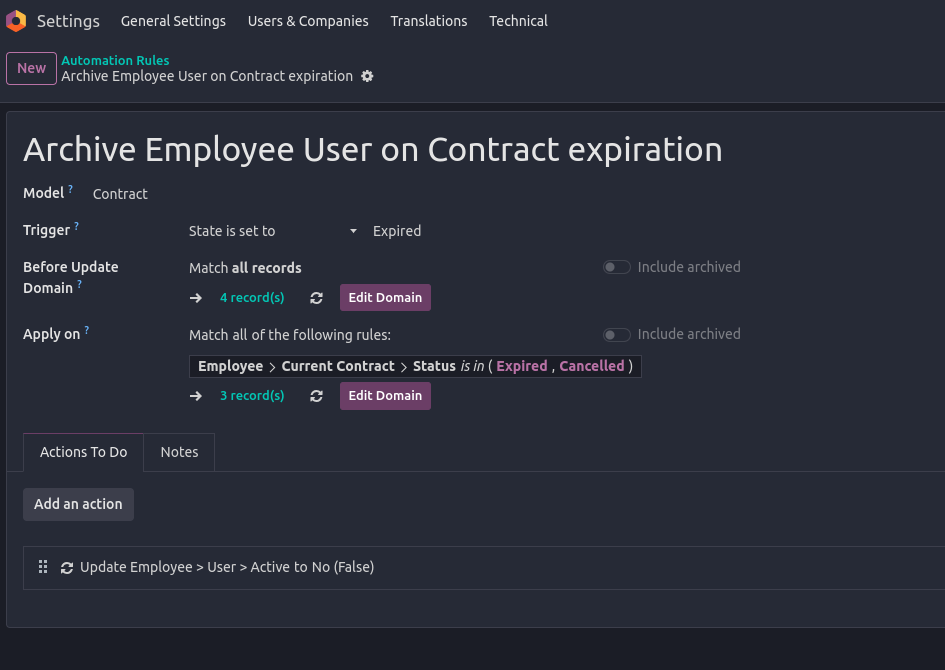


*) Note: The exact way of implementing this depends on how you manage your Employees and their Contracts, and as already stated, how you define a leaving Employee in your database.

In any case, the record(s) listed under Apply on should give you a clear indication of whom's contracts are falling under your current configuration.

I'd highly recommend you to try this Automation Rule in a Testing Environment (note: you will have to manually trigger the Automation Rule execution in a properly set up Test environment yourself since Scheduled Actions are not executed by default!).

Furthermore, don't set Actions To Do as long as you are not completely sure the rules specified don't lead to lock yourself out of your database or have any other unwanted side-effects on current employees!

--

In general, what above Automation Rule is meant to do is to Archive Users of Employees once the current Employees's Contract is expired/cancelled. This also means, in case you use multiple Contracts on Employees, you need to further on-wards ensure that new contracts are set up prior to ending existing ones.

Finally, in case you're not fully familiar with how Employee Contracts are managed, you should take a detailed look at the documentation available:

  • https://www.odoo.com/slides/slide/9654 (and other Human Resources videos)
  • https://www.odoo.com/slides/slide/6862 (about Automations)
  • https://www.odoo.com/documentation/17.0/applications/hr.html
1
Avatar
Kassér
Avatar
Cybrosys Techno Solutions Pvt.Ltd
Bedste svar

Hi,

In Odoo, there’s no built-in feature to automatically deactivate a user on a future date, such as December 31, 2025. Deactivation must typically be done manually by archiving the user on the day they leave.

However, there are several ways to manage this more efficiently. The easiest is to use a third-party module from the Odoo App Store—search for apps like “Auto Deactivate Users” or “Deactivate User by Date.” These allow you to set a deactivation date on the user profile or trigger it after inactivity.

If you prefer not to use external modules, you can create a scheduled automated action in Developer Mode to run Python code that deactivates users on a set date. For example:


env['res.users'].search([('login','=','user@example.com')]).write({'active': False})


Alternatively, create a calendar reminder or task for the admin to manually archive the user on the specified date.


Hope it helps

0
Avatar
Kassér
Kan du lide at diskutere? Læs ikke bare med, deltag aktivt i debatten!

Opret en konto i dag for at få glæde af eksklusive funktioner, og bliv en del af vores skønne fællesskab!

Tilmeld dig
Relaterede indlæg Besvarelser Visninger Aktivitet
Managing users access rights UI changed from last week Løst
users
Avatar
Avatar
1
sep. 25
3830
What is exact difference between portal and public user in odoo? when We need to create a public user? Løst
users
Avatar
Avatar
Avatar
Avatar
3
jul. 25
11943
How can I view user login history in my Odoo Standard v18 database?
users
Avatar
Avatar
1
maj 25
3914
What is the minimum number of users need to purchase ? Løst
users
Avatar
Avatar
Avatar
2
jan. 25
4720
How do I add a new user type field? Ex. In addition to Salesperson, we also want to have an Event Coordinator field. Løst
users
Avatar
Avatar
1
aug. 24
3355
Community
  • Tutorials
  • Dokumentation
  • Forum
Open Source
  • Download
  • Github
  • Runbot
  • Oversættelser
Tjenester
  • Odoo.sh-hosting
  • Support
  • Opgradere
  • Individuelt tilpasset udvikling
  • Uddannelse
  • Find en bogholder
  • Find en partner
  • Bliv partner
Om os
  • Vores virksomhed
  • Brandaktiver
  • Kontakt os
  • Stillinger
  • Arrangementer
  • Podcast
  • Blog
  • Kunder
  • Juridiske dokumenter • Privatlivspolitik
  • Sikkerhedspolitik
الْعَرَبيّة Català 简体中文 繁體中文 (台灣) Čeština Dansk Nederlands English Suomi Français Deutsch हिंदी Bahasa Indonesia Italiano 日本語 한국어 (KR) Lietuvių kalba Język polski Português (BR) română русский язык Slovenský jazyk Slovenščina Español (América Latina) Español Svenska ภาษาไทย Türkçe українська Tiếng Việt

Odoo er en samling open source-forretningsapps, der dækker alle dine virksomhedsbehov – lige fra CRM, e-handel og bogføring til lagerstyring, POS, projektledelse og meget mere.

Det unikke ved Odoo er, at systemet både er brugervenligt og fuldt integreret.

Website made with

Odoo Experience on YouTube

1. Use the live chat to ask your questions.
2. The operator answers within a few minutes.

Live support on Youtube
Watch now