Hoppa till innehåll
Odoo Meny
  • Logga in
  • Prova gratis
  • Appar
    Ekonomi
    • Bokföring
    • Fakturering
    • Utgifter
    • Kalkylark (Affärsanalyser)
    • Dokument
    • Underskrifter
    Försäljning
    • CRM
    • Försäljning
    • Kassasystem Butik
    • Kassasystem Restaurang
    • Prenumerationer
    • Uthyrning
    Hemsida
    • Hemsidesverktyg
    • E-handel
    • Blogg
    • Forum
    • Livechatt
    • Utbildning
    Försörjningskedja
    • Lager
    • Produktion
    • Produktens livscykel (PLM)
    • Inköp
    • Underhåll
    • Kvalitet
    HR
    • Anställda
    • Rekrytering
    • Ledighet
    • Utvärderingar
    • Rekommendationer
    • Fordon
    Marknadsföring
    • Sociala medier
    • E-postmarknadsföring
    • Sms-marknadsföring
    • Evenemang
    • Automatiserad marknadsföring
    • Enkäter
    Tjänster
    • Projekt
    • Tidrapporter
    • Fältservice
    • Kundtjänst
    • Planering
    • Tidsbokningar
    Produktivitet
    • Diskutera
    • AI
    • IoT
    • VoIP
    • Kunskap
    • WhatsApp
    Community-appar Odoo Studio Odoo Cloud
  • Branscher
    Butiker
    • Bokaffärer
    • Klädbutiker
    • Möbelaffärer
    • Mataffärer
    • Byggvaruhus
    • Leksaksaffärer
    Restaurang & Hotell
    • Barer och pubar
    • Restauranger
    • Snabbmatsrestauranger
    • Gästhus
    • Dryckesdistributörer
    • Hotell
    Fastigheter
    • Fastighetsbyråer
    • Arkitektfirmor
    • Byggföretag
    • Fastighetsägare
    • Trädgårdsmästare
    • Bostadsrättsföreningar
    Hitta en konsult
    • Redovisningsbyrå
    • Odoo Partner
    • Reklambyråer
    • Advokatbyråer
    • Rekrytering
    • Revisioner och certifieringar
    Produktion
    • Textilproduktion
    • Metallproduktion
    • Möbelproduktion
    • Livsmedelsproduktion
    • Bryggerier
    • Företagsgåvor
    Hälsa och fitness
    • Sportklubbar
    • Optiker
    • Träningscenter
    • Friskvård
    • Apotek
    • Frisörsalonger
    Hantverk
    • Hantverkare
    • IT-utrustning och kundtjänst
    • Solceller, solpaneler och solenergi
    • Skomakare
    • Städföretag
    • VVS-tjänster
    Övrigt
    • Ideella föreningar
    • Miljöförvaltningar
    • Uthyrning av reklamtavlor
    • Fotografer
    • Cykeluthyrning
    • Återförsäljare av mjukvara
    Upptäck alla Branscher
  • Community
    Utbildning
    • Instruktionsvideor
    • Dokumentation
    • Certifiering
    • Utbildningar
    • Blogg
    • Podcast
    Lär dig med oss
    • Workshops
    • Företagsspelet Scale Up!
    • Studiebesök hos Odoo
    Mjukvaran
    • Ladda ner
    • Jämför utgåvor
    • Versionsinformation
    Samverkan
    • GitHub
    • Forum
    • Evenemang
    • Översättningar
    • Bli en partner
    • Partnertjänster
    • Registrera din redovisningsbyrå
    Våra tjänster
    • Partners
    • Revisorer
    • Träffa en rådgivare
    • Implementering
    • Kundrecensioner
    • Kundtjänst
    • Uppgraderingar
    GitHub Youtube Twitter Linkedin Instagram Facebook Spotify
    +1 (650) 691-3277
    Boka en demo
  • Priser
  • Hjälp
Du måste vara registrerad för att kunna interagera med communityn.
Alla inlägg Personer Utmärkelser
Etiketter (Visa alla)
odoo accounting v14 pos v15
Om detta forum
Du måste vara registrerad för att kunna interagera med communityn.
Alla inlägg Personer Utmärkelser
Etiketter (Visa alla)
odoo accounting v14 pos v15
Om detta forum
Hjälp

odo v16 inventory app

Prenumerera

Få ett meddelande när det finns aktivitet på detta inlägg

Denna fråga har flaggats
productprinterlabelsodoo16featuresINVENTORY
3 Svar
3832 Vyer
Avatar
brent.desalvo

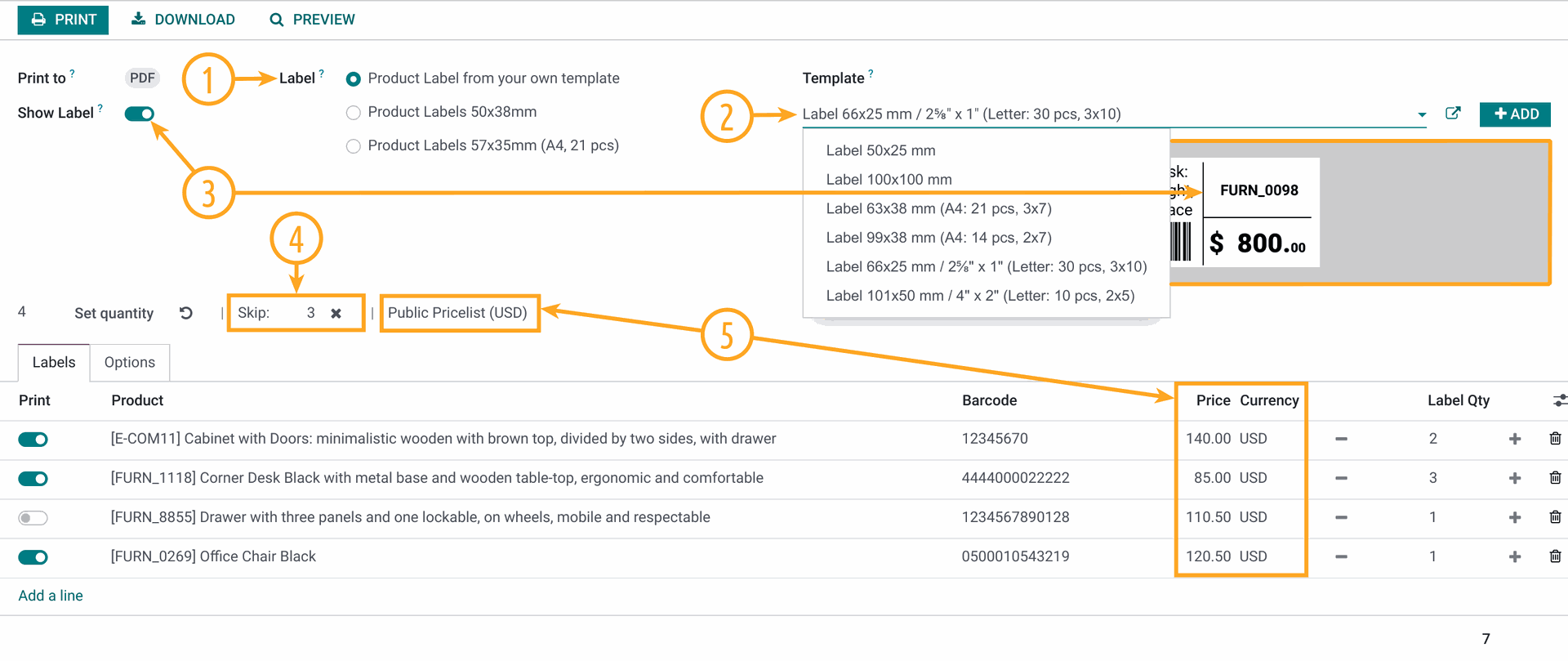
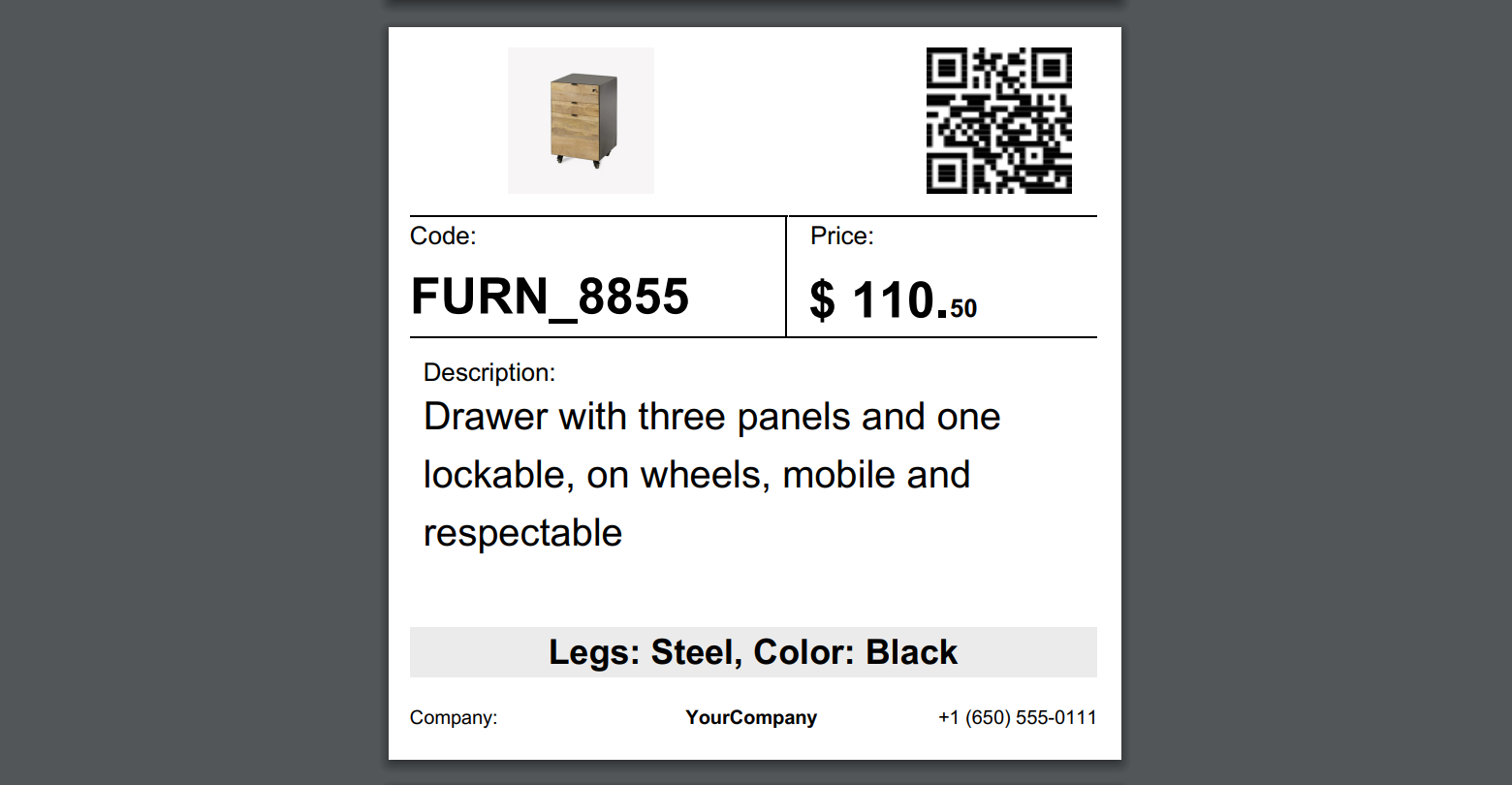
in the inventory app in ver. 16 i would like to print inventory labels.

these label i would like to print would be from the product items.

once printed they can show the product picture, and brief desc. and price  better yet and bar code to say bring item to counter scan it and it will tell me how many i have left and cost.

how can this be done?

thank you in advance..

label printer is printing on like 2x3" about size of business card or baseball card size


0
Avatar
Avbryt
Avatar
Yurii Razumovskyi
Bästa svar

Hi Brent,

To create a barcode product label in Odoo there are two common ways:

  1. Develop own label (by yourself or with Odoo developers);
  2. Use the app that allows to print and design own labels.

The first approach is not so flexible because after the label creation, if you want to change the label you will need to go into code and change something there.

The second way is more easy and convenient if you use some Odoo module, that is developed at the high level and covered with support and assistance.

We into the product label development since 2017, in the last year, we built our Odoo Product Label Builder. It allows designing and creating your own labels by Odoo UI. You can watch details in this YouTube video.


With the Product Label Builder, you can put into labels your product data and other information from various standard Odoo apps. In this case, you need additional extensions in addition to the Product Label Builder app. The list of these extensions is the following, and you can choose ones that you need:

  • Stock Product Labels — to print from the Stock documents and use its data on your label templates: 
    • Stock Transfers (stock.picking), 
    • Stock Inventory Adjustments (stock.quant),
    • Stock Lots (stock.lot), 
    • Stock Packages (stock.quant.package), 
    • Stock Scrap (stock.scrap).
  • Product Packaging Labels — to print from Product Packaging (product.packaging) and use its data on your label templates.
  • Purchase Product Labels — to print from Purchase Orders (purchaser.order) and use its data on your label templates.
  • MRP Product Labels — to print from Manufacturing Orders (mrp.production) and use its data on your label templates.
  • MRP Workorder Labels — to print from Manufacturing Work Orders (mrp.workorder) and use its data on your label templates (Odoo Enterprise feature only).
  • Repair Product Labels — to print from Repair Orders (repair.order) and use its data on your label templates.
  • Maintenance Barcode Labels — to print from the Maintenance documents and use its data on your label templates: 
    • Maintenance Requests (maintenance.request),
    • Maintenance Equipments (maintenance.equipment).
  • Sales Product Labels  — to print from Sales Orders (sale.order) and use its data on your label templates (in the development at the current moment).


If you need additional assistance or information, please contact us.


Best regards, Yurii Razumovskyi.

Company Garazd Creation — Odoo solutions for e-Commerce, SEO, Data Feeds, Website Tracking, Marketing and Analytics integrations, Product Label designing and printing.

https://garazd.biz  |  Our solutions on Odoo Apps

0
Avatar
Avbryt
Avatar
brent.desalvo
Författare Bästa svar

thank you for your input and time.,

this looks just about like what i am trying to complete.

i may contact you Monday in regard to maybe a little customization.

thank you i think i got your direct contact info..

thanks to all that read and responded im trying all

0
Avatar
Avbryt
Avatar
Cybrosys Techno Solutions Pvt.Ltd
Bästa svar

Hi,

Try to Inherits the pdf template

<?xml version="1.0" encoding="UTF-8"?>
<odoo>
    <data>
        <!-- Inherit the existing label template -->
<template id="label_product_product_view" inherit_id="stock.label_product_product_view">
            <xpath expr="//t" position="after">
                <!-- Add product cost -->
<t t-foreach="range(product_info['quantity'])" t-as="qty">
                    <t t-translation="off">
                        ^FT100,185^A0N,30,24^FDCost: <t t-esc="product.standard_price" t-options='{"widget": "float", "precision": 2}'/>^FS
                    </t>
                </t>
                <!-- Add quantity on hand -->
<t t-foreach="range(product_info['quantity'])" t-as="qty">
                    <t t-translation="off">
^FT100,220^A0N,30,24^FDQty: <t t-esc="product.qty_available"/>^FS
                    </t>
                </t>
            </xpath>
        </template>

        <!-- Define Odoo report -->
        <record id="label_product_product" model="ir.actions.report">
            <field name="name">Product Label (ZPL)</field>
<field name="model">product.product</field>
<field name="report_type">qweb-text</field>
<field name="report_name">stock.label_product_product_view_inherited</field>
<field name="report_file">stock.label_product_product_view_inherited</field>
            <field name="binding_model_id" eval="False"/>
<field name="binding_type">report</field>
        </record>
    </data>
</odoo>


if you need to change the print report size, please add a new style in the print label wizard action and add a new paper format to it

class ProductLabel(models.Model):
    _inherit = 'product.product'

    print_format = fields.Selection([
        ('dymo', 'Dymo'),
        ('2x7xprice', '2 x 7 with price'),
        ('4x7xprice', '4 x 7 with price'),
        ('4x12', '4 x 12'),
        ('4x12xprice', '4 x 12 with price'),
        ('2x3', '2 x 3 (Business Card Size)')  # New size option
    ], string="Format", default='2x7xprice', required=True)

<!-- Update existing template to handle different sizes -->
<template id="label_product_product_view" inherit_id="stock.label_product_product_view">
<xpath expr="//field[@name='print_format']/selection[@name='print_format']/value[last()]" position="after">
                <value>2x3</value>
            </xpath>
        </template>

        <!-- Define Odoo report for 2x3" label size -->
        <record id="label_product_product_2x3" model="ir.actions.report">
            <field name="name">Product Label 2x3 (ZPL)</field>
<field name="model">product.product</field>
<field name="report_type">qweb-text</field>
<field name="report_name">stock.label_product_product_view_2x3</field>
<field name="report_file">stock.label_product_product_view_2x3</field>
            <field name="binding_model_id" eval="False"/>
<field name="binding_type">report</field>
        </record>


Hope it helps

0
Avatar
Avbryt
Njuter du av diskussionen? Läs inte bara, delta också!

Skapa ett konto idag för att ta del av exklusiva funktioner och engagera dig i vår fantastiska community!

Registrera dig
Relaterade inlägg Svar Vyer Verksamhet
Print ODOO product label to zebra printer
product labels zebra odoo16features zpl
Avatar
Avatar
Avatar
Avatar
3
mars 24
6294
How to print barcode for products Löst
product printer barcode ean13 labels
Avatar
Avatar
Avatar
5
dec. 23
20243
product name on product label is not printing
product labels
Avatar
Avatar
2
mars 15
8623
Print Product Labels on Dymo 550 printer Löst
printer labels Dymo
Avatar
Avatar
2
aug. 25
1780
V16 Import multiple images for each product
product product_images odoo16features
Avatar
Avatar
Avatar
Avatar
Avatar
5
mars 25
7956
Community
  • Instruktionsvideor
  • Dokumentation
  • Forum
Öppen källkod
  • Ladda ner
  • GitHub
  • Runbot
  • Översättningar
Tjänster
  • Odoo.sh Hosting
  • Kundtjänst
  • Uppgradera
  • Anpassningsbara modifikationer
  • Utbildning
  • Revisorer
  • Partners
  • Bli en partner
Om oss
  • Vårt företag
  • Varumärkestillgångar
  • Kontakta oss
  • Jobb
  • Evenemang
  • Podcast
  • Blogg
  • Kunder
  • Juridiskt • Integritet
  • Säkerhet
الْعَرَبيّة Català 简体中文 繁體中文 (台灣) Čeština Dansk Nederlands English Suomi Français Deutsch हिंदी Bahasa Indonesia Italiano 日本語 한국어 (KR) Lietuvių kalba Język polski Português (BR) română русский язык Slovenský jazyk Slovenščina Español (América Latina) Español Svenska ภาษาไทย Türkçe українська Tiếng Việt

Odoo är ett affärssystem med öppen källkod som täcker alla dina företagsbehov: CRM, e-handel, bokföring, lager, kassasystem, projektledning, och så vidare.

Odoos unika värdeförslag är att samtidigt vara väldigt enkel att använda men också helt integrerad.

Website made with

Odoo Experience on YouTube

1. Use the live chat to ask your questions.
2. The operator answers within a few minutes.

Live support on Youtube
Watch now