Sari la conținut
Odoo Meniu
  • Autentificare
  • Try it free
  • Aplicații
    Finanțe
    • Contabilitate
    • Facturare
    • Cheltuieli
    • Spreadsheet (BI)
    • Documente
    • Semn
    Vânzări
    • CRM
    • Vânzări
    • POS Shop
    • POS Restaurant
    • Abonamente
    • Închiriere
    Site-uri web
    • Constructor de site-uri
    • eCommerce
    • Blog
    • Forum
    • Live Chat
    • eLearning
    Lanț Aprovizionare
    • Inventar
    • Producție
    • PLM
    • Achiziție
    • Maintenance
    • Calitate
    Resurse Umane
    • Angajați
    • Recrutare
    • Time Off
    • Evaluări
    • Referințe
    • Flotă
    Marketing
    • Social Marketing
    • Marketing prin email
    • SMS Marketing
    • Evenimente
    • Automatizare marketing
    • Sondaje
    Servicii
    • Proiect
    • Foi de pontaj
    • Servicii de teren
    • Centru de asistență
    • Planificare
    • Programări
    Productivitate
    • Discuss
    • Artificial Intelligence
    • IoT
    • VoIP
    • Knowledge
    • WhatsApp
    Aplicații Terțe Odoo Studio Platforma Odoo Cloud
  • Industrii
    Retail
    • Book Store
    • Magazin de îmbrăcăminte
    • Magazin de Mobilă
    • Magazin alimentar
    • Magazin de materiale de construcții
    • Magazin de jucării
    Food & Hospitality
    • Bar and Pub
    • Restaurant
    • Fast Food
    • Guest House
    • Distribuitor de băuturi
    • Hotel
    Proprietate imobiliara
    • Real Estate Agency
    • Firmă de Arhitectură
    • Construcție
    • Property Management
    • Grădinărit
    • Asociația Proprietarilor de Proprietăți
    Consultanta
    • Firma de Contabilitate
    • Partener Odoo
    • Agenție de marketing
    • Law firm
    • Atragere de talente
    • Audit & Certification
    Producție
    • Textil
    • Metal
    • Mobilier
    • Mâncare
    • Brewery
    • Cadouri corporate
    Health & Fitness
    • Club Sportiv
    • Magazin de ochelari
    • Centru de Fitness
    • Wellness Practitioners
    • Farmacie
    • Salon de coafură
    Trades
    • Handyman
    • IT Hardware and Support
    • Asigurare socială de stat
    • Cizmar
    • Servicii de curățenie
    • HVAC Services
    Altele
    • Organizație nonprofit
    • Agenție de Mediu
    • Închiriere panouri publicitare
    • Fotografie
    • Închiriere biciclete
    • Asigurare socială
    Browse all Industries
  • Comunitate
    Învăță
    • Tutorials
    • Documentație
    • Certificări
    • Instruire
    • Blog
    • Podcast
    Empower Education
    • Program Educațional
    • Scale Up! Business Game
    • Visit Odoo
    Obține Software-ul
    • Descărcare
    • Compară Edițiile
    • Lansări
    Colaborați
    • Github
    • Forum
    • Evenimente
    • Translations
    • Devino Partener
    • Services for Partners
    • Înregistrează-ți Firma de Contabilitate
    Obține Servicii
    • Găsește un Partener
    • Găsiți un contabil
    • Meet an advisor
    • Servicii de Implementare
    • Referințe ale clienților
    • Suport
    • Actualizări
    Github Youtube Twitter Linkedin Instagram Facebook Spotify
    +1 (650) 691-3277
    Obține un demo
  • Prețuri
  • Ajutor
Trebuie să fiți înregistrat pentru a interacționa cu comunitatea.
Toate postările Oameni Insigne
Etichete (Vezi tot)
odoo accounting v14 pos v15
Despre acest forum
Trebuie să fiți înregistrat pentru a interacționa cu comunitatea.
Toate postările Oameni Insigne
Etichete (Vezi tot)
odoo accounting v14 pos v15
Despre acest forum
Suport

Three-Step-Manufacturing don't generate PC-Transfer

Abonare

Primiți o notificare când există activitate la acestă postare

Această întrebare a fost marcată
manufacturing
2 Răspunsuri
1259 Vizualizări
Imagine profil
Nico

Hi,


I have an issue with standard 3-step manufacturing in Odoo.


Problem:

When creating and confirming a Manufacturing Order, Odoo only creates the transfer for:

  • Post-Production → Stock

But it does NOT create the expected component picking transfer:

  • Stock → Pre-Production (WH/PC/...)

As a result, the MO stays waiting for components (components not available).


I already reset everything to the standard Odoo 3-step manufacturing configuration and checked:

  • routes
  • operation types
  • source/destination locations

  • product routes

  • warehouse settings


Any idea why the picking transfer is never generated?


Thanks!



0
Imagine profil
Abandonează
Codesphere Tech

Hello
What rule you have set for Pre-Production?

Nico
Autor

Hi, i can't upload a picture but see my configuration below:

3 Step Manufacturing Route:
- Pull from - WH/ProductionRoom/Pre-Procution (internal Storage) to WH/ProctionRomm/Production (production)
- Pull from - WH/Stock to WH/ProductionRoom/Pre-Production
- Push to - WH/ProductionRoom/Post-Production to WH/Stock

Manufacturing Route:
- Manufacturing - (empty) to WH/ProductionRoom/Post-Production
- Pull from - WH/ProductionRoom/Post-Production to WH/Stock

These are the standard settings - i've also resetted them.

Codesphere Tech

I'm talking about the inventory -> Configuration -> Rules -> Pull From WH/Stock WH/Pre-Production
open this check which supply method you have set

Nico
Autor

Supply Method is Take from Stock (in the Rule for the Route 3 steps manufacturing)

Codesphere Tech

Can you try to change it to this: Take From Stock, if unavailable, Trigger Another Rule

Nico
Autor

Also no Transfer generated

Codesphere Tech

Revert that change.. Can you please write in detail like what you are doing so I can test that on my local env..

Nico
Autor

Okay. I reverted.

First i changed in "Inventory - Warehouses - MyWarehouse" the Manufacturing Radio Button to 3 steps Manufacturing. After that i took care that the Routes in my products are choosen to Manufacturing AND 3Step-Manufacturing. Then i go to "Manufacturing - Manufacturing Orders" and created a new one. The operation type (Misscelaneous) is automatically set up to "Manufacturing" and the locations for the components are from "Pre-Production" and the final prduct to "Post-Production". After that i confirm the MO. Then i can see the transfer in "Inventory"-App for the Manufacturing and for storage the final product after the production (WH/SPF/...). But there is no transfer generated for picking the components (WH/PC/...)

Codesphere Tech

Hello
1. Go to the Product Form for your Components, in the Inventory tab, uncheck any custom "3-Step" or "Manufacture" routes, Ensure only "Buy" route (if purchased) or nothing is checked.
2. Go to Operation Types ->Pick Components -> Check Default Source Location (WH/Stock) and Default Destination Location (WH/Pre-Production).
3. Go to Inventory > Configuration > Routes -> Manufacture -> Find the rule WH: Stock -> Pre-Production
Action: Pull from
Supply Method: Trigger another rule

Nico
Autor

Thanks for your reply. Unfortunately all settings have been existed before. Just the rule WH/Stock > WH/Pre-Production in Manufacturing Route does not have existed. I've added it and also no transfer added.

If i change the type from the rule WH/Stock > WH/Pre-Production in the (3-Steps-Manufacturing-Route) to "Push & Pull" or "Push to" then a transfer will be generated at the correct place. But it only generate a transfer with the product itself and not with the components needed for manufacturing.

Codesphere Tech

Can you please share the screenshot? Because I know something is missing but don't get it exactly.

Nico
Autor

I can't upload but here a link with Screenshots from the Routes and Rules (it's german language): https://spoondrink-my.sharepoint.com/:f:/p/nico/IgDa2Y-u9Rr0Ro5AvakWJIRAAWOZJf12jZNu0us253H6qQg?e=ne1Klg

Codesphere Tech

Can you provide it in English?

Nico
Autor

I've translated the Key-Facts in the Screenshots. You can see it in English now

Codesphere Tech

The issue is within sequence(22) in this screenshot Rule_Stock>PreProduction in 3 Step.png.
Suggest to reset all the settings by default to Odoo. and then test. It will working.
Thanks
Let me know after testing
info@codespheretech.in

Nico
Autor

So i have to reset ALL Odoo settings?

Codesphere Tech

No, only related to 3 steps configuration.

Nico
Autor

Okay but how can i do it? I've already resetted the radio buttons in Warehouse for Manufacturing? Do i have to delete the Routes for Manufacturing or how can i reset them to default?

Codesphere Tech

If you have already reset it then no need to do it again. I'm unable to give proper solution without seeing actual scenario. It is working properly my local env.

Nico
Autor

Hi Vivek,
thanks for your answer. Unfortunately the sequences does not help to fix the problem. But one question in this case: what sequence does the Routes have? The route "Manufacturing" and the "3-Step" Route? And what rules have to be set in the "Manufacturing" Route?

I tested with a whole new Odoo Test-Account on the Website and the Manufacturing-Route does not have changed? But i'm not sure if i crashed anything by deleting the standard Manufacturing Rule ...

I'm wondering because in normal the confirmation of a manufacturing generates a PC Transfer first and AFTER finishing the Manufacturing the SFP-Transfer is being generated. In my case the SFP-Transfer is being generated directly afert cofirmation of the manufacturing.

Imagine profil
Jaideep
Cel mai bun răspuns

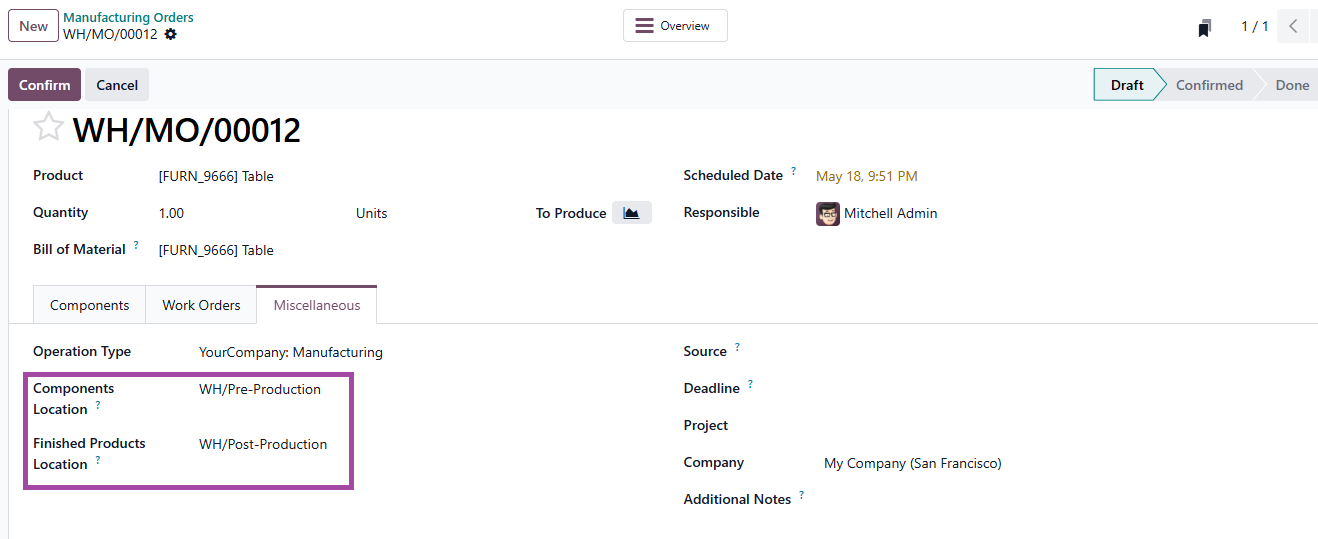
Could you validate if the source and destination location on the MO corresponds to the locations as set on your route? MO > Miscellaneous tab

AO/produktionsraum/pre-product and AO/produktionsraum/post-production

The default value is usually WH/Pre-product and WH/Post-production (AO/pre-production and AO/post-production as your WH is AO).

The locations being different on MO and that on route could be the reason for transfer operation not triggering


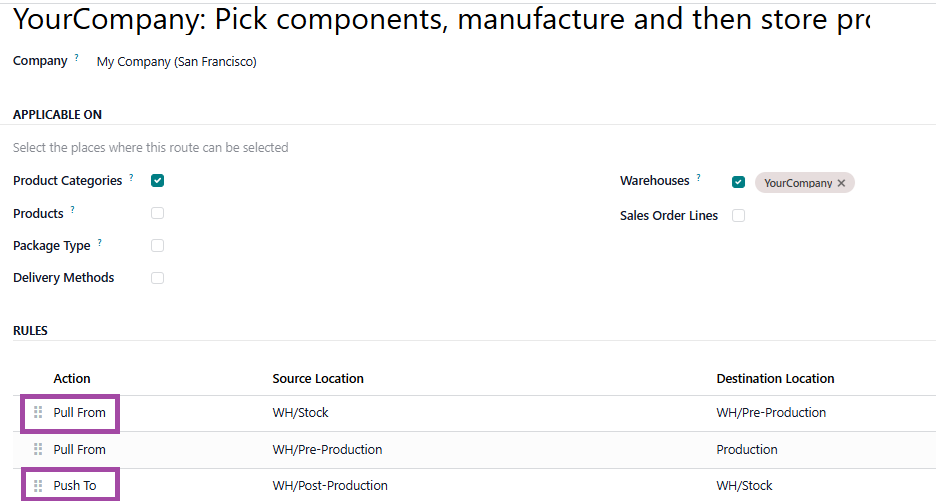
2. The 3 step route has a "pull from" Stock to pre-production and "Push to"  Post-production to Stock.

Since your route (manufacture sequence 4) has 'pull from' Post-production to Stock this operation triggers prior to product arriving at Post-production location.

Default route

Supply method is 'Take from Stock'

0
Imagine profil
Abandonează
Imagine profil
Vivek Kundaliya
Cel mai bun răspuns

Hi Nico,


I have seen this issue before — the Pick Components (WH/PC) transfer not generating is almost always a route sequence or product-level route assignment issue. Here is a step-by-step fix:


Step 1: Check routes on your component products

Open a component product → Inventory tab → Routes section. The "3-Step Manufacturing" route should NOT be checked on the components. Components should only have "Buy" (if purchased) or nothing special set. The 3-step route goes on the finished product only.


Step 2: Verify the Pull rule sequence in the route (most likely culprit)

Go to Inventory → Configuration → Routes → select your 3-Step Manufacturing route. You need exactly these rules in the right sequence order:

  • Sequence 5: Stock → Pre-Production (Pull, Take from Stock)

Sequence 10: Pre-Production → Production (Pull)

  • Sequence 15: Post-Production → Stock (Push)

The Stock → Pre-Production rule MUST have the lowest sequence number. If the sequences are wrong or that rule is missing, Odoo skips the first transfer entirely. Based on your screenshots, this is very likely the issue.


Step 3: Verify the Pick Components operation type

Inventory → Configuration → Operations Types → find Pick Components:

  • Source Location: WH/Stock

Destination Location: WH/Pre-Production

  • Reservation Method: At Confirmation

Step 4: Always click Confirm, not just Save

The Pick Component transfer is only generated when the MO is Confirmed, not when saved as a draft.


To reset routes to Odoo default without touching other settings: Go to Inventory → Configuration → Routes, delete the custom 3-step route, then go back to the Warehouse settings and switch from 2-step to 1-step manufacturing, save, then switch back to 3-step and save again. Odoo will regenerate the default rules.


Let us know if that fixes it!

-3
Imagine profil
Abandonează
Îți place discuția? Nu doar citi, alătură-te!

Creează-ți un cont astăzi pentru a beneficia de funcții exclusive și a interacționa cu minunata noastră comunitate!

Înscrie-te
Postări similare Răspunsuri Vizualizări Activitate
How to make Odoo schedule manufacturing in parallel?
manufacturing
Imagine profil
Imagine profil
1
mai 26
2093
Three-Step-Manufacturing don't generate PC-Transfer
manufacturing
Imagine profil
0
mai 26
3
Ayuda imprenta en apuros por odoo
manufacturing
Imagine profil
Imagine profil
Imagine profil
Imagine profil
Imagine profil
4
mai 26
1348
Weight barcode nomenclature not matching products despite correct
manufacturing
Imagine profil
0
apr. 26
3
Contatos para reservas0013~Como falar com a united airlines São Paulo SP?
manufacturing
Imagine profil
0
apr. 26
13
Comunitate
  • Tutorials
  • Documentație
  • Forum
Open Source
  • Descărcare
  • Github
  • Runbot
  • Translations
Servicii
  • Hosting Odoo.sh
  • Suport
  • Actualizare
  • Custom Developments
  • Educație
  • Găsiți un contabil
  • Găsește un Partener
  • Devino Partener
Despre Noi
  • Compania noastră
  • Active de marcă
  • Contactați-ne
  • Locuri de muncă
  • Evenimente
  • Podcast
  • Blog
  • Clienți
  • Aspecte juridice • Confidențialitate
  • Securitate
الْعَرَبيّة Català 简体中文 繁體中文 (台灣) Čeština Dansk Nederlands English Suomi Français Deutsch हिंदी Bahasa Indonesia Italiano 日本語 한국어 (KR) Lietuvių kalba Język polski Português (BR) română русский язык Slovenský jazyk Slovenščina Español (América Latina) Español Svenska ภาษาไทย Türkçe українська Tiếng Việt

Odoo este o suită de aplicații de afaceri open source care acoperă toate nevoile companiei dvs.: CRM, comerț electronic, contabilitate, inventar, punct de vânzare, management de proiect etc.

Propunerea de valoare unică a Odoo este să fie în același timp foarte ușor de utilizat și complet integrat.

Website made with

Odoo Experience on YouTube

1. Use the live chat to ask your questions.
2. The operator answers within a few minutes.

Live support on Youtube
Watch now