Se rendre au contenu
Odoo Menu
  • Se connecter
  • Essai gratuit
  • Applications
    Finance
    • Comptabilité
    • Facturation
    • Notes de frais
    • Feuilles de calcul (BI)
    • Documents
    • Signature
    Ventes
    • CRM
    • Ventes
    • PdV Boutique
    • PdV Restaurant
    • Abonnements
    • Location
    Sites web
    • Site Web
    • eCommerce
    • Blog
    • Forum
    • Live Chat
    • eLearning
    Chaîne d'approvisionnement
    • Inventaire
    • Fabrication
    • PLM
    • Achats
    • Maintenance
    • Qualité
    Ressources Humaines
    • Employés
    • Recrutement
    • Congés
    • Évaluations
    • Recommandations
    • Parc automobile
    Marketing
    • Marketing Social
    • E-mail Marketing
    • SMS Marketing
    • Événements
    • Marketing Automation
    • Sondages
    Services
    • Projet
    • Feuilles de temps
    • Services sur Site
    • Assistance
    • Planification
    • Rendez-vous
    Productivité
    • Discussion
    • Intelligence artificielle
    • Internet des Objets
    • VoIP
    • Connaissances
    • WhatsApp
    Applications tierces Odoo Studio Plateforme Cloud d'Odoo
  • Industries
    Commerce de détail
    • Librairie
    • Magasin de vêtements
    • Magasin de meubles
    • Supermarché
    • Quincaillerie
    • Magasin de jouets
    Restauration & Hôtellerie
    • Bar et Pub
    • Restaurant
    • Fast-food
    • Maison d’hôtes
    • Distributeur de boissons
    • Hôtel
    Immobilier
    • Agence immobilière
    • Cabinet d'architecture
    • Construction
    • Gestion immobilière
    • Jardinage
    • Association de copropriétaires
    Consultance
    • Cabinet d'expertise comptable
    • Partenaire Odoo
    • Agence Marketing
    • Cabinet d'avocats
    • Aquisition de talents
    • Audit & Certification
    Fabrication
    • Textile
    • Métal
    • Meubles
    • Alimentation
    • Brasserie
    • Cadeaux d'entreprise
    Santé & Fitness
    • Club de sports
    • Opticien
    • Salle de fitness
    • Praticiens bien-être
    • Pharmacie
    • Salon de coiffure
    Commerce
    • Homme à tout faire
    • Matériel informatique & support
    • Systèmes photovoltaïques
    • Cordonnier
    • Services de nettoyage
    • Services CVC
    Autres
    • Organisation à but non lucratif
    • Agence environnementale
    • Location de panneaux d'affichage
    • Photographie
    • Leasing de vélos
    • Revendeur de logiciel
    Parcourir toutes les industries
  • Communauté
    Apprenez
    • Tutoriels
    • Documentation
    • Certifications
    • Formation
    • Blog
    • Podcast
    Renforcer l'éducation
    • Programme éducatif
    • Business Game Scale-Up!
    • Rendez-nous visite
    Obtenir le logiciel
    • Téléchargement
    • Comparez les éditions
    • Versions
    Collaborer
    • Github
    • Forum
    • Événements
    • Traductions
    • Devenir partenaire
    • Services pour partenaires
    • Enregistrer votre cabinet comptable
    Nos Services
    • Trouver un partenaire
    • Trouver un comptable
    • Rencontrer un conseiller
    • Services de mise en œuvre
    • Références clients
    • Assistance
    • Mises à niveau
    Github Youtube Twitter Linkedin Instagram Facebook Spotify
    +1 (650) 691-3277
    Obtenir une démonstration
  • Tarification
  • Aide
Vous devez être inscrit pour interagir avec la communauté.
Toutes les publications Personnes Badges
Étiquettes (Voir toutl)
odoo accounting v14 pos v15
À propos de ce forum
Vous devez être inscrit pour interagir avec la communauté.
Toutes les publications Personnes Badges
Étiquettes (Voir toutl)
odoo accounting v14 pos v15
À propos de ce forum
Aide

Three-Step-Manufacturing don't generate PC-Transfer

S'inscrire

Recevez une notification lorsqu'il y a de l'activité sur ce poste

Cette question a été signalée
manufacturing
2 Réponses
1228 Vues
Avatar
Nico

Hi,


I have an issue with standard 3-step manufacturing in Odoo.


Problem:

When creating and confirming a Manufacturing Order, Odoo only creates the transfer for:

  • Post-Production → Stock

But it does NOT create the expected component picking transfer:

  • Stock → Pre-Production (WH/PC/...)

As a result, the MO stays waiting for components (components not available).


I already reset everything to the standard Odoo 3-step manufacturing configuration and checked:

  • routes
  • operation types
  • source/destination locations

  • product routes

  • warehouse settings


Any idea why the picking transfer is never generated?


Thanks!



0
Avatar
Ignorer
Codesphere Tech

Hello
What rule you have set for Pre-Production?

Nico
Auteur

Hi, i can't upload a picture but see my configuration below:

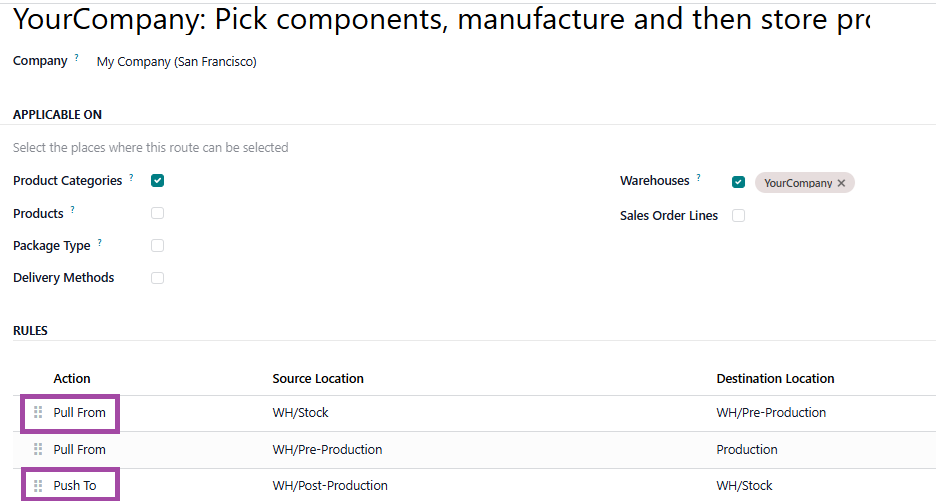
3 Step Manufacturing Route:
- Pull from - WH/ProductionRoom/Pre-Procution (internal Storage) to WH/ProctionRomm/Production (production)
- Pull from - WH/Stock to WH/ProductionRoom/Pre-Production
- Push to - WH/ProductionRoom/Post-Production to WH/Stock

Manufacturing Route:
- Manufacturing - (empty) to WH/ProductionRoom/Post-Production
- Pull from - WH/ProductionRoom/Post-Production to WH/Stock

These are the standard settings - i've also resetted them.

Codesphere Tech

I'm talking about the inventory -> Configuration -> Rules -> Pull From WH/Stock WH/Pre-Production
open this check which supply method you have set

Nico
Auteur

Supply Method is Take from Stock (in the Rule for the Route 3 steps manufacturing)

Codesphere Tech

Can you try to change it to this: Take From Stock, if unavailable, Trigger Another Rule

Nico
Auteur

Also no Transfer generated

Codesphere Tech

Revert that change.. Can you please write in detail like what you are doing so I can test that on my local env..

Nico
Auteur

Okay. I reverted.

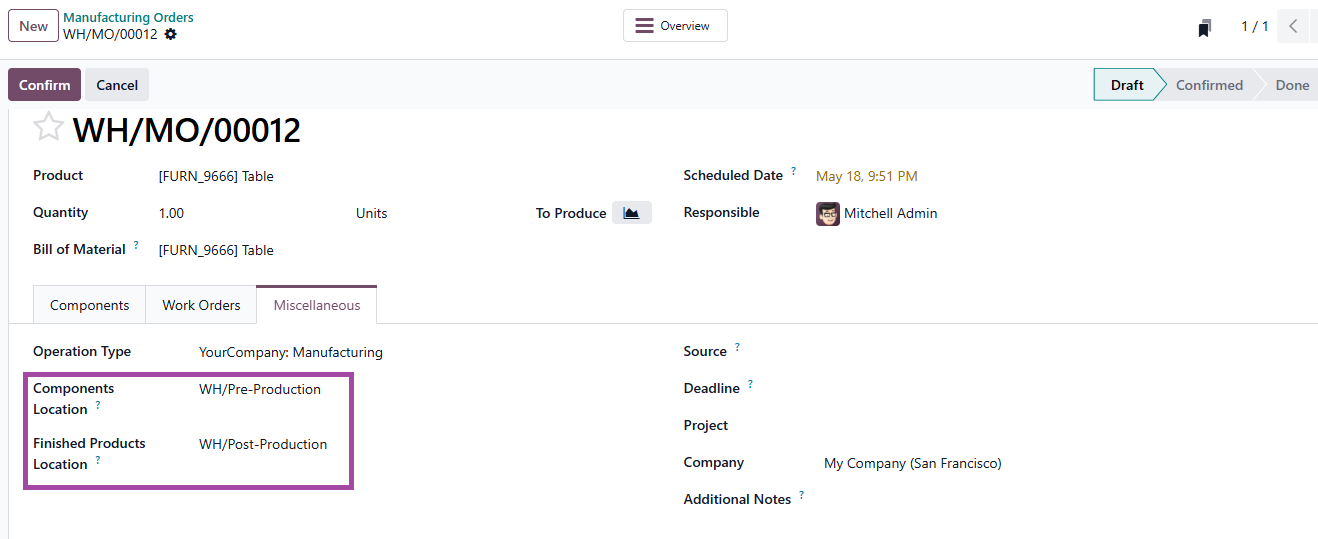
First i changed in "Inventory - Warehouses - MyWarehouse" the Manufacturing Radio Button to 3 steps Manufacturing. After that i took care that the Routes in my products are choosen to Manufacturing AND 3Step-Manufacturing. Then i go to "Manufacturing - Manufacturing Orders" and created a new one. The operation type (Misscelaneous) is automatically set up to "Manufacturing" and the locations for the components are from "Pre-Production" and the final prduct to "Post-Production". After that i confirm the MO. Then i can see the transfer in "Inventory"-App for the Manufacturing and for storage the final product after the production (WH/SPF/...). But there is no transfer generated for picking the components (WH/PC/...)

Codesphere Tech

Hello
1. Go to the Product Form for your Components, in the Inventory tab, uncheck any custom "3-Step" or "Manufacture" routes, Ensure only "Buy" route (if purchased) or nothing is checked.
2. Go to Operation Types ->Pick Components -> Check Default Source Location (WH/Stock) and Default Destination Location (WH/Pre-Production).
3. Go to Inventory > Configuration > Routes -> Manufacture -> Find the rule WH: Stock -> Pre-Production
Action: Pull from
Supply Method: Trigger another rule

Nico
Auteur

Thanks for your reply. Unfortunately all settings have been existed before. Just the rule WH/Stock > WH/Pre-Production in Manufacturing Route does not have existed. I've added it and also no transfer added.

If i change the type from the rule WH/Stock > WH/Pre-Production in the (3-Steps-Manufacturing-Route) to "Push & Pull" or "Push to" then a transfer will be generated at the correct place. But it only generate a transfer with the product itself and not with the components needed for manufacturing.

Codesphere Tech

Can you please share the screenshot? Because I know something is missing but don't get it exactly.

Nico
Auteur

I can't upload but here a link with Screenshots from the Routes and Rules (it's german language): https://spoondrink-my.sharepoint.com/:f:/p/nico/IgDa2Y-u9Rr0Ro5AvakWJIRAAWOZJf12jZNu0us253H6qQg?e=ne1Klg

Codesphere Tech

Can you provide it in English?

Nico
Auteur

I've translated the Key-Facts in the Screenshots. You can see it in English now

Codesphere Tech

The issue is within sequence(22) in this screenshot Rule_Stock>PreProduction in 3 Step.png.
Suggest to reset all the settings by default to Odoo. and then test. It will working.
Thanks
Let me know after testing
info@codespheretech.in

Nico
Auteur

So i have to reset ALL Odoo settings?

Codesphere Tech

No, only related to 3 steps configuration.

Nico
Auteur

Okay but how can i do it? I've already resetted the radio buttons in Warehouse for Manufacturing? Do i have to delete the Routes for Manufacturing or how can i reset them to default?

Codesphere Tech

If you have already reset it then no need to do it again. I'm unable to give proper solution without seeing actual scenario. It is working properly my local env.

Nico
Auteur

Hi Vivek,
thanks for your answer. Unfortunately the sequences does not help to fix the problem. But one question in this case: what sequence does the Routes have? The route "Manufacturing" and the "3-Step" Route? And what rules have to be set in the "Manufacturing" Route?

I tested with a whole new Odoo Test-Account on the Website and the Manufacturing-Route does not have changed? But i'm not sure if i crashed anything by deleting the standard Manufacturing Rule ...

I'm wondering because in normal the confirmation of a manufacturing generates a PC Transfer first and AFTER finishing the Manufacturing the SFP-Transfer is being generated. In my case the SFP-Transfer is being generated directly afert cofirmation of the manufacturing.

Avatar
Jaideep
Meilleure réponse

Could you validate if the source and destination location on the MO corresponds to the locations as set on your route? MO > Miscellaneous tab

AO/produktionsraum/pre-product and AO/produktionsraum/post-production

The default value is usually WH/Pre-product and WH/Post-production (AO/pre-production and AO/post-production as your WH is AO).

The locations being different on MO and that on route could be the reason for transfer operation not triggering


2. The 3 step route has a "pull from" Stock to pre-production and "Push to"  Post-production to Stock.

Since your route (manufacture sequence 4) has 'pull from' Post-production to Stock this operation triggers prior to product arriving at Post-production location.

Default route

Supply method is 'Take from Stock'

0
Avatar
Ignorer
Avatar
Vivek Kundaliya
Meilleure réponse

Hi Nico,


I have seen this issue before — the Pick Components (WH/PC) transfer not generating is almost always a route sequence or product-level route assignment issue. Here is a step-by-step fix:


Step 1: Check routes on your component products

Open a component product → Inventory tab → Routes section. The "3-Step Manufacturing" route should NOT be checked on the components. Components should only have "Buy" (if purchased) or nothing special set. The 3-step route goes on the finished product only.


Step 2: Verify the Pull rule sequence in the route (most likely culprit)

Go to Inventory → Configuration → Routes → select your 3-Step Manufacturing route. You need exactly these rules in the right sequence order:

  • Sequence 5: Stock → Pre-Production (Pull, Take from Stock)

Sequence 10: Pre-Production → Production (Pull)

  • Sequence 15: Post-Production → Stock (Push)

The Stock → Pre-Production rule MUST have the lowest sequence number. If the sequences are wrong or that rule is missing, Odoo skips the first transfer entirely. Based on your screenshots, this is very likely the issue.


Step 3: Verify the Pick Components operation type

Inventory → Configuration → Operations Types → find Pick Components:

  • Source Location: WH/Stock

Destination Location: WH/Pre-Production

  • Reservation Method: At Confirmation

Step 4: Always click Confirm, not just Save

The Pick Component transfer is only generated when the MO is Confirmed, not when saved as a draft.


To reset routes to Odoo default without touching other settings: Go to Inventory → Configuration → Routes, delete the custom 3-step route, then go back to the Warehouse settings and switch from 2-step to 1-step manufacturing, save, then switch back to 3-step and save again. Odoo will regenerate the default rules.


Let us know if that fixes it!

-3
Avatar
Ignorer
Vous appréciez la discussion ? Ne vous contentez pas de lire, rejoignez-nous !

Créez un compte dès aujourd'hui pour profiter de fonctionnalités exclusives et échanger avec notre formidable communauté !

S'inscrire
Publications associées Réponses Vues Activité
How to make Odoo schedule manufacturing in parallel?
manufacturing
Avatar
Avatar
1
mai 26
2044
Three-Step-Manufacturing don't generate PC-Transfer
manufacturing
Avatar
0
mai 26
3
Ayuda imprenta en apuros por odoo
manufacturing
Avatar
Avatar
Avatar
Avatar
Avatar
4
mai 26
1314
Weight barcode nomenclature not matching products despite correct
manufacturing
Avatar
0
avr. 26
3
Contatos para reservas0013~Como falar com a united airlines São Paulo SP?
manufacturing
Avatar
0
avr. 26
13
Communauté
  • Tutoriels
  • Documentation
  • Forum
Open Source
  • Téléchargement
  • Github
  • Runbot
  • Traductions
Services
  • Hébergement Odoo.sh
  • Assistance
  • Migration
  • Développements personnalisés
  • Éducation
  • Trouver un comptable
  • Trouver un partenaire
  • Devenir partenaire
À propos
  • Notre société
  • Actifs de la marque
  • Contactez-nous
  • Emplois
  • Événements
  • Podcast
  • Blog
  • Clients
  • Informations légales • Confidentialité
  • Sécurité.
الْعَرَبيّة Català 简体中文 繁體中文 (台灣) Čeština Dansk Nederlands English Suomi Français Deutsch हिंदी Bahasa Indonesia Italiano 日本語 한국어 (KR) Lietuvių kalba Język polski Português (BR) română русский язык Slovenský jazyk Slovenščina Español (América Latina) Español Svenska ภาษาไทย Türkçe українська Tiếng Việt

Odoo est une suite d'applications open source couvrant tous les besoins de votre entreprise : CRM, eCommerce, Comptabilité, Inventaire, Point de Vente, Gestion de Projet, etc.

Le positionnement unique d'Odoo est d'être à la fois très facile à utiliser et totalement intégré.

Website made with

Odoo Experience on YouTube

1. Use the live chat to ask your questions.
2. The operator answers within a few minutes.

Live support on Youtube
Watch now