Zum Inhalt springen
Odoo Menü
  • Anmelden
  • Jetzt gratis testen
  • Apps
    Finanzen
    • Buchhaltung
    • Rechnungsstellung
    • Spesenabrechnung
    • Tabellenkalkulation (BI)
    • Dokumente
    • E-Signatur
    Verkauf
    • CRM
    • Verkauf
    • Kassensystem – Shop
    • Kassensystem – Restaurant
    • Abonnements
    • Vermietung
    Websites
    • Website-Builder
    • E-Commerce
    • Blog
    • Forum
    • Livechat
    • E-Learning
    Lieferkette
    • Lager
    • Fertigung
    • PLM
    • Einkauf
    • Wartung
    • Qualität
    Personalwesen
    • Mitarbeiter
    • Personalbeschaffung
    • Abwesenheiten
    • Mitarbeiterbeurteilung
    • Personalempfehlungen
    • Fuhrpark
    Marketing
    • Social Marketing
    • E-Mail-Marketing
    • SMS-Marketing
    • Veranstaltungen
    • Marketing-Automatisierung
    • Umfragen
    Dienstleistungen
    • Projekte
    • Zeiterfassung
    • Außendienst
    • Kundendienst
    • Planung
    • Termine
    Produktivität
    • Dialog
    • Künstliche Intelligenz
    • IoT
    • VoIP
    • Wissensdatenbank
    • WhatsApp
    Apps von Drittanbietern Odoo Studio Odoo Cloud-Plattform
  • Branchen
    Einzelhandel
    • Buchladen
    • Kleidergeschäft
    • Möbelhaus
    • Lebensmittelgeschäft
    • Baumarkt
    • Spielwarengeschäft
    Essen & Gastgewerbe
    • Bar und Kneipe
    • Restaurant
    • Fast Food
    • Gästehaus
    • Getränkehändler
    • Hotel
    Immobilien
    • Immobilienagentur
    • Architekturbüro
    • Baugewerbe
    • Immobilienverwaltung
    • Gartenarbeit
    • Eigentümervereinigung
    Beratung
    • Buchhaltungsfirma
    • Odoo-Partner
    • Marketingagentur
    • Anwaltskanzlei
    • Talentakquise
    • Prüfung & Zertifizierung
    Fertigung
    • Textil
    • Metall
    • Möbel
    • Speisen
    • Brauerei
    • Firmengeschenke
    Gesundheit & Fitness
    • Sportklub
    • Brillengeschäft
    • Fitnessstudio
    • Therapeut
    • Apotheke
    • Friseursalon
    Handel
    • Handyman
    • IT-Hardware & -Support
    • Solarenergiesysteme
    • Schuster
    • Reinigungsdienstleistungen
    • HLK-Dienstleistungen
    Sonstiges
    • Gemeinnützige Organisation
    • Umweltschutzagentur
    • Plakatwandvermietung
    • Fotostudio
    • Fahrrad-Leasing
    • Software-Händler
    Alle Branchen ansehen
  • Community
    Lernen
    • Tutorials
    • Dokumentation
    • Zertifizierungen
    • Schulung
    • Blog
    • Podcast
    Bildung fördern
    • Bildungsprogramm
    • Scale-Up! Planspiel
    • Odoo besuchen
    Software anfragen
    • Herunterladen
    • Editionen vergleichen
    • Releases
    Zusammenarbeiten
    • Github
    • Forum
    • Veranstaltungen
    • Übersetzungen
    • Partner werden
    • Dienstleistungen für Partner
    • Buchhaltungsfirma registrieren
    Services anfragen
    • Partner finden
    • Buchhalter finden
    • Einen Experten treffen
    • Implementierungsservices
    • Kundenreferenzen
    • Support
    • Upgrades
    Github Youtube Twitter Linkedin Instagram Facebook Spotify
    +1 (650) 691-3277
    Eine Demo erhalten
  • Preise
  • Hilfe
Sie müssen registriert sein, um mit der Community zu interagieren.
Alle Beiträge Personen Abzeichen
Stichwörter (Alle anzeigen)
odoo accounting v14 pos v15
Über dieses Forum
Sie müssen registriert sein, um mit der Community zu interagieren.
Alle Beiträge Personen Abzeichen
Stichwörter (Alle anzeigen)
odoo accounting v14 pos v15
Über dieses Forum
Hilfe

Three-Step-Manufacturing don't generate PC-Transfer

Abonnieren

Erhalten Sie eine Benachrichtigung, wenn es eine Aktivität zu diesem Beitrag gibt

Diese Frage wurde gekennzeichnet
manufacturing
2 Antworten
1691 Ansichten
Avatar
Nico

Hi,


I have an issue with standard 3-step manufacturing in Odoo.


Problem:

When creating and confirming a Manufacturing Order, Odoo only creates the transfer for:

  • Post-Production → Stock

But it does NOT create the expected component picking transfer:

  • Stock → Pre-Production (WH/PC/...)

As a result, the MO stays waiting for components (components not available).


I already reset everything to the standard Odoo 3-step manufacturing configuration and checked:

  • routes
  • operation types
  • source/destination locations

  • product routes

  • warehouse settings


Any idea why the picking transfer is never generated?


Thanks!



0
Avatar
Verwerfen
Codesphere Tech

Hello
What rule you have set for Pre-Production?

Nico
Autor

Hi, i can't upload a picture but see my configuration below:

3 Step Manufacturing Route:
- Pull from - WH/ProductionRoom/Pre-Procution (internal Storage) to WH/ProctionRomm/Production (production)
- Pull from - WH/Stock to WH/ProductionRoom/Pre-Production
- Push to - WH/ProductionRoom/Post-Production to WH/Stock

Manufacturing Route:
- Manufacturing - (empty) to WH/ProductionRoom/Post-Production
- Pull from - WH/ProductionRoom/Post-Production to WH/Stock

These are the standard settings - i've also resetted them.

Codesphere Tech

I'm talking about the inventory -> Configuration -> Rules -> Pull From WH/Stock WH/Pre-Production
open this check which supply method you have set

Nico
Autor

Supply Method is Take from Stock (in the Rule for the Route 3 steps manufacturing)

Codesphere Tech

Can you try to change it to this: Take From Stock, if unavailable, Trigger Another Rule

Nico
Autor

Also no Transfer generated

Codesphere Tech

Revert that change.. Can you please write in detail like what you are doing so I can test that on my local env..

Nico
Autor

Okay. I reverted.

First i changed in "Inventory - Warehouses - MyWarehouse" the Manufacturing Radio Button to 3 steps Manufacturing. After that i took care that the Routes in my products are choosen to Manufacturing AND 3Step-Manufacturing. Then i go to "Manufacturing - Manufacturing Orders" and created a new one. The operation type (Misscelaneous) is automatically set up to "Manufacturing" and the locations for the components are from "Pre-Production" and the final prduct to "Post-Production". After that i confirm the MO. Then i can see the transfer in "Inventory"-App for the Manufacturing and for storage the final product after the production (WH/SPF/...). But there is no transfer generated for picking the components (WH/PC/...)

Codesphere Tech

Hello
1. Go to the Product Form for your Components, in the Inventory tab, uncheck any custom "3-Step" or "Manufacture" routes, Ensure only "Buy" route (if purchased) or nothing is checked.
2. Go to Operation Types ->Pick Components -> Check Default Source Location (WH/Stock) and Default Destination Location (WH/Pre-Production).
3. Go to Inventory > Configuration > Routes -> Manufacture -> Find the rule WH: Stock -> Pre-Production
Action: Pull from
Supply Method: Trigger another rule

Nico
Autor

Thanks for your reply. Unfortunately all settings have been existed before. Just the rule WH/Stock > WH/Pre-Production in Manufacturing Route does not have existed. I've added it and also no transfer added.

If i change the type from the rule WH/Stock > WH/Pre-Production in the (3-Steps-Manufacturing-Route) to "Push & Pull" or "Push to" then a transfer will be generated at the correct place. But it only generate a transfer with the product itself and not with the components needed for manufacturing.

Codesphere Tech

Can you please share the screenshot? Because I know something is missing but don't get it exactly.

Nico
Autor

I can't upload but here a link with Screenshots from the Routes and Rules (it's german language): https://spoondrink-my.sharepoint.com/:f:/p/nico/IgDa2Y-u9Rr0Ro5AvakWJIRAAWOZJf12jZNu0us253H6qQg?e=ne1Klg

Codesphere Tech

Can you provide it in English?

Nico
Autor

I've translated the Key-Facts in the Screenshots. You can see it in English now

Codesphere Tech

The issue is within sequence(22) in this screenshot Rule_Stock>PreProduction in 3 Step.png.
Suggest to reset all the settings by default to Odoo. and then test. It will working.
Thanks
Let me know after testing
info@codespheretech.in

Nico
Autor

So i have to reset ALL Odoo settings?

Codesphere Tech

No, only related to 3 steps configuration.

Nico
Autor

Okay but how can i do it? I've already resetted the radio buttons in Warehouse for Manufacturing? Do i have to delete the Routes for Manufacturing or how can i reset them to default?

Codesphere Tech

If you have already reset it then no need to do it again. I'm unable to give proper solution without seeing actual scenario. It is working properly my local env.

Nico
Autor

Hi Vivek,
thanks for your answer. Unfortunately the sequences does not help to fix the problem. But one question in this case: what sequence does the Routes have? The route "Manufacturing" and the "3-Step" Route? And what rules have to be set in the "Manufacturing" Route?

I tested with a whole new Odoo Test-Account on the Website and the Manufacturing-Route does not have changed? But i'm not sure if i crashed anything by deleting the standard Manufacturing Rule ...

I'm wondering because in normal the confirmation of a manufacturing generates a PC Transfer first and AFTER finishing the Manufacturing the SFP-Transfer is being generated. In my case the SFP-Transfer is being generated directly afert cofirmation of the manufacturing.

Avatar
Jaideep
Beste Antwort

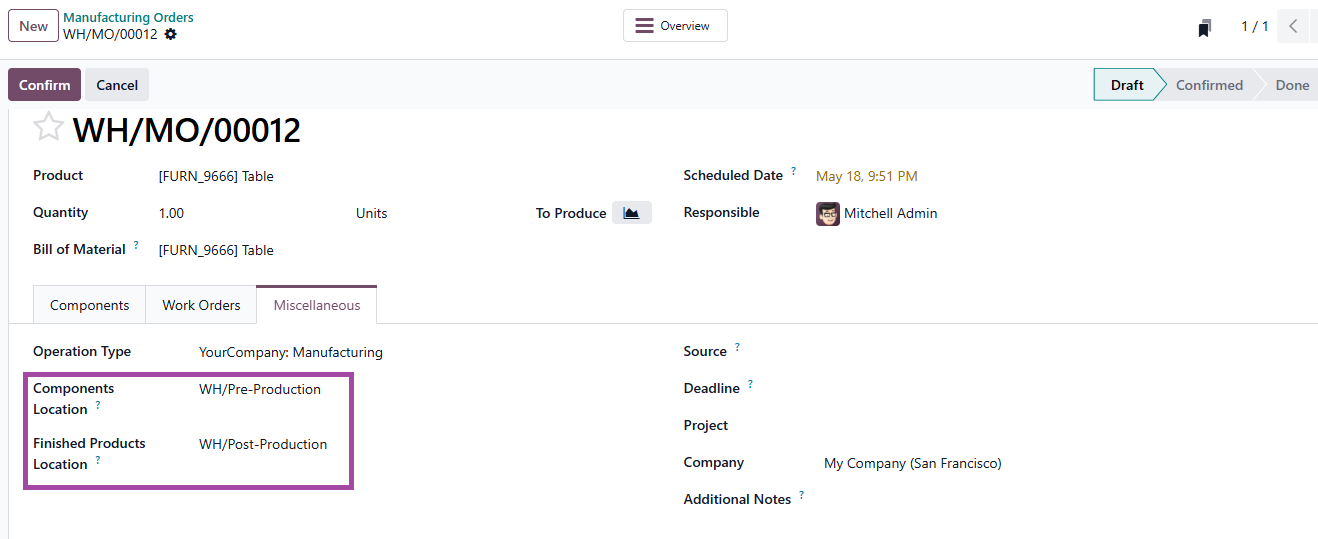
Could you validate if the source and destination location on the MO corresponds to the locations as set on your route? MO > Miscellaneous tab

AO/produktionsraum/pre-product and AO/produktionsraum/post-production

The default value is usually WH/Pre-product and WH/Post-production (AO/pre-production and AO/post-production as your WH is AO).

The locations being different on MO and that on route could be the reason for transfer operation not triggering


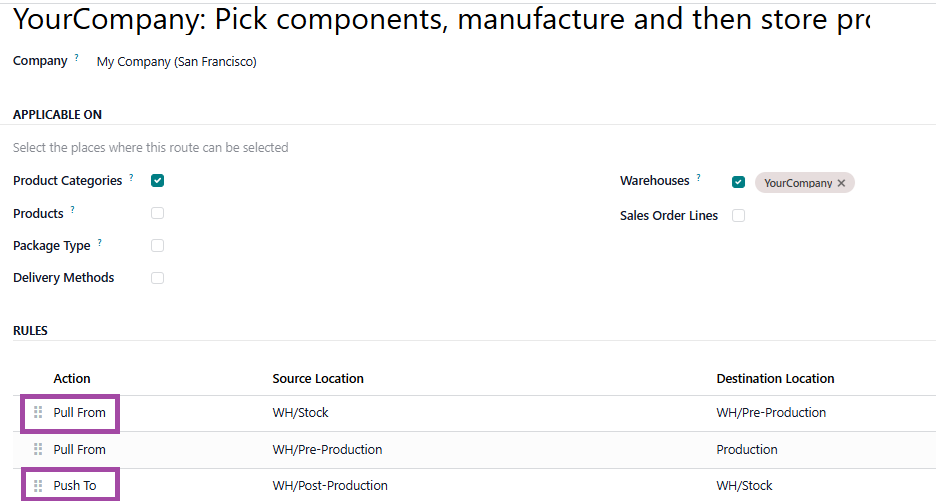
2. The 3 step route has a "pull from" Stock to pre-production and "Push to"  Post-production to Stock.

Since your route (manufacture sequence 4) has 'pull from' Post-production to Stock this operation triggers prior to product arriving at Post-production location.

Default route

Supply method is 'Take from Stock'

0
Avatar
Verwerfen
Avatar
Vivek Kundaliya
Beste Antwort

Hi Nico,


I have seen this issue before — the Pick Components (WH/PC) transfer not generating is almost always a route sequence or product-level route assignment issue. Here is a step-by-step fix:


Step 1: Check routes on your component products

Open a component product → Inventory tab → Routes section. The "3-Step Manufacturing" route should NOT be checked on the components. Components should only have "Buy" (if purchased) or nothing special set. The 3-step route goes on the finished product only.


Step 2: Verify the Pull rule sequence in the route (most likely culprit)

Go to Inventory → Configuration → Routes → select your 3-Step Manufacturing route. You need exactly these rules in the right sequence order:

  • Sequence 5: Stock → Pre-Production (Pull, Take from Stock)

Sequence 10: Pre-Production → Production (Pull)

  • Sequence 15: Post-Production → Stock (Push)

The Stock → Pre-Production rule MUST have the lowest sequence number. If the sequences are wrong or that rule is missing, Odoo skips the first transfer entirely. Based on your screenshots, this is very likely the issue.


Step 3: Verify the Pick Components operation type

Inventory → Configuration → Operations Types → find Pick Components:

  • Source Location: WH/Stock

Destination Location: WH/Pre-Production

  • Reservation Method: At Confirmation

Step 4: Always click Confirm, not just Save

The Pick Component transfer is only generated when the MO is Confirmed, not when saved as a draft.


To reset routes to Odoo default without touching other settings: Go to Inventory → Configuration → Routes, delete the custom 3-step route, then go back to the Warehouse settings and switch from 2-step to 1-step manufacturing, save, then switch back to 3-step and save again. Odoo will regenerate the default rules.


Let us know if that fixes it!

-3
Avatar
Verwerfen
Diskutieren Sie gerne? Treten Sie bei, statt nur zu lesen!

Erstellen Sie heute ein Konto, um exklusive Funktionen zu nutzen und mit unserer tollen Community zu interagieren!

Registrieren
Verknüpfte Beiträge Antworten Ansichten Aktivität
V19.0 MPS - Replenishment trigger set to automatic
manufacturing
Avatar
Avatar
1
Juni 26
714
How to make Odoo schedule manufacturing in parallel?
manufacturing
Avatar
Avatar
1
Mai 26
2634
Three-Step-Manufacturing don't generate PC-Transfer
manufacturing
Avatar
0
Mai 26
3
Ayuda imprenta en apuros por odoo
manufacturing
Avatar
Avatar
Avatar
Avatar
Avatar
4
Mai 26
1754
Weight barcode nomenclature not matching products despite correct
manufacturing
Avatar
0
Apr. 26
3
Community
  • Tutorials
  • Dokumentation
  • Forum
Open Source
  • Herunterladen
  • Github
  • Runbot
  • Übersetzungen
Dienstleistungen
  • Odoo.sh-Hosting
  • Support
  • Upgrade
  • Individuelle Entwicklungen
  • Bildung
  • Buchhalter finden
  • Partner finden
  • Partner werden
Über uns
  • Unsere Firma
  • Markenwerte
  • Kontakt
  • Karriere
  • Veranstaltungen
  • Podcast
  • Blog
  • Kunden
  • Rechtliches • Datenschutz
  • Sicherheit
الْعَرَبيّة Català 简体中文 繁體中文 (台灣) Čeština Dansk Nederlands English Suomi Français Deutsch हिंदी Bahasa Indonesia Italiano 日本語 한국어 (KR) Lietuvių kalba Język polski Português (BR) română русский язык Slovenský jazyk Slovenščina Español (América Latina) Español Svenska ภาษาไทย Türkçe українська Tiếng Việt

Odoo ist eine Suite von Open-Source-Betriebsanwendungen, die alle Bedürfnisse Ihres Unternehmens abdecken: CRM, E-Commerce, Buchhaltung, Lager, Kassensystem, Projektmanagement etc.

Das einzigartige Wertversprechen von Odoo ist, dass es gleichzeitig sehr einfach zu bedienen und voll integriert ist.

Website made with

Odoo Experience on YouTube

1. Use the live chat to ask your questions.
2. The operator answers within a few minutes.

Live support on Youtube
Watch now