
Why doesn't Odoo allow entering a quantity-based quality control for manufacturing operations?
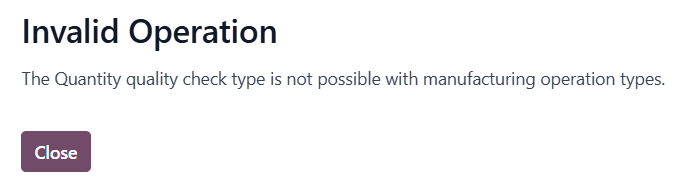

Why doesn't Odoo allow entering a quantity-based quality control for manufacturing operations?

Hi Agustin (and Jonathan, since you're hitting the same wall),
This is a deliberate restriction in Odoo, not a bug — and unfortunately the documentation linked above doesn't actually explain why the Quantity check type is blocked for Manufacturing operation types. Here's the reasoning and the workarounds:
Why Odoo blocks it
The "Quantity" quality check type is designed for transfer-based operations (receipts, deliveries, internal moves) where the operator records "I'm moving X units, do they pass?" against a fixed expected quantity from the source document. The check is evaluated against stock.move.product_uom_qty.
Manufacturing Orders work differently — the produced quantity is the output of the operation, not a pre-validated input. By the time an MO reaches the "quality check" stage at a work order, the produced quantity is either:
Already implicit in the MO itself (you produce what the MO says to produce), or
Variable, because the operator records actual production at the work order, not at the QCP.
So a "Quantity" check on an MO is ambiguous — quantity of what, measured when? Odoo's design forces you to use Measure or Pass-Fail check types instead, which have unambiguous semantics in a manufacturing context.
Workarounds depending on what you're actually trying to do
1. If you want to validate the produced quantity falls within a range (e.g., "we should produce 100 ± 2 units"):
Use the Measure check type instead. Configure:
Type: Measure
Norm: 100
Tolerance ±: 2
Device/Unit: units
Then at the work order, the operator enters the actual produced quantity. Odoo will flag it as failed if it's outside the tolerance. This is functionally equivalent to a "quantity check" and is the officially supported pattern.
2. If you want to validate a component consumption quantity (e.g., "exactly 5kg of raw material X must be consumed per MO"):
Use a quality check on the picking type for the raw material consumption move (the internal transfer into production), not on the manufacturing operation itself. Quantity checks are allowed on stock pickings, including the component-consumption picking generated by the MO.
3. If you want a hard count check on finished goods after production:
Add a Quality Control Point on the finished product's receipt-into-stock picking (the move from production location to stock). Set the QCP trigger to "Operations" → select the relevant operation type → Quantity check is allowed there.
4. If none of the above fit and you genuinely need a Quantity check at the work order level:
This requires a custom module. The block is enforced in quality.point._check_quality_check_type_consistency (the exact method name varies slightly by version, but it's the validator that raises the "Invalid Operation" UserError you screenshotted). You can override it to allow the Quantity type for manufacturing picking types, but you'll then need to write a corresponding _compute_quality_state override on quality.check to define what "quantity" actually means in your MO context — which goes back to the ambiguity Odoo deliberately avoided.
Rough sketch:
from odoo import models
from odoo.exceptions import UserError
class QualityPoint(models.Model):
_inherit = 'quality.point'
def _check_quality_check_type_consistency(self):
# Skip the manufacturing+quantity block for our use case
mfg_picking_types = self.picking_type_ids.filtered(
lambda pt: pt.code == 'mrp_operation'
)
if self.test_type_id.technical_name == 'passfail' and mfg_picking_types:
return # allow
return super()._check_quality_check_type_consistency()
Be aware this is fragile across upgrades — the validator method gets renamed/refactored fairly often in the quality module.
My recommendation
99% of "I want a quantity quality check on manufacturing" use cases are actually satisfied by the Measure check type with a tolerance. Try that first before going down the override path — it's what Odoo intends you to use, and it survives upgrades cleanly.
Hope this clears it up!
| 相关帖文 | 回复 | 查看 | 活动 | |
|---|---|---|---|---|


|
1
6月 26
|
1019 | ||


|
1
5月 26
|
2741 | ||

|
0
5月 26
|
3 | ||


|
2
5月 26
|
1842 | ||


|
4
5月 26
|
1807 |
1. Use the live chat to ask your questions.
2. The operator answers within a few minutes.

Please check this
https://www.odoo.com/documentation/19.0/applications/inventory_and_mrp/quality/quality_management/quality_control_points.html#configure-quality-control-points
I'm also facing issues because of this