Se rendre au contenu
Odoo Menu
  • Se connecter
  • Essai gratuit
  • Applications
    Finance
    • Comptabilité
    • Facturation
    • Notes de frais
    • Feuilles de calcul (BI)
    • Documents
    • Signature
    Ventes
    • CRM
    • Ventes
    • PdV Boutique
    • PdV Restaurant
    • Abonnements
    • Location
    Sites web
    • Site Web
    • eCommerce
    • Blog
    • Forum
    • Live Chat
    • eLearning
    Chaîne d'approvisionnement
    • Inventaire
    • Fabrication
    • PLM
    • Achats
    • Maintenance
    • Qualité
    Ressources Humaines
    • Employés
    • Recrutement
    • Congés
    • Évaluations
    • Recommandations
    • Parc automobile
    Marketing
    • Marketing Social
    • E-mail Marketing
    • SMS Marketing
    • Événements
    • Marketing Automation
    • Sondages
    Services
    • Projet
    • Feuilles de temps
    • Services sur Site
    • Assistance
    • Planification
    • Rendez-vous
    Productivité
    • Discussion
    • Intelligence artificielle
    • Internet des Objets
    • VoIP
    • Connaissances
    • WhatsApp
    Applications tierces Odoo Studio Plateforme Cloud d'Odoo
  • Industries
    Commerce de détail
    • Librairie
    • Magasin de vêtements
    • Magasin de meubles
    • Supermarché
    • Quincaillerie
    • Magasin de jouets
    Restauration & Hôtellerie
    • Bar et Pub
    • Restaurant
    • Fast-food
    • Maison d’hôtes
    • Distributeur de boissons
    • Hôtel
    Immobilier
    • Agence immobilière
    • Cabinet d'architecture
    • Construction
    • Gestion immobilière
    • Jardinage
    • Association de copropriétaires
    Consultance
    • Cabinet d'expertise comptable
    • Partenaire Odoo
    • Agence Marketing
    • Cabinet d'avocats
    • Aquisition de talents
    • Audit & Certification
    Fabrication
    • Textile
    • Métal
    • Meubles
    • Alimentation
    • Brasserie
    • Cadeaux d'entreprise
    Santé & Fitness
    • Club de sports
    • Opticien
    • Salle de fitness
    • Praticiens bien-être
    • Pharmacie
    • Salon de coiffure
    Commerce
    • Homme à tout faire
    • Matériel informatique & support
    • Systèmes photovoltaïques
    • Cordonnier
    • Services de nettoyage
    • Services CVC
    Autres
    • Organisation à but non lucratif
    • Agence environnementale
    • Location de panneaux d'affichage
    • Photographie
    • Leasing de vélos
    • Revendeur de logiciel
    Parcourir toutes les industries
  • Communauté
    Apprenez
    • Tutoriels
    • Documentation
    • Certifications
    • Formation
    • Blog
    • Podcast
    Renforcer l'éducation
    • Programme éducatif
    • Business Game Scale-Up!
    • Rendez-nous visite
    Obtenir le logiciel
    • Téléchargement
    • Comparez les éditions
    • Versions
    Collaborer
    • Github
    • Forum
    • Événements
    • Traductions
    • Devenir partenaire
    • Services pour partenaires
    • Enregistrer votre cabinet comptable
    Nos Services
    • Trouver un partenaire
    • Trouver un comptable
    • Rencontrer un conseiller
    • Services de mise en œuvre
    • Références clients
    • Assistance
    • Mises à niveau
    Github Youtube Twitter Linkedin Instagram Facebook Spotify
    +1 (650) 691-3277
    Obtenir une démonstration
  • Tarification
  • Aide
Vous devez être inscrit pour interagir avec la communauté.
Toutes les publications Personnes Badges
Étiquettes (Voir toutl)
odoo accounting v14 pos v15
À propos de ce forum
Vous devez être inscrit pour interagir avec la communauté.
Toutes les publications Personnes Badges
Étiquettes (Voir toutl)
odoo accounting v14 pos v15
À propos de ce forum
Aide

Quality - Manufacturing - Quantity based Control Points / Quality Checks not supported?

S'inscrire

Recevez une notification lorsqu'il y a de l'activité sur ce poste

Cette question a été signalée
manufacturingqualitycontrol
1 Répondre
2608 Vues
Avatar
Agustin Castellanos

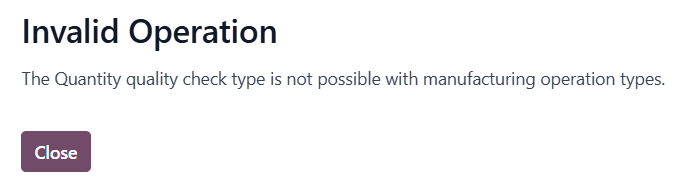
Why doesn't Odoo allow entering a quantity-based quality control for manufacturing operations?

0
Avatar
Ignorer
Codesphere Tech

Please check this
https://www.odoo.com/documentation/19.0/applications/inventory_and_mrp/quality/quality_management/quality_control_points.html#configure-quality-control-points

Jonathan Cunto-Diaz

I'm also facing issues because of this


Avatar
Hari deevagan M
Meilleure réponse

Hi Agustin (and Jonathan, since you're hitting the same wall),
This is a deliberate restriction in Odoo, not a bug — and unfortunately the documentation linked above doesn't actually explain why the Quantity check type is blocked for Manufacturing operation types. Here's the reasoning and the workarounds:
Why Odoo blocks it
The "Quantity" quality check type is designed for transfer-based operations (receipts, deliveries, internal moves) where the operator records "I'm moving X units, do they pass?" against a fixed expected quantity from the source document. The check is evaluated against stock.move.product_uom_qty.
Manufacturing Orders work differently — the produced quantity is the output of the operation, not a pre-validated input. By the time an MO reaches the "quality check" stage at a work order, the produced quantity is either:
Already implicit in the MO itself (you produce what the MO says to produce), or
Variable, because the operator records actual production at the work order, not at the QCP.
So a "Quantity" check on an MO is ambiguous — quantity of what, measured when? Odoo's design forces you to use Measure or Pass-Fail check types instead, which have unambiguous semantics in a manufacturing context.
Workarounds depending on what you're actually trying to do
1. If you want to validate the produced quantity falls within a range (e.g., "we should produce 100 ± 2 units"):
Use the Measure check type instead. Configure:
Type: Measure
Norm: 100
Tolerance ±: 2
Device/Unit: units
Then at the work order, the operator enters the actual produced quantity. Odoo will flag it as failed if it's outside the tolerance. This is functionally equivalent to a "quantity check" and is the officially supported pattern.
2. If you want to validate a component consumption quantity (e.g., "exactly 5kg of raw material X must be consumed per MO"):
Use a quality check on the picking type for the raw material consumption move (the internal transfer into production), not on the manufacturing operation itself. Quantity checks are allowed on stock pickings, including the component-consumption picking generated by the MO.
3. If you want a hard count check on finished goods after production:
Add a Quality Control Point on the finished product's receipt-into-stock picking (the move from production location to stock). Set the QCP trigger to "Operations" → select the relevant operation type → Quantity check is allowed there.
4. If none of the above fit and you genuinely need a Quantity check at the work order level:
This requires a custom module. The block is enforced in quality.point._check_quality_check_type_consistency (the exact method name varies slightly by version, but it's the validator that raises the "Invalid Operation" UserError you screenshotted). You can override it to allow the Quantity type for manufacturing picking types, but you'll then need to write a corresponding _compute_quality_state override on quality.check to define what "quantity" actually means in your MO context — which goes back to the ambiguity Odoo deliberately avoided.
Rough sketch:
from odoo import models
from odoo.exceptions import UserError

class QualityPoint(models.Model):
    _inherit = 'quality.point'

    def _check_quality_check_type_consistency(self):
        # Skip the manufacturing+quantity block for our use case
        mfg_picking_types = self.picking_type_ids.filtered(
            lambda pt: pt.code == 'mrp_operation'
        )
        if self.test_type_id.technical_name == 'passfail' and mfg_picking_types:
            return  # allow
        return super()._check_quality_check_type_consistency()
Be aware this is fragile across upgrades — the validator method gets renamed/refactored fairly often in the quality module.
My recommendation
99% of "I want a quantity quality check on manufacturing" use cases are actually satisfied by the Measure check type with a tolerance. Try that first before going down the override path — it's what Odoo intends you to use, and it survives upgrades cleanly.
Hope this clears it up!

0
Avatar
Ignorer
Vous appréciez la discussion ? Ne vous contentez pas de lire, rejoignez-nous !

Créez un compte dès aujourd'hui pour profiter de fonctionnalités exclusives et échanger avec notre formidable communauté !

S'inscrire
Publications associées Réponses Vues Activité
V19.0 MPS - Replenishment trigger set to automatic
manufacturing
Avatar
Avatar
1
juin 26
915
How to make Odoo schedule manufacturing in parallel?
manufacturing
Avatar
Avatar
1
mai 26
2709
Three-Step-Manufacturing don't generate PC-Transfer
manufacturing
Avatar
0
mai 26
3
Three-Step-Manufacturing don't generate PC-Transfer
manufacturing
Avatar
Avatar
Avatar
2
mai 26
1791
Ayuda imprenta en apuros por odoo
manufacturing
Avatar
Avatar
Avatar
Avatar
Avatar
4
mai 26
1795
Communauté
  • Tutoriels
  • Documentation
  • Forum
Open Source
  • Téléchargement
  • Github
  • Runbot
  • Traductions
Services
  • Hébergement Odoo.sh
  • Assistance
  • Migration
  • Développements personnalisés
  • Éducation
  • Trouver un comptable
  • Trouver un partenaire
  • Devenir partenaire
À propos
  • Notre société
  • Actifs de la marque
  • Contactez-nous
  • Emplois
  • Événements
  • Podcast
  • Blog
  • Clients
  • Informations légales • Confidentialité
  • Sécurité.
الْعَرَبيّة Català 简体中文 繁體中文 (台灣) Čeština Dansk Nederlands English Suomi Français Deutsch हिंदी Bahasa Indonesia Italiano 日本語 한국어 (KR) Lietuvių kalba Język polski Português (BR) română русский язык Slovenský jazyk Slovenščina Español (América Latina) Español Svenska ภาษาไทย Türkçe українська Tiếng Việt

Odoo est une suite d'applications open source couvrant tous les besoins de votre entreprise : CRM, eCommerce, Comptabilité, Inventaire, Point de Vente, Gestion de Projet, etc.

Le positionnement unique d'Odoo est d'être à la fois très facile à utiliser et totalement intégré.

Website made with

Odoo Experience on YouTube

1. Use the live chat to ask your questions.
2. The operator answers within a few minutes.

Live support on Youtube
Watch now
