Overslaan naar inhoud
Odoo Menu
  • Aanmelden
  • Probeer het gratis
  • Apps
    Financiën
    • Boekhouding
    • Facturatie
    • Onkosten
    • Spreadsheet (BI)
    • Documenten
    • Ondertekenen
    Verkoop
    • CRM
    • Verkoop
    • Kassasysteem winkel
    • Kassasysteem Restaurant
    • Abonnementen
    • Verhuur
    Websites
    • Websitebouwer
    • E-commerce
    • Blog
    • Forum
    • Live Chat
    • E-learning
    Bevoorradingsketen
    • Voorraad
    • Productie
    • PLM
    • Inkoop
    • Onderhoud
    • Kwaliteit
    Personeelsbeheer
    • Werknemers
    • Werving & Selectie
    • Verlof
    • Evaluaties
    • Aanbevelingen
    • Wagenpark
    Marketing
    • Sociale media-marketing
    • E-mailmarketing
    • Sms-marketing
    • Evenementen
    • Marketingautomatisering
    • Enquêtes
    Diensten
    • Project
    • Urenstaten
    • Buitendienst
    • Helpdesk
    • Planning
    • Afspraken
    Productiviteit
    • Chat
    • Artificiële Intelligentie
    • IoT
    • VoIP
    • Kennis
    • WhatsApp
    Apps van derden Odoo Studio Odoo Cloud Platform
  • Bedrijfstakken
    Detailhandel
    • Boekhandel
    • kledingwinkel
    • Meubelwinkel
    • Supermarkt
    • Bouwmarkt
    • Speelgoedwinkel
    Horeca & Hospitality
    • Bar en café
    • Restaurant
    • Fastfood
    • Gastenverblijf
    • Drankenhandelaar
    • Hotel
    Vastgoed
    • Makelaarskantoor
    • Architectenbureau
    • Bouw
    • Vastgoedbeheer
    • Tuinieren
    • Vereniging van mede-eigenaren
    Consulting
    • Accountantskantoor
    • Odoo Partner
    • Marketingbureau
    • Advocatenkantoor
    • Talentenwerving
    • Audit & Certificering
    Productie
    • Textiel
    • Metaal
    • Meubels
    • Eten
    • Brouwerij
    • Relatiegeschenken
    Gezondheid & Fitness
    • Sportclub
    • Opticien
    • Fitnesscentrum
    • Wellness-medewerkers
    • Apotheek
    • Kapper
    Diensten
    • Klusjesman
    • IT-hardware & ondersteuning
    • Zonne-energiesystemen
    • Schoenmaker
    • Schoonmaakdiensten
    • HVAC-diensten
    Andere
    • Non-profitorganisatie
    • Milieuagentschap
    • Verhuur van Billboards
    • Fotograaf
    • Fietsleasing
    • Softwareverkoper
    Alle bedrijfstakken bekijken
  • Community
    Leren
    • Tutorials
    • Documentatie
    • Certificeringen
    • Training
    • Blog
    • Podcast
    Versterk het onderwijs
    • Onderwijsprogramma
    • Scale Up! Business Game
    • Odoo bezoeken
    Download de Software
    • Downloaden
    • Vergelijk edities
    • Releases
    Werk samen
    • Github
    • Forum
    • Evenementen
    • Vertalingen
    • Partner worden
    • Diensten voor partners
    • Registreer je accountantskantoor
    Diensten
    • Vind een partner
    • Vind een boekhouder
    • Een adviseur ontmoeten
    • Implementatiediensten
    • Klantreferenties
    • Ondersteuning
    • Upgrades
    Github Youtube Twitter Linkedin Instagram Facebook Spotify
    +1 (650) 691-3277
    Vraag een demo aan
  • Prijzen
  • Help
Je moet geregistreerd zijn om te kunnen communiceren met de community.
Alle posts Personen Badges
Labels (Bekijk alle)
odoo accounting v14 pos v15
Over dit forum
Je moet geregistreerd zijn om te kunnen communiceren met de community.
Alle posts Personen Badges
Labels (Bekijk alle)
odoo accounting v14 pos v15
Over dit forum
Help

Quality - Manufacturing - Quantity based Control Points / Quality Checks not supported?

Inschrijven

Ontvang een bericht wanneer er activiteit is op deze post

Deze vraag is gerapporteerd
manufacturingqualitycontrol
1 Beantwoorden
2632 Weergaven
Avatar
Agustin Castellanos

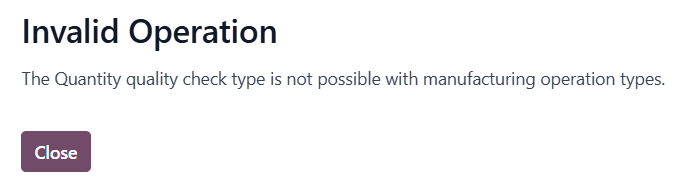
Why doesn't Odoo allow entering a quantity-based quality control for manufacturing operations?

0
Avatar
Annuleer
Codesphere Tech

Please check this
https://www.odoo.com/documentation/19.0/applications/inventory_and_mrp/quality/quality_management/quality_control_points.html#configure-quality-control-points

Jonathan Cunto-Diaz

I'm also facing issues because of this


Avatar
Hari deevagan M
Beste antwoord

Hi Agustin (and Jonathan, since you're hitting the same wall),
This is a deliberate restriction in Odoo, not a bug — and unfortunately the documentation linked above doesn't actually explain why the Quantity check type is blocked for Manufacturing operation types. Here's the reasoning and the workarounds:
Why Odoo blocks it
The "Quantity" quality check type is designed for transfer-based operations (receipts, deliveries, internal moves) where the operator records "I'm moving X units, do they pass?" against a fixed expected quantity from the source document. The check is evaluated against stock.move.product_uom_qty.
Manufacturing Orders work differently — the produced quantity is the output of the operation, not a pre-validated input. By the time an MO reaches the "quality check" stage at a work order, the produced quantity is either:
Already implicit in the MO itself (you produce what the MO says to produce), or
Variable, because the operator records actual production at the work order, not at the QCP.
So a "Quantity" check on an MO is ambiguous — quantity of what, measured when? Odoo's design forces you to use Measure or Pass-Fail check types instead, which have unambiguous semantics in a manufacturing context.
Workarounds depending on what you're actually trying to do
1. If you want to validate the produced quantity falls within a range (e.g., "we should produce 100 ± 2 units"):
Use the Measure check type instead. Configure:
Type: Measure
Norm: 100
Tolerance ±: 2
Device/Unit: units
Then at the work order, the operator enters the actual produced quantity. Odoo will flag it as failed if it's outside the tolerance. This is functionally equivalent to a "quantity check" and is the officially supported pattern.
2. If you want to validate a component consumption quantity (e.g., "exactly 5kg of raw material X must be consumed per MO"):
Use a quality check on the picking type for the raw material consumption move (the internal transfer into production), not on the manufacturing operation itself. Quantity checks are allowed on stock pickings, including the component-consumption picking generated by the MO.
3. If you want a hard count check on finished goods after production:
Add a Quality Control Point on the finished product's receipt-into-stock picking (the move from production location to stock). Set the QCP trigger to "Operations" → select the relevant operation type → Quantity check is allowed there.
4. If none of the above fit and you genuinely need a Quantity check at the work order level:
This requires a custom module. The block is enforced in quality.point._check_quality_check_type_consistency (the exact method name varies slightly by version, but it's the validator that raises the "Invalid Operation" UserError you screenshotted). You can override it to allow the Quantity type for manufacturing picking types, but you'll then need to write a corresponding _compute_quality_state override on quality.check to define what "quantity" actually means in your MO context — which goes back to the ambiguity Odoo deliberately avoided.
Rough sketch:
from odoo import models
from odoo.exceptions import UserError

class QualityPoint(models.Model):
    _inherit = 'quality.point'

    def _check_quality_check_type_consistency(self):
        # Skip the manufacturing+quantity block for our use case
        mfg_picking_types = self.picking_type_ids.filtered(
            lambda pt: pt.code == 'mrp_operation'
        )
        if self.test_type_id.technical_name == 'passfail' and mfg_picking_types:
            return  # allow
        return super()._check_quality_check_type_consistency()
Be aware this is fragile across upgrades — the validator method gets renamed/refactored fairly often in the quality module.
My recommendation
99% of "I want a quantity quality check on manufacturing" use cases are actually satisfied by the Measure check type with a tolerance. Try that first before going down the override path — it's what Odoo intends you to use, and it survives upgrades cleanly.
Hope this clears it up!

0
Avatar
Annuleer
Geniet je van het gesprek? Blijf niet alleen lezen, doe ook mee!

Maak vandaag nog een account aan om te profiteren van exclusieve functies en deel uit te maken van onze geweldige community!

Aanmelden
Gerelateerde posts Antwoorden Weergaven Activiteit
V19.0 MPS - Replenishment trigger set to automatic
manufacturing
Avatar
Avatar
1
jun. 26
1000
How to make Odoo schedule manufacturing in parallel?
manufacturing
Avatar
Avatar
1
mei 26
2736
Three-Step-Manufacturing don't generate PC-Transfer
manufacturing
Avatar
0
mei 26
3
Three-Step-Manufacturing don't generate PC-Transfer
manufacturing
Avatar
Avatar
Avatar
2
mei 26
1835
Ayuda imprenta en apuros por odoo
manufacturing
Avatar
Avatar
Avatar
Avatar
Avatar
4
mei 26
1805
Community
  • Tutorials
  • Documentatie
  • Forum
Open Source
  • Downloaden
  • Github
  • Runbot
  • Vertalingen
Diensten
  • Odoo.sh Hosting
  • Ondersteuning
  • Upgrade
  • Gepersonaliseerde ontwikkelingen
  • Onderwijs
  • Vind een boekhouder
  • Vind een partner
  • Partner worden
Over ons
  • Ons bedrijf
  • Merkelementen
  • Neem contact met ons op
  • Vacatures
  • Evenementen
  • Podcast
  • Blog
  • Klanten
  • Juridisch • Privacy
  • Beveiliging
الْعَرَبيّة Català 简体中文 繁體中文 (台灣) Čeština Dansk Nederlands English Suomi Français Deutsch हिंदी Bahasa Indonesia Italiano 日本語 한국어 (KR) Lietuvių kalba Język polski Português (BR) română русский язык Slovenský jazyk Slovenščina Español (América Latina) Español Svenska ภาษาไทย Türkçe українська Tiếng Việt

Odoo is een suite van open source zakelijke apps die aan al je bedrijfsbehoeften voldoet: CRM, E-commerce, boekhouding, inventaris, kassasysteem, projectbeheer, enz.

Odoo's unieke waardepropositie is om tegelijkertijd zeer gebruiksvriendelijk en volledig geïntegreerd te zijn.

Website made with

Odoo Experience on YouTube

1. Use the live chat to ask your questions.
2. The operator answers within a few minutes.

Live support on Youtube
Watch now
