
when export translated terms and import after delete do not work ?
Câu hỏi này đã bị gắn cờ
2
Trả lời
11208
Lượt xem


You may want to check https://www.spinomana.com/deepl-translator which will greatly reduce time and effort for doing translations with the default export/import. This app will translate all web pages and products "en masse" automatically with the DEEPL Api and you can use glossary with it.
Kind regards
Seppe

Hi,
1. Settings-> Translations-> Import translation
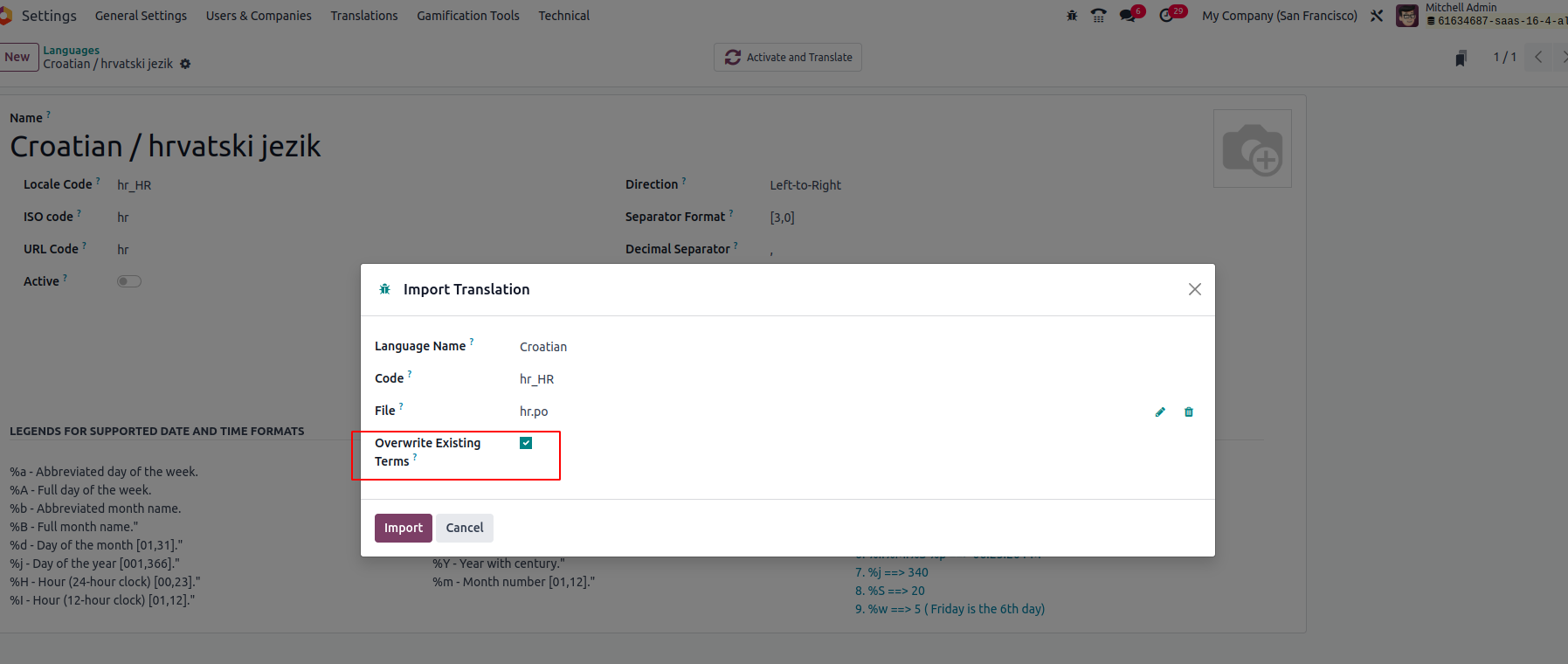
2. Don't forget to enable overwriting the existing terms
3. Import
It will replace the existing term with a newly imported one.
For more details, Please refer to the book.
Hope it helps,
Bạn có hứng thú với cuộc thảo luận không? Đừng chỉ đọc, hãy tham gia nhé!
Tạo tài khoản ngay hôm nay để tận hưởng các tính năng độc đáo và tham gia cộng đồng tuyệt vời của chúng tôi!
Đăng ký| Bài viết liên quan | Trả lời | Lượt xem | Hoạt động | |
|---|---|---|---|---|


|
4
thg 7 24
|
9676 | ||


|
4
thg 6 24
|
29310 | ||

|
3
thg 4 24
|
4509 | ||
|
|
1
thg 2 24
|
10763 | ||


|
2
thg 5 23
|
6737 |

What you deleted, please let us know? Export and import normally work perfectly.