
I'm looking to create a purchase order number formatted year.month.day.sequence number.
This question has been flagged
1
Odgovori
6022
Prikazi


Hi,
You can change the purchase order number format by following the steps below:
1. Go to Settings and enable Developer mode.
2. Select Technical and then select the Sequences menu under the Sequences & Identifiers section.
3. Search for the Purchase Order sequence and in the form view of the Purchase Order sequence, create a duplicate.
4. In the newly created duplicate sequence, edit the prefix field as needed.
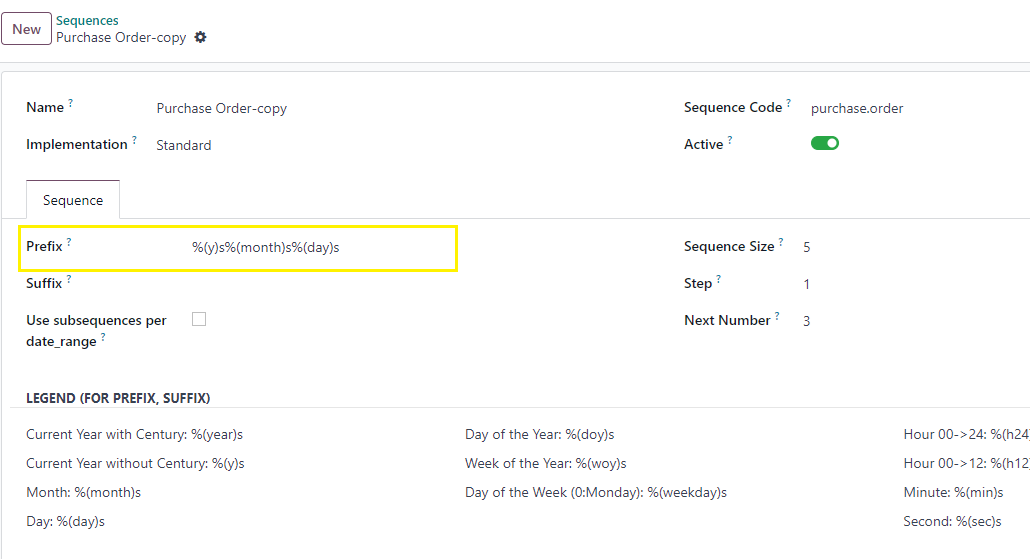
5. Now deactivate the existing Purchase Order sequence by deselecting the active toggle field.
The newly created purchase order number as
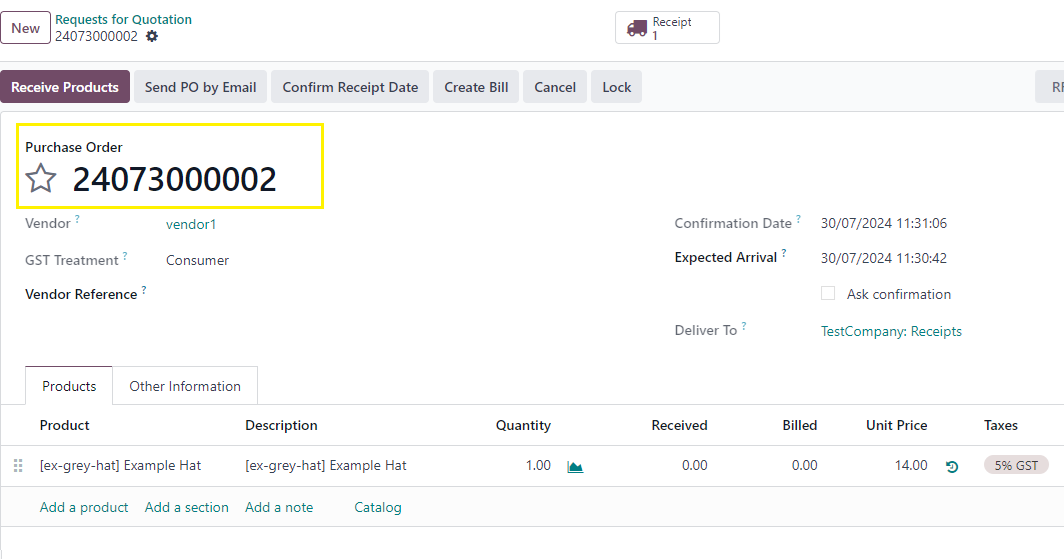
This will change the purchase order number format as per your requirement.
Thanks.
Enjoying the discussion? Don't just read, join in!
Create an account today to enjoy exclusive features and engage with our awesome community!
Prijavi| Related Posts | Odgovori | Prikazi | Aktivnost | |
|---|---|---|---|---|


|
3
apr. 26
|
1652 | ||
|
Bundle POs per vendor
Solved
|


|
2
apr. 26
|
1321 | |

|
2
mar. 26
|
1375 | ||

|
2
maj 25
|
4276 | ||


|
3
dec. 24
|
11027 |
