Zum Inhalt springen
Odoo Menü
  • Anmelden
  • Jetzt gratis testen
  • Apps
    Finanzen
    • Buchhaltung
    • Rechnungsstellung
    • Spesenabrechnung
    • Tabellenkalkulation (BI)
    • Dokumente
    • E-Signatur
    Verkauf
    • CRM
    • Verkauf
    • Kassensystem – Shop
    • Kassensystem – Restaurant
    • Abonnements
    • Vermietung
    Websites
    • Website-Builder
    • E-Commerce
    • Blog
    • Forum
    • Livechat
    • E-Learning
    Lieferkette
    • Lager
    • Fertigung
    • PLM
    • Einkauf
    • Wartung
    • Qualität
    Personalwesen
    • Mitarbeiter
    • Personalbeschaffung
    • Abwesenheiten
    • Mitarbeiterbeurteilung
    • Personalempfehlungen
    • Fuhrpark
    Marketing
    • Social Marketing
    • E-Mail-Marketing
    • SMS-Marketing
    • Veranstaltungen
    • Marketing-Automatisierung
    • Umfragen
    Dienstleistungen
    • Projekte
    • Zeiterfassung
    • Außendienst
    • Kundendienst
    • Planung
    • Termine
    Produktivität
    • Dialog
    • Künstliche Intelligenz
    • IoT
    • VoIP
    • Wissensdatenbank
    • WhatsApp
    Apps von Drittanbietern Odoo Studio Odoo Cloud-Plattform
  • Branchen
    Einzelhandel
    • Buchladen
    • Kleidergeschäft
    • Möbelhaus
    • Lebensmittelgeschäft
    • Baumarkt
    • Spielwarengeschäft
    Essen & Gastgewerbe
    • Bar und Kneipe
    • Restaurant
    • Fast Food
    • Gästehaus
    • Getränkehändler
    • Hotel
    Immobilien
    • Immobilienagentur
    • Architekturbüro
    • Baugewerbe
    • Immobilienverwaltung
    • Gartenarbeit
    • Eigentümervereinigung
    Beratung
    • Buchhaltungsfirma
    • Odoo-Partner
    • Marketingagentur
    • Anwaltskanzlei
    • Talentakquise
    • Prüfung & Zertifizierung
    Fertigung
    • Textil
    • Metall
    • Möbel
    • Speisen
    • Brauerei
    • Firmengeschenke
    Gesundheit & Fitness
    • Sportklub
    • Brillengeschäft
    • Fitnessstudio
    • Therapeut
    • Apotheke
    • Friseursalon
    Handel
    • Handyman
    • IT-Hardware & -Support
    • Solarenergiesysteme
    • Schuster
    • Reinigungsdienstleistungen
    • HLK-Dienstleistungen
    Sonstiges
    • Gemeinnützige Organisation
    • Umweltschutzagentur
    • Plakatwandvermietung
    • Fotostudio
    • Fahrrad-Leasing
    • Software-Händler
    Alle Branchen ansehen
  • Community
    Lernen
    • Tutorials
    • Dokumentation
    • Zertifizierungen
    • Schulung
    • Blog
    • Podcast
    Bildung fördern
    • Bildungsprogramm
    • Scale-Up! Planspiel
    • Odoo besuchen
    Software anfragen
    • Herunterladen
    • Editionen vergleichen
    • Releases
    Zusammenarbeiten
    • Github
    • Forum
    • Veranstaltungen
    • Übersetzungen
    • Partner werden
    • Dienstleistungen für Partner
    • Buchhaltungsfirma registrieren
    Services anfragen
    • Partner finden
    • Buchhalter finden
    • Einen Experten treffen
    • Implementierungsservices
    • Kundenreferenzen
    • Support
    • Upgrades
    Github Youtube Twitter Linkedin Instagram Facebook Spotify
    +1 (650) 691-3277
    Eine Demo erhalten
  • Preise
  • Hilfe
Sie müssen registriert sein, um mit der Community zu interagieren.
Alle Beiträge Personen Abzeichen
Stichwörter (Alle anzeigen)
odoo accounting v14 pos v15
Über dieses Forum
Sie müssen registriert sein, um mit der Community zu interagieren.
Alle Beiträge Personen Abzeichen
Stichwörter (Alle anzeigen)
odoo accounting v14 pos v15
Über dieses Forum
Hilfe

Hide Shop for Public Users

Abonnieren

Erhalten Sie eine Benachrichtigung, wenn es eine Aktivität zu diesem Beitrag gibt

Diese Frage wurde gekennzeichnet
ecommercewebsiteB2Bodoo16featuresSF-Experts
3 Antworten
10998 Ansichten
Avatar
Vasudevan Padmanabhan (vpd)

How Do I hide the website store from public users?

0
Avatar
Verwerfen
1 Euro Store SH.P.K, Eurostore

Well it works. But only for internal users and not for portal one. if you have portal user you will not be able to access the shop

Avatar
Vasudevan Padmanabhan (vpd)
Autor Beste Antwort

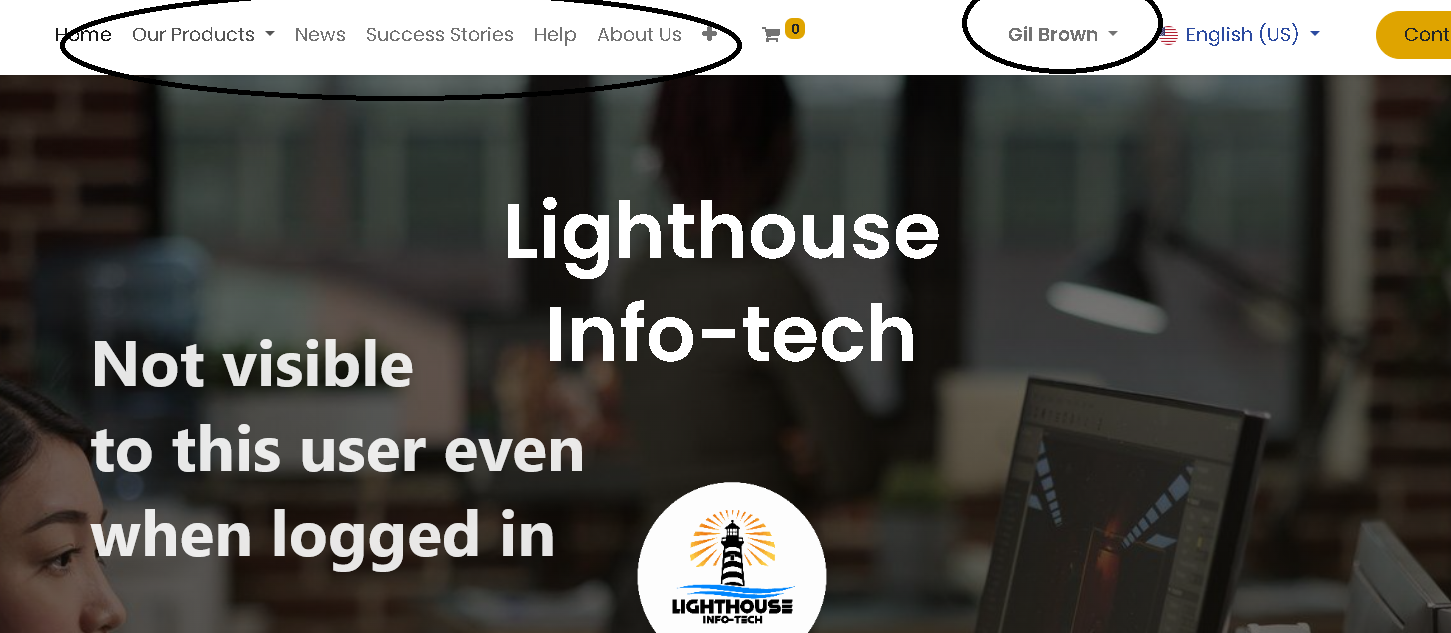
This is a quick workaround solution, however, if someone has the URL for the shop page they will still be able to access the page or the product page, hence any SEO done will lead public users to the page.

Public User:
A public user is a website visitor, who has not signed in.

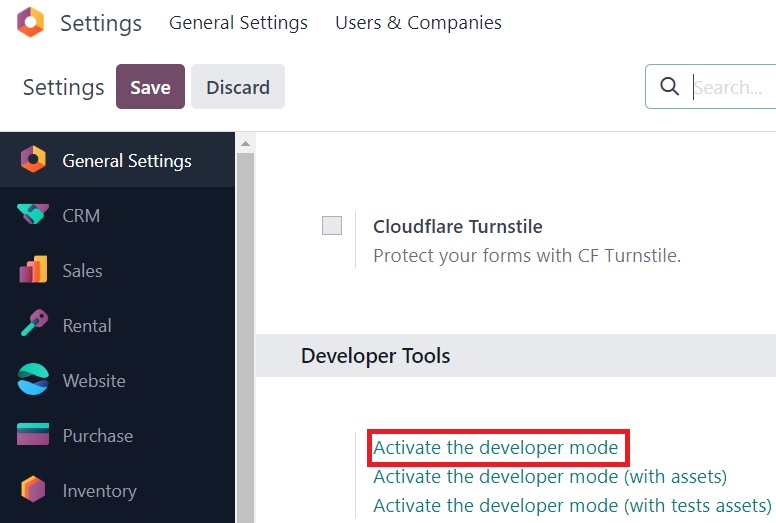
Activate the developer mode from the General Settings

To have the shop page in the website, eCommerce Application needs to be installed.

The Out of the box shop page will not be visible under the pages menu for us to add conditions to it. Hence, we will have to create a secondary page for the Shop.

Go to Website app, Select the website editor, press the “+NEW” and press page.


In the Pop-up page, specify the name of the page as Shop and have the option to add the menu enabled.
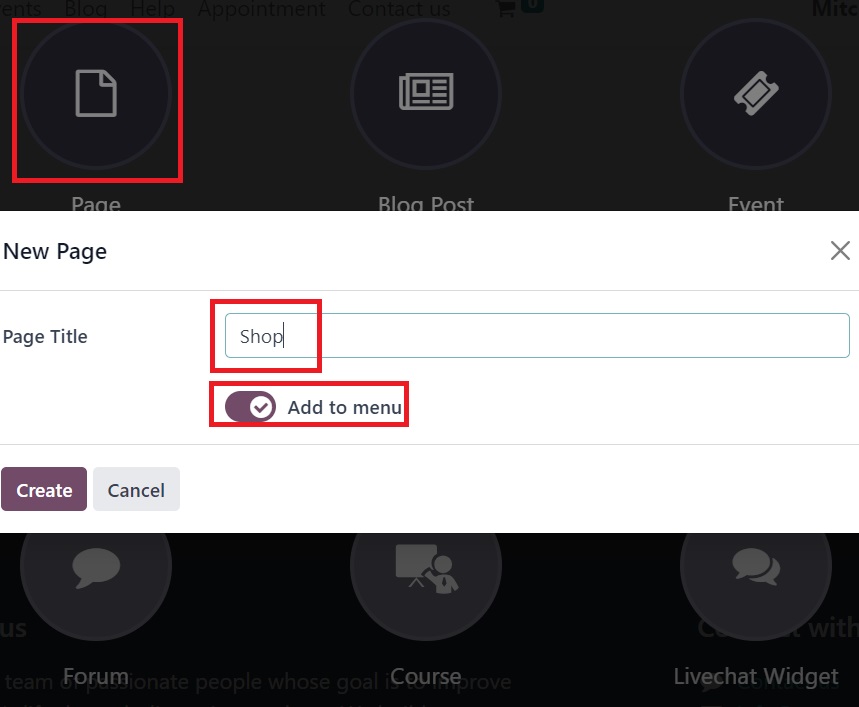


With this, the newly created Shop page will be linked to the original shop page and there will be 2 Shop menu items available on the website.
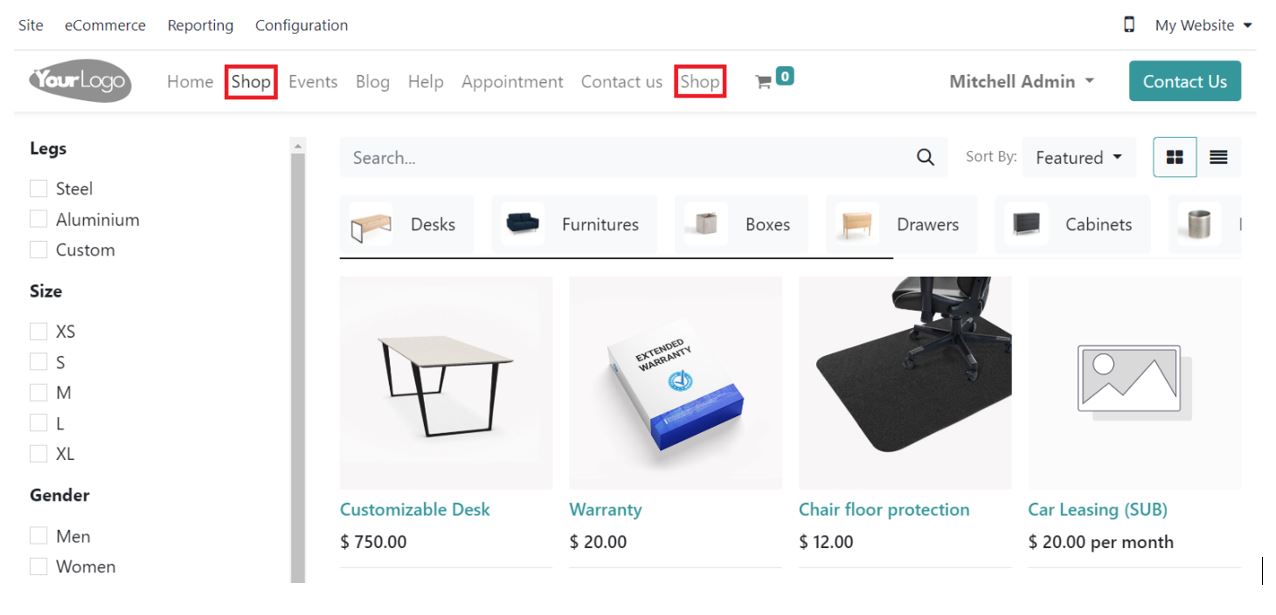


Go to the website, Site -> Pages.
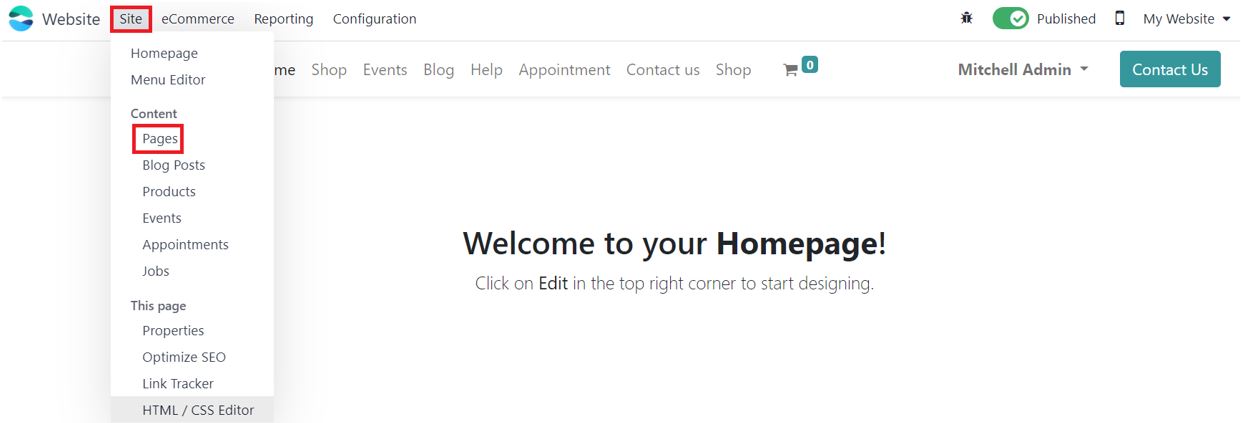

Select the Bug icon next to the Shop Page
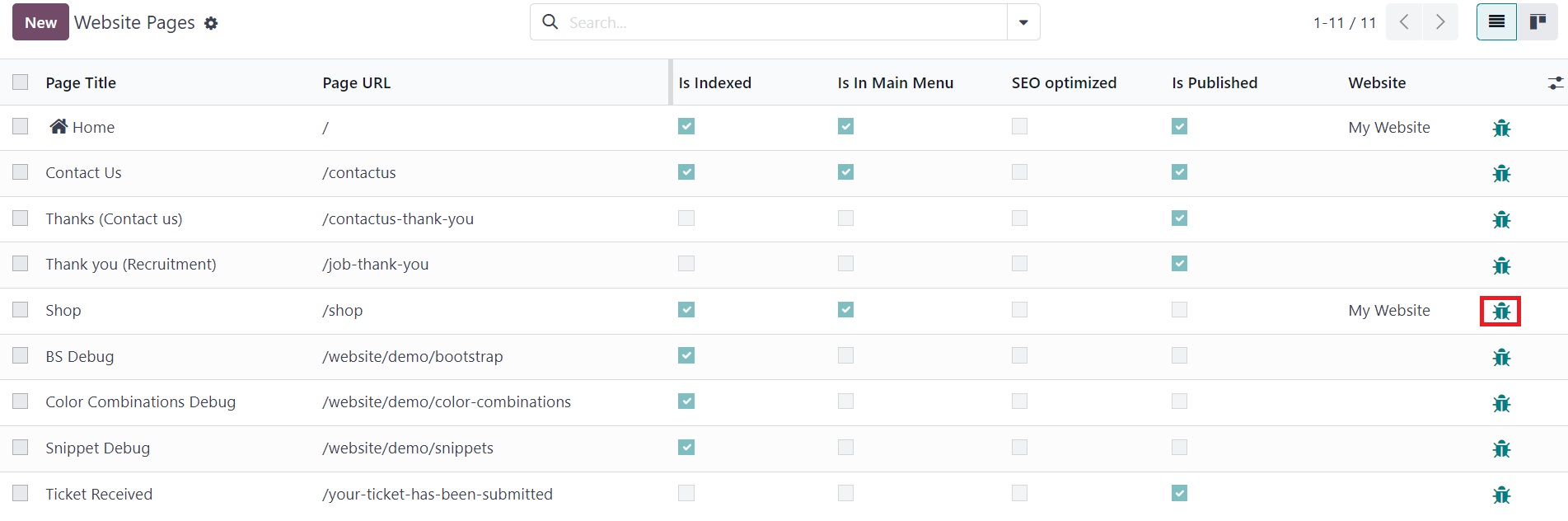

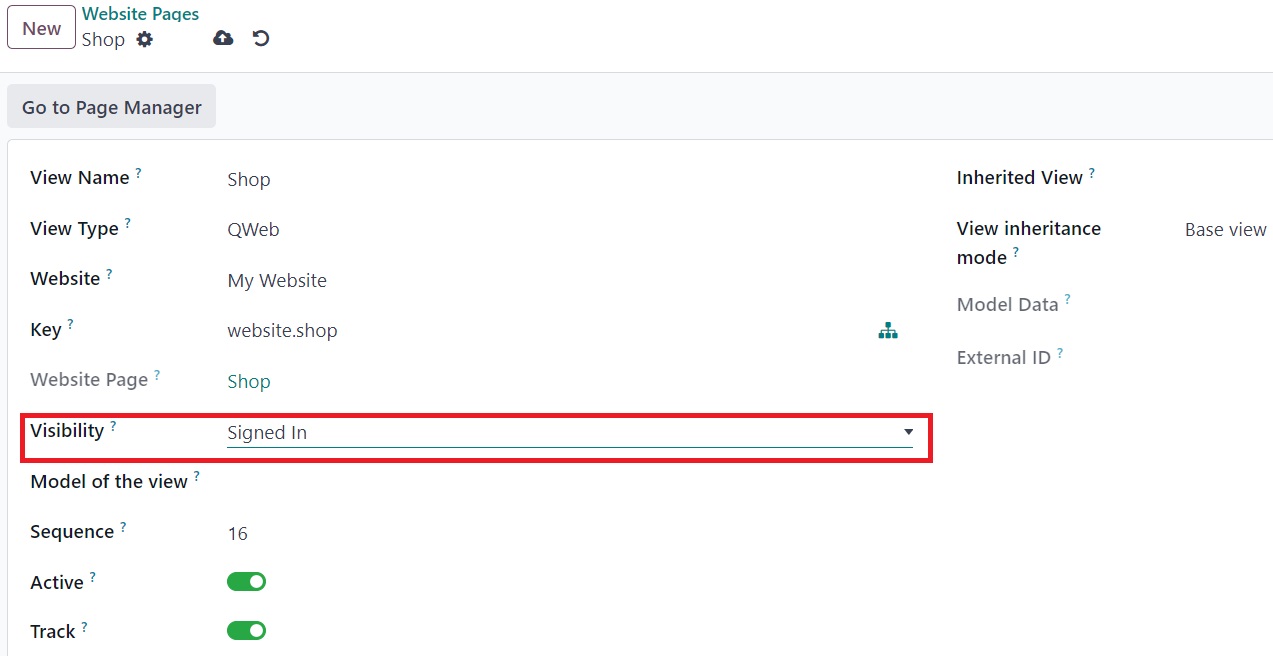
Set Visibility to Signed In


Since there are 2 Shops in the menu, we will need to remove the original Shop from the menu.

Select Site -> Menu Editor.
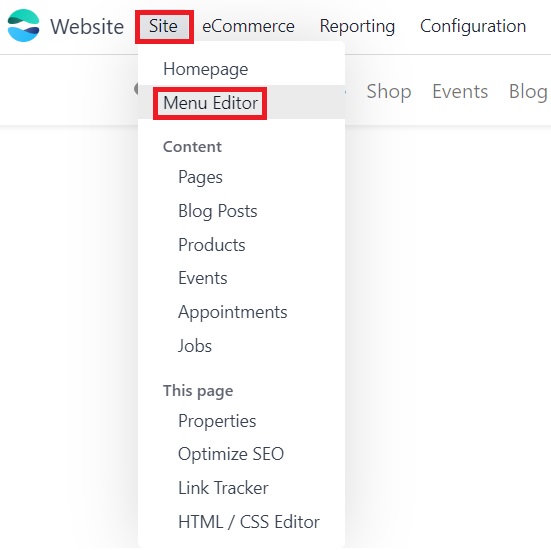

Remove the Original Shop Menu Item by pressing the trash icon next to it and save the changes.
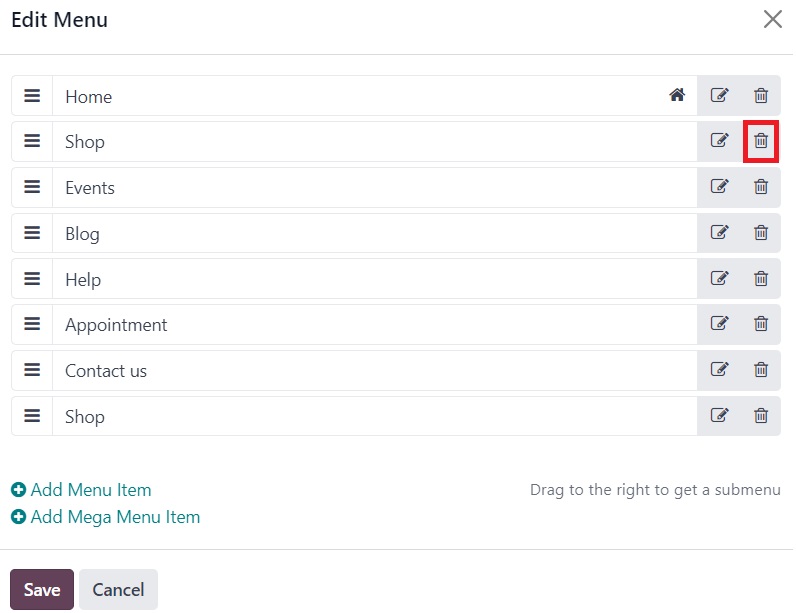


Once the changes are made and saved, the shop page will no longer be visible to the Public user and will only be visible to users who sign in


1
Avatar
Verwerfen
Auto-Matt

well... it's not visible, but it is still there... go to 'yoururl.com'/shop and the page will pop up

Christian Munari

as stated with url/shop it still appears so its not working

Avatar
Premier Property Management Co., Ltd.
Beste Antwort

I tried this, and its a decent work around for now.  However, it is only visible to some logged in users, does anybody know why?  What have  done wrong?  


0
Avatar
Verwerfen
Avatar
Pierre Caro
Beste Antwort

arsh23
Your tips doesn't seems to work on the shop.
Could you help ?
Thanks

0
Avatar
Verwerfen
Christian Munari

i wonder if anybody has a working solution for V17

Diskutieren Sie gerne? Treten Sie bei, statt nur zu lesen!

Erstellen Sie heute ein Konto, um exklusive Funktionen zu nutzen und mit unserer tollen Community zu interagieren!

Registrieren
Verknüpfte Beiträge Antworten Ansichten Aktivität
HTTPS redirect to HTTP Content block of url Gelöst
ecommerce website odoo16features
Avatar
Avatar
Avatar
Avatar
4
Nov. 25
11854
owlCarousel not working in Odoo 16
ecommerce website odoo16features
Avatar
Avatar
1
Aug. 23
4329
Set Maximum number of products to be added to cart Gelöst
ecommerce website Quickstart SF-Experts
Avatar
Avatar
2
Juni 25
4602
How to configure a B2B ECommerce like Odoov17 demo shows
ecommerce website B2B v17
Avatar
1
Mai 24
5378
Website display prices with AND without taxes
price ecommerce website OdooSH odoo16features
Avatar
Avatar
Avatar
Avatar
Avatar
5
Jan. 25
4971
Community
  • Tutorials
  • Dokumentation
  • Forum
Open Source
  • Herunterladen
  • Github
  • Runbot
  • Übersetzungen
Dienstleistungen
  • Odoo.sh-Hosting
  • Support
  • Upgrade
  • Individuelle Entwicklungen
  • Bildung
  • Buchhalter finden
  • Partner finden
  • Partner werden
Über uns
  • Unsere Firma
  • Markenwerte
  • Kontakt
  • Karriere
  • Veranstaltungen
  • Podcast
  • Blog
  • Kunden
  • Rechtliches • Datenschutz
  • Sicherheit
الْعَرَبيّة Català 简体中文 繁體中文 (台灣) Čeština Dansk Nederlands English Suomi Français Deutsch हिंदी Bahasa Indonesia Italiano 日本語 한국어 (KR) Lietuvių kalba Język polski Português (BR) română русский язык Slovenský jazyk Slovenščina Español (América Latina) Español Svenska ภาษาไทย Türkçe українська Tiếng Việt

Odoo ist eine Suite von Open-Source-Betriebsanwendungen, die alle Bedürfnisse Ihres Unternehmens abdecken: CRM, E-Commerce, Buchhaltung, Lager, Kassensystem, Projektmanagement etc.

Das einzigartige Wertversprechen von Odoo ist, dass es gleichzeitig sehr einfach zu bedienen und voll integriert ist.

Website made with

Odoo Experience on YouTube

1. Use the live chat to ask your questions.
2. The operator answers within a few minutes.

Live support on Youtube
Watch now