Skip to Content
Odoo मेन्यू
  • साइन इन करें
  • मुफ़्त में आज़माएं
  • ऐप्लिकेशन
    फ़ाइनेंस
    • अकाउंटिंग
    • इनवॉइसिंग
    • एक्सपेंस
    • स्प्रेडशीट (बीआई)
    • डॉक्यूमेंट्स
    • साइन
    सेल्स
    • सीआरएम
    • सेल्स
    • पीओएस शॉप
    • पीओएस रेस्टोरेंट
    • सब्सक्रिप्शन
    • रेंटल
    वेबसाइट
    • वेबसाइट बिल्डर
    • ई-कॉमर्स
    • ब्लॉग
    • फ़ोरम
    • लाइव चैट
    • ई-लर्निंग
    सप्लाई चेन
    • इन्वेंट्री
    • मैन्युफ़ैक्चरिंग
    • पीएलएम
    • परचेज़
    • मेंटेनेंस
    • क्वालिटी
    मानव संसाधन
    • कर्मचारी
    • रिक्रूटमेंट
    • टाइम ऑफ़
    • अप्रेज़ल
    • रेफ़रल
    • फ़्लीट
    मार्केटिंग
    • सोशल मार्केटिंग
    • ईमेल मार्केटिंग
    • एसएमएस मार्केटिंग
    • इवेंट
    • मार्केटिंग ऑटोमेशन
    • सर्वे
    सेवाएं
    • प्रोजेक्ट
    • टाइमशीट
    • फ़ील्ड सर्विस
    • हेल्पडेस्क
    • प्लानिंग
    • अपॉइंटमेंट
    प्रॉडक्टिविटी
    • डिस्कस
    • आर्टिफ़िशियल इंटेलिजेंस
    • आईओटी
    • वीओआईपी
    • नॉलेज
    • WhatsApp
    तीसरे पक्ष के ऐप्लिकेशन Odoo स्टूडियो Odoo क्लाउड प्लेटफ़ॉर्म
  • इंडस्ट्री
    रीटेल
    • बुक स्टोर
    • क्लोदिंग स्टोर
    • फ़र्नीचर स्टोर
    • ग्रॉसरी स्टोर
    • हार्डवेयर स्टोर
    • टॉय स्टोर
    फ़ूड & हॉस्पिटैलिटी
    • बार और पब
    • रेस्टोरेंट
    • फ़ास्ट फ़ूड
    • गेस्ट हाउस
    • बेवरिज डिस्ट्रीब्यूटर
    • होटल
    रियल एस्टेट
    • रियल एस्टेट एजेंसी
    • आर्किटेक्चर फ़र्म
    • कंसट्रक्शन
    • प्रॉपर्टी मैनेजमेंट
    • गार्ड्निंग
    • प्रॉपर्टी ओनर असोसिएशन
    कंसल्टिंग
    • अकाउंटिंग फ़र्म
    • Odoo पार्टनर
    • मार्केटिंग एजेंसी
    • लॉ फ़र्म
    • टैलेंट ऐक्विज़िशन
    • ऑडिट & सर्टिफ़िकेशन
    मैन्युफ़ैक्चरिंग
    • टेक्सटाइल
    • धातु
    • फ़र्नीचर
    • फ़ूड
    • ब्रुअरी
    • कॉर्पोरेट गिफ़्ट
    हेल्थ & फिटनेस
    • स्पोर्ट्स क्लब
    • आईवियर स्टोर
    • फिटनेस सेंटर
    • वेलनेस प्रैक्टिशनर
    • फॉर्मेसी
    • हेयर सैलून
    व्यापार
    • Handyman
    • आईटी हार्डवेयर & सपोर्ट
    • सोलर एनर्जी सिस्टम
    • शू मेकर
    • साफ-सफाई से जुड़ी सेवाएं
    • HVAC सर्विस
    अन्य
    • गैर-लाभकारी संगठन
    • एन्वायरमेंटल एजेंसी
    • बिलबोर्ड रेंटल
    • फ़ोटोग्राफी
    • बाइक लीजिंग
    • सॉफ़्टवेयर रीसेलर
    सभी इंडस्ट्री को ब्राउज़ करें
  • कम्यूनिटी
    सीखें
    • ट्यूटोरियल्स
    • दस्तावेज़
    • सर्टिफ़िकेशन
    • ट्रेनिंग
    • ब्लॉग
    • पॉडकास्ट
    शिक्षा को बढ़ावा दें
    • एजुकेशन प्रोग्राम
    • स्केल अप! बिजनेस गेम
    • Odoo के ऑफ़िस में आएं
    सॉफ़्टवेयर पाएं
    • डाउनलोड
    • वर्शन की तुलना करें
    • रिलीज़
    साथ मिलकर काम करें
    • Github
    • फ़ोरम
    • इवेंट
    • अनुवाद
    • पार्टनर बनें
    • पार्टनर के लिए सेवाएं
    • अपना अकाउंटिंग फ़र्म रजिस्टर करें
    • Referral Program
    सेवाएं पाएं
    • पार्टनर ढूंढें
    • अकाउंटेंट खोजें
    • सलाहकार की मदद लें
    • इम्प्लिमेंटेशन सेवाएं
    • कस्टमर रेफ़रेंस
    • सहायता
    • अपग्रेड
    Github Youtube Twitter Linkedin Instagram Facebook Spotify
    +1 (650) 691-3277
    डेमो देखें
  • कीमत
  • सहायता
You need to be registered to interact with the community.
All Posts People Badges
टैग (View all)
odoo accounting v14 pos v15
About this forum
You need to be registered to interact with the community.
All Posts People Badges
टैग (View all)
odoo accounting v14 pos v15
About this forum
सहायता

Hide Shop for Public Users

Subscribe

Get notified when there's activity on this post

This question has been flagged
ecommercewebsiteB2Bodoo16featuresSF-Experts
3 Replies
11086 डेटा देखने का तरीका
अवतार
Vasudevan Padmanabhan (vpd)

How Do I hide the website store from public users?

0
अवतार
खारिज करें
1 Euro Store SH.P.K, Eurostore

Well it works. But only for internal users and not for portal one. if you have portal user you will not be able to access the shop

अवतार
Vasudevan Padmanabhan (vpd)
लेखक Best Answer

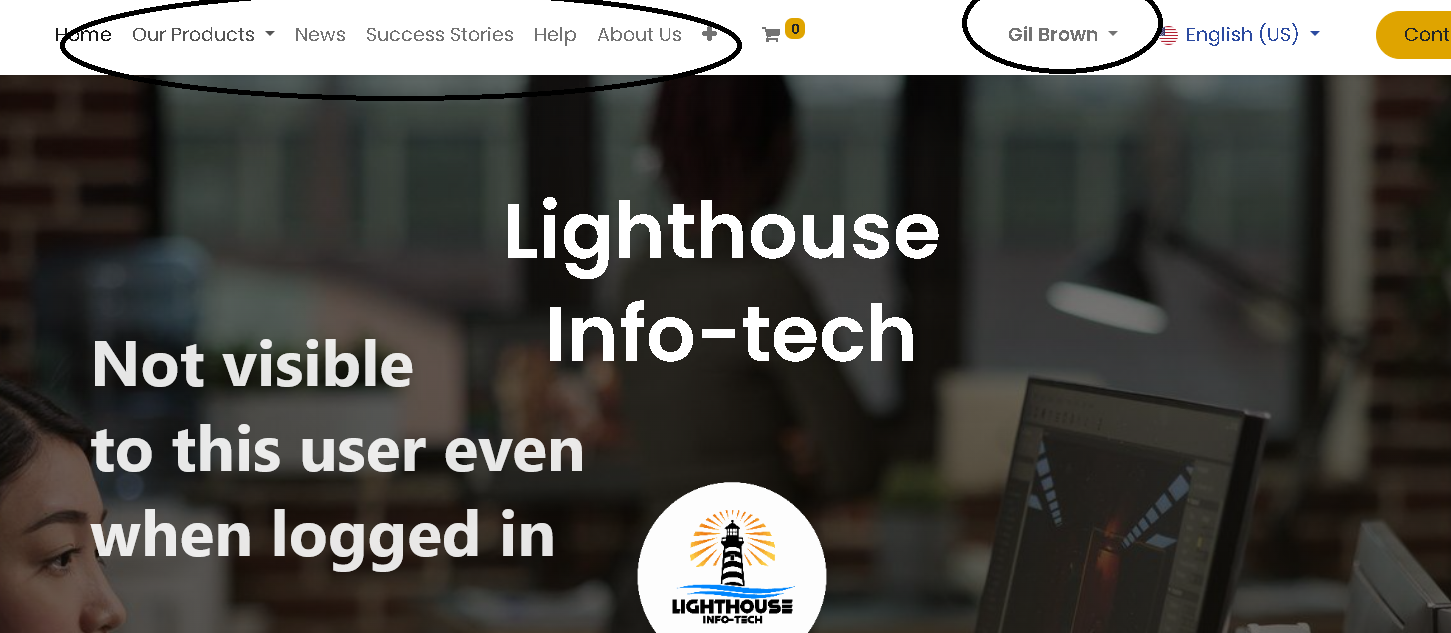
This is a quick workaround solution, however, if someone has the URL for the shop page they will still be able to access the page or the product page, hence any SEO done will lead public users to the page.

Public User:
A public user is a website visitor, who has not signed in.

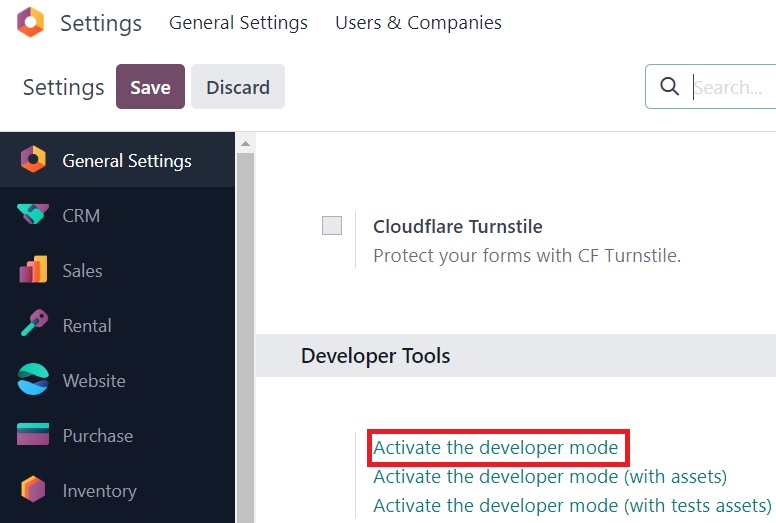
Activate the developer mode from the General Settings

To have the shop page in the website, eCommerce Application needs to be installed.

The Out of the box shop page will not be visible under the pages menu for us to add conditions to it. Hence, we will have to create a secondary page for the Shop.

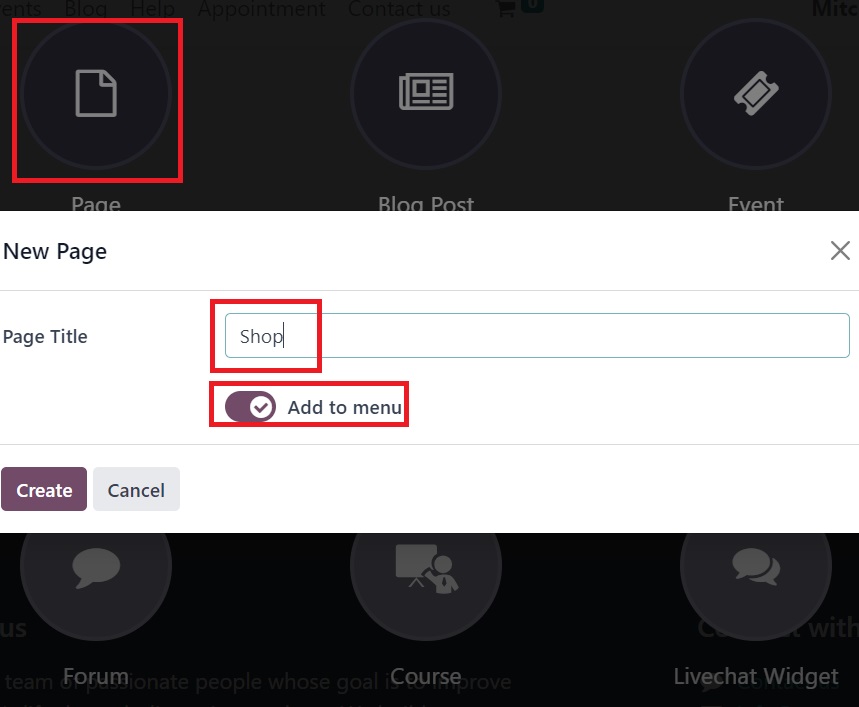
Go to Website app, Select the website editor, press the “+NEW” and press page.


In the Pop-up page, specify the name of the page as Shop and have the option to add the menu enabled.


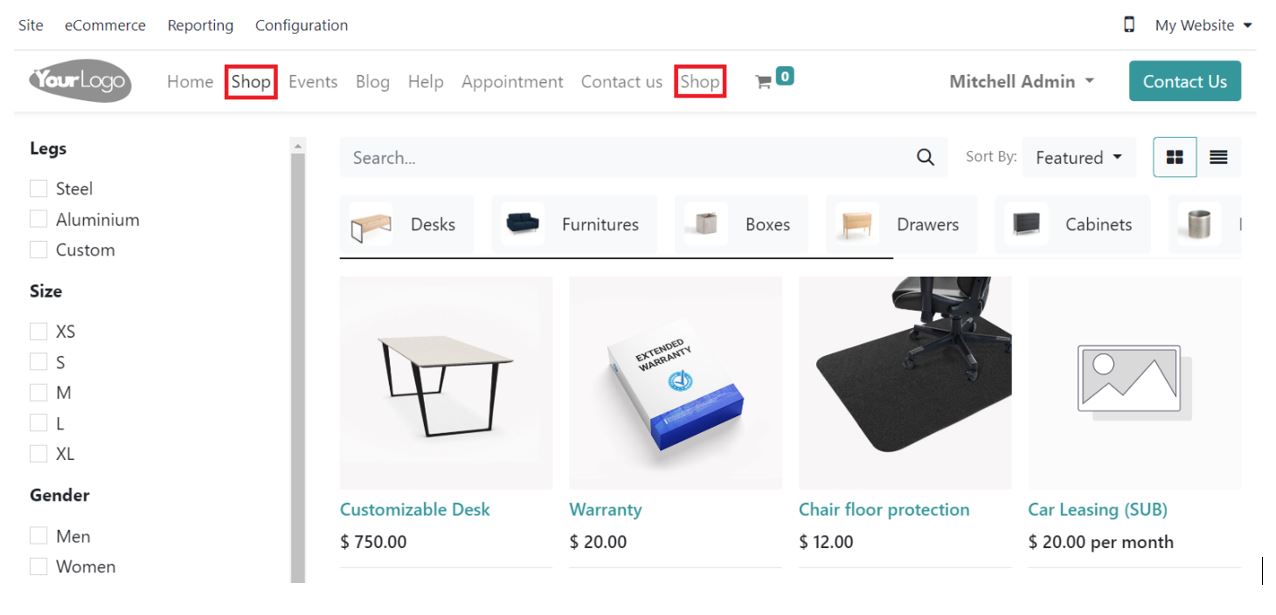
With this, the newly created Shop page will be linked to the original shop page and there will be 2 Shop menu items available on the website.


Go to the website, Site -> Pages.
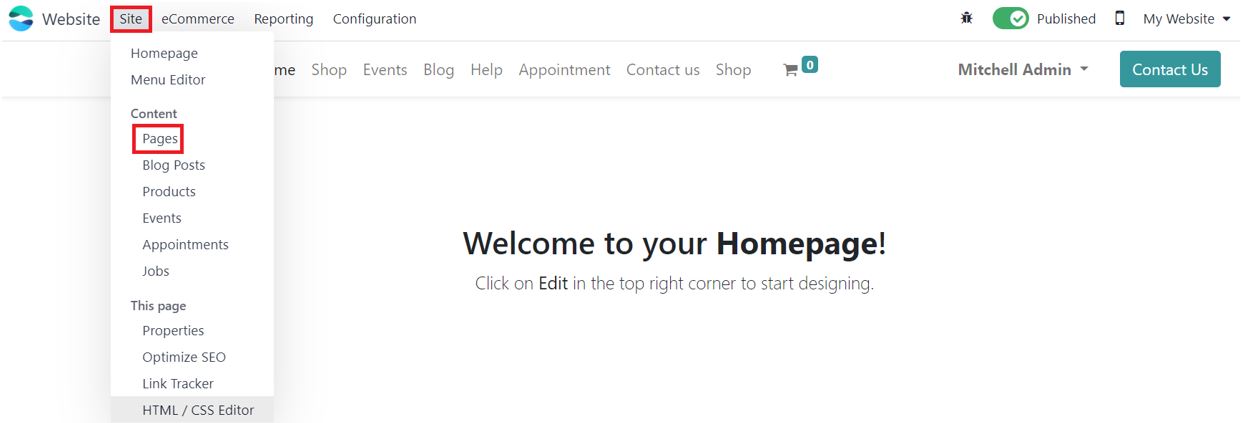

Select the Bug icon next to the Shop Page
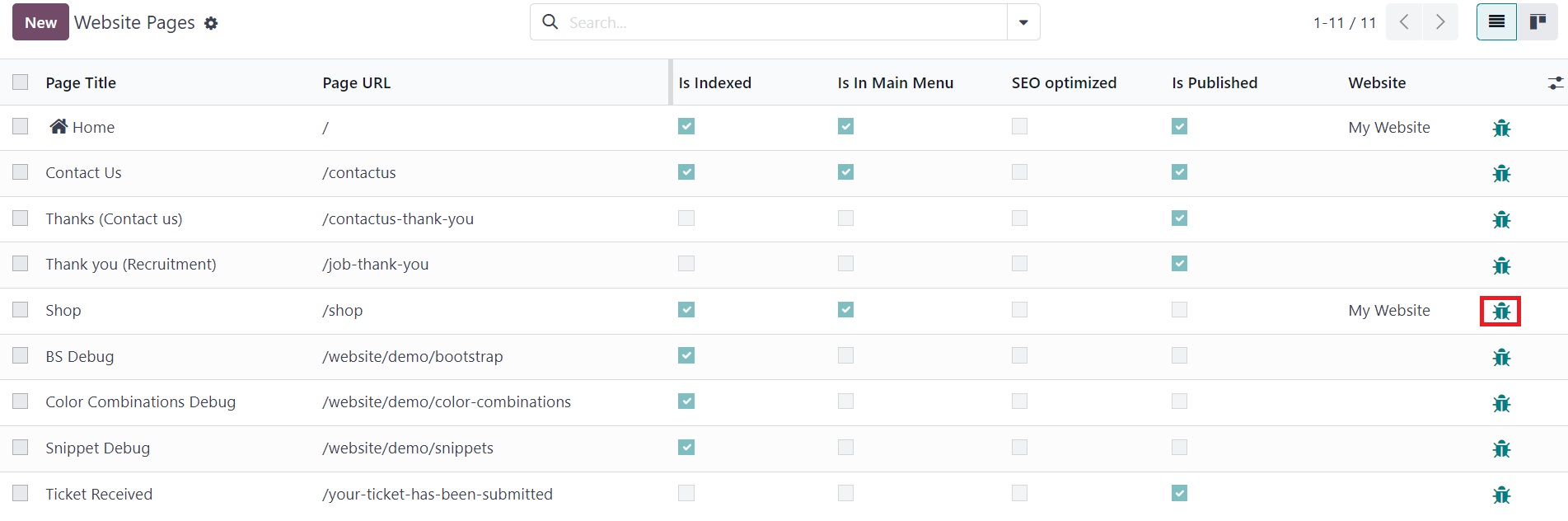

Set Visibility to Signed In
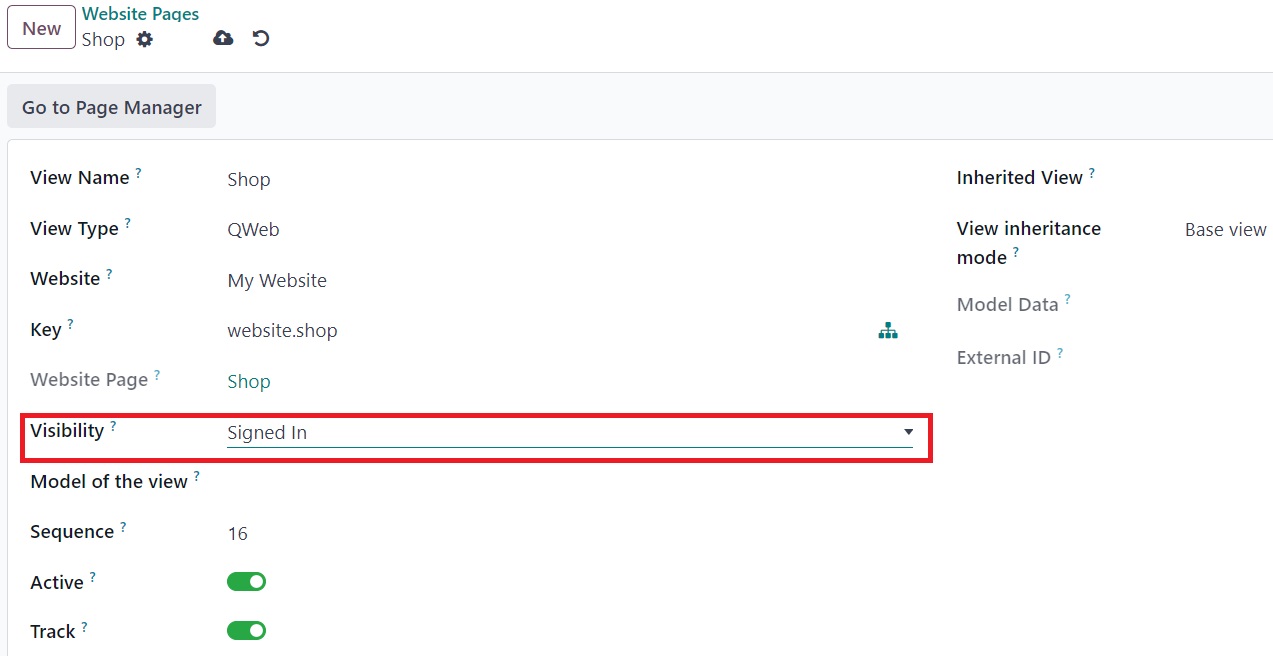


Since there are 2 Shops in the menu, we will need to remove the original Shop from the menu.

Select Site -> Menu Editor.
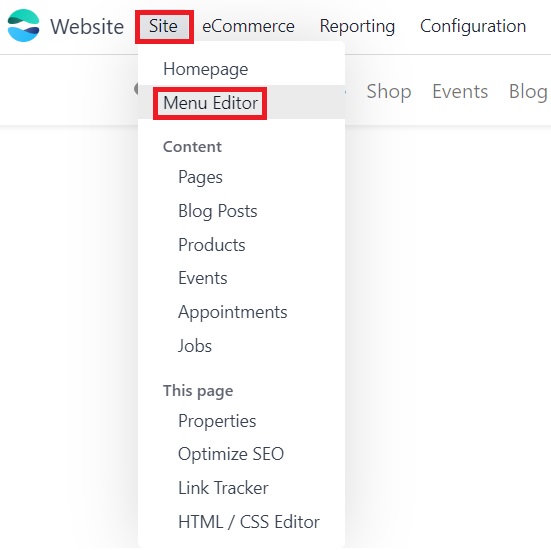

Remove the Original Shop Menu Item by pressing the trash icon next to it and save the changes.
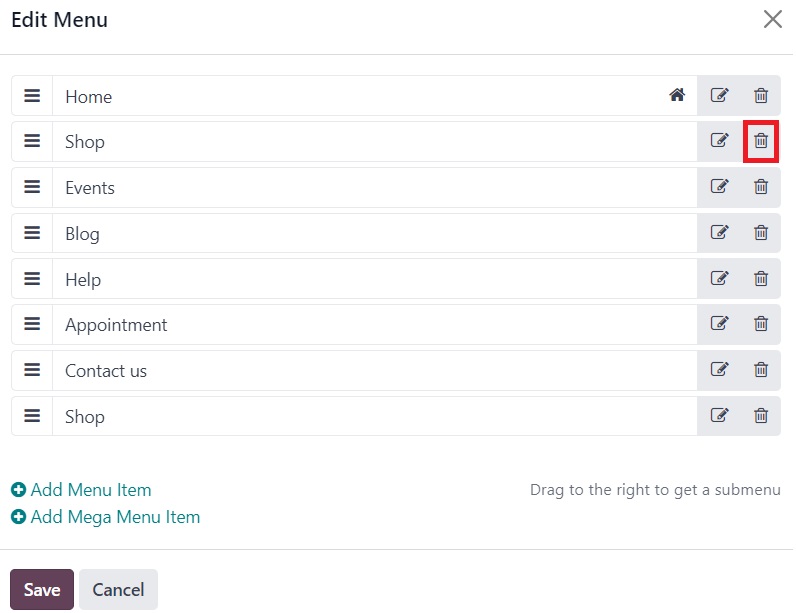


Once the changes are made and saved, the shop page will no longer be visible to the Public user and will only be visible to users who sign in


1
अवतार
खारिज करें
Auto-Matt

well... it's not visible, but it is still there... go to 'yoururl.com'/shop and the page will pop up

Christian Munari

as stated with url/shop it still appears so its not working

अवतार
Premier Property Management Co., Ltd.
Best Answer

I tried this, and its a decent work around for now.  However, it is only visible to some logged in users, does anybody know why?  What have  done wrong?  


0
अवतार
खारिज करें
अवतार
Pierre Caro
Best Answer

arsh23
Your tips doesn't seems to work on the shop.
Could you help ?
Thanks

0
अवतार
खारिज करें
Christian Munari

i wonder if anybody has a working solution for V17

Enjoying the discussion? Don't just read, join in!

Create an account today to enjoy exclusive features and engage with our awesome community!

साइन अप करें
Related Posts Replies डेटा देखने का तरीका ऐक्टिविटी
HTTPS redirect to HTTP Content block of url Solved
ecommerce website odoo16features
अवतार
अवतार
अवतार
अवतार
4
नव॰ 25
11957
owlCarousel not working in Odoo 16
ecommerce website odoo16features
अवतार
अवतार
1
अग॰ 23
4351
Set Maximum number of products to be added to cart Solved
ecommerce website Quickstart SF-Experts
अवतार
अवतार
2
जून 25
4674
How to configure a B2B ECommerce like Odoov17 demo shows
ecommerce website B2B v17
अवतार
1
मई 24
5426
Website display prices with AND without taxes
price ecommerce website OdooSH odoo16features
अवतार
अवतार
अवतार
अवतार
अवतार
5
जन॰ 25
5039
कम्यूनिटी
  • ट्यूटोरियल्स
  • दस्तावेज़
  • फ़ोरम
ओपन सोर्स
  • डाउनलोड
  • Github
  • रनबॉट
  • अनुवाद
सेवाएं
  • Odoo.sh Hosting
  • सहायता
  • अपग्रेड
  • कस्टम डेवलपमेंट्स
  • शिक्षा
  • अकाउंटेंट खोजें
  • पार्टनर ढूंढें
  • पार्टनर बनें
हमारे बारे में
  • हमारी कंपनी
  • ब्रांड ऐसेट
  • संपर्क करें
  • नौकरियां
  • इवेंट
  • पॉडकास्ट
  • ब्लॉग
  • ग्राहक
  • लीगल • गोपनीयता
  • सुरक्षा
الْعَرَبيّة Català 简体中文 繁體中文 (台灣) Čeština Dansk Nederlands English Suomi Français Deutsch हिंदी Bahasa Indonesia Italiano 日本語 한국어 (KR) Lietuvių kalba Język polski Português (BR) română русский язык Slovenský jazyk Slovenščina Español (América Latina) Español Svenska ภาษาไทย Türkçe українська Tiếng Việt

Odoo, बिज़नेस से जुड़े ऐप्लिकेशन का एक कलेक्शन है जो ओपन सोर्स पर आधारित है. इसमें आपकी कंपनी की हर ज़रूरत के लिए ऐप्लिकेशन हैं. जैसे, सीआरएम, ई-कॉमर्स, अकाउंटिंग, इन्वेंट्री, पॉइंट ऑफ़ सेल, प्रोजेक्ट मैनेजमेंट वगैरह.

Odoo की सबसे बड़ी खासियत है कि यह इस्तेमाल करने में बहुत आसान है और यह पूरी तरह से इंटिग्रेट किया हुआ है.

Website made with

Odoo Experience on YouTube

1. Use the live chat to ask your questions.
2. The operator answers within a few minutes.

Live support on Youtube
Watch now