跳至内容
Odoo 菜单
  • 登录
  • 免费试用
  • 应用程序
    财务
    • 会计
    • 发票
    • 费用
    • 电子表格 (BI)
    • 文档
    • 电子签名
    销售
    • 客户关系管理
    • 销售
    • POS 销售点管理-零售
    • POS 销售点管理 - 餐厅
    • 订阅
    • 租赁
    网站
    • 网站设计
    • 电子商务
    • 博客
    • 论坛
    • 在线客服
    • 在线学习
    供应链
    • 库存
    • 制造
    • 产品生命周期
    • 采购
    • 维护保养
    • 品控
    人力资源
    • 员工
    • 招聘
    • 休假
    • 评价
    • 内部推荐
    • 车队
    营销
    • 社媒营销
    • 电邮营销
    • 短信营销
    • 近期活动
    • 营销自动化
    • 网上调查
    服务
    • 项目管理
    • 工时单
    • 现场服务
    • 服务台
    • 排期
    • 预约
    生产力
    • 讨论
    • 人工智能
    • IoT物联网
    • VoIP
    • 知识库
    • WhatsApp
    第三方应用软件 Odoo 定制 Odoo云端平台
  • 行业
    零售
    • 书店
    • 服装店
    • 家具店
    • 食品杂货店
    • 五金店
    • 玩具店
    餐饮与酒店服务
    • 酒吧及酒馆
    • 餐厅
    • 快餐
    • 民宿
    • 饮品分销商
    • 酒店
    房地产
    • 房地产代理
    • 建筑师事务所
    • 建造业
    • 物业管理
    • 园艺
    • 业主协会
    咨询
    • 会计师事务所
    • Odoo合作伙伴
    • 市场推广公司
    • 律师事务所
    • 人才招聘
    • 审核 & 认证
    制造
    • 纺织
    • 金属
    • 家具
    • 食品
    • 啤酒厂
    • 企业礼品
    保健与健身
    • 体育俱乐部
    • 眼镜店
    • 健身中心
    • 健康从业者
    • 药房
    • 发型屋
    商贸服务
    • 维修人员
    • IT 硬件及支持
    • 太阳能系统
    • 鞋匠
    • 清洁服务
    • 暖通空调服务
    其他
    • 非营利组织
    • 环境机构
    • 广告牌租赁
    • 摄影服务
    • 自行车租赁
    • 软件经销商
    浏览所有行业
  • 社区
    学习
    • 教学视频
    • 文档
    • 认证
    • 培训
    • 博客
    • 播客
    赋能教育
    • 教育计划
    • Scale Up! 商业游戏
    • 参观Odoo
    获取软件
    • 下载
    • 版本对比
    • 发布
    合作
    • Github
    • 论坛
    • 近期活动
    • 翻译
    • 成为合作伙伴
    • 合作伙伴服务
    • 注册您的会计事务所
    获取服务
    • 寻找合作伙伴
    • 查找会计服务
    • 预约顾问咨询
    • 安装及推行服务
    • 客户参考
    • 支持
    • 升级
    Github Youtube Twitter Linkedin Instagram Facebook Spotify
    +1 (650) 691-3277
    获取演示
  • 定价
  • 技术支持
只限注册用戶才可与社群互动。
所有帖文 人 徽章
标签 (查看所有)
odoo accounting v14 pos v15
关于此论坛区
只限注册用戶才可与社群互动。
所有帖文 人 徽章
标签 (查看所有)
odoo accounting v14 pos v15
关于此论坛区
帮助

Website Issue

订阅

此帖文有活动时,接收通知

此问题已终结
website_builder
4 回复
11268 查看
形象
Allbest Meat Co. Ltd

Hi,


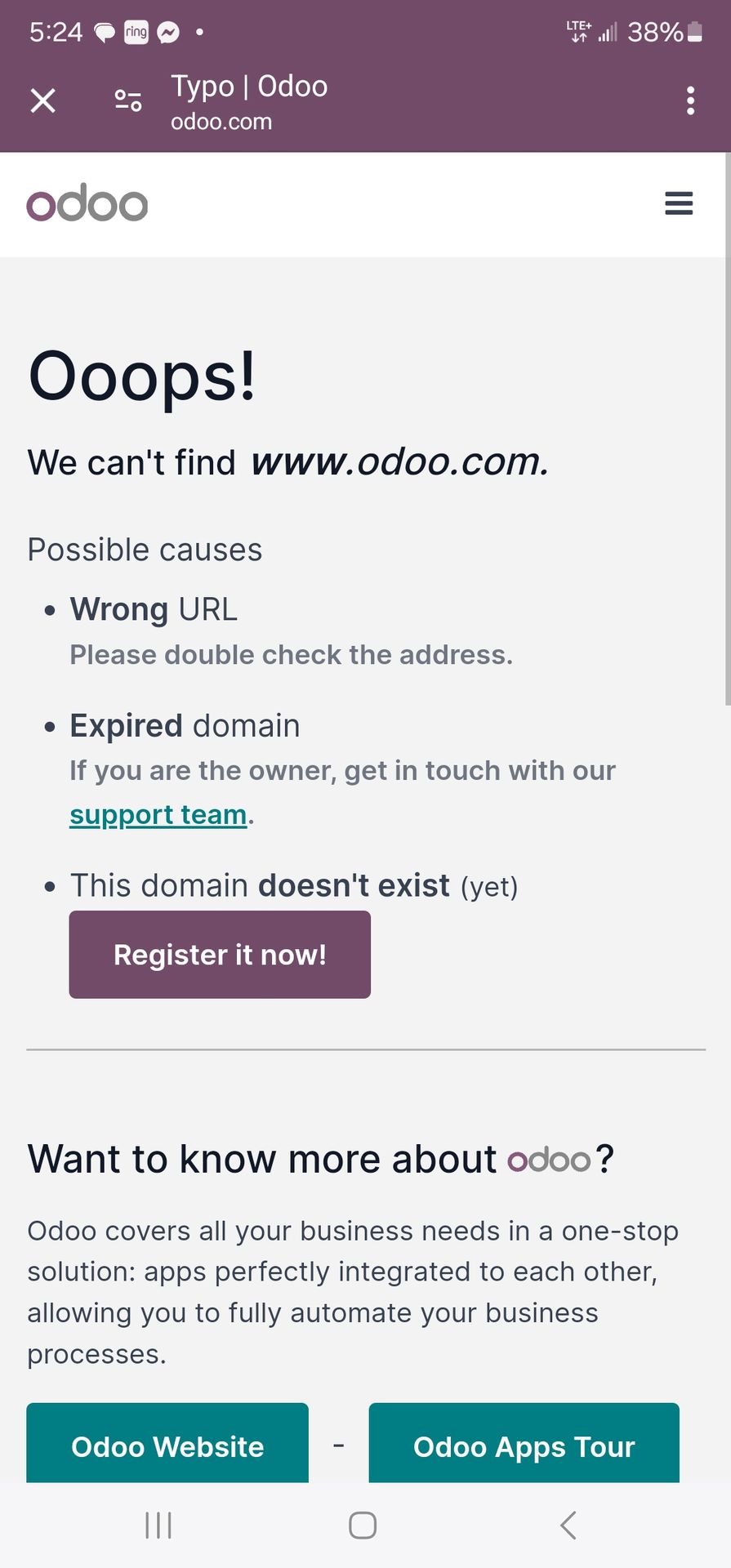
I've been having problems with Odoo Website maker. I followed the steps and have my domain registered, but whenever I go through the Odoo website app it says domain does not exist. I tried to just use the url without odoo app to see if the website works and same pop up error occurs. Does anyone else have this issue or have a solution? Thanks

0
形象
丢弃
Niyas Raphy (Walnut Software Solutions)

Could you provide an image showing the pop up that you are receiving

形象
Tatvamasi Labs, Piyush H
最佳答案

Okay, you're having trouble accessing your Odoo website with your registered domain, and you're getting a "domain does not exist" error both within the Odoo website app and when accessing the URL directly. This is a frustrating issue, but here's a breakdown of the possible causes and how to troubleshoot them:

1. DNS Propagation (Most Common):

  • What it is: When you register a domain name and point it to a new server (in this case, Odoo's servers), it takes time for the DNS (Domain Name System) records to propagate across the internet. This means that different computers and servers around the world need to update their information about where your domain points to.
  • How long it takes: DNS propagation can take anywhere from a few hours to 48 hours (in rare cases, up to 72 hours).
  • Solution: This is the most likely cause, especially if you recently registered your domain or changed its DNS settings. Wait at least 24-48 hours and try again.
  • Check Propagation: You can use online tools like https://www.whatsmydns.net/ to check if your DNS records have propagated to different locations around the world. Enter your domain name and check if the A record (or CNAME record, depending on your setup) points to the correct Odoo server IP address or hostname.

2. Incorrect DNS Settings:

  • What it is: Your domain's DNS records might be configured incorrectly. You need to make sure that the A record (or CNAME record) points to the correct Odoo server.
  • Solution:
    1. Find Odoo's DNS Information: Odoo should provide you with the specific DNS records you need to configure for your domain. This information is usually found in the Odoo Website app settings or in the Odoo documentation. Look for the A record IP address or the CNAME record hostname.
    2. Access Your Domain Registrar: Log in to your domain registrar's website (e.g., GoDaddy, Namecheap, Google Domains).
    3. Manage DNS Records: Find the DNS management section for your domain.
    4. Verify/Update DNS Records:
      • A Record: If you're using an A record, make sure it points to the correct Odoo server IP address.
      • CNAME Record: If you're using a CNAME record, make sure it points to the correct Odoo hostname (usually something like yourdomain.odoo.com).
    5. Save Changes: Save your DNS settings.
  • Common Mistakes:
    • Typing the IP address or hostname incorrectly.
    • Forgetting to add the trailing dot (.) to the hostname in a CNAME record (sometimes required).
    • Having conflicting DNS records.

3. Odoo Configuration Issues:

  • Domain Not Registered in Odoo: You need to register your domain name within the Odoo Website app settings.
  • Solution:
    1. Go to Odoo Website App: Open the Website app in Odoo.
    2. Settings: Go to Configuration > Settings.
    3. Domain Name: Enter your domain name in the "Domain Name" field.
    4. Save: Save the settings.
  • Incorrect Odoo Configuration: There might be an issue with Odoo's internal configuration that prevents it from recognizing your domain.
  • Solution: Contact Odoo support. They can check your Odoo instance and identify any configuration problems.

4. SSL/TLS Certificate Issues:

  • What it is: If your website is not properly configured with an SSL/TLS certificate, you might encounter errors when accessing it over HTTPS.
  • Solution:
    1. Check SSL Status: Use an online tool like https://www.sslshopper.com/ssl-checker.html to check the SSL status of your domain.
    2. Odoo Configuration: Odoo usually handles SSL certificate configuration automatically, but if there's an issue, contact Odoo support.

5. Browser Cache:

  • What it is: Your browser might be caching old DNS information or website data.
  • Solution:
    1. Clear Browser Cache: Clear your browser's cache and cookies.
    2. Try a Different Browser: Try accessing your website with a different browser to see if the issue persists.
    3. Incognito Mode: Try accessing your website in your browser's incognito or private browsing mode.

6. Odoo Server Issues (Less Likely):

  • What it is: There might be a problem with Odoo's servers that is preventing your website from being accessed.
  • Solution: Contact Odoo support. They can check the status of their servers and investigate any potential issues.

Troubleshooting Steps:

  1. Wait for DNS Propagation: This is the first and most important step. Wait at least 24-48 hours after registering your domain or changing its DNS settings.
  2. Check DNS Settings: Verify that your DNS records are configured correctly at your domain registrar.
  3. Register Domain in Odoo: Make sure you've registered your domain name in the Odoo Website app settings.
  4. Clear Browser Cache: Clear your browser's cache and cookies.
  5. Check SSL Status: Verify that your website has a valid SSL certificate.
  6. Contact Odoo Support: If you've tried all of the above steps and the issue is still not resolved, contact Odoo support for assistance.

Example Scenario:

Let's say you registered your domain name 2 hours ago and you're getting the "domain does not exist" error. The most likely cause is DNS propagation. You should wait at least 24 hours and try again.

By following these steps, you should be able to identify and resolve the issue that is preventing you from accessing your Odoo website with your registered domain. Remember to be patient and check each potential cause systematically.


🚀 Did This Solve Your Problem?

If this answer helped you save time, money, or frustration, consider:

✅ Upvoting (👍) to help others find it faster

✅ Marking as "Best Answer" if it resolved your issue

Your feedback keeps the Odoo community strong! 💪

(Need further customization? Drop a comment—I’m happy to refine the solution!)

0
形象
丢弃
形象
jackd
最佳答案

Hi there,

I’ve run into something similar before. If Odoo is saying your domain doesn’t exist, a few things might be going on:

  1. DNS Settings – Make sure your domain’s DNS records (like A record or CNAME) are correctly pointing to Odoo’s servers.
  2. Domain Verification – Odoo usually requires verifying the domain. Check if you’ve completed that step in the Website app.
  3. Propagation Time – If you just updated your DNS, it might take some time (up to 24–48 hours) to fully propagate.
  4. Typo or Formatting – Double-check that the domain name is entered correctly without any extra spaces or characters.

If everything seems correct and it’s still not working, I’d suggest opening a support ticket with Odoo—they can check on their end too.

Hope that helps! Let me know if you get it working.

0
形象
丢弃
形象
isaciu65
最佳答案

Clear your browser cache and try accessing the website again. You can also try accessing the website in a different browser or incognito mode.


0
形象
丢弃
isaciu65

Make sure you're entering the domain name correctly in the address bar, including any typos.
Ensure you haven't made any mistakes while adding the CNAME record.
https://pixel-speedrun.com

形象
Allbest Meat Co. Ltd
编写者 最佳答案


0
形象
丢弃
Allbest Meat Co. Ltd
编写者

I checked the domain url to see if it is registered, and it shows it is

喜欢讨论吗?不要只阅读,加入进来!

立即创建账户,享受专属功能,与我们的精彩社区互动!

注册
相关帖文 回复 查看 活动
(((Guia~JetBlue!@!Oficial^Hablo//+182)) ¿Cómo llamar a JetBlue desde República Dominicana?
website_builder
形象
0
12月 25
41
(((Guia~ Latam!@!Oficial^Hablo//0800))) ¿Cómo llamar a LATAM Airlines desde Chile?
website_builder
形象
0
12月 25
142
Website Builder theme breaks after upgrading to Odoo 17 — CSS not loading
website_builder
形象
0
12月 25
32
AssertionError while install Appoinment in website
website_builder
形象
形象
形象
2
11月 25
1922
Hide website menu items on mobile
website_builder
形象
形象
形象
2
1月 25
3826
社区
  • 教学视频
  • 文档
  • 论坛
开源
  • 下载
  • Github
  • Runbot
  • 翻译
服务
  • Odoo.sh 托管
  • 支持
  • 升级
  • 自定义开发服务
  • 教育
  • 查找会计服务
  • 寻找合作伙伴
  • 成为合作伙伴
关于我们
  • 我们的公司
  • 品牌资产
  • 联系我们
  • 招聘
  • 近期活动
  • 播客
  • 博客
  • 客户
  • 法律 • 隐私
  • 安全
الْعَرَبيّة Català 简体中文 繁體中文 (台灣) Čeština Dansk Nederlands English Suomi Français Deutsch हिंदी Bahasa Indonesia Italiano 日本語 한국어 (KR) Lietuvių kalba Język polski Português (BR) română русский язык Slovenský jazyk Slovenščina Español (América Latina) Español Svenska ภาษาไทย Türkçe українська Tiếng Việt

Odoo致力于为企业管理提供高效智能的开源解决方案,是全球业内高速成长的软件服务商之一,逾七百五十万用户选择Odoo进行数字化升级。通过一系列全业务链覆盖、高度集成、简单易用的商业应用,助力企业实现信息化改革、降本增效并释放公司增长潜力。

Odoo独特的价值在于是一款非常容易使用又完全集成的应用。

Website made with

Odoo Experience on YouTube

1. Use the live chat to ask your questions.
2. The operator answers within a few minutes.

Live support on Youtube
Watch now