Bỏ qua để đến Nội dung
Odoo Menu
  • Đăng nhập
  • Dùng thử miễn phí
  • Ứng dụng
    Tài chính
    • Kế toán
    • Hóa đơn
    • Chi phí
    • Bảng tính (BI)
    • Tài liệu
    • Ký tên
    Bán hàng
    • CRM
    • Bán hàng
    • POS Cửa hàng
    • POS Nhà hàng
    • Đăng ký
    • Cho thuê
    Trang web
    • Trình tạo trang web
    • Thương mại điện tử
    • Blog
    • Diễn đàn
    • Trò chuyện trực tiếp
    • Học trực tuyến
    Chuỗi cung ứng
    • Tồn kho
    • Sản xuất
    • PLM
    • Mua hàng
    • Bảo dưỡng
    • Chất lượng
    Nhân sự
    • Nhân viên
    • Tuyển dụng
    • Ngày nghỉ
    • Đánh giá
    • Giới thiệu
    • Đội xe
    Marketing
    • Marketing trên MXH
    • Marketing qua email
    • Marketing qua SMS
    • Sự kiện
    • Tự động hóa Marketing
    • Khảo sát
    Dịch vụ
    • Dự án
    • Bảng chấm công
    • Dịch vụ hiện trường
    • Hỗ trợ
    • Kế hoạch
    • Lịch hẹn
    Năng suất
    • Thảo luận
    • Trí tuệ nhân tạo (AI)
    • IoT
    • VoIP
    • Kiến thức
    • WhatsApp
    Ứng dụng của bên thứ ba Studio Odoo Nền tảng Đám mây Odoo
  • Ngành
    Bán lẻ
    • Nhà sách
    • Cửa hàng quần áo
    • Cửa hàng nội thất
    • Cửa hàng tạp hóa
    • Cửa hàng đồ kim khí
    • Cửa hàng đồ chơi
    Ẩm thực & Dịch vụ lưu trú
    • Bar và quán rượu
    • Nhà hàng
    • Đồ ăn nhanh
    • Guest house
    • Nhà phân phối đồ uống
    • Khách sạn
    Bất động sản
    • Công ty môi giới bất động sản
    • Công ty kiến trúc
    • Xây dựng
    • Quản lý bất động sản
    • Làm vườn
    • Hiệp hội chủ sở hữu bất động sản
    Tư vấn
    • Công ty kế toán
    • Đối tác Odoo
    • Công ty marketing
    • Công ty luật
    • Tuyển dụng
    • Thanh tra & chứng nhận
    Sản xuất
    • Dệt may
    • Kim loại
    • Nội thất
    • Ẩm thực
    • Nhà máy bia
    • Quà tặng doanh nghiệp
    Sức khoẻ & fitness
    • CLB thể thao
    • Cửa hàng kính mắt
    • Trung tâm fitness
    • Chuyên gia chăm sóc sức khỏe
    • Hiệu thuốc
    • Tiệm làm tóc
    Thương mại
    • Dịch vụ sửa chữa
    • Phần cứng CNTT & Hỗ trợ
    • Hệ thống năng lượng mặt trời
    • Công ty sản xuất giày
    • Dịch vụ vệ sinh
    • Dịch vụ HVAC
    Khác
    • Tổ chức phi lợi nhuận
    • Cơ quan môi trường
    • Cho thuê biển quảng cáo
    • Nhiếp ảnh
    • Cho thuê xe đạp
    • Đại lý phần mềm
    Xem tất cả ngành
  • Cộng đồng
    Học tập
    • Khóa học
    • Tài liệu
    • Chứng chỉ
    • Đào tạo
    • Blog
    • Podcast
    Thúc đẩy đào tạo
    • Chương trình đào tạo
    • Trò chơi kinh doanh Scale Up!
    • Tham quan Odoo
    Nhận phần mềm
    • Tải xuống
    • So sánh các phiên bản
    • Phiên bản
    Hợp tác
    • Github
    • Diễn đàn
    • Sự kiện
    • Dịch thuật
    • Trở thành đối tác
    • Dịch vụ dành cho Đối tác
    • Đăng ký công ty kế toán của bạn
    Nhận dịch vụ
    • Tìm đối tác
    • Tìm kế toán
    • Gặp chuyên gia hỗ trợ
    • Dịch vụ Triển khai
    • Khách hàng tham khảo
    • Hỗ trợ
    • Nâng cấp
    Github Youtube Twitter Linkedin Instagram Facebook Spotify
    +1 (650) 691-3277
    Nhận một buổi demo
  • Bảng giá
  • Trợ giúp
Bạn cần phải đăng ký để tương tác với cộng đồng.
Tất cả bài viết Người Huy hiệu
Thẻ (Xem tất cả)
odoo accounting v14 pos v15
Về diễn đàn này
Bạn cần phải đăng ký để tương tác với cộng đồng.
Tất cả bài viết Người Huy hiệu
Thẻ (Xem tất cả)
odoo accounting v14 pos v15
Về diễn đàn này
Hỗ trợ

Odoo 16 Import Translations marked as "code" not working

Đăng ký nhận tin

Nhận thông báo khi có hoạt động trên bài viết này

Câu hỏi này đã bị gắn cờ
importtranslationsbugodoo16features
8 Trả lời
15422 Lượt xem
Ảnh đại diện
Riquo Electronics

Hello,


Translations lines marked as "code" import / export are not working on Odoo 16. We have been trying on october first version, and each month the same: still not working.


UPDATE 070623:

- 16.0 Enterprise and Community (last checked 080623) and all 16 till now.

- Bug is back again or still unsolved.

- Bug impacts Odoo 16 on translations marked as "code" (find here screenshot).

- Bug is being pointed out on many forum post ( e.g.  https://www.odoo.com/es_ES/forum/ayuda-1/translations-in-odoo-16-online-220924 ) and issues e.g. https://github.com/odoo/odoo/issues/115876

- Also on latest Odoo 16, we have reproduced and confirmed here,  please try on official Odoo here: https://demo4.odoo.com/ or https://demo6.odoo.com/
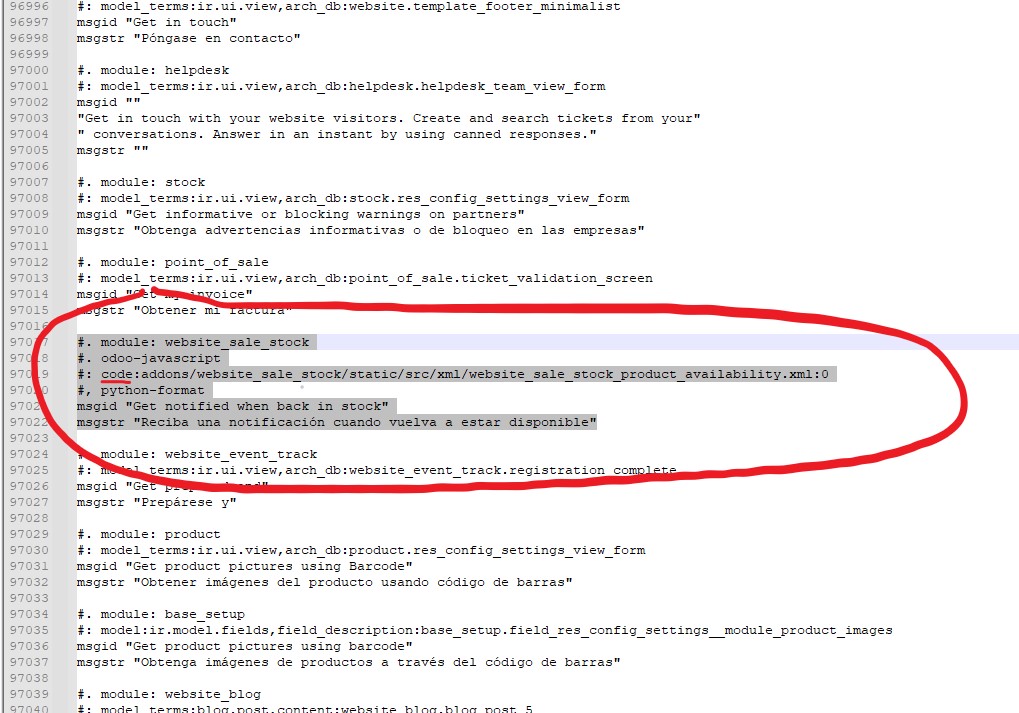


¿Can someone please help reporting this bug to Odoo guys?

Impacted version: 
 
- 16.0 (last checked 270323) and all 16 till March.
 
 
Steps to reproduce:
 
1. Settings > Translations > Export a translation for a single or all modules.
2. Donwload a .PO (same on CSV) and open using POEDIT or just a simple TXT editor (does not matter).
3. Import .PO file once modified locally and saved.
 
 
Current behavior:
 
- PO file is not being imported. No error message, neither log error, no trace of this error. Odoo log does confirm correct upload ! Even restarting server and/or single module updating, terms are still not updated.


Expected behavior:
 
- PO file is expected to be effectively imported and tanslations to be applied as on e.g. Odoo 15 (no need to restart server, neither single module update !)
 

Thank you


Odoo log shows translation as uploaded !!


2
Ảnh đại diện
Huỷ bỏ
arick111

I just wanted to express my gratitude for the time I spent reading your post.

Delon

I want express my gratitude, I notice exactly the same bug. If you specify some modules you can do the translation but if you specify nothing you export all of terms with type code and it become impossible to translate these important terms. I lost a lot of time before to see your post and I was really disapointed to see in the same time a big regression that is you can no more translate directly in Odoo some terms. So translation in Odoo became annoying considering just for one word you have to export / import PO and all of that to see some parts does not work ..... :(

Ảnh đại diện
Niyas Raphy (Walnut Software Solutions)
Câu trả lời hay nhất

Hi,

in Odoo 16, code translations can be exported but are not expected to be customized/imported.

Reason:
code translations can be treated as part of code, which are shared to all registries/databases
you can only change it in the po file in the code directory like changing the source code for all registries/databases

For more: https://github.com/odoo/odoo/issues/115876#issuecomment-1580532408


Thanks

0
Ảnh đại diện
Huỷ bỏ
Riquo Electronics
Tác giả

Hi Niyas,

Thanks for detailed answer. Yes it is !

However that being said, it seems to us that:

a - Odoo end users need most of code tanslations to be customized. This new Odoo 16 behaviour not only requires us to impact on "code directory" (almost impossible to mantain bcs updates, etc.) as you said, but also does impact on Odoo as multi database service. A big doble issue here.

b - As pointed out here https://github.com/odoo/odoo/issues/124124, there is not a clear consistency along "code" importable translations, not talking about "code directory": on importable PO file, some are allowed to be imported, some not. Having them on database PO file (not code directory), all terms should be importable. Seems to be a bug there. Why this, what do you think?

Will Odoo switch to a single-database model in future?

Guess any end client using a 300 euros monthly Enterprise licence, or an old clients updating to Odoo 16 CE: how do we justify this core issue towards our clients?

Moreover, Odoo 17 seems to go in the same line: deeply worrisome.

Thanks for your attention

Cheers!

Ảnh đại diện
Tommy Lo
Câu trả lời hay nhất

-- this universal bug is still open for Odoo 16 / 17  - and everyone who is telling the opposite is wrong!

see

https://github.com/odoo/odoo/issues/115876

1
Ảnh đại diện
Huỷ bỏ
Ảnh đại diện
yoany mora
Câu trả lời hay nhất

Hi everybody, I just found this error while working with a JS translation and a teammate helped me, let me help you as well.

I attached a snippet to this response, basically you have to inherit the method of the attached snippet and change the line with the OR expression, substitute ´your_modules_name´ value. In the method comments is the explanation about why this needs to be made. Hope this works for you!


from odoo import models
from odoo.osv import expression
​

​class IrHttp(models.AbstractModel):
​ ​_inherit = "ir.http"
​ ​@classmethod
​ ​def _get_translation_frontend_modules_domain(cls): ​
​ ​ ​# Odoo by default only gets the translations for the modules ​that have
​ ​# `website` in it's name, that being said, if an app ads static files
​ ​# and doesn't have the word `website` the translations are not brought.
​ ​# for a better explanation see:
​ ​#https://github.com/Vauxoo/odoo/commit/8b8815f44cc7e8529ba0f841c7366ee6b8e28356
​ ​domain = super()._get_translation_frontend_modules_domain()
​​return expression.OR([domain, [("name", "in", ["your_module_name"])]])
0
Ảnh đại diện
Huỷ bỏ
Ảnh đại diện
David Fleischmann
Câu trả lời hay nhất

This seems to still be an issue. Having the same trouble when trying to change translation for: l10n_din5008_document_title on odoo.sh
https://github\\.com/odoo/odoo/blob/d748ca8708aa5d13737de9b78722b3755a6cdebc/addons/l10n_din5008_sale/models/sale\\.py 

I\\ think\\ also\\ here\\ the\\ issue\\ ist\\ that\\ it's\\ marked\\ as\\ a\\ python\\ code\\ value\\ in\\ csv\\ \\(see\\ last\\ column:\\ odoo\\-python\\): 
l10n_din5008_sale,code,addons/l10n_din5008_sale/models/sale.py,41,Sales Order,Verkaufsauftrag,odoo-python

0
Ảnh đại diện
Huỷ bỏ
Ảnh đại diện
Cybrosys Techno Solutions Pvt.Ltd
Câu trả lời hay nhất

We can import/export translations in Odoo16

Go to Settings -> Translation -> Export Translation -> Then add Language(French) , file format(PO file) and Apps to Export(Odoo15 CRM kit, CRM Dashboard) ->Export

Download the .po file

(If you need any more translation to add it in the .py file) then,

Go to Settings -> Translation -> Import Translation -> Then add language and corresponding language code also add the downloaded .py file and enable the boolean field 'Overwrite Existing Terms' ->Import

Go to My Profile -> Preferences -> Language

0
Ảnh đại diện
Huỷ bỏ
Riquo Electronics
Tác giả

Hi Cybrosys,

First of all thanks for your reply.

Issue is still there on Odoo 16, you can also have a try on latest Odoo 16 demo:

https://demo4.odoo.com/

or

https://demo6.odoo.com/

We have updated our first post, because issue is on translations marked as "code".

Check please attached screen-shot on our updated answer.

Have please a look here: https://github.com/odoo/odoo/issues/115876

Issue is back again or just unsolved.

Appreciate

I Max International Srl, Maxg

Riquo I confirm this is not working tried today in runbot odoo 16 enterprise edition.

I Max International Srl, Maxg

This is not working.

Ảnh đại diện
Ray Carnes (ray)
Câu trả lời hay nhất

I tested today and was able to get Translations working fine:


1. Identify the App or Apps containing the terms you want to export.  

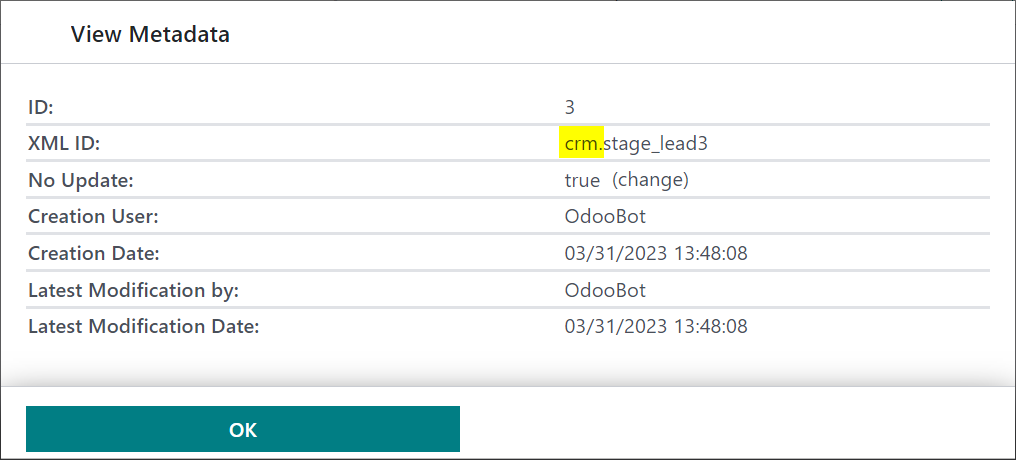
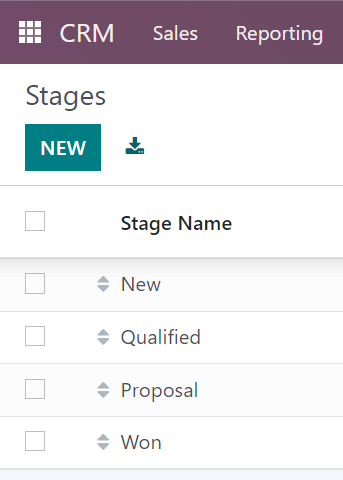
For this example, we will translate the CRM stage name "Proposition" to "Proposal", so by checking the Metadata of this record in Developer mode, we can see that we need to export the CRM App:


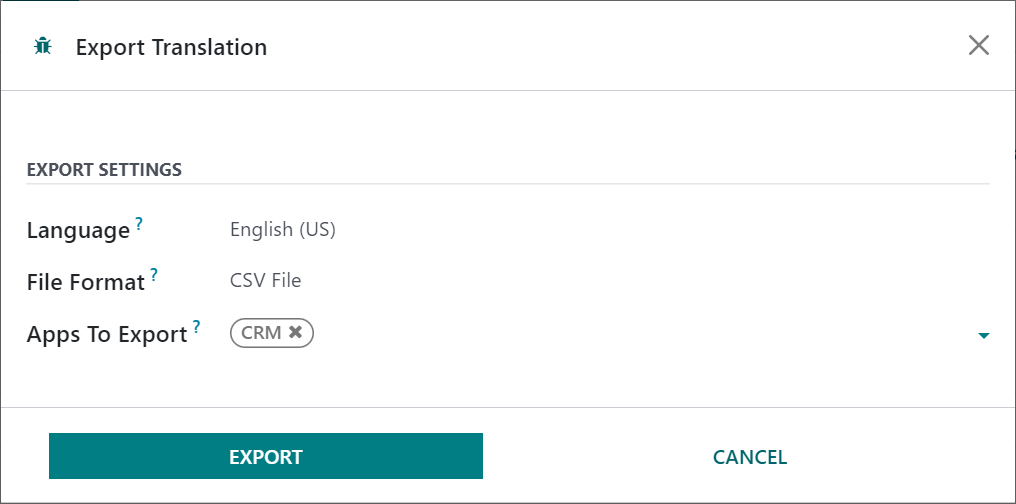
2. Via the Export Translation Menu, select the App or Apps you wish to export, with the Language you wish to translate selected.

You cannot translate English (US) as this is the base language for Odoo, but you can export English (US) and work with the terms it exports.


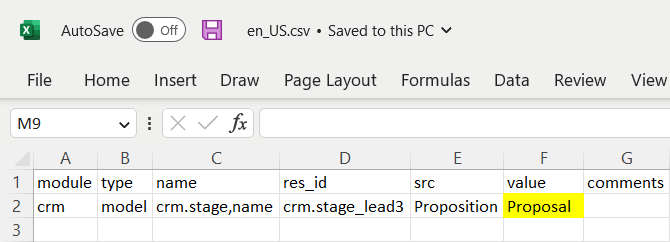
3. Download and edit the CSV file, adding the Value for the term(s) you want to replace. 

For this example, there is only one occurrence of the word "Proposition" in the CRM App, but you may find more if the term is also used in Menus or Filters, etc. Be sure to check every place the term occurs in the src field in your downloaded file.


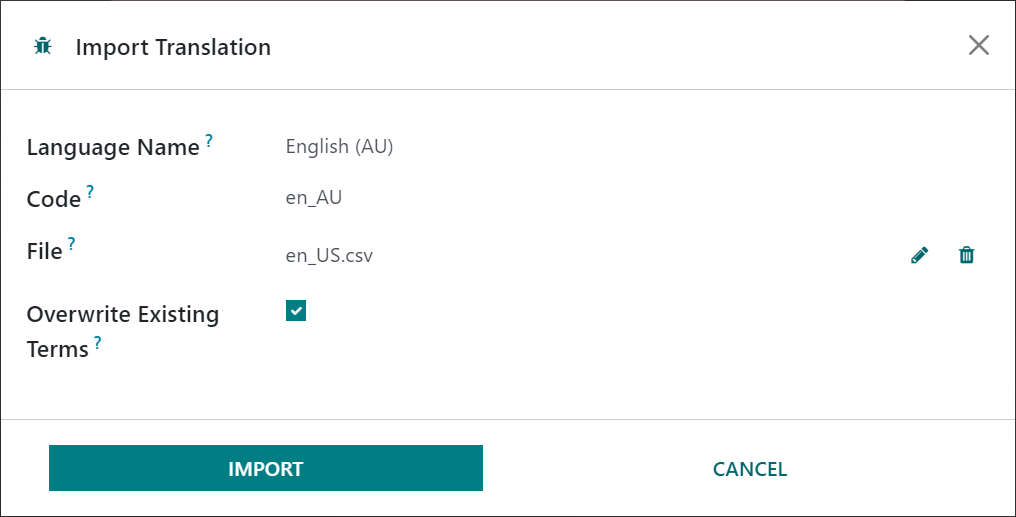
4. Upload your edited file. Be sure to use the same Language Name and code for the language you want to change terms for.

Again, you can't translate English (US) so you will either need to create your own language, or overwrite terms in another language.


5. Switch to the Language you have translated, via the Preferences Menu, to see the terms translated:


0
Ảnh đại diện
Huỷ bỏ
Riquo Electronics
Tác giả

Hi Ray, greetings of the day:

First of all thank you for quick answering and for details !!

We have been previously trying exactly as you shown, no way to get it working. We are using exactly the same method as per Odoo 15 and never failed.

We will attempt to record a video and share ;-) as soon as possible.

We are using CE16 as per 270323 latest download.

Are you using Enterprise or any newer version? Please, might you let us know exactly which version are you using?

We have been digging into forum, exactly the same:

https://www.odoo.com/es_ES/forum/ayuda-1/translations-in-odoo-16-online-220924
https://www.odoo.com/es_ES/forum/ayuda-1/where-is-the-translated-terms-menu-in-odoo-16-211982

Please let us know

Apprecciate!

Ray Carnes (ray)

I am using Odoo Enterprise (I don't work with CE) and have been doing this same process successfully since December, with versions updated each month or so. A video won't help me help you any more than I have already - I can only share my experience with how things are working when I use Odoo Enterprise.

I Max International Srl, Maxg

I followed these steps in Odoo 16 enterprise and this is not working.

Ảnh đại diện
Riquo Electronics
Tác giả Câu trả lời hay nhất

Apologies for answering ourselves.


For anyone landing here, this bug has been solved on latest Odoo 16 update.


Please, refer to the following report: https://github.com/odoo/odoo/issues/115876


Import translation is currently working as per April 2023 Odoo 16 updates.


Please, update your Odoo installation in order to fix it.


How to translate Odoo 16:

 
1. Settings > Translations > Export a translation for a single or all modules.
2. Donwload a .PO (or CSV) and open using POEDIT or just a TXT editor.
3. Import .PO file once modified locally and saved ("Overwrite Existing Terms" option should be checked whilst importing).


Once uploaded, no need to restart server, neither upgrading module being translated.


Regards

0
Ảnh đại diện
Huỷ bỏ
Ảnh đại diện
I Max International Srl, Maxg
Câu trả lời hay nhất

To make sure I was using the very last version of Odoo 16, I just tested today on odoo runbot with both version CE and Enterprise,  (Odoo 16.0+e (Enterprise Edition) Database expiration: July 3, 2023. I tested both with PO file and with CSV file. I did a simple test: Translate website product page message: "Get notified with back in stock". It is not working. Please try! Any suggestion ?

website_sale_stock,code,addons/website_sale_stock/static/src/xml/website_sale_stock_product_availability.xml,19,Get notified when back in stock,Avvisami quando torna disponibile,odoo-javascript

0
Ảnh đại diện
Huỷ bỏ
Riquo Electronics
Tác giả

Hi Maxg,

First of all thanks for following this up.

Yes, just checked on our recently update installations, and yes, that term is not being translated to a second language. We tried from English to Spanish. Same as you.

Can confirm issue is back again for Odoo 16.

Could anyone here please help us spread this urgent issue out?

Appreciate

Bạn có hứng thú với cuộc thảo luận không? Đừng chỉ đọc, hãy tham gia nhé!

Tạo tài khoản ngay hôm nay để tận hưởng các tính năng độc đáo và tham gia cộng đồng tuyệt vời của chúng tôi!

Đăng ký
Bài viết liên quan Trả lời Lượt xem Hoạt động
Translations in Odoo 16 Online Đã xử lý
import translations odoo16features
Ảnh đại diện
Ảnh đại diện
Ảnh đại diện
Ảnh đại diện
Ảnh đại diện
8
thg 10 25
9518
Bug appear when add boolean_toggle widget in Wizard
bug odoo16features
Ảnh đại diện
0
thg 8 23
4347
How to take translations from one database to another using code in Odoo 16 ?
import database translations controllers odoo16features
Ảnh đại diện
0
thg 2 23
971
Odoo 16 Đã xử lý
translations odoo16features
Ảnh đại diện
Ảnh đại diện
1
thg 12 22
6003
Import translation status / mass update translation status
import translations
Ảnh đại diện
0
thg 11 16
5380
Cộng đồng
  • Khóa học
  • Tài liệu
  • Diễn đàn
Open source
  • Tải xuống
  • Github
  • Runbot
  • Dịch thuật
Dịch vụ
  • Lưu trữ Odoo.sh
  • Hỗ trợ
  • Nâng cấp
  • Phát triển tùy chỉnh
  • Đào tạo
  • Tìm kế toán
  • Tìm đối tác
  • Trở thành đối tác
Giới thiệu công ty
  • Công ty của chúng tôi
  • Tài sản thương hiệu
  • Liên hệ
  • Việc làm
  • Sự kiện
  • Podcast
  • Blog
  • Khách hàng
  • Pháp lý • Riêng tư
  • Bảo mật
الْعَرَبيّة Català 简体中文 繁體中文 (台灣) Čeština Dansk Nederlands English Suomi Français Deutsch हिंदी Bahasa Indonesia Italiano 日本語 한국어 (KR) Lietuvių kalba Język polski Português (BR) română русский язык Slovenský jazyk Slovenščina Español (América Latina) Español Svenska ภาษาไทย Türkçe українська Tiếng Việt

Odoo là bộ ứng dụng kinh doanh có open source đáp ứng tất cả các nhu cầu của công ty bạn: CRM, thương mại điện tử, kế toán, tồn kho, POS, quản lý dự án, v.v.

Định hướng giá trị riêng biệt của Odoo là tích hợp hoàn toàn và dễ dàng sử dụng.

Website made with

Odoo Experience on YouTube

1. Use the live chat to ask your questions.
2. The operator answers within a few minutes.

Live support on Youtube
Watch now