Перейти к содержимому
Odoo Меню
  • Войти
  • Попробовать бесплатно
  • Модули
    Финансы
    • Бухгалтерия
    • Выставление счетов
    • Расходы
    • Таблицы
    • Документооборот
    • Подпись
    Продажи
    • CRM
    • Продажи
    • POS Магазин
    • POS Ресторан
    • Подписки
    • Аренда
    Вебсайты
    • Конструктор вебсайтов
    • eCommerce
    • Блог
    • Форум
    • Онлайн-чат
    • Электронное обучение
    Логистика
    • Склад
    • Производство
    • PLM
    • Закупки
    • Обслуживание
    • Качество
    Отдел кадров
    • Сотрудники
    • Подбор персонала
    • Отпуска
    • Оценка персонала
    • Реферальная программа
    • Автопарк
    Маркетинг
    • SMM
    • E-mail рассылки
    • СМС рассылки
    • Мероприятия
    • Автоматизация маркетинга
    • Опросы
    Услуги
    • Проекты
    • Табели
    • Выездной сервис
    • Поддержка
    • Планирование
    • Встречи
    Продуктивность
    • Обсуждения
    • Искусственный интеллект
    • IoT
    • VoIP-телефония
    • Knowledge
    • WhatsApp
    Сторонние приложения Модуль Студия Odoo Платформа Odoo Cloud
  • Индустрии
    Розничная торговля
    • Книжный магазин
    • Магазин одежды
    • Мебельный магазин
    • Продуктовый магазин
    • Строительный магазин
    • Магазин игрушек
    Гостинично-ресторанный бизнес
    • Бар и паб
    • Ресторан
    • Фастфуд
    • Гостевой дом
    • Дистрибьютор напитков
    • Отель
    Недвижимость
    • Агентство недвижимости
    • Архитектурное бюро
    • Строительство
    • Управление недвижимостью
    • Ландшафтный дизайн
    • Товарищество собственников жилья
    Консалтинг
    • Бухгалтерская фирма
    • Партнер Odoo
    • Маркетинговое агентство
    • Юридическая фирма
    • Подбор персонала
    • Аудиторское бюро
    Производство
    • Текстиль
    • Металл
    • Мебель
    • Продукты питания
    • Пивоварня
    • Корпоративные сувениры
    Здоровье и фитнес
    • Спортивный комплекс
    • Магазин оптики
    • Фитнес-клуб
    • Велнес-центр
    • Аптека
    • Салон красоты
    Услуги
    • Специалист по бытовым услугам
    • Продажа и обслуживание IT-оборудования
    • Солнечные энергосистемы
    • Производство обуви
    • Клининг
    • Системы ОВКВ
    Прочее
    • Некоммерческая организация
    • Консалтинг в сфере устойчивого развития
    • Аренда рекламных щитов
    • Бизнес по фотосъемке
    • Прокат велосипедов
    • Реселлер программного обеспечения
    Все индустрии
  • Community
    Обучение
    • Видео уроки
    • Документация
    • Сертификация
    • Тренинг
    • Блог
    • Подкаст
    Образование и развитие
    • Образовательная программа
    • Деловая игра Scale Up!
    • Экскурсия в офис Odoo
    ПО
    • Скачать
    • Сравнить версии
    • Релизы
    Сотрудничество
    • Github
    • Форум
    • Мероприятия
    • Перевод
    • Стать партнером
    • Услуги для партнеров
    • Зарегистрировать бухгалтерскую фирму
    Услуги
    • Найти партнера
    • Найти бухгалтера
    • Встреча с экспертом
    • Услуги по внедрению
    • Отзывы клиентов
    • Поддержка
    • Обновления
    Github Youtube Twitter Linkedin Instagram Facebook Spotify
    +1 (650) 691-3277
    Заказать демонстрацию
  • Цены
  • Поддержка
Чтобы взаимодействовать с сообществом, необходимо зарегистрироваться.
Все посты Люди Значки
Теги (Смотреть все)
odoo accounting v14 pos v15
Об этом форуме
Чтобы взаимодействовать с сообществом, необходимо зарегистрироваться.
Все посты Люди Значки
Теги (Смотреть все)
odoo accounting v14 pos v15
Об этом форуме
Помощь

Odoo 16 Import Translations marked as "code" not working

Подписаться

Получайте уведомления о появлении активности в этом посте

Этот вопрос был отмечен
importtranslationsbugodoo16features
8 Ответы
15431 Представления
Аватар
Riquo Electronics

Hello,


Translations lines marked as "code" import / export are not working on Odoo 16. We have been trying on october first version, and each month the same: still not working.


UPDATE 070623:

- 16.0 Enterprise and Community (last checked 080623) and all 16 till now.

- Bug is back again or still unsolved.

- Bug impacts Odoo 16 on translations marked as "code" (find here screenshot).

- Bug is being pointed out on many forum post ( e.g.  https://www.odoo.com/es_ES/forum/ayuda-1/translations-in-odoo-16-online-220924 ) and issues e.g. https://github.com/odoo/odoo/issues/115876

- Also on latest Odoo 16, we have reproduced and confirmed here,  please try on official Odoo here: https://demo4.odoo.com/ or https://demo6.odoo.com/
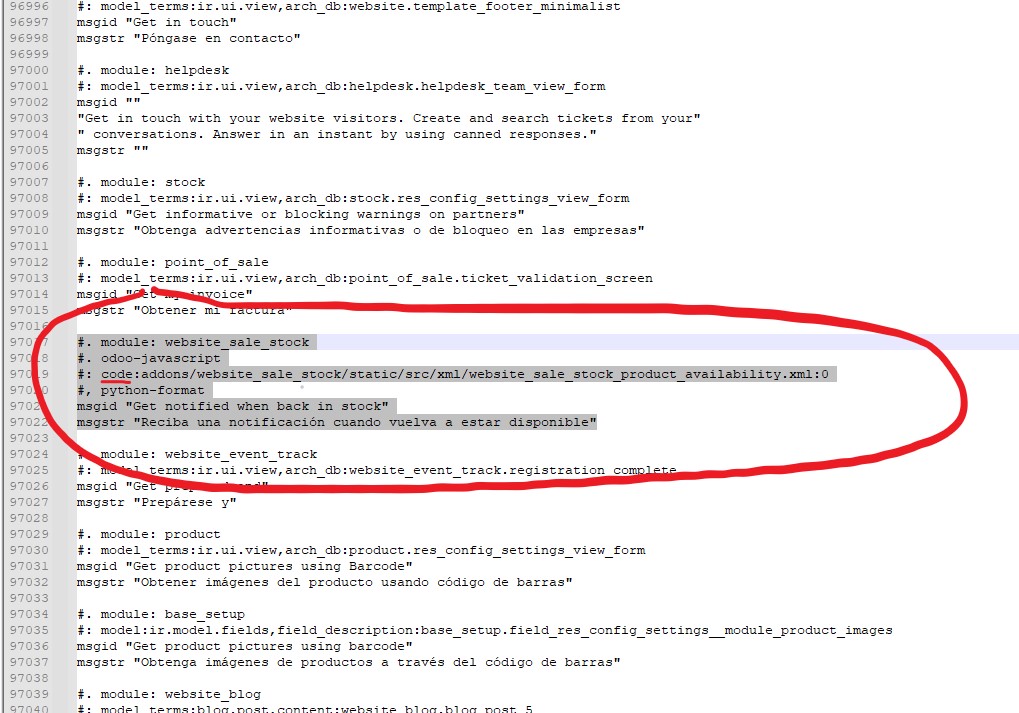


¿Can someone please help reporting this bug to Odoo guys?

Impacted version: 
 
- 16.0 (last checked 270323) and all 16 till March.
 
 
Steps to reproduce:
 
1. Settings > Translations > Export a translation for a single or all modules.
2. Donwload a .PO (same on CSV) and open using POEDIT or just a simple TXT editor (does not matter).
3. Import .PO file once modified locally and saved.
 
 
Current behavior:
 
- PO file is not being imported. No error message, neither log error, no trace of this error. Odoo log does confirm correct upload ! Even restarting server and/or single module updating, terms are still not updated.


Expected behavior:
 
- PO file is expected to be effectively imported and tanslations to be applied as on e.g. Odoo 15 (no need to restart server, neither single module update !)
 

Thank you


Odoo log shows translation as uploaded !!


2
Аватар
Отменить
arick111

I just wanted to express my gratitude for the time I spent reading your post.

Delon

I want express my gratitude, I notice exactly the same bug. If you specify some modules you can do the translation but if you specify nothing you export all of terms with type code and it become impossible to translate these important terms. I lost a lot of time before to see your post and I was really disapointed to see in the same time a big regression that is you can no more translate directly in Odoo some terms. So translation in Odoo became annoying considering just for one word you have to export / import PO and all of that to see some parts does not work ..... :(

Аватар
Niyas Raphy (Walnut Software Solutions)
Лучший ответ

Hi,

in Odoo 16, code translations can be exported but are not expected to be customized/imported.

Reason:
code translations can be treated as part of code, which are shared to all registries/databases
you can only change it in the po file in the code directory like changing the source code for all registries/databases

For more: https://github.com/odoo/odoo/issues/115876#issuecomment-1580532408


Thanks

0
Аватар
Отменить
Riquo Electronics
Автор

Hi Niyas,

Thanks for detailed answer. Yes it is !

However that being said, it seems to us that:

a - Odoo end users need most of code tanslations to be customized. This new Odoo 16 behaviour not only requires us to impact on "code directory" (almost impossible to mantain bcs updates, etc.) as you said, but also does impact on Odoo as multi database service. A big doble issue here.

b - As pointed out here https://github.com/odoo/odoo/issues/124124, there is not a clear consistency along "code" importable translations, not talking about "code directory": on importable PO file, some are allowed to be imported, some not. Having them on database PO file (not code directory), all terms should be importable. Seems to be a bug there. Why this, what do you think?

Will Odoo switch to a single-database model in future?

Guess any end client using a 300 euros monthly Enterprise licence, or an old clients updating to Odoo 16 CE: how do we justify this core issue towards our clients?

Moreover, Odoo 17 seems to go in the same line: deeply worrisome.

Thanks for your attention

Cheers!

Аватар
Tommy Lo
Лучший ответ

-- this universal bug is still open for Odoo 16 / 17  - and everyone who is telling the opposite is wrong!

see

https://github.com/odoo/odoo/issues/115876

1
Аватар
Отменить
Аватар
yoany mora
Лучший ответ

Hi everybody, I just found this error while working with a JS translation and a teammate helped me, let me help you as well.

I attached a snippet to this response, basically you have to inherit the method of the attached snippet and change the line with the OR expression, substitute ´your_modules_name´ value. In the method comments is the explanation about why this needs to be made. Hope this works for you!


from odoo import models
from odoo.osv import expression
​

​class IrHttp(models.AbstractModel):
​ ​_inherit = "ir.http"
​ ​@classmethod
​ ​def _get_translation_frontend_modules_domain(cls): ​
​ ​ ​# Odoo by default only gets the translations for the modules ​that have
​ ​# `website` in it's name, that being said, if an app ads static files
​ ​# and doesn't have the word `website` the translations are not brought.
​ ​# for a better explanation see:
​ ​#https://github.com/Vauxoo/odoo/commit/8b8815f44cc7e8529ba0f841c7366ee6b8e28356
​ ​domain = super()._get_translation_frontend_modules_domain()
​​return expression.OR([domain, [("name", "in", ["your_module_name"])]])
0
Аватар
Отменить
Аватар
David Fleischmann
Лучший ответ

This seems to still be an issue. Having the same trouble when trying to change translation for: l10n_din5008_document_title on odoo.sh
https://github\\.com/odoo/odoo/blob/d748ca8708aa5d13737de9b78722b3755a6cdebc/addons/l10n_din5008_sale/models/sale\\.py 

I\\ think\\ also\\ here\\ the\\ issue\\ ist\\ that\\ it's\\ marked\\ as\\ a\\ python\\ code\\ value\\ in\\ csv\\ \\(see\\ last\\ column:\\ odoo\\-python\\): 
l10n_din5008_sale,code,addons/l10n_din5008_sale/models/sale.py,41,Sales Order,Verkaufsauftrag,odoo-python

0
Аватар
Отменить
Аватар
Cybrosys Techno Solutions Pvt.Ltd
Лучший ответ

We can import/export translations in Odoo16

Go to Settings -> Translation -> Export Translation -> Then add Language(French) , file format(PO file) and Apps to Export(Odoo15 CRM kit, CRM Dashboard) ->Export

Download the .po file

(If you need any more translation to add it in the .py file) then,

Go to Settings -> Translation -> Import Translation -> Then add language and corresponding language code also add the downloaded .py file and enable the boolean field 'Overwrite Existing Terms' ->Import

Go to My Profile -> Preferences -> Language

0
Аватар
Отменить
Riquo Electronics
Автор

Hi Cybrosys,

First of all thanks for your reply.

Issue is still there on Odoo 16, you can also have a try on latest Odoo 16 demo:

https://demo4.odoo.com/

or

https://demo6.odoo.com/

We have updated our first post, because issue is on translations marked as "code".

Check please attached screen-shot on our updated answer.

Have please a look here: https://github.com/odoo/odoo/issues/115876

Issue is back again or just unsolved.

Appreciate

I Max International Srl, Maxg

Riquo I confirm this is not working tried today in runbot odoo 16 enterprise edition.

I Max International Srl, Maxg

This is not working.

Аватар
Ray Carnes (ray)
Лучший ответ

I tested today and was able to get Translations working fine:


1. Identify the App or Apps containing the terms you want to export.  

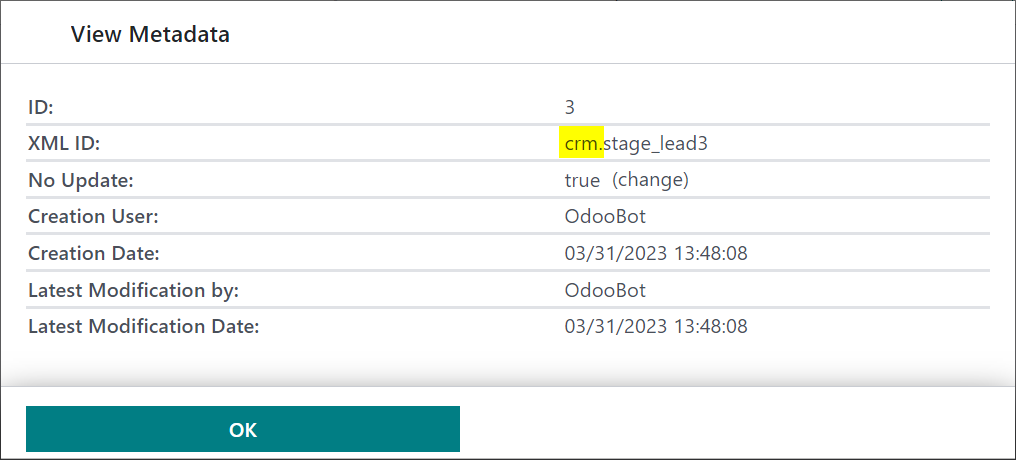
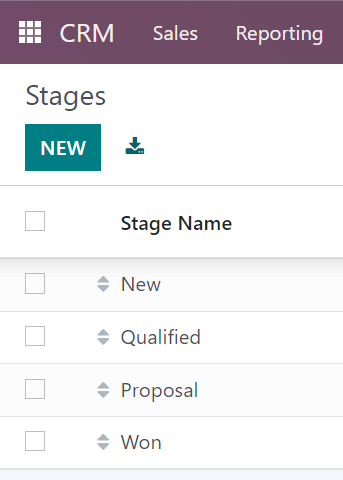
For this example, we will translate the CRM stage name "Proposition" to "Proposal", so by checking the Metadata of this record in Developer mode, we can see that we need to export the CRM App:


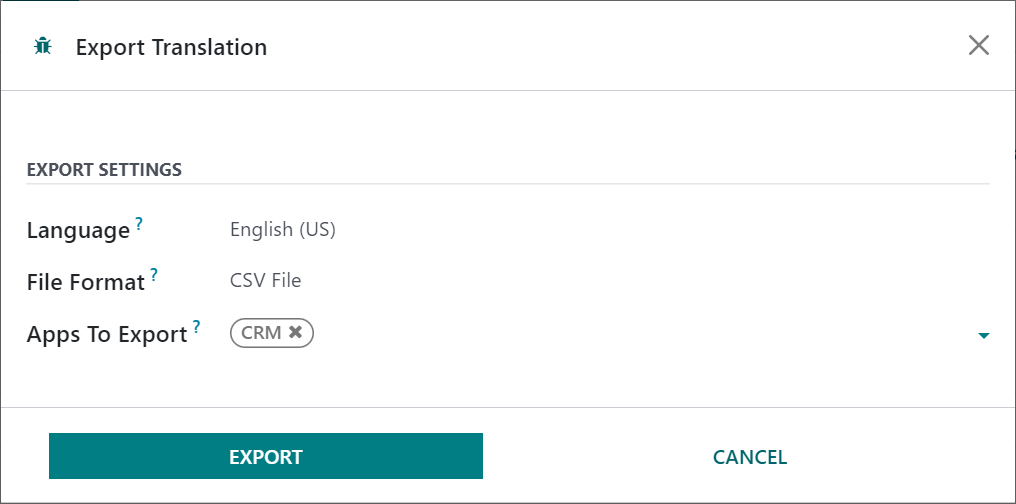
2. Via the Export Translation Menu, select the App or Apps you wish to export, with the Language you wish to translate selected.

You cannot translate English (US) as this is the base language for Odoo, but you can export English (US) and work with the terms it exports.


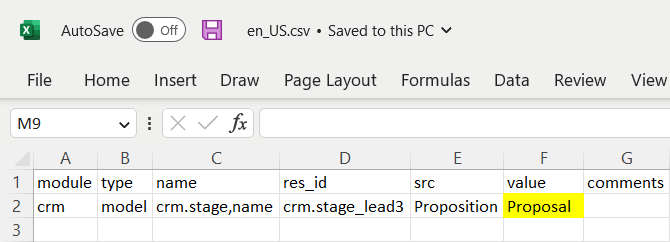
3. Download and edit the CSV file, adding the Value for the term(s) you want to replace. 

For this example, there is only one occurrence of the word "Proposition" in the CRM App, but you may find more if the term is also used in Menus or Filters, etc. Be sure to check every place the term occurs in the src field in your downloaded file.


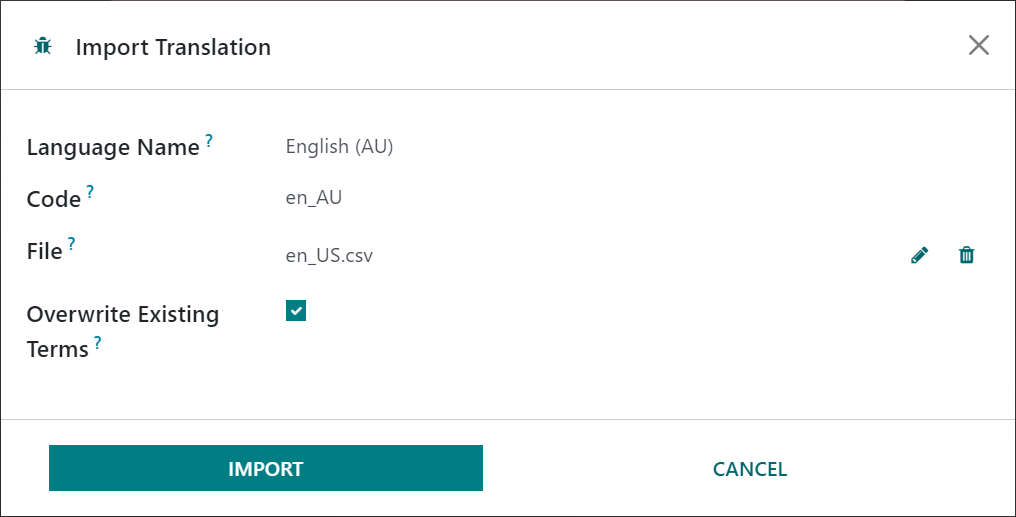
4. Upload your edited file. Be sure to use the same Language Name and code for the language you want to change terms for.

Again, you can't translate English (US) so you will either need to create your own language, or overwrite terms in another language.


5. Switch to the Language you have translated, via the Preferences Menu, to see the terms translated:


0
Аватар
Отменить
Riquo Electronics
Автор

Hi Ray, greetings of the day:

First of all thank you for quick answering and for details !!

We have been previously trying exactly as you shown, no way to get it working. We are using exactly the same method as per Odoo 15 and never failed.

We will attempt to record a video and share ;-) as soon as possible.

We are using CE16 as per 270323 latest download.

Are you using Enterprise or any newer version? Please, might you let us know exactly which version are you using?

We have been digging into forum, exactly the same:

https://www.odoo.com/es_ES/forum/ayuda-1/translations-in-odoo-16-online-220924
https://www.odoo.com/es_ES/forum/ayuda-1/where-is-the-translated-terms-menu-in-odoo-16-211982

Please let us know

Apprecciate!

Ray Carnes (ray)

I am using Odoo Enterprise (I don't work with CE) and have been doing this same process successfully since December, with versions updated each month or so. A video won't help me help you any more than I have already - I can only share my experience with how things are working when I use Odoo Enterprise.

I Max International Srl, Maxg

I followed these steps in Odoo 16 enterprise and this is not working.

Аватар
Riquo Electronics
Автор Лучший ответ

Apologies for answering ourselves.


For anyone landing here, this bug has been solved on latest Odoo 16 update.


Please, refer to the following report: https://github.com/odoo/odoo/issues/115876


Import translation is currently working as per April 2023 Odoo 16 updates.


Please, update your Odoo installation in order to fix it.


How to translate Odoo 16:

 
1. Settings > Translations > Export a translation for a single or all modules.
2. Donwload a .PO (or CSV) and open using POEDIT or just a TXT editor.
3. Import .PO file once modified locally and saved ("Overwrite Existing Terms" option should be checked whilst importing).


Once uploaded, no need to restart server, neither upgrading module being translated.


Regards

0
Аватар
Отменить
Аватар
I Max International Srl, Maxg
Лучший ответ

To make sure I was using the very last version of Odoo 16, I just tested today on odoo runbot with both version CE and Enterprise,  (Odoo 16.0+e (Enterprise Edition) Database expiration: July 3, 2023. I tested both with PO file and with CSV file. I did a simple test: Translate website product page message: "Get notified with back in stock". It is not working. Please try! Any suggestion ?

website_sale_stock,code,addons/website_sale_stock/static/src/xml/website_sale_stock_product_availability.xml,19,Get notified when back in stock,Avvisami quando torna disponibile,odoo-javascript

0
Аватар
Отменить
Riquo Electronics
Автор

Hi Maxg,

First of all thanks for following this up.

Yes, just checked on our recently update installations, and yes, that term is not being translated to a second language. We tried from English to Spanish. Same as you.

Can confirm issue is back again for Odoo 16.

Could anyone here please help us spread this urgent issue out?

Appreciate

Не оставайтесь в стороне – присоединяйтесь к обсуждению!

Создайте аккаунт сегодня, чтобы получить доступ к эксклюзивным функциям и стать частью нашего замечательного сообщества!

Регистрация
Похожие посты Ответы Просмотры Активность
Translations in Odoo 16 Online Решено
import translations odoo16features
Аватар
Аватар
Аватар
Аватар
Аватар
8
окт. 25
9526
Bug appear when add boolean_toggle widget in Wizard
bug odoo16features
Аватар
0
авг. 23
4347
How to take translations from one database to another using code in Odoo 16 ?
import database translations controllers odoo16features
Аватар
0
февр. 23
971
Odoo 16 Решено
translations odoo16features
Аватар
Аватар
1
дек. 22
6011
Import translation status / mass update translation status
import translations
Аватар
0
нояб. 16
5386
Сообщество
  • Видео уроки
  • Документация
  • Форум
Открытый исходный код
  • Скачать
  • Github
  • Runbot
  • Перевод
Услуги
  • Хостинг Odoo.sh
  • Поддержка
  • Обновление
  • Индивидуальные решения по доработке
  • Образование
  • Найти бухгалтера
  • Найти партнера
  • Стать партнером
О нас
  • Наша компания
  • Активы бренда
  • Cвяжитесь с нами
  • Вакансии
  • Мероприятия
  • Подкаст
  • Блог
  • Клиенты
  • Правовые документы • Конфиденциальность
  • Безопасность
الْعَرَبيّة Català 简体中文 繁體中文 (台灣) Čeština Dansk Nederlands English Suomi Français Deutsch हिंदी Bahasa Indonesia Italiano 日本語 한국어 (KR) Lietuvių kalba Język polski Português (BR) română русский язык Slovenský jazyk Slovenščina Español (América Latina) Español Svenska ภาษาไทย Türkçe українська Tiếng Việt

Odoo – это набор бизнес-модулей с открытым исходным кодом, который закроет все потребности вашей компании: CRM, E-commerce, Бухгалтерия, Склад, POS, управление проектами и др.

Odoo сочетает в себе простоту использования и полную интеграцию всех бизнес-процессов в одной системе.

Website made with

Odoo Experience on YouTube

1. Use the live chat to ask your questions.
2. The operator answers within a few minutes.

Live support on Youtube
Watch now