İçereği Atla
Odoo Menü
  • Portal
  • Ücretsiz deneyin
  • Uygulamalar
    Finans
    • Muhasebe
    • Faturalama
    • Masraf Yönetimi
    • Elektronik Çizelge (BI)
    • Belgeler
    • İmza
    Satış
    • Müşteri İlişkileri Yönetimi (CRM)
    • Satış
    • Satış Noktası Mağaza
    • Satış Noktası Restoran
    • Abonelikler
    • Kiralama
    Web Sitesi
    • Web Sitesi Oluşturucu
    • eTicaret
    • Blog
    • Forum
    • Canlı Sohbet
    • eÖğrenme
    Tedarik Zinciri
    • Envanter
    • Üretim
    • Ürün Yaşam Döngüsü Yönetimi
    • Satın Alma
    • Bakım
    • Kalite
    İnsan Kaynakları
    • Çalışanlar
    • İşe Alım
    • İzin
    • Değerlendirme
    • Referans
    • Filo Yönetimi
    Pazarlama
    • Sosyal Medyada Pazarlama
    • E-posta ile Pazarlama
    • SMS ile Pazarlama
    • Etkinlikler
    • Pazarlama Otomasyonu
    • Anket
    Hizmetler
    • Proje Yönetimi
    • Çalışma Çizelgeleri
    • Saha Hizmeti
    • Yardım Masası
    • Planlama
    • Randevular
    Verimlilik
    • Sohbet
    • Yapay Zeka
    • Nesnelerin İnterneti
    • VoIP
    • Bilgi Bankası
    • WhatsApp
    Üçüncü taraf uygulamalar Odoo Stüdyo Odoo Bulut Platformu
  • Sektörler
    Perakende satış
    • Kitapçı
    • Giyim Mağazası
    • Mobilya Mağazası
    • Gıda Marketi
    • Hırdavat Dükkanı
    • Oyuncak Dükkanı
    Gıda ve Konaklama
    • Bar ve Pub
    • Restoran
    • Fast Food Restoranı
    • Konuk Evi
    • İçecek Distribütörü
    • Otel
    Gayrimenkul
    • Emlak Acentesi
    • Mimarlık Firması
    • İnşaat
    • Emlak Yönetimi
    • Bahçe Tasarımı
    • Mülk Sahipleri Derneği
    Uzmanlık
    • Muhasebe Firması
    • Odoo Partner
    • Pazarlama Ajansı
    • Hukuk Firması
    • Yetenek Kazanımı
    • Denetim ve Belgelendirme
    Üretim
    • Tekstil
    • Metal
    • Mobilyalar
    • Gıda
    • Bira fabrikası
    • Kurumsal Hediye
    Sağlık ve Spor
    • Spor Kulübü
    • Optik Mağazası
    • Fitness Merkezi
    • Sağlıklı Yaşam Merkezi
    • Eczane
    • Kuaför Salonu
    Ticaret
    • Tamirci
    • BT Donanım & Destek
    • Güneş Enerjisi Sistemleri
    • Ayakkabı İmalatçısı
    • Temizlik Hizmetleri
    • HVAC Hizmetleri
    Diğerleri
    • Kar Amacı Gütmeyen Kuruluş
    • Çevre Ajansı
    • Reklam Panosu Kiralama
    • Fotoğrafçılık
    • Bisiklet Kiralama
    • Yazılım Bayisi
    Tüm Sektörlere Göz Atın
  • Topluluk
    Öğrenim
    • Eğitim Araçları
    • Dokümantasyon
    • Sertifikasyonlar
    • Eğitim Etkinlikleri
    • Blog
    • Podcast
    Eğitim ve Gelişim
    • Eğitim Programı
    • Scale Up! İşletme Oyunu
    • Odoo'yu Ziyaret Edin
    Yazılım
    • İndirin
    • Sürümleri Kıyaslayın
    • Sürümler
    İş Birliği
    • Github
    • Forum
    • Etkinlikler
    • Çeviriler
    • Partner Olun
    • Partnerler için Hizmetler
    • Muhasebe Firmanızı Kaydettirin
    Hizmetler
    • Partner Bulun
    • Muhasebeci Bulun
    • Bir danışmanla görüşün
    • Kurulum Hizmetleri
    • Müşteri Referansları
    • Destek
    • Sürüm Yükseltme
    Github Youtube Twitter Linkedin Instagram Facebook Spotify
    +1 (650) 691-3277
    Demo randevusu alın
  • Fiyatlandırma
  • Yardım
  1. Kurslar
  2. Smart Tutorial - Localización de Chile
  3. eComerce Localización de Chile
Gezinme
Ana Sayfa └Smart Tutorial - Localización de Chile └eComerce Localización de Chile

Smart Tutorial - Localización de Chile

0 %

Tamamlandı

Kurs içeriği
  • Módulos y Conceptos básicos
    • Módulos y Conceptos básicos - Localización de Chile 10 xp
      • Test
    • Configuración de datos Maestros - Localización de Chile 10 xp
      • Test
    • Servidor de correo DTE - Localización de Chile 10 xp
      • Test
  • Facturación Electrónica
    • Flujo base de Factura Electrónica - Localización de Chile 10 xp
      • Test
    • Flujo base de Boleta Electrónica - Localización de Chile 10 xp
      • Test
    • Flujo base de Guía de Despacho - Localización de Chile 10 xp
      • Test
    • Flujo Base de Nota de Crédito - Localización de Chile 10 xp
      • Test
    • Factura Electrónica de Exportación de Bienes - Localización de Chile
    • Modo Demo - Localización de Chile
    • eComerce Localización de Chile
    • Facturación Electrónica para Punto de Venta - Localización de Chile
    • Facturación Electrónica para Punto de Venta - Localización de Chile 10 xp
      • Test
    • Factoring - Localización Chile 10 xp
      • Test
  • Reportes
    • Reportes Financieros - Localización de Chile 10 xp
      • Test
  • Proceso de Go -Live
    • Go Live Checklist - Localización de Chile 10 xp
      • Test
    • Importación de Facturas abiertas - Localización de Chile 10 xp
      • Test
  • Casos de Uso
    • Cierre de Año - Localización de Chile

eComerce Localización de Chile

Prev Next
Tam ekran Paylaş

eCommerce

En este video te explicaremos como generar Facturas Electrónicas o Boletas desde la app de E-commerce,


Módulo de eCommerce Chileno


  • Generación de boletas o facturas electrónicas desde eCommerce

  • Soporte de campos fiscales requeridos

  • Disponible en Enterprise Odoo v16.3


Requerimientos


Configuración general de facturación electrónica


  • Instalar módulo de eCommerce Chileno l10n_cl_edi_website_sale


Contabilidad > Configuración > Tipos de documentos


  • Activar tipo de documento 33 Factura Electrónica

  • Activar tiṕo de documento 39 Boleta Electrónica


Nota: El módulo de eCommerce Chileno no generará documentos de tipo 110 Factura de Exportación Electrónica de servicios o bienes.


Contabilidad > Configuración > CAFs


  • Cargar archivo CAF obtenido desde la plataforma del SII para ambos tipos de documentos


Nota: Si los CAFs que se ingresaron no empiezan con la Factura o Boleta número 1, la primera Factura y/o Boleta Electrónica deberá hacerse desde la aplicación de Contabilidad manualmente para ingresar el número inicial necesario


 Sitio Web


  • Activar opción de Factura automática

  • Asegurarse de tener una lista de precios creada para el Sitio Web ligado al eCommerce

  • Asegurarse de tener métodos de pago activados para completar el flujo de compra en eCommerce


Productos


  • Para generar la factura desde eCommerce, se debe seleccionar como Política de Facturación la opción de “Cantidades Pedidas” 


Flujos de Facturación Disponibles


Clientes Locales: Los clientes locales tendrán la opción de seleccionar el Tipo de Documento a generar para su compra en la nueva sección de “Información de Facturación”.


  • Los clientes locales que requieran de una factura electrónica deberán de ingresar sus datos fiscales para poder generar este tipo de documento

  • Los clientes locales que requieran de una boleta electrónica no necesitan agregar la información fiscal mencionada anteriormente, ya que la boleta se hará referenciando al Consumidor Final Anónimo


Clientes Extranjero


  • Un cliente se considera extranjero cuando el país de dirección es diferente a Chile

  • Los clientes extranjeros no pasarán por la etapa de “Información de Facturación”

  • Odoo creará una boleta electrónica para este tipo de órdenes


To format your data, many functions can be used, here are some examples.

 Note : This list of functions is not exhaustive, meaning that all functions that are available aren’t listed in the below list, for more functions, we invite you to check the babel documentation, last but not least, modifications on the templates are considered as customization and isn’t covered by our support.

For the following examples, we will introduce mostly some date functions. By default, the format of the date used is the one defined in the settings of the language.

These settings can only be accessed when the developer mode is enabled. Once developer is enabled go to Settings ‣ Translations ‣ Languages and click on one of the languages to see all the settings such as the time format or date format used by the language.

format_date() - formats the date (without the time).

Can be found on the template Purchase Order: Send PO:

The result will look like this:

format_datetime() - formats the datetime, defining a specific timezone, in this case Central European Time (CET).

Can be found on the template Event: Registration.

The result will look like this:
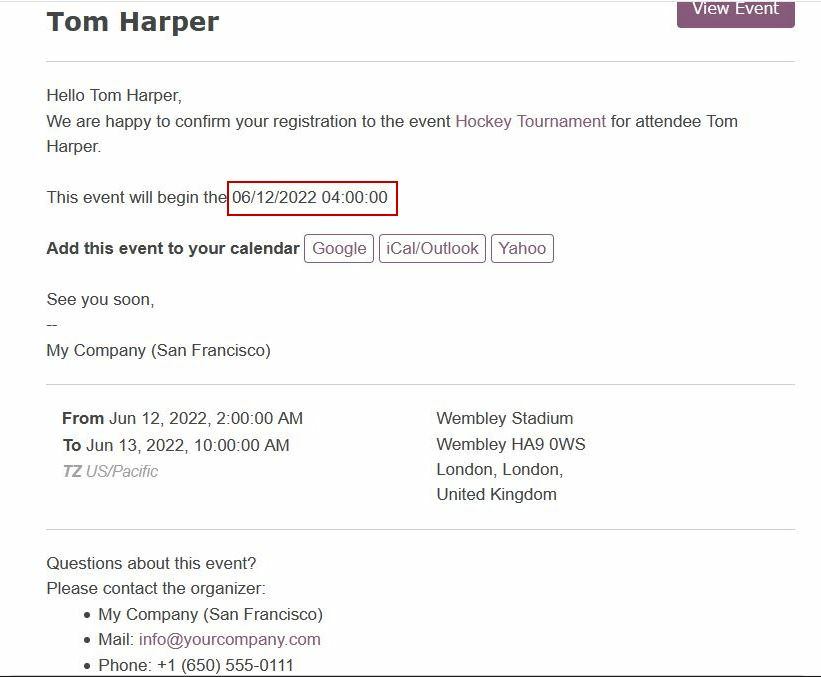
format_time() - Similar to the format_datetime function except It’s used only for the time, not a date.

format_amount() - Formats a number, an amount to display the currency depending on the display setting that has been defined on the currency (the debug mode must be activated to see this feature) Accounting ‣ Configuration ‣ Currencies (before or after the amount depending on the convention).
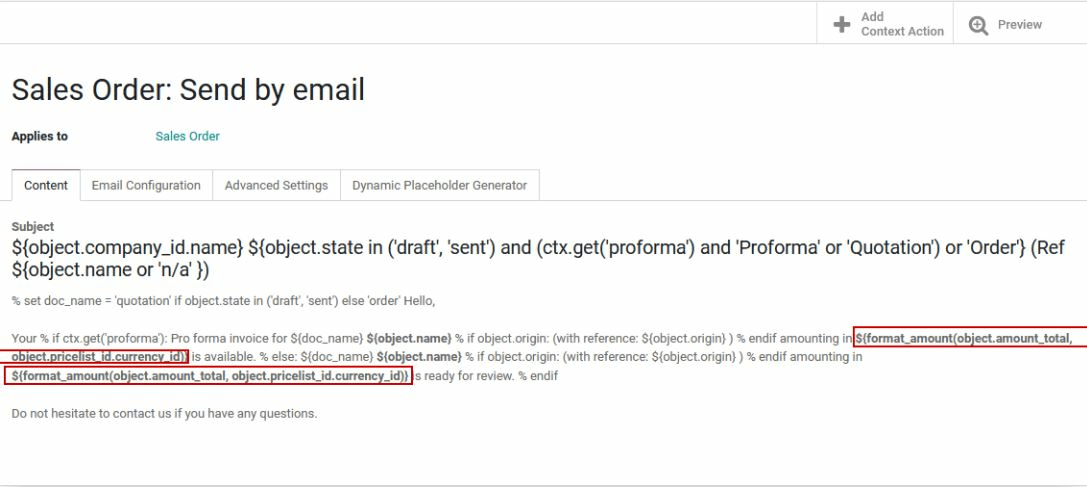
Which will look like this:
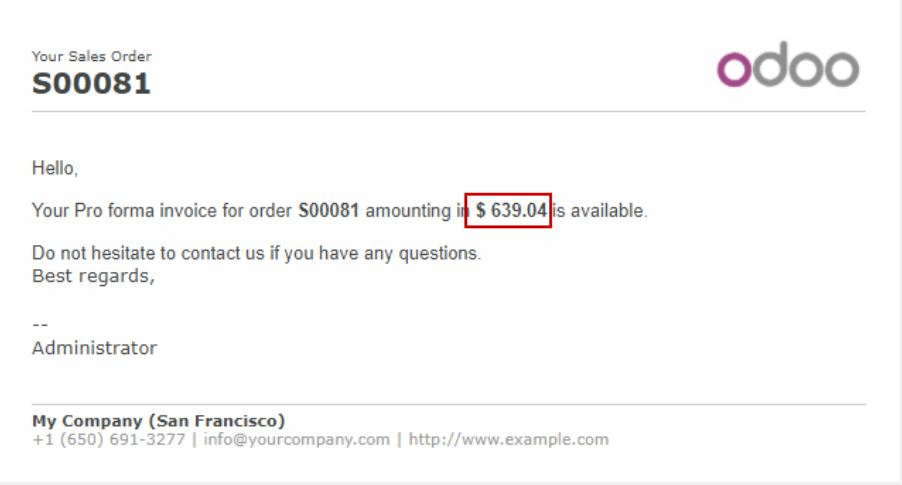

  • Hakkında
  • Yorumlar (0)


Derecelendirme
3 0

Burada şimdilik hiç yorum yok.

Bu Kursa Katılın
yorum bırakan ilk kişi olmak.

Topluluk
  • Eğitim Araçları
  • Dokümantasyon
  • Forum
Açık Kaynak
  • İndirin
  • Github
  • Runbot
  • Çeviriler
Hizmetler
  • Odoo.sh Hosting
  • Destek
  • Sürüm Yükseltme
  • Özel Geliştirmeler
  • Eğitim
  • Muhasebeci Bulun
  • Partner Bulun
  • Partner Olun
Hakkında
  • Şirketimiz
  • Pazarlama Gereçleri
  • İletişim
  • Kariyer
  • Etkinlikler
  • Podcast
  • Blog
  • Müşteriler
  • Hukuki • Gizlilik
  • Güvenlik
الْعَرَبيّة Català 简体中文 繁體中文 (台灣) Čeština Dansk Nederlands English Suomi Français Deutsch हिंदी Bahasa Indonesia Italiano 日本語 한국어 (KR) Lietuvių kalba Język polski Português (BR) română русский язык Slovenský jazyk Slovenščina Español (América Latina) Español Svenska ภาษาไทย Türkçe українська Tiếng Việt

Odoo, müşteri ilişkileri yönetimi, eTicaret, muhasebe, envanter, satış noktası, proje yönetimi gibi şirketinizin tüm ihtiyaçlarını karşılayan bir açık kaynak işletme uygulamaları paketidir.

Odoo’nun eşsiz değer önermesi, aynı anda hem kullanımının çok kolay olup hem de tamamen entegre olmasıdır.

Website made with

Odoo Experience on YouTube

1. Use the live chat to ask your questions.
2. The operator answers within a few minutes.

Live support on Youtube
Watch now
