Zum Inhalt springen
Odoo Menü
  • Anmelden
  • Jetzt gratis testen
  • Apps
    Finanzen
    • Buchhaltung
    • Rechnungsstellung
    • Spesenabrechnung
    • Tabellenkalkulation (BI)
    • Dokumente
    • E-Signatur
    Verkauf
    • CRM
    • Verkauf
    • Kassensystem – Shop
    • Kassensystem – Restaurant
    • Abonnements
    • Vermietung
    Websites
    • Website-Builder
    • E-Commerce
    • Blog
    • Forum
    • Livechat
    • E-Learning
    Lieferkette
    • Lager
    • Fertigung
    • PLM
    • Einkauf
    • Wartung
    • Qualität
    Personalwesen
    • Mitarbeiter
    • Personalbeschaffung
    • Abwesenheiten
    • Mitarbeiterbeurteilung
    • Personalempfehlungen
    • Fuhrpark
    Marketing
    • Social Marketing
    • E-Mail-Marketing
    • SMS-Marketing
    • Veranstaltungen
    • Marketing-Automatisierung
    • Umfragen
    Dienstleistungen
    • Projekte
    • Zeiterfassung
    • Außendienst
    • Kundendienst
    • Planung
    • Termine
    Produktivität
    • Dialog
    • Künstliche Intelligenz
    • IoT
    • VoIP
    • Wissensdatenbank
    • WhatsApp
    Apps von Drittanbietern Odoo Studio Odoo Cloud-Plattform
  • Branchen
    Einzelhandel
    • Buchladen
    • Kleidergeschäft
    • Möbelhaus
    • Lebensmittelgeschäft
    • Baumarkt
    • Spielwarengeschäft
    Essen & Gastgewerbe
    • Bar und Kneipe
    • Restaurant
    • Fast Food
    • Gästehaus
    • Getränkehändler
    • Hotel
    Immobilien
    • Immobilienagentur
    • Architekturbüro
    • Baugewerbe
    • Immobilienverwaltung
    • Gartenarbeit
    • Eigentümervereinigung
    Beratung
    • Buchhaltungsfirma
    • Odoo-Partner
    • Marketingagentur
    • Anwaltskanzlei
    • Talentakquise
    • Prüfung & Zertifizierung
    Fertigung
    • Textil
    • Metall
    • Möbel
    • Speisen
    • Brauerei
    • Firmengeschenke
    Gesundheit & Fitness
    • Sportklub
    • Brillengeschäft
    • Fitnessstudio
    • Therapeut
    • Apotheke
    • Friseursalon
    Handel
    • Handyman
    • IT-Hardware & -Support
    • Solarenergiesysteme
    • Schuster
    • Reinigungsdienstleistungen
    • HLK-Dienstleistungen
    Sonstiges
    • Gemeinnützige Organisation
    • Umweltschutzagentur
    • Plakatwandvermietung
    • Fotostudio
    • Fahrrad-Leasing
    • Software-Händler
    Alle Branchen ansehen
  • Community
    Lernen
    • Tutorials
    • Dokumentation
    • Zertifizierungen
    • Schulung
    • Blog
    • Podcast
    Bildung fördern
    • Bildungsprogramm
    • Scale-Up! Planspiel
    • Odoo besuchen
    Software anfragen
    • Herunterladen
    • Editionen vergleichen
    • Releases
    Zusammenarbeiten
    • Github
    • Forum
    • Veranstaltungen
    • Übersetzungen
    • Partner werden
    • Dienstleistungen für Partner
    • Buchhaltungsfirma registrieren
    Services anfragen
    • Partner finden
    • Buchhalter finden
    • Einen Experten treffen
    • Implementierungsservices
    • Kundenreferenzen
    • Support
    • Upgrades
    Github Youtube Twitter Linkedin Instagram Facebook Spotify
    +1 (650) 691-3277
    Eine Demo erhalten
  • Preise
  • Hilfe
  1. Kurse
  2. Smart Tutorial - Localización de Chile
  3. eComerce Localización de Chile
Nav
Home └Smart Tutorial - Localización de Chile └eComerce Localización de Chile

Smart Tutorial - Localización de Chile

0 %

Abgeschlossen

Kursinhalt
  • Módulos y Conceptos básicos
    • Módulos y Conceptos básicos - Localización de Chile 10 xp
      • Quiz
    • Configuración de datos Maestros - Localización de Chile 10 xp
      • Quiz
    • Servidor de correo DTE - Localización de Chile 10 xp
      • Quiz
  • Facturación Electrónica
    • Flujo base de Factura Electrónica - Localización de Chile 10 xp
      • Quiz
    • Flujo base de Boleta Electrónica - Localización de Chile 10 xp
      • Quiz
    • Flujo base de Guía de Despacho - Localización de Chile 10 xp
      • Quiz
    • Flujo Base de Nota de Crédito - Localización de Chile 10 xp
      • Quiz
    • Factura Electrónica de Exportación de Bienes - Localización de Chile
    • Modo Demo - Localización de Chile
    • eComerce Localización de Chile
    • Facturación Electrónica para Punto de Venta - Localización de Chile
    • Facturación Electrónica para Punto de Venta - Localización de Chile 10 xp
      • Quiz
    • Factoring - Localización Chile 10 xp
      • Quiz
  • Reportes
    • Reportes Financieros - Localización de Chile 10 xp
      • Quiz
  • Proceso de Go -Live
    • Go Live Checklist - Localización de Chile 10 xp
      • Quiz
    • Importación de Facturas abiertas - Localización de Chile 10 xp
      • Quiz
  • Casos de Uso
    • Cierre de Año - Localización de Chile

eComerce Localización de Chile

Zurück Weiter
Vollbild Teilen

eCommerce

En este video te explicaremos como generar Facturas Electrónicas o Boletas desde la app de E-commerce,


Módulo de eCommerce Chileno


  • Generación de boletas o facturas electrónicas desde eCommerce

  • Soporte de campos fiscales requeridos

  • Disponible en Enterprise Odoo v16.3


Requerimientos


Configuración general de facturación electrónica


  • Instalar módulo de eCommerce Chileno l10n_cl_edi_website_sale


Contabilidad > Configuración > Tipos de documentos


  • Activar tipo de documento 33 Factura Electrónica

  • Activar tiṕo de documento 39 Boleta Electrónica


Nota: El módulo de eCommerce Chileno no generará documentos de tipo 110 Factura de Exportación Electrónica de servicios o bienes.


Contabilidad > Configuración > CAFs


  • Cargar archivo CAF obtenido desde la plataforma del SII para ambos tipos de documentos


Nota: Si los CAFs que se ingresaron no empiezan con la Factura o Boleta número 1, la primera Factura y/o Boleta Electrónica deberá hacerse desde la aplicación de Contabilidad manualmente para ingresar el número inicial necesario


 Sitio Web


  • Activar opción de Factura automática

  • Asegurarse de tener una lista de precios creada para el Sitio Web ligado al eCommerce

  • Asegurarse de tener métodos de pago activados para completar el flujo de compra en eCommerce


Productos


  • Para generar la factura desde eCommerce, se debe seleccionar como Política de Facturación la opción de “Cantidades Pedidas” 


Flujos de Facturación Disponibles


Clientes Locales: Los clientes locales tendrán la opción de seleccionar el Tipo de Documento a generar para su compra en la nueva sección de “Información de Facturación”.


  • Los clientes locales que requieran de una factura electrónica deberán de ingresar sus datos fiscales para poder generar este tipo de documento

  • Los clientes locales que requieran de una boleta electrónica no necesitan agregar la información fiscal mencionada anteriormente, ya que la boleta se hará referenciando al Consumidor Final Anónimo


Clientes Extranjero


  • Un cliente se considera extranjero cuando el país de dirección es diferente a Chile

  • Los clientes extranjeros no pasarán por la etapa de “Información de Facturación”

  • Odoo creará una boleta electrónica para este tipo de órdenes


To format your data, many functions can be used, here are some examples.

 Note : This list of functions is not exhaustive, meaning that all functions that are available aren’t listed in the below list, for more functions, we invite you to check the babel documentation, last but not least, modifications on the templates are considered as customization and isn’t covered by our support.

For the following examples, we will introduce mostly some date functions. By default, the format of the date used is the one defined in the settings of the language.

These settings can only be accessed when the developer mode is enabled. Once developer is enabled go to Settings ‣ Translations ‣ Languages and click on one of the languages to see all the settings such as the time format or date format used by the language.

format_date() - formats the date (without the time).

Can be found on the template Purchase Order: Send PO:

The result will look like this:

format_datetime() - formats the datetime, defining a specific timezone, in this case Central European Time (CET).

Can be found on the template Event: Registration.

The result will look like this:
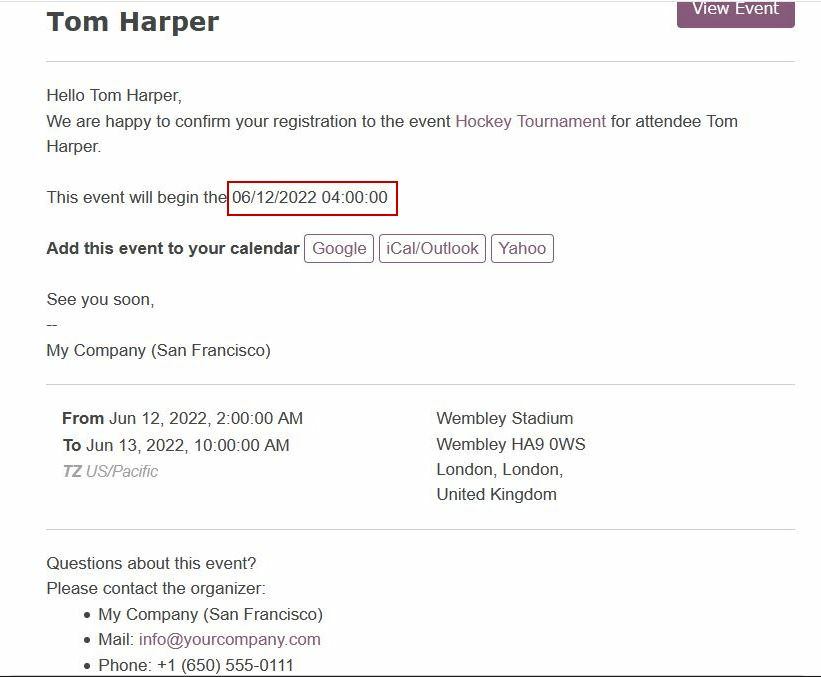
format_time() - Similar to the format_datetime function except It’s used only for the time, not a date.

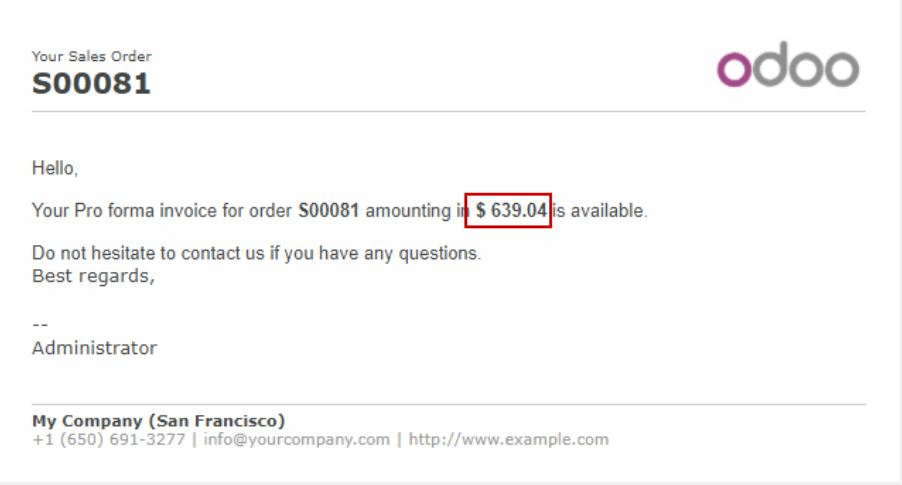
format_amount() - Formats a number, an amount to display the currency depending on the display setting that has been defined on the currency (the debug mode must be activated to see this feature) Accounting ‣ Configuration ‣ Currencies (before or after the amount depending on the convention).
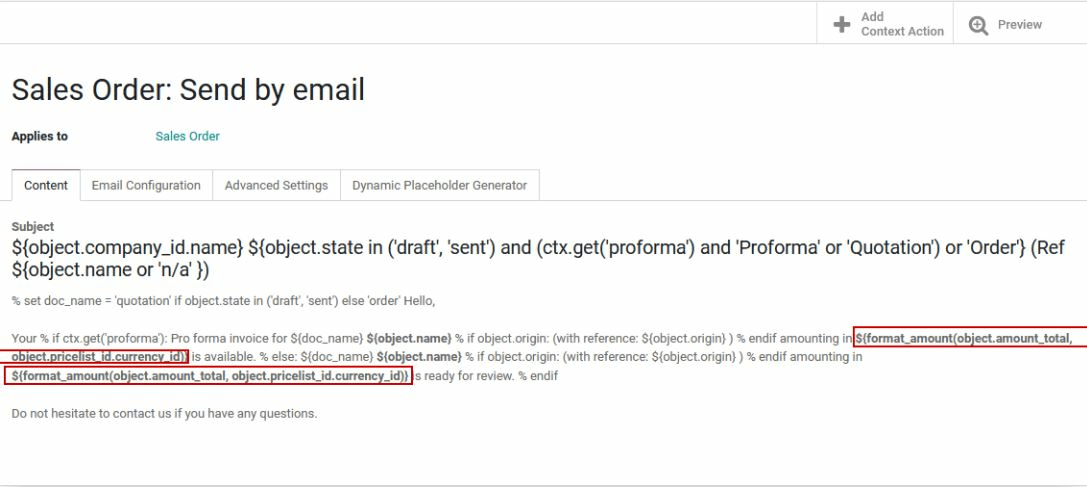
Which will look like this:

  • Infos
  • Kommentare (0)


Bewertung
3 0

Momentan sind keine Kommentare vorhanden.

Diesem Kurs beitreten
, um als erster einen Kommentar zu hinterlassen.

Community
  • Tutorials
  • Dokumentation
  • Forum
Open Source
  • Herunterladen
  • Github
  • Runbot
  • Übersetzungen
Dienstleistungen
  • Odoo.sh-Hosting
  • Support
  • Upgrade
  • Individuelle Entwicklungen
  • Bildung
  • Buchhalter finden
  • Partner finden
  • Partner werden
Über uns
  • Unsere Firma
  • Markenwerte
  • Kontakt
  • Karriere
  • Veranstaltungen
  • Podcast
  • Blog
  • Kunden
  • Rechtliches • Datenschutz
  • Sicherheit
الْعَرَبيّة Català 简体中文 繁體中文 (台灣) Čeština Dansk Nederlands English Suomi Français Deutsch हिंदी Bahasa Indonesia Italiano 日本語 한국어 (KR) Lietuvių kalba Język polski Português (BR) română русский язык Slovenský jazyk Slovenščina Español (América Latina) Español Svenska ภาษาไทย Türkçe українська Tiếng Việt

Odoo ist eine Suite von Open-Source-Betriebsanwendungen, die alle Bedürfnisse Ihres Unternehmens abdecken: CRM, E-Commerce, Buchhaltung, Lager, Kassensystem, Projektmanagement etc.

Das einzigartige Wertversprechen von Odoo ist, dass es gleichzeitig sehr einfach zu bedienen und voll integriert ist.

Website made with

Odoo Experience on YouTube

1. Use the live chat to ask your questions.
2. The operator answers within a few minutes.

Live support on Youtube
Watch now