Hoppa till innehåll
Odoo Meny
  • Logga in
  • Prova gratis
  • Appar
    Ekonomi
    • Bokföring
    • Faktura
    • Utgifter
    • Kalkylark (Affärsanalyser)
    • Dokument
    • Underskrifter
    Försäljning
    • CRM
    • Försäljning
    • Kassasystem Butik
    • Kassasystem Restaurang
    • Prenumerationer
    • Uthyrning
    Hemsida
    • Hemsidesverktyg
    • E-handel
    • Blogg
    • Forum
    • Livechatt
    • Utbildning
    Försörjningskedja
    • Lager
    • Produktion
    • Produktens livscykel (PLM)
    • Inköp
    • Underhåll
    • Kvalitet
    HR
    • Anställda
    • Rekrytering
    • Ledighet
    • Utvärderingar
    • Rekommendationer
    • Fordon
    Marknadsföring
    • Sociala medier
    • E-postmarknadsföring
    • Sms-marknadsföring
    • Evenemang
    • Automatiserad marknadsföring
    • Enkäter
    Tjänster
    • Projekt
    • Tidrapporter
    • Fältservice
    • Kundtjänst
    • Planering
    • Tidsbokningar
    Produktivitet
    • Diskutera
    • AI
    • IoT
    • VoIP
    • Kunskap
    • WhatsApp
    Community-appar Odoo Studio Odoo Cloud
  • Branscher
    Butiker
    • Bokaffärer
    • Klädbutiker
    • Möbelaffärer
    • Mataffärer
    • Byggvaruhus
    • Leksaksaffärer
    Restaurang & Hotell
    • Barer och pubar
    • Restauranger
    • Snabbmatsrestauranger
    • Gästhus
    • Dryckesdistributörer
    • Hotell
    Fastigheter
    • Fastighetsbyråer
    • Arkitektfirmor
    • Byggföretag
    • Fastighetsägare
    • Trädgårdsmästare
    • Bostadsrättsföreningar
    Hitta en konsult
    • Redovisningsbyrå
    • Odoo Partner
    • Reklambyråer
    • Advokatbyråer
    • Rekrytering
    • Revisioner och certifieringar
    Produktion
    • Textilproduktion
    • Metallproduktion
    • Möbelproduktion
    • Livsmedelsproduktion
    • Bryggerier
    • Företagsgåvor
    Hälsa och fitness
    • Sportklubbar
    • Optiker
    • Träningscenter
    • Friskvård
    • Apotek
    • Frisörsalonger
    Hantverk
    • Hantverkare
    • IT-utrustning och kundtjänst
    • Solceller, solpaneler och solenergi
    • Skomakare
    • Städföretag
    • VVS-tjänster
    Övrigt
    • Ideella föreningar
    • Miljöförvaltningar
    • Uthyrning av reklamtavlor
    • Fotografer
    • Cykeluthyrning
    • Återförsäljare av mjukvara
    Upptäck alla Branscher
  • Community
    Utbildning
    • Instruktionsvideor
    • Dokumentation
    • Certifiering
    • Utbildningar
    • Blogg
    • Podcast
    Lär dig med oss
    • Workshops
    • Företagsspelet Scale Up!
    • Studiebesök hos Odoo
    Mjukvaran
    • Ladda ner
    • Jämför utgåvor
    • Versionsinformation
    Samverkan
    • GitHub
    • Forum
    • Evenemang
    • Översättningar
    • Bli en partner
    • Partnertjänster
    • Registrera din redovisningsbyrå
    Våra tjänster
    • Partners
    • Revisorer
    • Träffa en rådgivare
    • Implementering
    • Kundrecensioner
    • Kundtjänst
    • Uppgraderingar
    GitHub Youtube Twitter Linkedin Instagram Facebook Spotify
    +1 (650) 691-3277
    Boka en demo
  • Priser
  • Hjälp
Du måste vara registrerad för att kunna interagera med communityn.
Alla inlägg Personer Utmärkelser
Etiketter (Visa alla)
odoo accounting v14 pos v15
Om detta forum
Du måste vara registrerad för att kunna interagera med communityn.
Alla inlägg Personer Utmärkelser
Etiketter (Visa alla)
odoo accounting v14 pos v15
Om detta forum
Hjälp

Set Minimum Order Quantities Odoo 18

Prenumerera

Få ett meddelande när det finns aktivitet på detta inlägg

Denna fråga har flaggats
salesinventorydeliveryminimum order quantities
2 Svar
3664 Vyer
Avatar
Allie Kempf

Hi, 

I am having a hard time trying to figure this one out.  I have a MOQ for 6 cases, but multiple products can be built to create a total number of 6. My retailers can mix and match products (ie: 4 vanilla and 2 mocha), as long as there are 6 or more in total. What's odd is that I can't even seem to find basic MOQ's for just one product. 

I figured out how to create a price list for buy more save more features, but I cannot seem to figure out how to prevent a sales agent from selling anything less than 6 total. I would also like a sales warning to populate if an agent attempts to sell less than 6. Our shipper does not allow us to send anything less to retailers.

Thank you in advance 

0
Avatar
Avbryt
Avatar
Christoph Farnleitner
Bästa svar

Odoo has no minimum selling quantity feature.


The closest you can get without customization, for a random assortment of 6-item groups (i.e. 'My retailers can mix and match products (ie: 4 vanilla and 2 mocha), as long as there are 6') is by using Combo-type Products. The 'or more in total' part could be handled with automated actions checking on write, whether a certain quantity threshold is reached or not and displaying a message accordingly. This involves advanced Studio and View customization as well however.

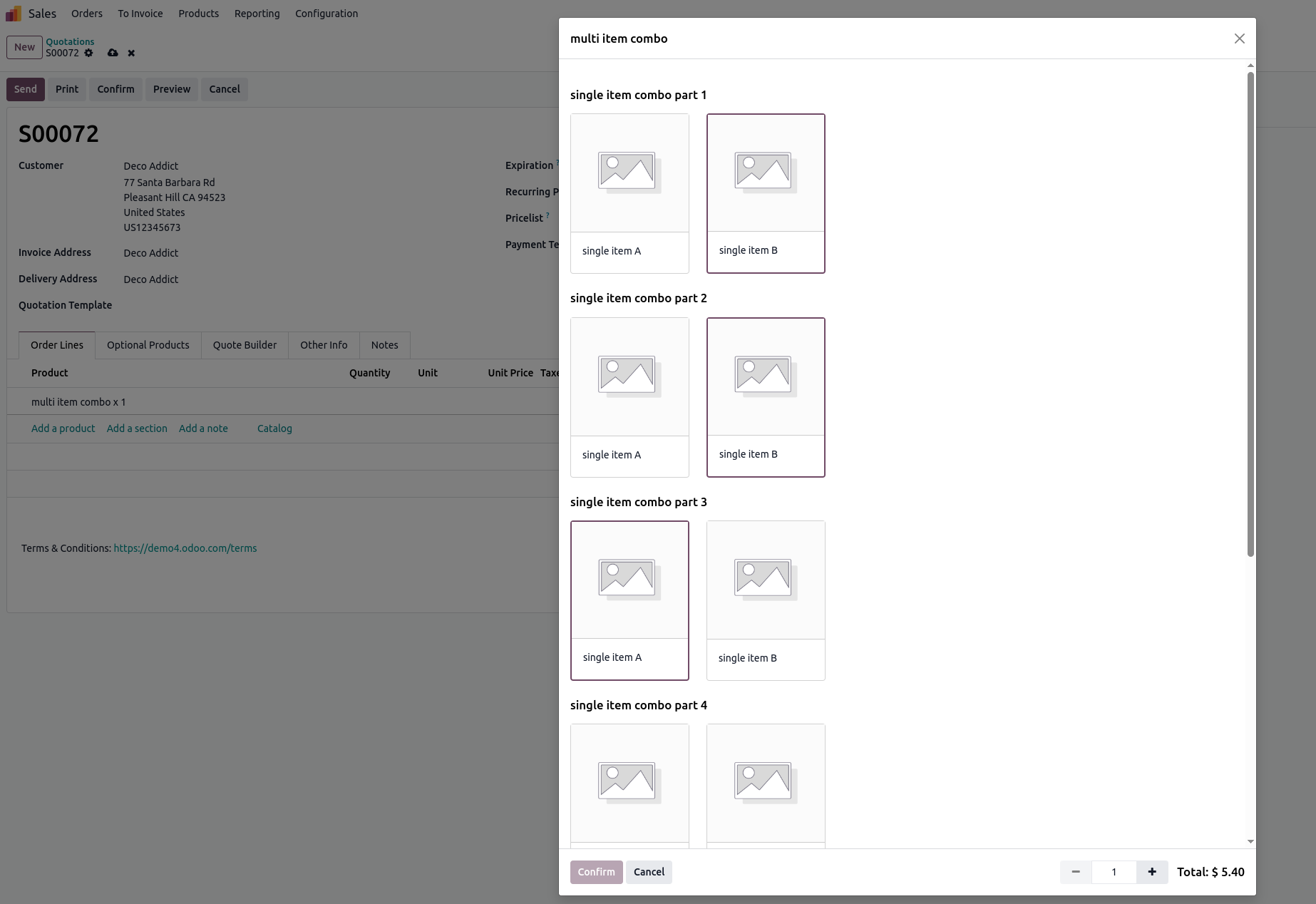
The UI for adding such a Combo to a Sales Order would look similar to this:


The resulting Sales Orders would look like this:
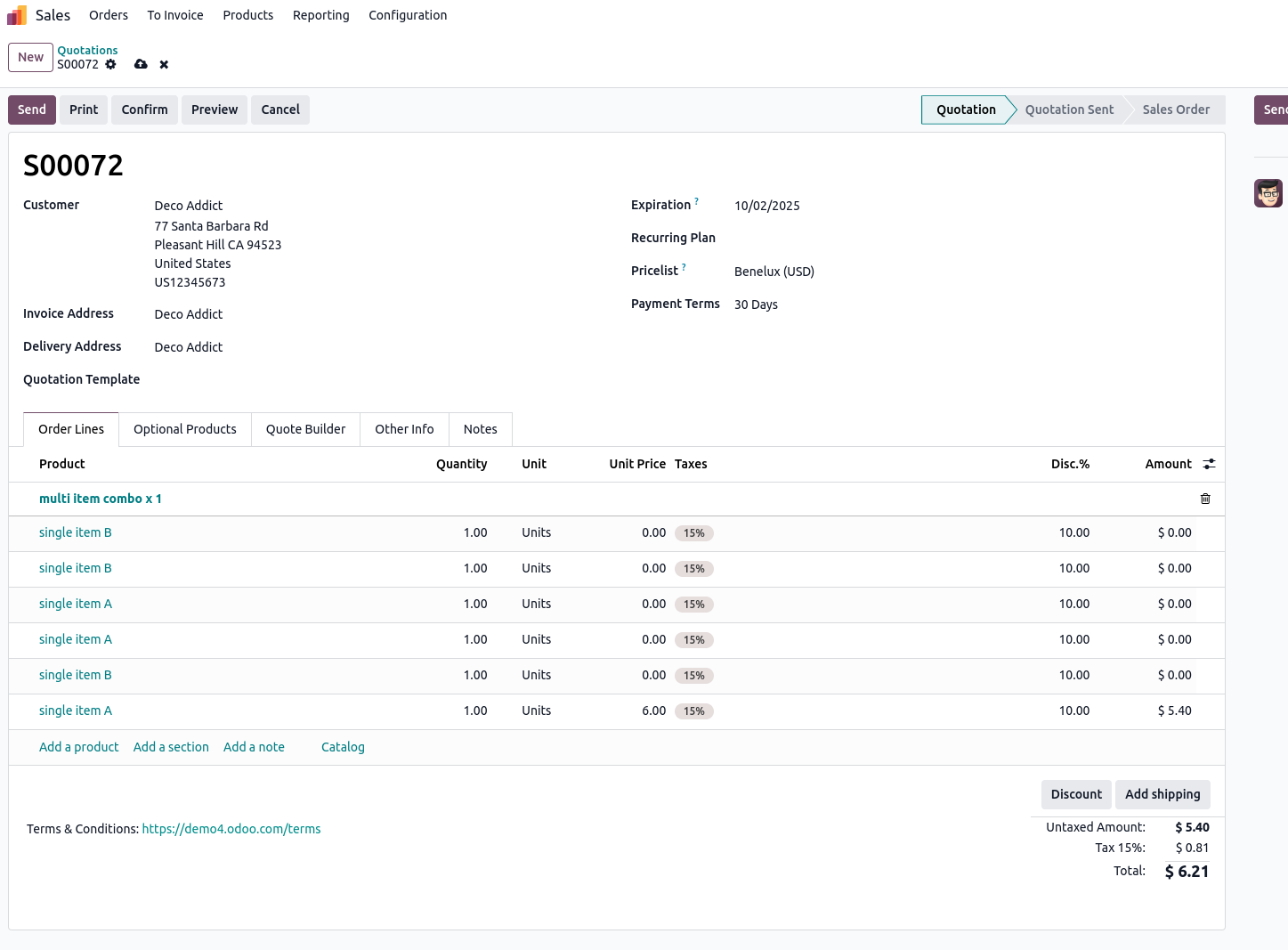

The setup of this approach would allow you to sell a 6-pack with random (allowed) items. It would however not allow you to freely just add multiple additional items to that combo. This then would need to be separate lines in your Sales Order, or, an additional Combo with possibly different selections.

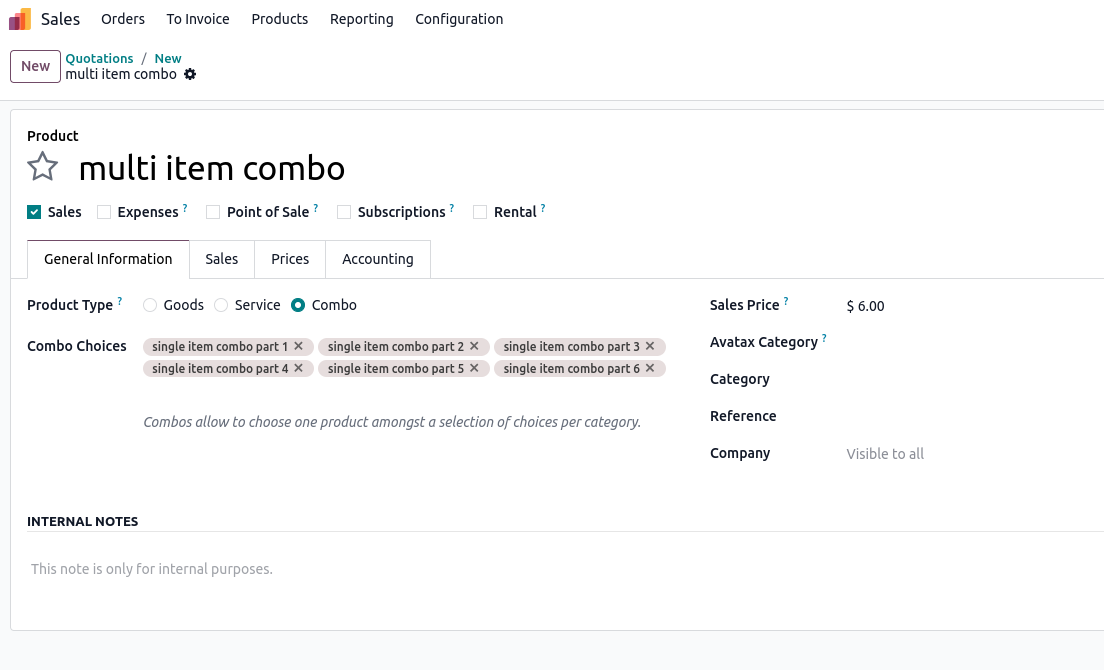
The Product configuration for this would be like this: 
A Product of type Combo with as many Combo Choices as items are allowed in the pack.
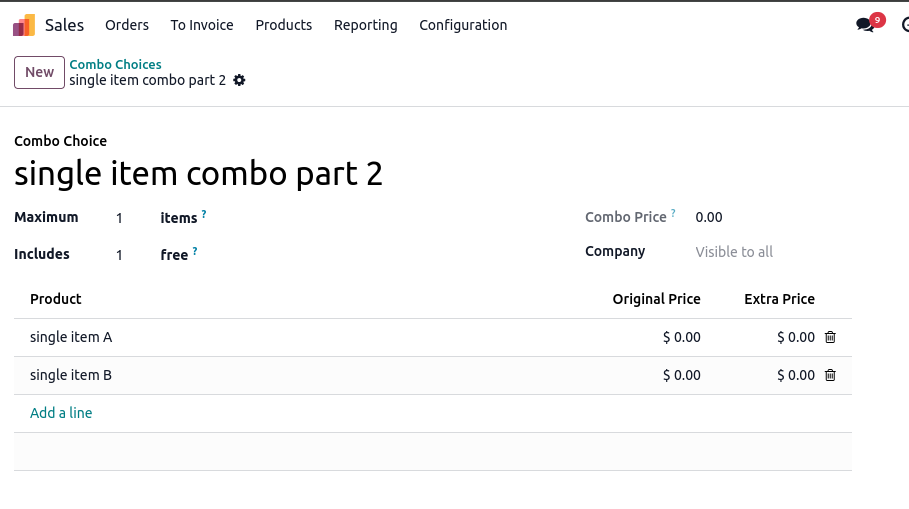
Each Combo Choice on the other hand would look like this:
A Choice of Product 1, Product 2, ... with 1 free quantity (as the price is given by the 'parent' Combo Product) - you could however modify the price by setting an Extra Price in addition.


An alternative approach could be the use of Bill of Materials (from the Manufacturing App) - but, this seems a bit of a stretch.

Another alternative approach could be to use a Pricelist for setting up a price for a Minimum Quantity of 6 on a product to cover for extra cost individual item handling would otherwise require.

You can find further details on Combo Products for example here: https://www.odoo.com/documentation/18.0/applications/sales/point_of_sale/combos.html
Above screens are created with a demo/playground instance of https://demo.odoo.com which you can use as well to test the functionality.

1
Avatar
Avbryt
Allie Kempf
Författare

Hi, thank you so much for this detailed answer!

I checked Studio and it looks like it may trigger custom pricing options (I'm using Odoo Online) and would likely upgrade me into Odoo.sh. From what I gathered with both answers, I need to upgrade from Odoo Online to Odoo.sh to accomplish it.

I did however find that I can add a Warning message on each product, so I added that on both stating the MOQ requirement, but it will not block the sale if the agent isn't following MOQ's.

I also built several Pricelists, so it may be better to advise sales agents to select from the Pricelists when they begin creating an order, as that will be somewhat of a "bumper" for them when a customer orders more inventory from us as they'll be able to recognize the pricing difference. Bit of a band-aid option until I can upgrade.

I am also wondering how this workaround works differently than if each product was added in simpler format by simply adjusting the quantities for each product. I'm not sure if applying the combo-type would help in my specific scenario, as each product has separate barcodes and goes through different manufacturing/procurement processes.

Avatar
Cybrosys Techno Solutions Pvt.Ltd
Bästa svar

Hi,

Please refer to the module: https://odoo-community.org/shop/sale-order-min-quantity-9076#attr=14781


Hope it helps.

0
Avatar
Avbryt
Allie Kempf
Författare

This sounds like it would be the most direct path to solve my problem, however I'm getting an error when I try to install the module:

"Invalid Operation
Error while importing module 'sale_restricted_qty'.
Invalid version '12.0.2.0.0'. Modules should have a version in format `x.y`, `x.y.z`, `18.0.x.y` or `18.0.x.y.z`. "

I downloaded the file and went to upload it as a .zip and no changes were applied. I looked into it more and learned that my version, Odoo Online, cannot support custom modules: https://www.odoo.com/documentation/18.0/administration/odoo_online.html

I realize now that I should have specified in the title that I was running Odoo Online and not Odoo.sh , my apologies

Njuter du av diskussionen? Läs inte bara, delta också!

Skapa ett konto idag för att ta del av exklusiva funktioner och engagera dig i vår fantastiska community!

Registrera dig
Relaterade inlägg Svar Vyer Verksamhet
Sales > Warehouse pickup
sales inventory delivery
Avatar
Avatar
1
juli 19
4469
Cutomer lead time does not take weekends into account
sales scheduler inventory delivery
Avatar
Avatar
1
nov. 20
4473
Self pickup as delivery method
sales sale inventory delivery
Avatar
0
nov. 20
5874
How would you sell a product to a customer who is unsure about buying?
sales inventory
Avatar
0
maj 26
3
Expedite report
sales inventory
Avatar
0
maj 26
1
Community
  • Instruktionsvideor
  • Dokumentation
  • Forum
Öppen källkod
  • Ladda ner
  • GitHub
  • Runbot
  • Översättningar
Tjänster
  • Odoo.sh Hosting
  • Kundtjänst
  • Uppgradera
  • Anpassningsbara modifikationer
  • Utbildning
  • Revisorer
  • Partners
  • Bli en partner
Om oss
  • Vårt företag
  • Varumärkestillgångar
  • Kontakta oss
  • Jobb
  • Evenemang
  • Podcast
  • Blogg
  • Kunder
  • Juridiskt • Integritet
  • Säkerhet
الْعَرَبيّة Català 简体中文 繁體中文 (台灣) Čeština Dansk Nederlands English Suomi Français Deutsch हिंदी Bahasa Indonesia Italiano 日本語 한국어 (KR) Lietuvių kalba Język polski Português (BR) română русский язык Slovenský jazyk Slovenščina Español (América Latina) Español Svenska ภาษาไทย Türkçe українська Tiếng Việt

Odoo är ett affärssystem med öppen källkod som täcker alla dina företagsbehov: CRM, e-handel, bokföring, lager, kassasystem, projektledning, och så vidare.

Odoos unika värdeförslag är att samtidigt vara väldigt enkel att använda men också helt integrerad.

Website made with

Odoo Experience on YouTube

1. Use the live chat to ask your questions.
2. The operator answers within a few minutes.

Live support on Youtube
Watch now
