

When creating a custom model with Odoo Studio, you may need each new record to receive its own automatic reference number, similar to a quotation number, purchase order number, ticket number, or manufacturing order number.
For example, a custom model called Request may need records numbered automatically as follows:
REQ-000001
REQ-000002
REQ-000003
This can be configured directly with Odoo Studio, without requiring Python code or a custom module.
Use Case
A Studio-created model has a Name field that identifies each record. By default, users may need to enter this value manually.
Instead, the objective is to:
Automatically assign the next sequential number when a record is created.
Prevent regular users from manually changing the generated reference.
Avoid duplicate numbers caused by manual data entry.
Step 1: Configure the Name Field
Open the custom model and enter Studio.
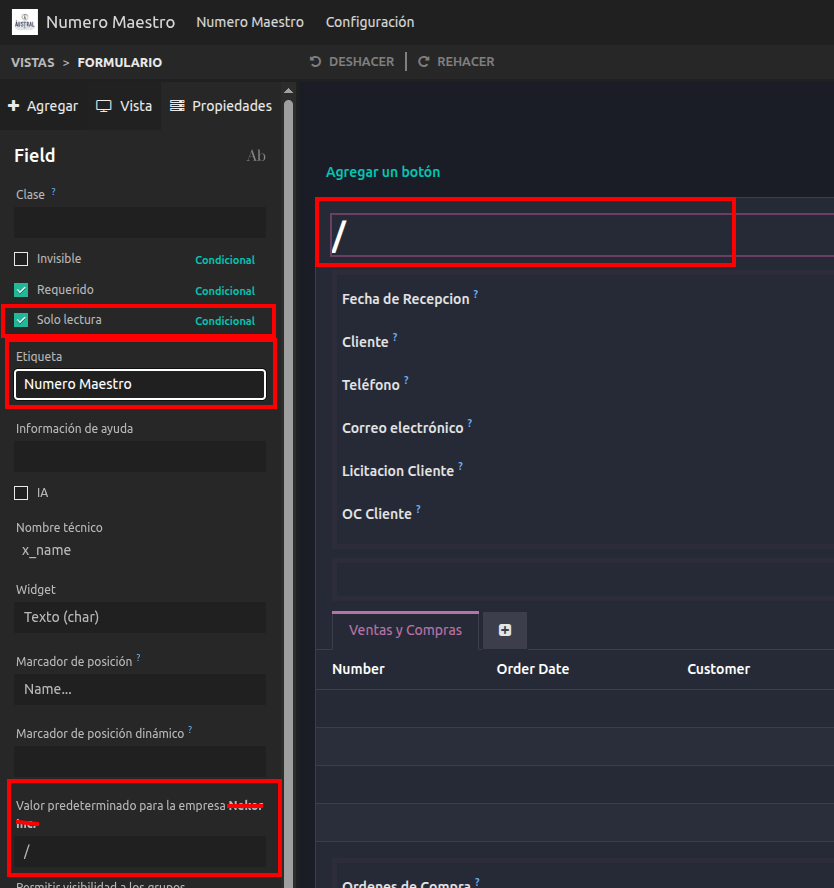
Select the field that will store the record reference, normally the model's Name field.
Configure the field as follows:
Change the label if needed, for example: Reference, Request Number, or Record Number.
Enable Readonly so users cannot manually modify the assigned number from the form view.
If the field is required, set a temporary Default Value, such as /.
The temporary value is useful because the record must first be saved before the automated action can assign the actual sequence number.
Step 2: Create the Sequence
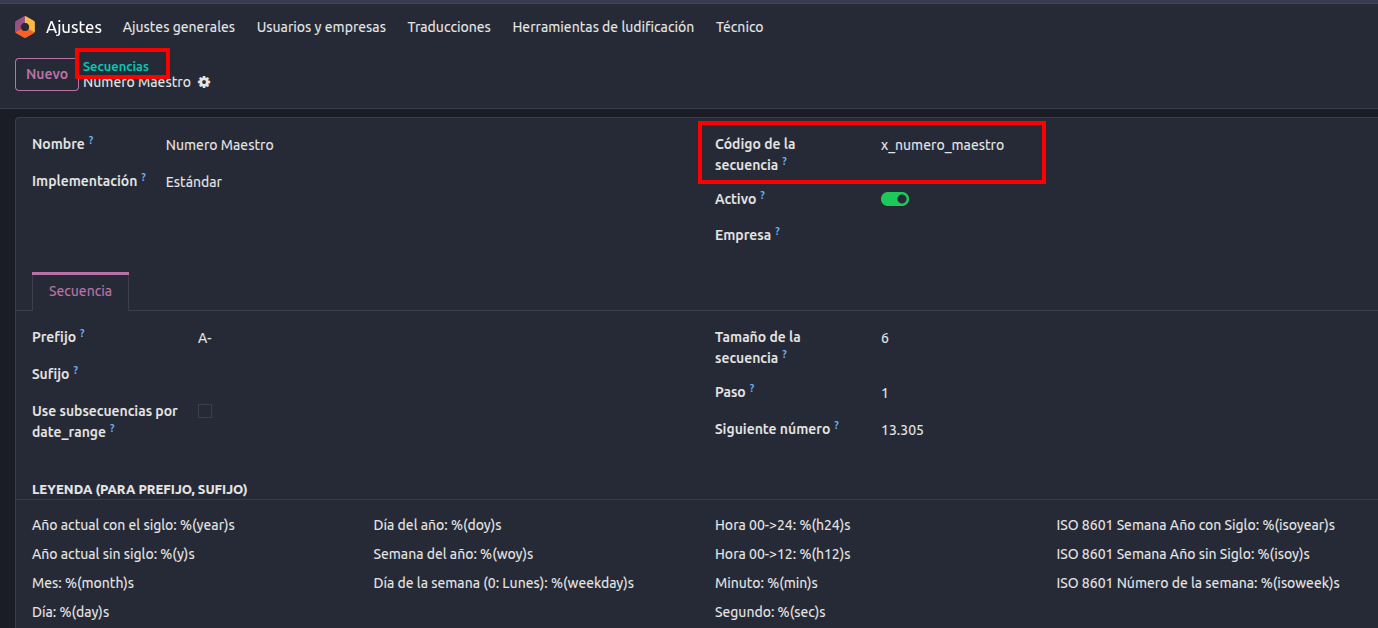
From the automated action configuration, a new sequence can be created directly when selecting the sequence to apply. Alternatively, with developer mode enabled, sequences can be managed from:
Settings → Technical → Sequences & Identifiers → Sequences
Create a sequence and configure the desired numbering format.
Example:
Name: Request Sequence
Prefix: REQ-
Sequence Size: 6
Step: 1
Next Number: 1
With this configuration, the generated values will be:
REQ-000001
REQ-000002
REQ-000003
The prefix and suffix can also use dynamic placeholders, such as the year or month, when a format such as REQ-2026-000001 is needed.
Step 3: Create the Automation Rule
Open the Studio-created model, then go to:
Studio → Automations → New
Configure the automation rule as follows:
Name: Assign Automatic Reference Number
Model: Your Studio-created model
Trigger: Custom → On create
The On create trigger ensures that the action is executed when a new record is saved for the first time.
No additional conditions are needed unless the sequence should only apply to specific records.
Step 4: Add the Sequence Action
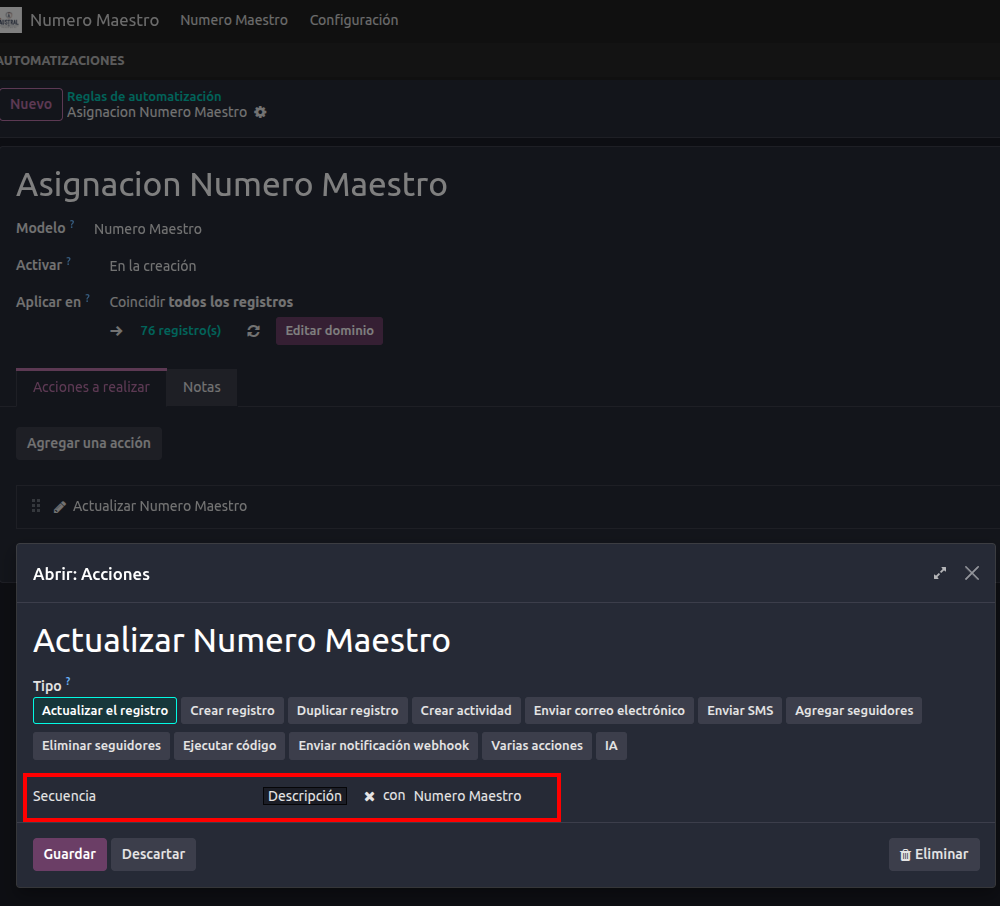
Under Actions To Do, add a new action and configure it as follows:
Action Type: Update Record
Option: Sequence
Field to Update: Select the field that stores the record reference, usually Name.
Sequence: Select the sequence created in the previous step.
Save the automation rule.
Result
When a user creates and saves a new record in the Studio-created model:
The record is initially created with the temporary value, such as /, if that default value was needed.
The automation rule runs immediately after creation.
Odoo retrieves the next number from the selected sequence.
The Name or reference field is updated automatically.
Since the field is read-only, regular users cannot manually change the number from the form view.
For example:
| New Record | Assigned Reference |
|---|---|
| First record | REQ-000001 |
| Second record | REQ-000002 |
| Third record | REQ-000003 |
Important Note About Duplicate Prevention
Using a sequence prevents duplicate numbering during the normal automatic record creation process. Making the field read-only also prevents regular users from manually overwriting the reference through the standard form view.
However, Readonly is a user-interface restriction, not a database-level uniqueness constraint. A value could still potentially be modified through imports, integrations, API calls, or technical actions.
Therefore:
For standard Studio use cases, the combination of Sequence + On create automation + Readonly field is usually sufficient.
If the reference must be technically guaranteed as unique under all circumstances, custom development is required to add a server-side uniqueness constraint to the field.


