Zum Inhalt springen
Odoo Menü
  • Anmelden
  • Jetzt gratis testen
  • Apps
    Finanzen
    • Buchhaltung
    • Rechnungsstellung
    • Spesenabrechnung
    • Tabellenkalkulation (BI)
    • Dokumente
    • E-Signatur
    Verkauf
    • CRM
    • Verkauf
    • Kassensystem – Shop
    • Kassensystem – Restaurant
    • Abonnements
    • Vermietung
    Websites
    • Website-Builder
    • E-Commerce
    • Blog
    • Forum
    • Livechat
    • E-Learning
    Lieferkette
    • Lager
    • Fertigung
    • PLM
    • Einkauf
    • Wartung
    • Qualität
    Personalwesen
    • Mitarbeiter
    • Personalbeschaffung
    • Abwesenheiten
    • Mitarbeiterbeurteilung
    • Personalempfehlungen
    • Fuhrpark
    Marketing
    • Social Marketing
    • E-Mail-Marketing
    • SMS-Marketing
    • Veranstaltungen
    • Marketing-Automatisierung
    • Umfragen
    Dienstleistungen
    • Projekte
    • Zeiterfassung
    • Außendienst
    • Kundendienst
    • Planung
    • Termine
    Produktivität
    • Dialog
    • Künstliche Intelligenz
    • IoT
    • VoIP
    • Wissensdatenbank
    • WhatsApp
    Apps von Drittanbietern Odoo Studio Odoo Cloud-Plattform
  • Branchen
    Einzelhandel
    • Buchladen
    • Kleidergeschäft
    • Möbelhaus
    • Lebensmittelgeschäft
    • Baumarkt
    • Spielwarengeschäft
    Essen & Gastgewerbe
    • Bar und Kneipe
    • Restaurant
    • Fast Food
    • Gästehaus
    • Getränkehändler
    • Hotel
    Immobilien
    • Immobilienagentur
    • Architekturbüro
    • Baugewerbe
    • Immobilienverwaltung
    • Gartenarbeit
    • Eigentümervereinigung
    Beratung
    • Buchhaltungsfirma
    • Odoo-Partner
    • Marketingagentur
    • Anwaltskanzlei
    • Talentakquise
    • Prüfung & Zertifizierung
    Fertigung
    • Textil
    • Metall
    • Möbel
    • Speisen
    • Brauerei
    • Firmengeschenke
    Gesundheit & Fitness
    • Sportklub
    • Brillengeschäft
    • Fitnessstudio
    • Therapeut
    • Apotheke
    • Friseursalon
    Handel
    • Handyman
    • IT-Hardware & -Support
    • Solarenergiesysteme
    • Schuster
    • Reinigungsdienstleistungen
    • HLK-Dienstleistungen
    Sonstiges
    • Gemeinnützige Organisation
    • Umweltschutzagentur
    • Plakatwandvermietung
    • Fotostudio
    • Fahrrad-Leasing
    • Software-Händler
    Alle Branchen ansehen
  • Community
    Lernen
    • Tutorials
    • Dokumentation
    • Zertifizierungen
    • Schulung
    • Blog
    • Podcast
    Bildung fördern
    • Bildungsprogramm
    • Scale-Up! Planspiel
    • Odoo besuchen
    Software anfragen
    • Herunterladen
    • Editionen vergleichen
    • Releases
    Zusammenarbeiten
    • Github
    • Forum
    • Veranstaltungen
    • Übersetzungen
    • Partner werden
    • Dienstleistungen für Partner
    • Buchhaltungsfirma registrieren
    Services anfragen
    • Partner finden
    • Buchhalter finden
    • Einen Experten treffen
    • Implementierungsservices
    • Kundenreferenzen
    • Support
    • Upgrades
    Github Youtube Twitter Linkedin Instagram Facebook Spotify
    +1 (650) 691-3277
    Eine Demo erhalten
  • Preise
  • Hilfe
Sie müssen registriert sein, um mit der Community zu interagieren.
Alle Beiträge Personen Abzeichen
Stichwörter (Alle anzeigen)
odoo accounting v14 pos v15
Über dieses Forum
Sie müssen registriert sein, um mit der Community zu interagieren.
Alle Beiträge Personen Abzeichen
Stichwörter (Alle anzeigen)
odoo accounting v14 pos v15
Über dieses Forum
Hilfe

How to automatically assign sequence numbers to records in a Studio-created model ✅ SOLVED

Abonnieren

Erhalten Sie eine Benachrichtigung, wenn es eine Aktivität zu diesem Beitrag gibt

Diese Frage wurde gekennzeichnet
studio
1251 Ansichten
Avatar
Diego Cerrilla (dice)

When creating a custom model with Odoo Studio, you may need each new record to receive its own automatic reference number, similar to a quotation number, purchase order number, ticket number, or manufacturing order number.

For example, a custom model called Request may need records numbered automatically as follows:

  • REQ-000001

  • REQ-000002

  • REQ-000003

This can be configured directly with Odoo Studio, without requiring Python code or a custom module.

Use Case

A Studio-created model has a Name field that identifies each record. By default, users may need to enter this value manually.

Instead, the objective is to:

  • Automatically assign the next sequential number when a record is created.

  • Prevent regular users from manually changing the generated reference.

  • Avoid duplicate numbers caused by manual data entry.

Step 1: Configure the Name Field

Open the custom model and enter Studio.

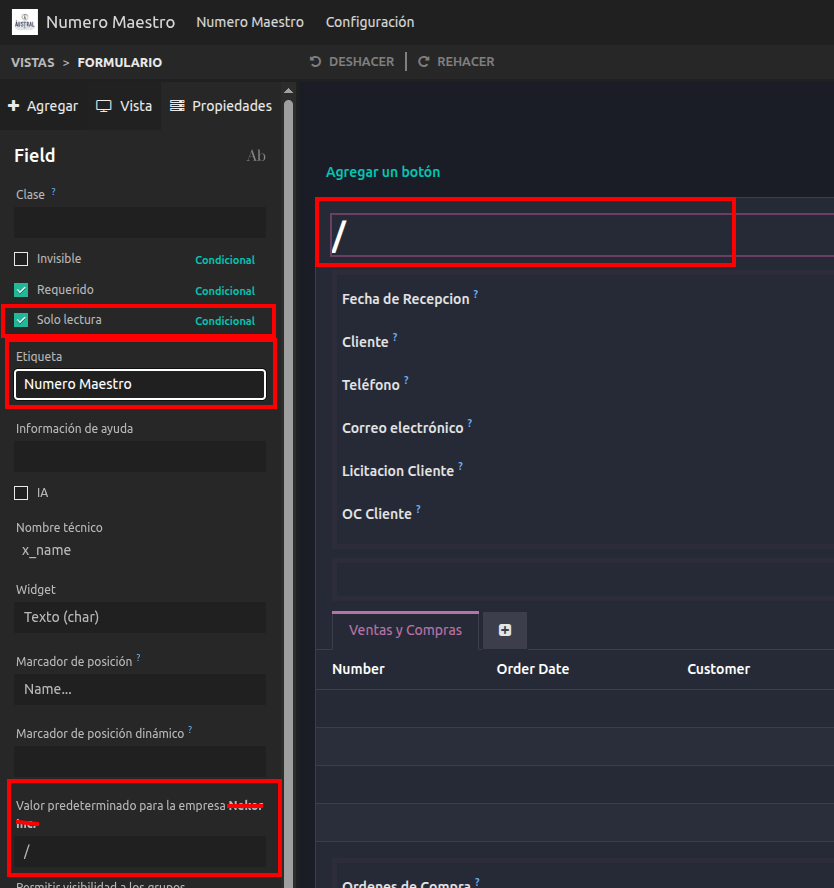
Select the field that will store the record reference, normally the model's Name field.

Configure the field as follows:

  • Change the label if needed, for example: Reference, Request Number, or Record Number.

  • Enable Readonly so users cannot manually modify the assigned number from the form view.

  • If the field is required, set a temporary Default Value, such as /.

The temporary value is useful because the record must first be saved before the automated action can assign the actual sequence number.

Step 2: Create the Sequence

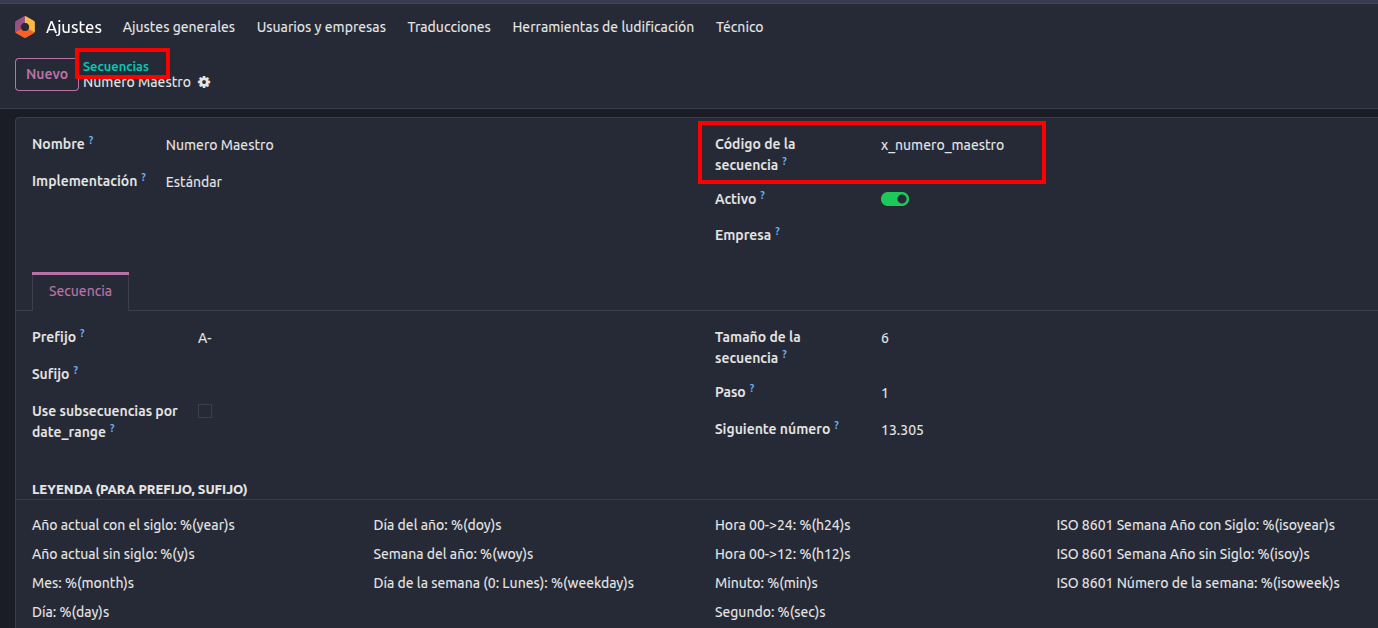
From the automated action configuration, a new sequence can be created directly when selecting the sequence to apply. Alternatively, with developer mode enabled, sequences can be managed from:

Settings → Technical → Sequences & Identifiers → Sequences

Create a sequence and configure the desired numbering format.

Example:

  • Name: Request Sequence

  • Prefix: REQ-

  • Sequence Size: 6

  • Step: 1

  • Next Number: 1

With this configuration, the generated values will be:

  • REQ-000001

  • REQ-000002

  • REQ-000003

The prefix and suffix can also use dynamic placeholders, such as the year or month, when a format such as REQ-2026-000001 is needed.
Step 3: Create the Automation Rule

Open the Studio-created model, then go to:

Studio → Automations → New

Configure the automation rule as follows:

  • Name: Assign Automatic Reference Number

  • Model: Your Studio-created model

  • Trigger: Custom → On create

The On create trigger ensures that the action is executed when a new record is saved for the first time.

No additional conditions are needed unless the sequence should only apply to specific records.

Step 4: Add the Sequence Action

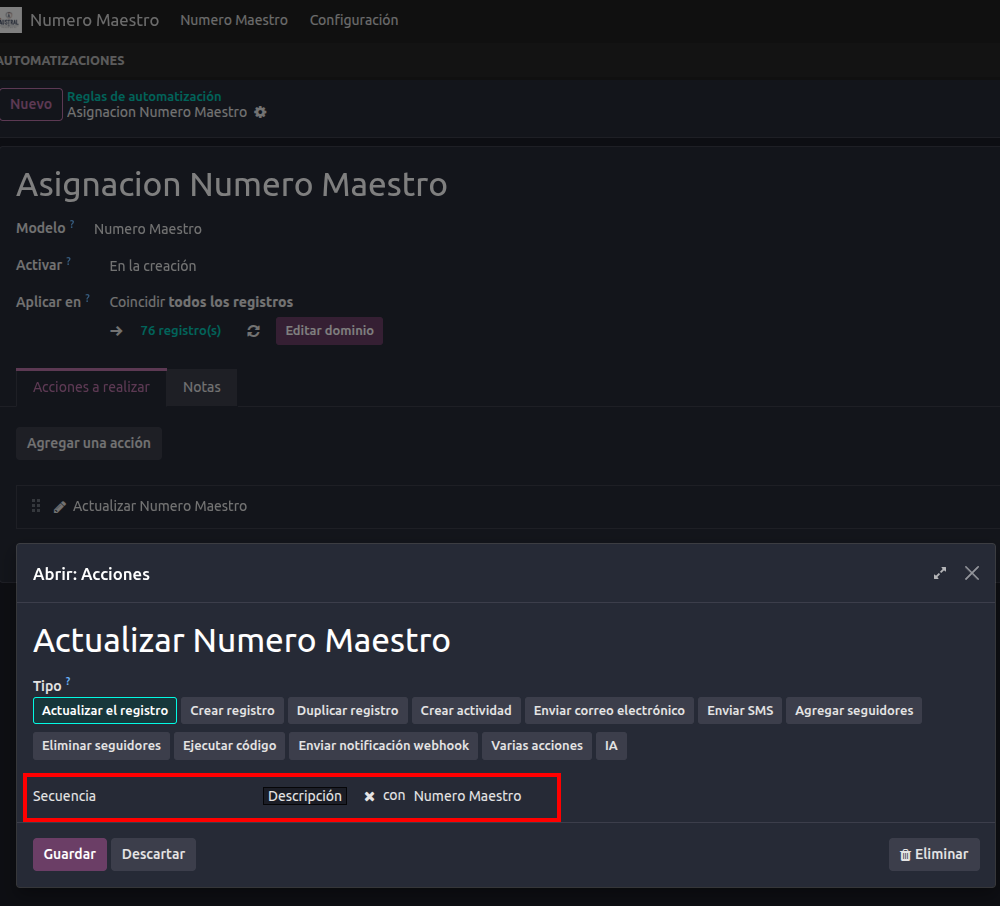
Under Actions To Do, add a new action and configure it as follows:

  • Action Type: Update Record

  • Option: Sequence

  • Field to Update: Select the field that stores the record reference, usually Name.

  • Sequence: Select the sequence created in the previous step.

Save the automation rule.
Result

When a user creates and saves a new record in the Studio-created model:

  1. The record is initially created with the temporary value, such as /, if that default value was needed.

  2. The automation rule runs immediately after creation.

  3. Odoo retrieves the next number from the selected sequence.

  4. The Name or reference field is updated automatically.

  5. Since the field is read-only, regular users cannot manually change the number from the form view.

For example:

New RecordAssigned Reference
First recordREQ-000001
Second recordREQ-000002
Third recordREQ-000003

Important Note About Duplicate Prevention

Using a sequence prevents duplicate numbering during the normal automatic record creation process. Making the field read-only also prevents regular users from manually overwriting the reference through the standard form view.

However, Readonly is a user-interface restriction, not a database-level uniqueness constraint. A value could still potentially be modified through imports, integrations, API calls, or technical actions.

Therefore:

  • For standard Studio use cases, the combination of Sequence + On create automation + Readonly field is usually sufficient.

  • If the reference must be technically guaranteed as unique under all circumstances, custom development is required to add a server-side uniqueness constraint to the field.

1
Avatar
Verwerfen
Diskutieren Sie gerne? Treten Sie bei, statt nur zu lesen!

Erstellen Sie heute ein Konto, um exklusive Funktionen zu nutzen und mit unserer tollen Community zu interagieren!

Registrieren
Verknüpfte Beiträge Antworten Ansichten Aktivität
Custom popup Gelöst
studio
Avatar
Avatar
2
März 26
1704
Menu's with different default filter Gelöst
studio
Avatar
Avatar
1
Dez. 25
3846
How to add or reorder columns in Studio Gelöst
studio
Avatar
Avatar
1
Dez. 25
2057
Studio V18 Domain does not have current field
studio
Avatar
Avatar
1
Dez. 25
1763
debit and credit in currency
studio
Avatar
Avatar
1
Nov. 25
3512
Community
  • Tutorials
  • Dokumentation
  • Forum
Open Source
  • Herunterladen
  • Github
  • Runbot
  • Übersetzungen
Dienstleistungen
  • Odoo.sh-Hosting
  • Support
  • Upgrade
  • Individuelle Entwicklungen
  • Bildung
  • Buchhalter finden
  • Partner finden
  • Partner werden
Über uns
  • Unsere Firma
  • Markenwerte
  • Kontakt
  • Karriere
  • Veranstaltungen
  • Podcast
  • Blog
  • Kunden
  • Rechtliches • Datenschutz
  • Sicherheit
الْعَرَبيّة Català 简体中文 繁體中文 (台灣) Čeština Dansk Nederlands English Suomi Français Deutsch हिंदी Bahasa Indonesia Italiano 日本語 한국어 (KR) Lietuvių kalba Język polski Português (BR) română русский язык Slovenský jazyk Slovenščina Español (América Latina) Español Svenska ภาษาไทย Türkçe українська Tiếng Việt

Odoo ist eine Suite von Open-Source-Betriebsanwendungen, die alle Bedürfnisse Ihres Unternehmens abdecken: CRM, E-Commerce, Buchhaltung, Lager, Kassensystem, Projektmanagement etc.

Das einzigartige Wertversprechen von Odoo ist, dass es gleichzeitig sehr einfach zu bedienen und voll integriert ist.

Website made with

Odoo Experience on YouTube

1. Use the live chat to ask your questions.
2. The operator answers within a few minutes.

Live support on Youtube
Watch now
