Skip to Content
Odoo मेन्यू
  • साइन इन करें
  • मुफ़्त में आज़माएं
  • ऐप्लिकेशन
    फ़ाइनेंस
    • अकाउंटिंग
    • इनवॉइसिंग
    • एक्सपेंस
    • स्प्रेडशीट (बीआई)
    • डॉक्यूमेंट्स
    • साइन
    सेल्स
    • सीआरएम
    • सेल्स
    • पीओएस शॉप
    • पीओएस रेस्टोरेंट
    • सब्सक्रिप्शन
    • रेंटल
    वेबसाइट
    • वेबसाइट बिल्डर
    • ई-कॉमर्स
    • ब्लॉग
    • फ़ोरम
    • लाइव चैट
    • ई-लर्निंग
    सप्लाई चेन
    • इन्वेंट्री
    • मैन्युफ़ैक्चरिंग
    • पीएलएम
    • परचेज़
    • मेंटेनेंस
    • क्वालिटी
    मानव संसाधन
    • कर्मचारी
    • रिक्रूटमेंट
    • टाइम ऑफ़
    • अप्रेज़ल
    • रेफ़रल
    • फ़्लीट
    मार्केटिंग
    • सोशल मार्केटिंग
    • ईमेल मार्केटिंग
    • एसएमएस मार्केटिंग
    • इवेंट
    • मार्केटिंग ऑटोमेशन
    • सर्वे
    सेवाएं
    • प्रोजेक्ट
    • टाइमशीट
    • फ़ील्ड सर्विस
    • हेल्पडेस्क
    • प्लानिंग
    • अपॉइंटमेंट
    प्रॉडक्टिविटी
    • डिस्कस
    • आर्टिफ़िशियल इंटेलिजेंस
    • आईओटी
    • वीओआईपी
    • नॉलेज
    • WhatsApp
    तीसरे पक्ष के ऐप्लिकेशन Odoo स्टूडियो Odoo क्लाउड प्लेटफ़ॉर्म
  • इंडस्ट्री
    रीटेल
    • बुक स्टोर
    • क्लोदिंग स्टोर
    • फ़र्नीचर स्टोर
    • ग्रॉसरी स्टोर
    • हार्डवेयर स्टोर
    • टॉय स्टोर
    फ़ूड & हॉस्पिटैलिटी
    • बार और पब
    • रेस्टोरेंट
    • फ़ास्ट फ़ूड
    • गेस्ट हाउस
    • बेवरिज डिस्ट्रीब्यूटर
    • होटल
    रियल एस्टेट
    • Real Estate Agency
    • आर्किटेक्चर फ़र्म
    • कंसट्रक्शन
    • Property Management
    • गार्ड्निंग
    • प्रॉपर्टी ओनर असोसिएशन
    कंसल्टिंग
    • अकाउंटिंग फ़र्म
    • Odoo पार्टनर
    • मार्केटिंग एजेंसी
    • लॉ फ़र्म
    • टैलेंट ऐक्विज़िशन
    • ऑडिट & सर्टिफ़िकेशन
    मैन्युफ़ैक्चरिंग
    • टेक्सटाइल
    • धातु
    • फ़र्नीचर
    • फ़ूड
    • ब्रुअरी
    • कॉर्पोरेट गिफ़्ट
    हेल्थ & फिटनेस
    • स्पोर्ट्स क्लब
    • आईवियर स्टोर
    • फिटनेस सेंटर
    • वेलनेस प्रैक्टिशनर
    • फॉर्मेसी
    • हेयर सैलून
    Trades
    • Handyman
    • आईटी हार्डवेयर & सपोर्ट
    • Solar Energy Systems
    • Shoe Maker
    • साफ-सफाई से जुड़ी सेवाएं
    • HVAC सर्विस
    अन्य
    • गैर-लाभकारी संगठन
    • एन्वायरमेंटल एजेंसी
    • बिलबोर्ड रेंटल
    • फ़ोटोग्राफी
    • बाइक लीजिंग
    • सॉफ़्टवेयर रीसेलर
    सभी इंडस्ट्री को ब्राउज़ करें
  • कम्यूनिटी
    सीखें
    • ट्यूटोरियल्स
    • दस्तावेज़
    • सर्टिफ़िकेशन
    • ट्रेनिंग
    • ब्लॉग
    • पॉडकास्ट
    शिक्षा को बढ़ावा दें
    • एजुकेशन प्रोग्राम
    • स्केल अप! बिजनेस गेम
    • Odoo के ऑफ़िस में आएं
    सॉफ़्टवेयर पाएं
    • डाउनलोड
    • वर्शन की तुलना करें
    • रिलीज़
    साथ मिलकर काम करें
    • Github
    • फ़ोरम
    • इवेंट
    • अनुवाद
    • पार्टनर बनें
    • Services for Partners
    • अपना अकाउंटिंग फ़र्म रजिस्टर करें
    सेवाएं पाएं
    • पार्टनर ढूंढें
    • अकाउंटेंट खोजें
    • सलाहकार की मदद लें
    • इम्प्लिमेंटेशन सेवाएं
    • कस्टमर रेफ़रेंस
    • सहायता
    • अपग्रेड
    Github Youtube Twitter Linkedin Instagram Facebook Spotify
    +1 (650) 691-3277
    डेमो देखें
  • कीमत
  • सहायता
You need to be registered to interact with the community.
All Posts People Badges
टैग (View all)
odoo accounting v14 pos v15
About this forum
You need to be registered to interact with the community.
All Posts People Badges
टैग (View all)
odoo accounting v14 pos v15
About this forum
सहायता

Odoo Helpdesk Email Template Setup

Subscribe

Get notified when there's activity on this post

This question has been flagged
emailtemplateshelpdeskV16
3 Replies
2392 डेटा देखने का तरीका
अवतार
Hemanth

Where can I create the email templates used for Odoo Helpdesk notifications, such as:

  • "Your ticket has been created - our team will get back to you soon"

  • "RE: {Ticket Number} - {Title}"

  • "Your ticket has been resolved"

  • "Please provide your feedback"

  • etc...

How can we send these emails automatically to the user who created the ticket? And, when a team member replies to a ticket, the response should use a predefined header and footer template, with the message content inserted between them before sending it to the user.

0
अवतार
खारिज करें
Hemanth
लेखक

Thank you for your answer. But, in the email templates, I can only find three options: “Helpdesk Changed Stage Notification Email,” “Helpdesk Closed Ticket Notification Email,” and “Ticket Assignment.” There are no templates available for editing replies or for ticket creation.

अवतार
Intero Technologies GmbH, Chris Dominiak (Intero Technologies GmbH)
Best Answer

Hi Hemanth,

You can find the email templates in Settings -> scroll all the way down and click “Enable developer mode” -> click on Technical settings in the top right corner and then edit “Email templates.”

The default templates for the help desk should all start with “Help desk:” – you can then filter them.

To create a new template for the help desk, I recommend duplicating an existing template for the help desk—this way, you can transfer the necessary parameters so that the email template can be used correctly. Here you can then enter your content, including the header and footer (you can also set the footer as a signature on user profiles – this will then be automatically added to every email sent).


You can then set the created email templates on the individual Kanban stages in the help desk configuration – these are then triggered as soon as a message is moved to or created in the corresponding stage. This allows you to send an automatic confirmation of receipt to your customers when they open a ticket, for example.


I hope I have been able to give you some pointers.


Regards,

Chris Dominiak

1
अवतार
खारिज करें
अवतार
Ray Carnes (ray)
Best Answer

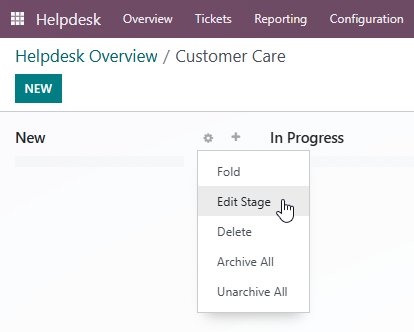
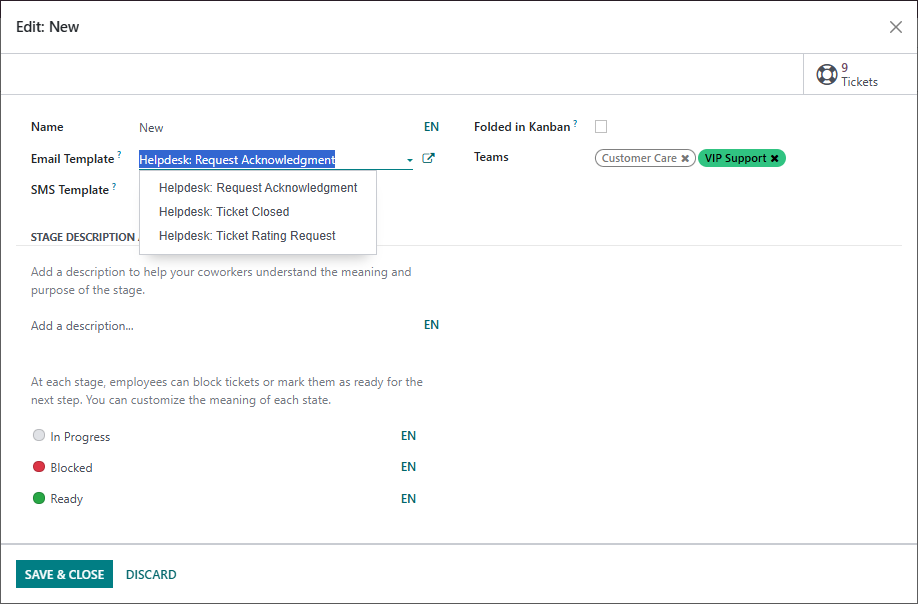
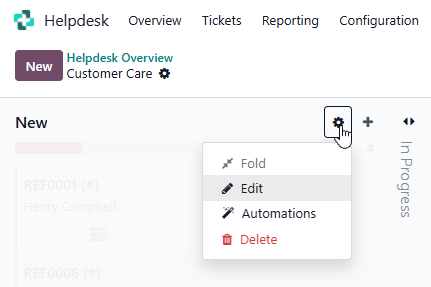
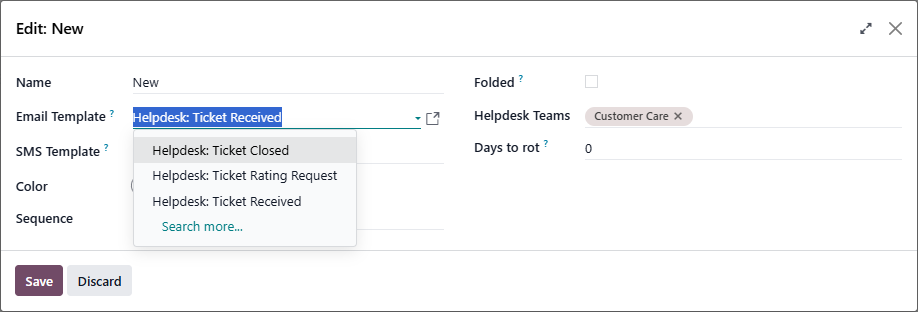
The Email sent when tickets arrive in each Stage is defined on the Stage:

Odoo 16.0:


Odoo 19.0:

0
अवतार
खारिज करें
अवतार
Cybrosys Techno Solutions Pvt.Ltd
Best Answer

Hi,

You can find the email templates used for helpdesk tickets by following a simple path inside Odoo:
    Go to Settings.
    Turn on Developer Mode so that the advanced options become visible.
    After enabling it, navigate to Technical → Email Templates.
    In the list, search for the helpdesk-related templates by typing keywords like helpdesk, ticket, or the specific action you’re looking for.

This will give you full visibility into all the automated emails triggered during the helpdesk ticket lifecycle, and you can open any template to review or update its content.


Hope it helps

0
अवतार
खारिज करें
Enjoying the discussion? Don't just read, join in!

Create an account today to enjoy exclusive features and engage with our awesome community!

साइन अप करें
Related Posts Replies डेटा देखने का तरीका ऐक्टिविटी
Customer replies autofill agent email instead of organization email
email helpdesk V16
अवतार
0
फ़र॰ 26
1237
Send helpdesk ticket acknowledgement from relevant alias email
email templates helpdesk
अवतार
0
अग॰ 21
4679
No Notification or Easy Way to Track Email Replies from Customers
ticket email helpdesk V16
अवतार
अवतार
1
मार्च 26
1769
Editing helpdesk message template
message email templates helpdesk
अवतार
0
फ़र॰ 21
5932
How to remove default header and footer from Odoo email templates Solved
email header templates helpdesk footer V16 Powered By
अवतार
अवतार
अवतार
2
मई 26
1333
कम्यूनिटी
  • ट्यूटोरियल्स
  • दस्तावेज़
  • फ़ोरम
ओपन सोर्स
  • डाउनलोड
  • Github
  • रनबॉट
  • अनुवाद
सेवाएं
  • Odoo.sh Hosting
  • सहायता
  • अपग्रेड
  • कस्टम डेवलपमेंट्स
  • शिक्षा
  • अकाउंटेंट खोजें
  • पार्टनर ढूंढें
  • पार्टनर बनें
हमारे बारे में
  • हमारी कंपनी
  • ब्रांड ऐसेट
  • संपर्क करें
  • नौकरियां
  • इवेंट
  • पॉडकास्ट
  • ब्लॉग
  • ग्राहक
  • लीगल • गोपनीयता
  • सुरक्षा
الْعَرَبيّة Català 简体中文 繁體中文 (台灣) Čeština Dansk Nederlands English Suomi Français Deutsch हिंदी Bahasa Indonesia Italiano 日本語 한국어 (KR) Lietuvių kalba Język polski Português (BR) română русский язык Slovenský jazyk Slovenščina Español (América Latina) Español Svenska ภาษาไทย Türkçe українська Tiếng Việt

Odoo, बिज़नेस से जुड़े ऐप्लिकेशन का एक कलेक्शन है जो ओपन सोर्स पर आधारित है. इसमें आपकी कंपनी की हर ज़रूरत के लिए ऐप्लिकेशन हैं. जैसे, सीआरएम, ई-कॉमर्स, अकाउंटिंग, इन्वेंट्री, पॉइंट ऑफ़ सेल, प्रोजेक्ट मैनेजमेंट वगैरह.

Odoo की सबसे बड़ी खासियत है कि यह इस्तेमाल करने में बहुत आसान है और यह पूरी तरह से इंटिग्रेट किया हुआ है.

Website made with

Odoo Experience on YouTube

1. Use the live chat to ask your questions.
2. The operator answers within a few minutes.

Live support on Youtube
Watch now