تخطي للذهاب إلى المحتوى
أودو القائمة
  • تسجيل الدخول
  • جرب مجاناً
  • التطبيقات
    المالية
    • المحاسبة
    • فوترة
    • النفقات
    • جدول البيانات (BI)
    • المستندات
    • توقيع إلكتروني
    المبيعات
    • إدارة علاقات العملاء
    • المبيعات
    • نقطة البيع للمتاجر
    • نقطة البيع للمطاعم
    • الاشتراكات
    • تأجير
    المواقع الإلكترونية
    • أداة بناء المواقع الإلكترونية
    • متاجر إلكترونية
    • مدونة
    • المنتدى
    • دردشة مباشرة
    • التعليم الإلكتروني
    سلسلة التوريد
    • المستودعات
    • التصنيع
    • إدارة دورة حياة المنتج
    • المشتريات
    • الصيانة
    • الجودة
    الموارد البشرية
    • موظفون
    • التوظيف
    • إجازة عمل
    • التقييمات
    • الإحالات
    • تطبيق الأسطول
    التسويق
    • التسويق الإجتماعي
    • التسويق عبر البريد الإلكتروني
    • التسويق عبر الرسائل النصية
    • فعاليات
    • أتمتة التسويق
    • الاستطلاعات
    الخدمات
    • المشاريع
    • الجداول الزمنية
    • الخدمة الميدانية
    • مكتب المساعدة
    • التخطيط
    • مواعيد
    اﻹنتاجية
    • مناقشة
    • Artificial Intelligence
    • إنترنت الأشياء "IoT"
    • بروتوكول ربط المحادثات الصوتية عبر الإنترنت
    • المعرفة
    • WhatsApp
    التطبيقات الخارجية ستوديو أودو منصة أودو السحابية
  • قطاعات الأعمال
    البيع بالتجزئة
    • متجر كتب
    • متجر ملابس
    • متجر أثاث
    • متجر بقالة
    • متجر معدات
    • متجر ألعاب
    الطعام والضيافة
    • بار وحانة
    • المطعم
    • مطعم للوجبات السريعة
    • نزل للضيوف
    • موزّع مشروبات
    • فندق
    العقارات
    • وكالة عقارات
    • شركة هندسة معمارية
    • البناء
    • إدارة العقارات
    • العناية بالحدائق
    • اتحاد مُلاّك العقارات
    استشارة
    • مؤسسة محاسبية
    • شريك أودو
    • وكالة تسويقية
    • منشأة قانونية
    • استقطاب المواهب
    • التدقيق والتوثيق
    التصنيع
    • الأقمشة
    • معدني
    • الأثاث
    • الطعام
    • مصنع خمور
    • هدايا الشركات
    الصحة واللياقة البدنية
    • نادي رياضي
    • متجر نظارات
    • مركز لياقة بدنية
    • الممارسون الصحيون
    • صيدلية
    • صالون تصفيف الشعر
    التجارة
    • عامل صيانة
    • الأجهزة والمعدات التقنية ودعمها
    • أنظمة الطاقة الشمسية
    • صانع أحذية
    • خدمات التنظيف
    • خدمات التكييف (HVAC)
    غير ذلك
    • منظمة غير ربحية
    • وكالة بيئية
    • تأجير لوحات إعلانية
    • تصوير
    • تأجير دراجات
    • بائع وسيط للبرمجيات
    تصفح كافة قطاعات الأعمال
  • مجتمع أودو
    تعلم
    • دروس
    • التوثيق
    • شهادات
    • التدريب
    • مدونة
    • بودكاست
    قم بتعزيز التعليم
    • برنامج تعليم
    • Scale UP! لعبة الأعمال
    • قم بزيارة أودو
    احصل على البرنامج
    • تحميل
    • قارنْ الإصدارات
    • إطلاق
    تعاون
    • جيت هاب "Github"
    • المنتدى
    • فعاليات
    • الترجمات
    • كنْ شريكاً
    • خدمات الشركاء
    • سجل مكتب المحاسبة الخاص بك
    احصل على الخدمات
    • اعثر على شريك
    • اعثر على محاسب
    • قابل أحد مرشدي الأعمال
    • خدمات التنفيذ
    • مراجع العملاء
    • الدعم
    • الترقيات
    Github Youtube Twitter Linkedin Instagram Facebook Spotify
    +1 (650) 691-3277
    الحصول على عرض توضيحي
  • الأسعار
  • المساعدة
يجب أن تكون مسجلاً حتى تتفاعل مع المجتمع.
كافة المنشورات الأفراد الشارات
علامات التصنيف (عرض الكل)
odoo accounting v14 pos v15
حول هذا المنتدى
يجب أن تكون مسجلاً حتى تتفاعل مع المجتمع.
كافة المنشورات الأفراد الشارات
علامات التصنيف (عرض الكل)
odoo accounting v14 pos v15
حول هذا المنتدى
المساعدة

Odoo Helpdesk Email Template Setup

اشتراك

تسلم الإشعارات عندما يكون هناك نشاط في هذا المنشور

لقد تم الإبلاغ عن هذا السؤال
emailtemplateshelpdeskV16
3 الردود
2400 أدوات العرض
الصورة الرمزية
Hemanth

Where can I create the email templates used for Odoo Helpdesk notifications, such as:

  • "Your ticket has been created - our team will get back to you soon"

  • "RE: {Ticket Number} - {Title}"

  • "Your ticket has been resolved"

  • "Please provide your feedback"

  • etc...

How can we send these emails automatically to the user who created the ticket? And, when a team member replies to a ticket, the response should use a predefined header and footer template, with the message content inserted between them before sending it to the user.

0
الصورة الرمزية
إهمال
Hemanth
الكاتب

Thank you for your answer. But, in the email templates, I can only find three options: “Helpdesk Changed Stage Notification Email,” “Helpdesk Closed Ticket Notification Email,” and “Ticket Assignment.” There are no templates available for editing replies or for ticket creation.

الصورة الرمزية
Intero Technologies GmbH, Chris Dominiak (Intero Technologies GmbH)
أفضل إجابة

Hi Hemanth,

You can find the email templates in Settings -> scroll all the way down and click “Enable developer mode” -> click on Technical settings in the top right corner and then edit “Email templates.”

The default templates for the help desk should all start with “Help desk:” – you can then filter them.

To create a new template for the help desk, I recommend duplicating an existing template for the help desk—this way, you can transfer the necessary parameters so that the email template can be used correctly. Here you can then enter your content, including the header and footer (you can also set the footer as a signature on user profiles – this will then be automatically added to every email sent).


You can then set the created email templates on the individual Kanban stages in the help desk configuration – these are then triggered as soon as a message is moved to or created in the corresponding stage. This allows you to send an automatic confirmation of receipt to your customers when they open a ticket, for example.


I hope I have been able to give you some pointers.


Regards,

Chris Dominiak

1
الصورة الرمزية
إهمال
الصورة الرمزية
Ray Carnes (ray)
أفضل إجابة

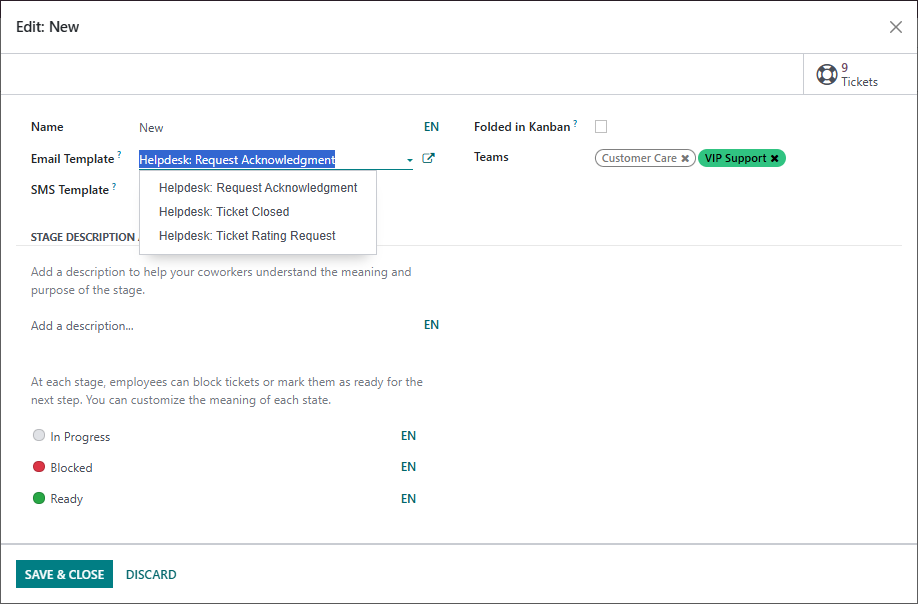
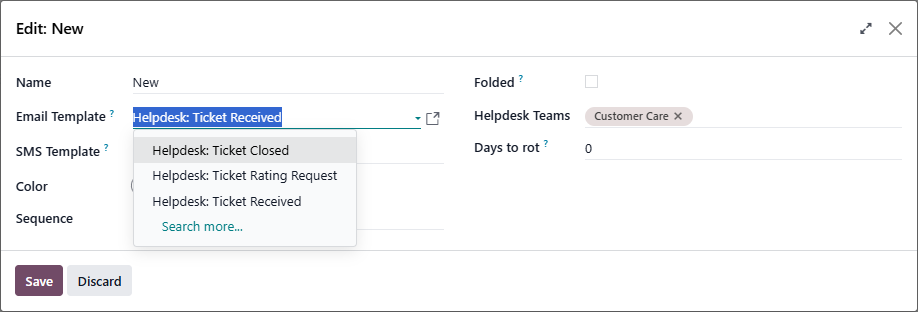
The Email sent when tickets arrive in each Stage is defined on the Stage:

Odoo 16.0:


Odoo 19.0:

0
الصورة الرمزية
إهمال
الصورة الرمزية
Cybrosys Techno Solutions Pvt.Ltd
أفضل إجابة

Hi,

You can find the email templates used for helpdesk tickets by following a simple path inside Odoo:
    Go to Settings.
    Turn on Developer Mode so that the advanced options become visible.
    After enabling it, navigate to Technical → Email Templates.
    In the list, search for the helpdesk-related templates by typing keywords like helpdesk, ticket, or the specific action you’re looking for.

This will give you full visibility into all the automated emails triggered during the helpdesk ticket lifecycle, and you can open any template to review or update its content.


Hope it helps

0
الصورة الرمزية
إهمال
هل أعجبك النقاش؟ لا تكن مستمعاً فقط. شاركنا!

أنشئ حساباً اليوم لتستمتع بالخصائص الحصرية، وتفاعل مع مجتمعنا الرائع!

تسجيل
المنشورات ذات الصلة الردود أدوات العرض النشاط
Customer replies autofill agent email instead of organization email
email helpdesk V16
الصورة الرمزية
0
فبراير 26
1237
Send helpdesk ticket acknowledgement from relevant alias email
email templates helpdesk
الصورة الرمزية
0
أغسطس 21
4697
No Notification or Easy Way to Track Email Replies from Customers
ticket email helpdesk V16
الصورة الرمزية
الصورة الرمزية
1
مارس 26
1770
Editing helpdesk message template
message email templates helpdesk
الصورة الرمزية
0
فبراير 21
5938
How to remove default header and footer from Odoo email templates تم الحل
email header templates helpdesk footer V16 Powered By
الصورة الرمزية
الصورة الرمزية
الصورة الرمزية
2
مايو 26
1335
المجتمع
  • دروس
  • التوثيق
  • المنتدى
مصدر مفتوح
  • تحميل
  • جيت هاب "Github"
  • المشغل الآلي رنبوت
  • الترجمات
خدماتنا
  • استضافة أودو إس إتش
  • الدعم
  • الترقية
  • التطويرات المخصصة
  • التعليم
  • اعثر على محاسب
  • اعثر على شريك
  • كنْ شريكاً
معلومات عنا
  • شركتنا
  • أصول العلامة التجارية
  • اتصلْ بنا
  • الوظائف
  • فعاليات
  • بودكاست
  • مدونة
  • عملاء
  • قانوني • الخصوصية
  • الحماية
الْعَرَبيّة Català 简体中文 繁體中文 (台灣) Čeština Dansk Nederlands English Suomi Français Deutsch हिंदी Bahasa Indonesia Italiano 日本語 한국어 (KR) Lietuvių kalba Język polski Português (BR) română русский язык Slovenský jazyk Slovenščina Español (América Latina) Español Svenska ภาษาไทย Türkçe українська Tiếng Việt

أودو هو عبارة عن مجموعة من تطبيقات الأعمال مفتوحة المصدر التي تغطي جميع احتياجات شركتك، مثل: إدارة علاقات العملاء والتجارة الإلكترونية والمحاسبة والمخزون ونقاط البيع وإدارة المشاريع وما إلى ذلك.

ما يجعل من أودو مميزاً هو هدفه بأن يكون سهل الاستخدام للغاية ومتكاملاً تمامًا في الوقت ذاته.

Website made with

Odoo Experience on YouTube

1. Use the live chat to ask your questions.
2. The operator answers within a few minutes.

Live support on Youtube
Watch now