Skip to Content
Odoo मेन्यू
  • साइन इन करें
  • मुफ़्त में आज़माएं
  • ऐप्लिकेशन
    फ़ाइनेंस
    • अकाउंटिंग
    • इनवॉइसिंग
    • एक्सपेंस
    • स्प्रेडशीट (बीआई)
    • डॉक्यूमेंट्स
    • साइन
    सेल्स
    • सीआरएम
    • सेल्स
    • पीओएस शॉप
    • पीओएस रेस्टोरेंट
    • सब्सक्रिप्शन
    • रेंटल
    वेबसाइट
    • वेबसाइट बिल्डर
    • ई-कॉमर्स
    • ब्लॉग
    • फ़ोरम
    • लाइव चैट
    • ई-लर्निंग
    सप्लाई चेन
    • इन्वेंट्री
    • मैन्युफ़ैक्चरिंग
    • पीएलएम
    • परचेज़
    • मेंटेनेंस
    • क्वालिटी
    मानव संसाधन
    • कर्मचारी
    • रिक्रूटमेंट
    • टाइम ऑफ़
    • अप्रेज़ल
    • रेफ़रल
    • फ़्लीट
    मार्केटिंग
    • सोशल मार्केटिंग
    • ईमेल मार्केटिंग
    • एसएमएस मार्केटिंग
    • इवेंट
    • मार्केटिंग ऑटोमेशन
    • सर्वे
    सेवाएं
    • प्रोजेक्ट
    • टाइमशीट
    • फ़ील्ड सर्विस
    • हेल्पडेस्क
    • प्लानिंग
    • अपॉइंटमेंट
    प्रॉडक्टिविटी
    • डिस्कस
    • आर्टिफ़िशियल इंटेलिजेंस
    • आईओटी
    • वीओआईपी
    • नॉलेज
    • WhatsApp
    तीसरे पक्ष के ऐप्लिकेशन Odoo स्टूडियो Odoo क्लाउड प्लेटफ़ॉर्म
  • इंडस्ट्री
    रीटेल
    • बुक स्टोर
    • क्लोदिंग स्टोर
    • फ़र्नीचर स्टोर
    • ग्रॉसरी स्टोर
    • हार्डवेयर स्टोर
    • टॉय स्टोर
    फ़ूड & हॉस्पिटैलिटी
    • बार और पब
    • रेस्टोरेंट
    • फ़ास्ट फ़ूड
    • Guest House
    • बेवरिज डिस्ट्रीब्यूटर
    • होटल
    रियल एस्टेट
    • Real Estate Agency
    • आर्किटेक्चर फ़र्म
    • कंसट्रक्शन
    • Property Management
    • गार्ड्निंग
    • प्रॉपर्टी ओनर असोसिएशन
    कंसल्टिंग
    • अकाउंटिंग फ़र्म
    • Odoo पार्टनर
    • मार्केटिंग एजेंसी
    • लॉ फ़र्म
    • टैलेंट ऐक्विज़िशन
    • ऑडिट & सर्टिफ़िकेशन
    मैन्युफ़ैक्चरिंग
    • टेक्सटाइल
    • Metal
    • फ़र्नीचर
    • फ़ूड
    • ब्रुअरी
    • कॉर्पोरेट गिफ़्ट
    हेल्थ & फिटनेस
    • स्पोर्ट्स क्लब
    • आईवियर स्टोर
    • फिटनेस सेंटर
    • वेलनेस प्रैक्टिशनर
    • फॉर्मेसी
    • हेयर सैलून
    Trades
    • Handyman
    • आईटी हॉर्डवेयर और सपोर्ट
    • Solar Energy Systems
    • Shoe Maker
    • साफ-सफाई से जुड़ी सेवाएं
    • HVAC Services
    अन्य
    • Nonprofit Organization
    • एन्वायरमेंटल एजेंसी
    • बिलबोर्ड रेंटल
    • फ़ोटोग्राफी
    • बाइक लीजिंग
    • सॉफ़्टवेयर रीसेलर
    सभी इंडस्ट्री को ब्राउज़ करें
  • कम्यूनिटी
    सीखें
    • ट्यूटोरियल्स
    • दस्तावेज़
    • सर्टिफ़िकेशन
    • ट्रेनिंग
    • ब्लॉग
    • पॉडकास्ट
    शिक्षा को बढ़ावा दें
    • एजुकेशन प्रोग्राम
    • स्केल अप! बिजनेस गेम
    • Odoo के ऑफ़िस में आएं
    सॉफ़्टवेयर पाएं
    • डाउनलोड
    • वर्शन की तुलना करें
    • रिलीज़
    साथ मिलकर काम करें
    • Github
    • फ़ोरम
    • इवेंट
    • अनुवाद
    • पार्टनर बनें
    • Services for Partners
    • अपना अकाउंटिंग फ़र्म रजिस्टर करें
    सेवाएं पाएं
    • पार्टनर ढूंढें
    • अकाउंटेंट खोजें
    • सलाहकार की मदद लें
    • इम्प्लिमेंटेशन सेवाएं
    • कस्टमर रेफ़रेंस
    • सहायता
    • अपग्रेड
    Github Youtube Twitter Linkedin Instagram Facebook Spotify
    +1 (650) 691-3277
    डेमो देखें
  • कीमत
  • सहायता
You need to be registered to interact with the community.
All Posts People Badges
टैग (View all)
odoo accounting v14 pos v15
About this forum
You need to be registered to interact with the community.
All Posts People Badges
टैग (View all)
odoo accounting v14 pos v15
About this forum
सहायता

Amazon Connector

Subscribe

Get notified when there's activity on this post

This question has been flagged
amazonamazonconnectorAmazon
3 Replies
1838 डेटा देखने का तरीका
अवतार
Cain

How can we connect the Amazon connector to a odoo 17 community edition without upgrading the odoo instance. this is for testing purpose before purchasing the connector

0
अवतार
खारिज करें
Cain
लेखक

The only option I have on the app is to upgrade, the links provided I have seen and I don't have any of the information shown on the links sent because the only option given to me on the app is upgrade, I would attach a screenshot but it wont allow me to says I need 20 karma...

अवतार
Christoph Farnleitner
Best Answer

In all cases, where there is just an Upgrade button available for an App, this means that this feature is not part of the Odoo Community Edition:
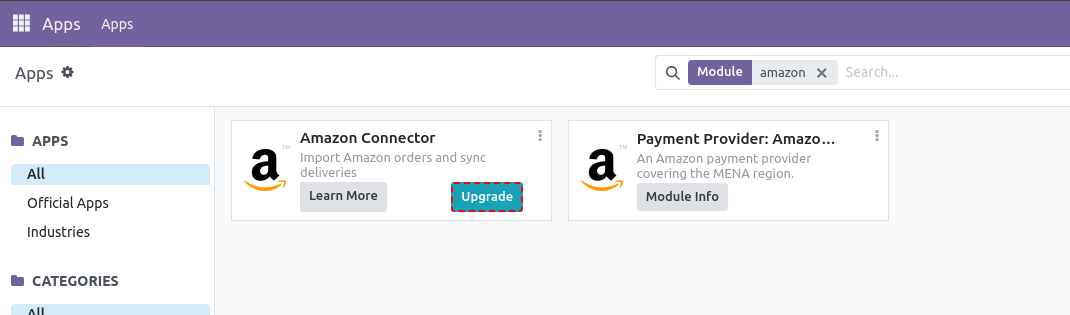
Therefore, Upgrade here means an upgrade from Odoo Community to Odoo Enterprise is necessary, if you wish to use this feature (and many others). You can't choose to just buy a single App from the Odoo Enterprise App-set and use it in your Community Edition.

However, you could run a 15 days free trial instance of Odoo Enterprise Online (Odoo 18 only!) here: https://www.odoo.com/trial

Alternatively you may go for Amazon connectors provided by the community. Whether or not these vendors provide trials, showcases, demos etc. is completely up to them.

1
अवतार
खारिज करें
अवतार
FLEXIBLES Y ACCESORIOS GOBE S.L.
Best Answer

Hi Cain,


You've already hit the core issue: Odoo's *native* Amazon connector ships only with Enterprise, so you can't enable it on Community no matter what. The 15-day Enterprise trial lets you see the native one, but it won't help you test on your actual Community instance.


The practical path for testing on Odoo 17 Community is a third-party (community-installable) Amazon connector. Those install as a normal module/app on Community, so you can run them on your existing instance and evaluate the real flow (order import, FBA/FBM stock, returns) before committing.


When you test any of them, two things worth checking up front:

- That it imports orders by SKU mapping cleanly (auto-create vs. fail on unknown SKUs).

- That FBA inventory pulls into a dedicated Amazon location and not your main warehouse.


Full disclosure: I build the FlexiGoTech Amazon Connector, which is exactly this kind of community-installable module for Odoo 17 (also 18/19). Since you specifically want to test before purchasing, I'm happy to just give you a free copy to install on your Odoo 17 Community instance and evaluate, in exchange for an honest review afterwards. No pressure, send me a message if that's useful.

0
अवतार
खारिज करें
अवतार
Cybrosys Techno Solutions Pvt.Ltd
Best Answer

Hi,

Please refer to the following links:

1. https://www.odoo.com/documentation/18.0/applications/sales/sales/amazon_connector.html

2. https://www.odoo.com/sl_SI/app/amazon-connector

3. https://www.odoo.com/documentation/18.0/applications/sales/sales/amazon_connector/setup.html

4. https://www.odoo.com/documentation/18.0/applications/sales/sales/amazon_connector/features.html


Hope it helps.

-2
अवतार
खारिज करें
Enjoying the discussion? Don't just read, join in!

Create an account today to enjoy exclusive features and engage with our awesome community!

साइन अप करें
Related Posts Replies डेटा देखने का तरीका ऐक्टिविटी
Amazon Connector for Demo
amazon amazonconnector Odoo18.0 Amazon
अवतार
अवतार
अवतार
2
अग॰ 25
2063
FBA Inventory in Odoo
stock amazon amazonconnector Amazon
अवतार
0
नव॰ 24
1996
Amazon oddo connector
amazon amazonconnector
अवतार
अवतार
1
जून 23
4186
Amazon FBA tracking inventory from supplier, prepper and through till sale at Amazon
amazon amazonconnector
अवतार
0
मई 23
2684
Problème de connecteur Odoo Amazon
amazon amazonconnector
अवतार
अवतार
1
नव॰ 22
3521
कम्यूनिटी
  • ट्यूटोरियल्स
  • दस्तावेज़
  • फ़ोरम
ओपन सोर्स
  • डाउनलोड
  • Github
  • रनबॉट
  • अनुवाद
सेवाएं
  • Odoo.sh Hosting
  • सहायता
  • अपग्रेड
  • कस्टम डेवलपमेंट्स
  • शिक्षा
  • अकाउंटेंट खोजें
  • पार्टनर ढूंढें
  • पार्टनर बनें
हमारे बारे में
  • हमारी कंपनी
  • ब्रांड ऐसेट
  • संपर्क करें
  • नौकरियां
  • इवेंट
  • पॉडकास्ट
  • ब्लॉग
  • ग्राहक
  • लीगल • गोपनीयता
  • सुरक्षा
الْعَرَبيّة Català 简体中文 繁體中文 (台灣) Čeština Dansk Nederlands English Suomi Français Deutsch हिंदी Bahasa Indonesia Italiano 日本語 한국어 (KR) Lietuvių kalba Język polski Português (BR) română русский язык Slovenský jazyk Slovenščina Español (América Latina) Español Svenska ภาษาไทย Türkçe українська Tiếng Việt

Odoo, बिज़नेस से जुड़े ऐप्लिकेशन का एक कलेक्शन है जो ओपन सोर्स पर आधारित है. इसमें आपकी कंपनी की हर ज़रूरत के लिए ऐप्लिकेशन हैं. जैसे, सीआरएम, ई-कॉमर्स, अकाउंटिंग, इन्वेंट्री, पॉइंट ऑफ़ सेल, प्रोजेक्ट मैनेजमेंट वगैरह.

Odoo की सबसे बड़ी खासियत है कि यह इस्तेमाल करने में बहुत आसान है और यह पूरी तरह से इंटिग्रेट किया हुआ है.

Website made with

Odoo Experience on YouTube

1. Use the live chat to ask your questions.
2. The operator answers within a few minutes.

Live support on Youtube
Watch now
