Skip to Content
Odoo Menu
  • Log ind
  • Prøv gratis
  • Apps
    Økonomi
    • Bogføring
    • Fakturering
    • Udgifter
    • Regneark (BI)
    • Dokumenter
    • e-Signatur
    Salg
    • CRM
    • Salg
    • POS Butik
    • POS Restaurant
    • Abonnementer
    • Udlejning
    Hjemmeside
    • Hjemmesidebygger
    • e-Handel
    • Blog
    • Forum
    • LiveChat
    • e-Læring
    Forsyningskæde
    • Lagerbeholdning
    • Produktion
    • PLM
    • Indkøb
    • Vedligeholdelse
    • Kvalitet
    HR
    • Medarbejdere
    • Rekruttering
    • Fravær
    • Medarbejdersamtaler
    • Anbefalinger
    • Flåde
    Marketing
    • Markedsføring på sociale medier
    • E-mailmarketing
    • SMS-marketing
    • Arrangementer
    • Automatiseret marketing
    • Spørgeundersøgelser
    Tjenester
    • Projekt
    • Timesedler
    • Udkørende Service
    • Kundeservice
    • Planlægning
    • Aftaler
    Produktivitet
    • Dialog
    • Kunstig intelligens
    • IoT
    • VoIP
    • Vidensdeling
    • WhatsApp
    Tredjepartsapps Odoo Studio Odoo Cloud-platform
  • Brancher
    Detailhandel
    • Boghandel
    • Tøjforretning
    • Møbelforretning
    • Dagligvarebutik
    • Byggemarked
    • Legetøjsforretning
    Mad og værtsskab
    • Bar og pub
    • Restaurant
    • Fastfood
    • Gæstehus
    • Drikkevareforhandler
    • Hotel
    Ejendom
    • Ejendomsmægler
    • Arkitektfirma
    • Byggeri
    • Ejendomsadministration
    • Havearbejde
    • Boligejerforening
    Rådgivning
    • Regnskabsfirma
    • Odoo-partner
    • Marketingbureau
    • Advokatfirma
    • Rekruttering
    • Audit & certificering
    Produktion
    • Tekstil
    • Metal
    • Møbler
    • Fødevareproduktion
    • Bryggeri
    • Firmagave
    Heldbred & Fitness
    • Sportsklub
    • Optiker
    • Fitnesscenter
    • Kosmetolog
    • Apotek
    • Frisør
    Håndværk
    • Handyman
    • IT-hardware og support
    • Solenergisystemer
    • Skomager
    • Rengøringsservicer
    • VVS- og ventilationsservice
    Andet
    • Nonprofitorganisation
    • Miljøagentur
    • Udlejning af billboards
    • Fotografi
    • Cykeludlejning
    • Softwareforhandler
    Gennemse alle brancher
  • Community
    Få mere at vide
    • Tutorials
    • Dokumentation
    • Certificeringer
    • Oplæring
    • Blog
    • Podcast
    Bliv klogere
    • Udannelselsesprogram
    • Scale Up!-forretningsspillet
    • Besøg Odoo
    Få softwaren
    • Download
    • Sammenlign versioner
    • Udgaver
    Samarbejde
    • Github
    • Forum
    • Arrangementer
    • Oversættelser
    • Bliv partner
    • Tjenester til partnere
    • Registrér dit regnskabsfirma
    Modtag tjenester
    • Find en partner
    • Find en bogholder
    • Kontakt en rådgiver
    • Implementeringstjenester
    • Kundereferencer
    • Support
    • Opgraderinger
    Github Youtube Twitter LinkedIn Instagram Facebook Spotify
    +1 (650) 691-3277
    Få en demo
  • Prissætning
  • Hjælp
Du skal være registreret for at interagere med fællesskabet.
Alle bidrag Personer Emblemer
Tags (Vis alle)
odoo accounting v14 pos v15
Om dette forum
Du skal være registreret for at interagere med fællesskabet.
Alle bidrag Personer Emblemer
Tags (Vis alle)
odoo accounting v14 pos v15
Om dette forum
Hjælp

Amazon Connector

Tilmeld

Få besked, når der er aktivitet på dette indlæg

Dette spørgsmål er blevet anmeldt
amazonamazonconnectorAmazon
3 Besvarelser
1947 Visninger
Avatar
Cain

How can we connect the Amazon connector to a odoo 17 community edition without upgrading the odoo instance. this is for testing purpose before purchasing the connector

0
Avatar
Kassér
Cain
Forfatter

The only option I have on the app is to upgrade, the links provided I have seen and I don't have any of the information shown on the links sent because the only option given to me on the app is upgrade, I would attach a screenshot but it wont allow me to says I need 20 karma...

Avatar
Christoph Farnleitner
Bedste svar

In all cases, where there is just an Upgrade button available for an App, this means that this feature is not part of the Odoo Community Edition:
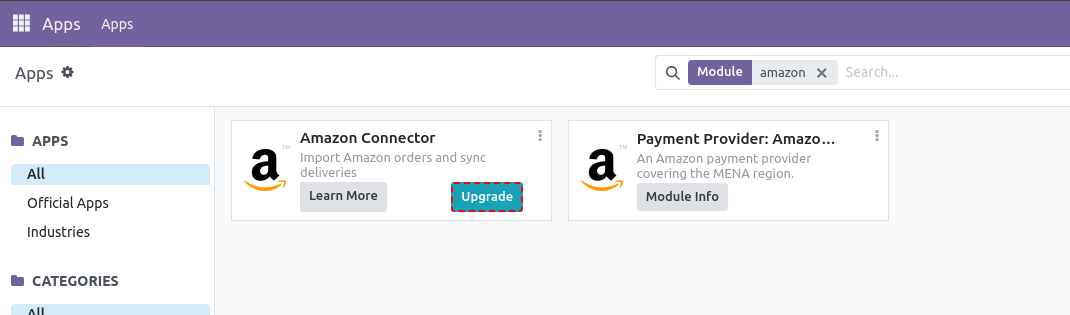
Therefore, Upgrade here means an upgrade from Odoo Community to Odoo Enterprise is necessary, if you wish to use this feature (and many others). You can't choose to just buy a single App from the Odoo Enterprise App-set and use it in your Community Edition.

However, you could run a 15 days free trial instance of Odoo Enterprise Online (Odoo 18 only!) here: https://www.odoo.com/trial

Alternatively you may go for Amazon connectors provided by the community. Whether or not these vendors provide trials, showcases, demos etc. is completely up to them.

1
Avatar
Kassér
Avatar
FLEXIBLES Y ACCESORIOS GOBE S.L.
Bedste svar

Hi Cain,


You've already hit the core issue: Odoo's *native* Amazon connector ships only with Enterprise, so you can't enable it on Community no matter what. The 15-day Enterprise trial lets you see the native one, but it won't help you test on your actual Community instance.


The practical path for testing on Odoo 17 Community is a third-party (community-installable) Amazon connector. Those install as a normal module/app on Community, so you can run them on your existing instance and evaluate the real flow (order import, FBA/FBM stock, returns) before committing.


When you test any of them, two things worth checking up front:

- That it imports orders by SKU mapping cleanly (auto-create vs. fail on unknown SKUs).

- That FBA inventory pulls into a dedicated Amazon location and not your main warehouse.


Full disclosure: I build the FlexiGoTech Amazon Connector, which is exactly this kind of community-installable module for Odoo 17 (also 18/19). Since you specifically want to test before purchasing, I'm happy to just give you a free copy to install on your Odoo 17 Community instance and evaluate, in exchange for an honest review afterwards. No pressure, send me a message if that's useful.

0
Avatar
Kassér
Avatar
Cybrosys Techno Solutions Pvt.Ltd
Bedste svar

Hi,

Please refer to the following links:

1. https://www.odoo.com/documentation/18.0/applications/sales/sales/amazon_connector.html

2. https://www.odoo.com/sl_SI/app/amazon-connector

3. https://www.odoo.com/documentation/18.0/applications/sales/sales/amazon_connector/setup.html

4. https://www.odoo.com/documentation/18.0/applications/sales/sales/amazon_connector/features.html


Hope it helps.

-2
Avatar
Kassér
Kan du lide at diskutere? Læs ikke bare med, deltag aktivt i debatten!

Opret en konto i dag for at få glæde af eksklusive funktioner, og bliv en del af vores skønne fællesskab!

Tilmeld dig
Relaterede indlæg Besvarelser Visninger Aktivitet
Amazon Connector for Demo
amazon amazonconnector Odoo18.0 Amazon
Avatar
Avatar
Avatar
2
aug. 25
2123
FBA Inventory in Odoo
stock amazon amazonconnector Amazon
Avatar
0
nov. 24
2051
Amazon oddo connector
amazon amazonconnector
Avatar
Avatar
1
jun. 23
4228
Amazon FBA tracking inventory from supplier, prepper and through till sale at Amazon
amazon amazonconnector
Avatar
0
maj 23
2753
Problème de connecteur Odoo Amazon
amazon amazonconnector
Avatar
Avatar
1
nov. 22
3549
Community
  • Tutorials
  • Dokumentation
  • Forum
Open Source
  • Download
  • Github
  • Runbot
  • Oversættelser
Tjenester
  • Odoo.sh-hosting
  • Support
  • Opgradere
  • Individuelt tilpasset udvikling
  • Uddannelse
  • Find en bogholder
  • Find en partner
  • Bliv partner
Om os
  • Vores virksomhed
  • Brandaktiver
  • Kontakt os
  • Stillinger
  • Arrangementer
  • Podcast
  • Blog
  • Kunder
  • Juridiske dokumenter • Privatlivspolitik
  • Sikkerhedspolitik
الْعَرَبيّة Català 简体中文 繁體中文 (台灣) Čeština Dansk Nederlands English Suomi Français Deutsch हिंदी Bahasa Indonesia Italiano 日本語 한국어 (KR) Lietuvių kalba Język polski Português (BR) română русский язык Slovenský jazyk Slovenščina Español (América Latina) Español Svenska ภาษาไทย Türkçe українська Tiếng Việt

Odoo er en samling open source-forretningsapps, der dækker alle dine virksomhedsbehov – lige fra CRM, e-handel og bogføring til lagerstyring, POS, projektledelse og meget mere.

Det unikke ved Odoo er, at systemet både er brugervenligt og fuldt integreret.

Website made with

Odoo Experience on YouTube

1. Use the live chat to ask your questions.
2. The operator answers within a few minutes.

Live support on Youtube
Watch now
