
Avalara Included
Avalara Included is an affordable in-app tax calculation service designed for small and medium-sized businesses with essential tax compliance needs. Built on Avalara’s AvaTax platform, Avalara Included integrates with Odoo to provide real-time, region-specific tax calculations for sales, purchases, and invoices.
Available for databases/companies with locations in the United States, Canada, and Brazil, Avalara Included automatically calculates precise tax rates at the state, county, and city levels. The service continuously accounts for changing tax laws, jurisdiction boundaries, and special circumstances such as tax holidays and product exemptions to help improve remittance accuracy and simplify tax compliance processes.
Important
Some limitations exist in Odoo while using AvaTax for tax calculation:
AvaTax uses the company address by default. To use the address of the specific warehouse that is listed in the Warehouse field on a sales order, enable Allow Ship Later in the POS app settings.
Excise tax is not supported. This includes tobacco/vape taxes, fuel taxes, and other specific industries.
See also
Avalara’s support documents: About AvaTax
Available integrations
For users in the United States and Canada, there are two options for AvaTax integration:
Avalara Included: An affordable In-App purchase service designed for SMBs with essential tax calculation needs.
Avalara Direct: A robust solution for high-volume or complex businesses, offering advanced features like tax filing and exemption management.
Avalara Included |
Avalara Direct |
|
|---|---|---|
Best fit |
SMBs / Lower Volume |
Mid-Market / Enterprise |
AvaTax Engine |
✅ |
✅ |
Cost per Transaction |
$ Credit-based |
$$ Contract-based |
Account Managed by |
Odoo IAP |
Avalara Direct |
Odoo Technical Support |
✅ |
✅ |
Annual Transaction Limit |
5,000 |
Unlimited Custom |
1st tier Support by |
Odoo |
Avalara |
Avalara Direct Support |
Limited |
✅ |
Return Prep & Filing |
⚠️ Add-on only |
⚠️ Add-on only |
Tax Remittance |
⚠️ Add-on only |
⚠️ Add-on only |
Important
Businesses that exceed 5,000 transactions annually must transition to an Avalara Direct plan to ensure uninterrupted service at higher transaction volumes.
In-App purchase credits
Avalara Included requires users to purchase credits on the Odoo IAP page.
How do credits work?
One credit is consumed every time an invoice or credit note is posted with an Avatax fiscal position. Select the package that best fits the demand, based on the estimated transactions.
Configuration
Avalara Included is available both for Odoo users who do not yet have an Avalara account and need to create one and for Odoo users with an existing Avalara account that they would like to migrate to the Avalara Included plan.
Create an Avalara Included account
Important
The Avalara account activation must be done on the production database. If the account is created from a sandbox database that does not have an associated valid enterprise account, the following error message may appear:
Odoo was unable to register with the AvaTax proxy for My US Company INVALID_DBUUID - No valid
enterprise contract!
To activate and use the Avalara Included feature, first navigate to . Then, in the Taxes section, enable the AvaTax checkbox.
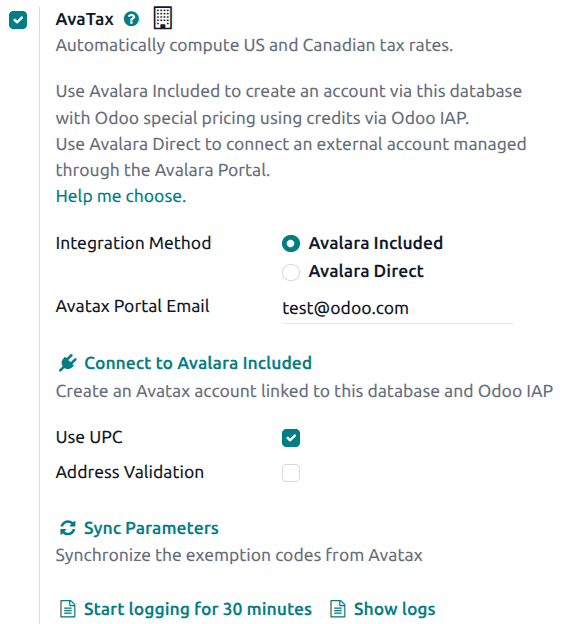
Next, select Avalara Included as the account type and enter a valid email address. This email address is used to link the company’s information to the Avalara Included account.
After the information has been entered, click Connect to Avalara Included to establish the connection between the Odoo database and the new Avalara account.
Important
As part of the account creation, Avalara’s terms and conditions must be accepted.
After accepting the terms and conditions, the Avalara account is created and an email is automatically sent to the associated email address. Follow the instructions in the email to activate the account by creating a password and registering in the Avalara Portal.
To complete the Avalara account setup, create a company profile.
Migrate to Avalara Included
Companies currently using Avalara Direct in production that have fewer than 5,000 annual transactions, including invoices and credit notes, are eligible to migrate their account plan to Avalara Included.
Important
Migrating from Avalara Direct to Avalara Included changes the Avalara account from a monthly contract model to an in-app purchase model, where transaction credits can be purchased based on volume. First-level support is also transferred to Odoo.
To begin, navigate to . In the Taxes section, under Avatax verify that the Integration Method is set to Avalara Direct. In the Environment field, select Production. Confirm that the API ID and API KEY are correctly configured. Click Migrate to Avalara Included.
After the button is clicked, a confirmation message appears outlining the changes to Avalara services and pricing before proceeding with the migration. Review the differences between each integration carefully before confirming the migration.
Once the migration is complete, a confirmation message appears indicating that the account was successfully migrated to Avalara Included.
Because the migration process uses the same email address associated with the Avalara Direct account, access to the Avalara portal remains available with the existing email address. No additional email configuration is required in Odoo.
Important
It is at this point that IAP credits must be purchased to continue using the AvaTax engine.