
I created a project in Odoo.sh and have subsequently deleted the related Github repository but the project still shows in the Odoo.sh projects list. How can I delete it completely?
Bu soru işaretlendi
3
Cevaplar
8963
Görünümler

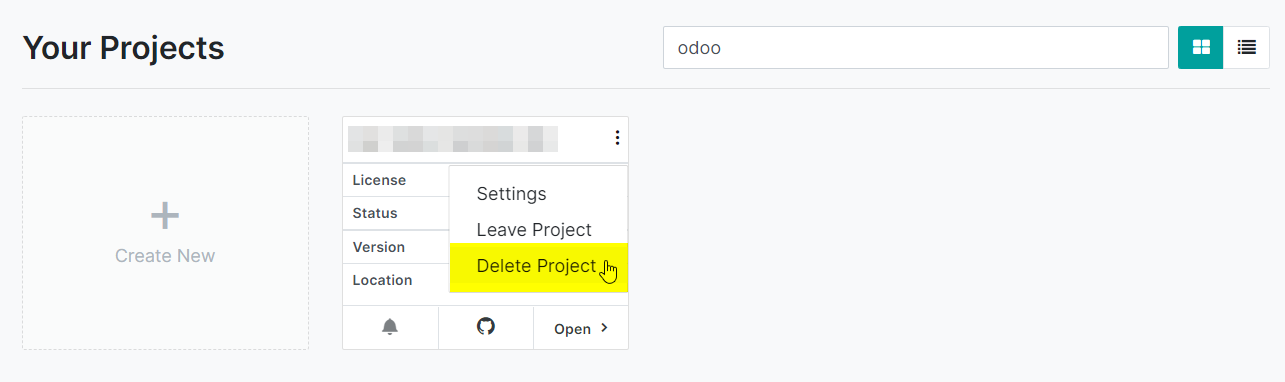
While the two answers are correct, in trying them out I discovered an easier way. In the projects page (https://www.odoo.sh/project) if you click on the three dots, there is an option "Delete Project".

Hello
there are 3 steps to find delete project option in odoo.sh
1) login into odoo.sh and select your project
2) click on setting and scroll down untill you find delete project option as per screenshot
3) click on delete project.

Thanks & Regards,

CandidRoot Solutions Pvt. Ltd.
Mobile: (+91) 8849036209
Email: info@candidroot.com
Skype: live:candidroot
Web: https://www.candidroot.com
Address: 1229-1230, Iconic Shyamal, Near Shyamal Cross Road, Ahmedabad, Gujarat 380015


So after deletion the project can I create another project using the same subscription code?
Hello Shajib Hossain,
Yes, You can create the project using the same subscription code.
Thanks,

Hi,
Open the settings page in Odoo.sh(Settings in Top bar), then at the bottom right of this page, you will see a button named Delete Project. Make sure you have enough access rights in this project.
Thanks & Regards.
Tartışma hoşunuza mı gidiyor? Sadece okumakla kalmayın, katılın!
Özel özelliklerden yararlanmak ve harika topluluğumuzla etkileşime geçmek için bugün bir hesap oluşturun!
Üye Ol| İlgili Gönderiler | Cevaplar | Görünümler | Aktivite | |
|---|---|---|---|---|

|
0
Haz 26
|
5052 | ||

|
0
Eki 22
|
4184 | ||


|
3
Ağu 25
|
5951 | ||

|
0
Mar 26
|
16 | ||


|
1
May 26
|
2024 |
