İçereği Atla
Odoo Menü
  • Portal
  • Ücretsiz deneyin
  • Uygulamalar
    Finans
    • Muhasebe
    • Faturalama
    • Masraf Yönetimi
    • Elektronik Çizelge (BI)
    • Belgeler
    • İmza
    Satış
    • Müşteri İlişkileri Yönetimi (CRM)
    • Satış
    • Satış Noktası Mağaza
    • Satış Noktası Restoran
    • Abonelikler
    • Kiralama
    Web Sitesi
    • Web Sitesi Oluşturucu
    • eTicaret
    • Blog
    • Forum
    • Canlı Sohbet
    • eÖğrenme
    Tedarik Zinciri
    • Envanter
    • Üretim
    • Ürün Yaşam Döngüsü Yönetimi
    • Satın Alma
    • Bakım
    • Kalite
    İnsan Kaynakları
    • Çalışanlar
    • İşe Alım
    • İzin
    • Değerlendirme
    • Referans
    • Filo Yönetimi
    Pazarlama
    • Sosyal Medyada Pazarlama
    • E-posta ile Pazarlama
    • SMS ile Pazarlama
    • Etkinlikler
    • Pazarlama Otomasyonu
    • Anket
    Hizmetler
    • Proje Yönetimi
    • Çalışma Çizelgeleri
    • Saha Hizmeti
    • Yardım Masası
    • Planlama
    • Randevular
    Verimlilik
    • Sohbet
    • Yapay Zeka
    • Nesnelerin İnterneti
    • VoIP
    • Bilgi Bankası
    • WhatsApp
    Üçüncü taraf uygulamalar Odoo Stüdyo Odoo Bulut Platformu
  • Sektörler
    Perakende satış
    • Kitapçı
    • Giyim Mağazası
    • Mobilya Mağazası
    • Gıda Marketi
    • Hırdavat Dükkanı
    • Oyuncak Dükkanı
    Gıda ve Konaklama
    • Bar ve Pub
    • Restoran
    • Fast Food Restoranı
    • Konuk Evi
    • İçecek Distribütörü
    • Otel
    Gayrimenkul
    • Emlak Acentesi
    • Mimarlık Firması
    • İnşaat
    • Emlak Yönetimi
    • Bahçe Tasarımı
    • Mülk Sahipleri Derneği
    Uzmanlık
    • Muhasebe Firması
    • Odoo Partner
    • Pazarlama Ajansı
    • Hukuk Firması
    • Yetenek Kazanımı
    • Denetim ve Belgelendirme
    Üretim
    • Tekstil
    • Metal
    • Mobilyalar
    • Gıda
    • Bira fabrikası
    • Kurumsal Hediye
    Sağlık ve Spor
    • Spor Kulübü
    • Optik Mağazası
    • Fitness Merkezi
    • Sağlıklı Yaşam Merkezi
    • Eczane
    • Kuaför Salonu
    Ticaret
    • Tamirci
    • BT Donanım & Destek
    • Güneş Enerjisi Sistemleri
    • Ayakkabı İmalatçısı
    • Temizlik Hizmetleri
    • HVAC Hizmetleri
    Diğerleri
    • Kar Amacı Gütmeyen Kuruluş
    • Çevre Ajansı
    • Reklam Panosu Kiralama
    • Fotoğrafçılık
    • Bisiklet Kiralama
    • Yazılım Bayisi
    Tüm Sektörlere Göz Atın
  • Topluluk
    Öğrenim
    • Eğitim Araçları
    • Dokümantasyon
    • Sertifikasyonlar
    • Eğitim Etkinlikleri
    • Blog
    • Podcast
    Eğitim ve Gelişim
    • Eğitim Programı
    • Scale Up! İşletme Oyunu
    • Odoo'yu Ziyaret Edin
    Yazılım
    • İndirin
    • Sürümleri Kıyaslayın
    • Sürümler
    İş Birliği
    • Github
    • Forum
    • Etkinlikler
    • Çeviriler
    • Partner Olun
    • Partnerler için Hizmetler
    • Muhasebe Firmanızı Kaydettirin
    Hizmetler
    • Partner Bulun
    • Muhasebeci Bulun
    • Bir danışmanla görüşün
    • Kurulum Hizmetleri
    • Müşteri Referansları
    • Destek
    • Sürüm Yükseltme
    Github Youtube Twitter Linkedin Instagram Facebook Spotify
    +1 (650) 691-3277
    Demo randevusu alın
  • Fiyatlandırma
  • Yardım
Toplulukla etkileşime geçmek için kayıtlı olmanız gerekir.
Tüm Gönderiler İnsanlar Rozetler
Etiketler (Tümünü göster)
odoo accounting v14 pos v15
Bu forum hakkında
Toplulukla etkileşime geçmek için kayıtlı olmanız gerekir.
Tüm Gönderiler İnsanlar Rozetler
Etiketler (Tümünü göster)
odoo accounting v14 pos v15
Bu forum hakkında
Yardım

✅ Delivery with UPS Integration - small things to understand / tips

Abone Ol

Bu gönderide etkinlik olduğunda bildirim alın

Bu soru işaretlendi
deliveryshippingquickstartUPS
1727 Görünümler
Avatar
Revanth Boda (rebo)

Assumptions: 

This guide assumes you already have the UPS developer account set up for use and have access to all the keys/account information. If you have not done that, please take a look here: 
https://www.odoo.com/documentation/19.0/applications/inventory_and_mrp/inventory/shipping_receiving/setup_configuration/ups_credentials.html

It also assumes you have the UPS app downloaded on your database. If you don't go to app>search for UPS> install module

You have packages enabled. Settings > search for packages > under inventory operations, enable packages


Notes:

I will only be going over simple information, as other details have nuances that can be read about in the documentation itself. This is meant to be used as a quick reference.

Some areas of trouble during initial setup:

Package and Service Types: 
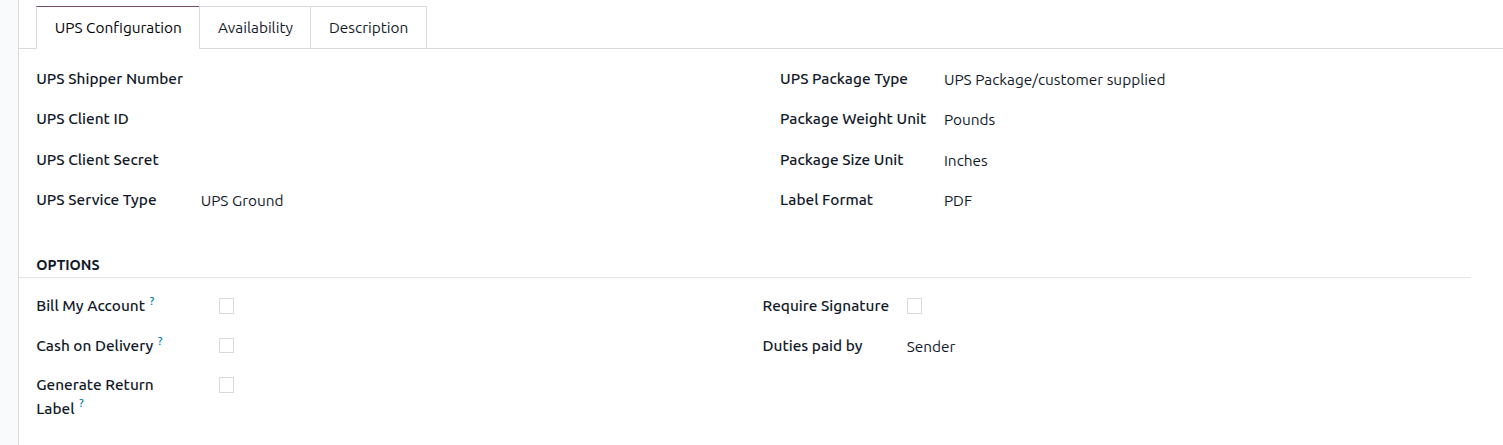

UPS Service Type and Package Type

You have to create a new delivery method for every combination of Service and Package type you use. This can be simplified by doing an import with all the relevant information.

Example: your company uses the package types UPS Letter, UPS Tube, and UPS Pak. They use the service types: UPS Ground, Standard, and Next Day. You would have to create a combination for  Ground + Letter, Ground + Tube, Ground + Pak, etc...

Generate Return Label: Enabling this automatically creates a return label when the shipping labels are created. 

Note: Sometimes you might get an error when trying to generate labels: "Only one package is allowed for this movement." This error is caused by having the return label enabled; unchecking it will remove the error. 

Shipping Label generation: 

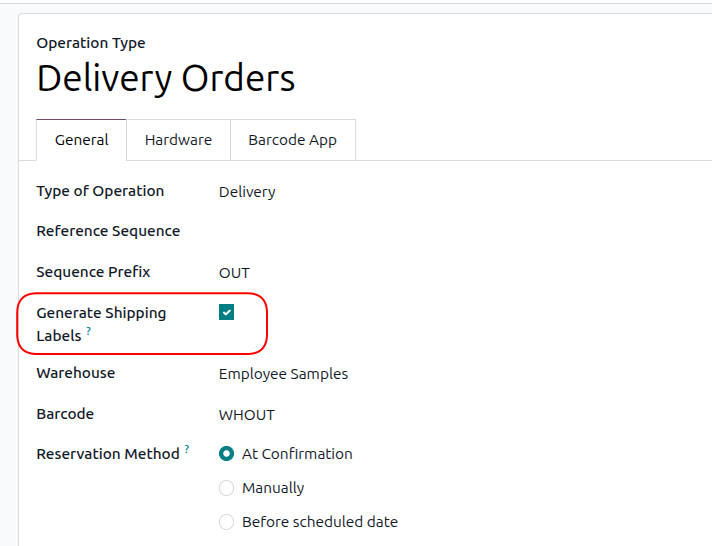
Depending on what shipment operation you selected for your warehouse (1 step, 2 step, or 3 step), you can set up when you'd like to have your shipping labels created. By default, shipping labels are created on the operation type: Delivery Orders (regardless of what step delivery) for a warehouse. You can modify these settings in Inventory > Configuration > Operation Types, then select the operation step you'd like to have them generated on. Make sure you only enable this on a SINGULAR/ONE operation step!

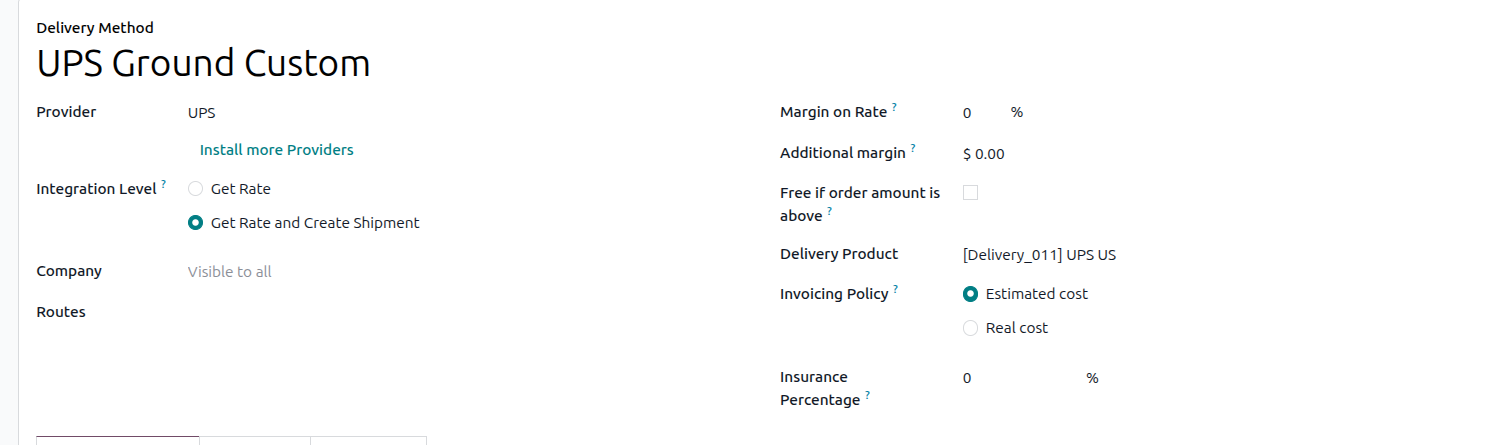
Shipping Estimate added to Sales Quote:

When getting the rate for shipping, you will get a quote based on the package's weight/dimensions. However, there is a limitation: you cannot get a quote for multiple packages/boxes. 

Example: If you know your products ship out in 2 boxes, the shipping quote will not accurately reflect that, as it only gets the rate for 1 of your packages with a combined weight of the products (unless you change it).


Note that the shipping estimate value will only appear on the quote if "Estimated Cost" was selected during the delivery method setup. If you did select this option, the real cost will be shown in the chatter at the time of label generation. 

Generating Multiple Shipping Labels: During any of your stages, you will have the option to put the products into packages. Once you put the products into multiple packages (on or before the step you set to generate labels), you can click the validate button to generate the number of labels equal to the number of packages you created.

3
Avatar
Vazgeç
Tartışma hoşunuza mı gidiyor? Sadece okumakla kalmayın, katılın!

Özel özelliklerden yararlanmak ve harika topluluğumuzla etkileşime geçmek için bugün bir hesap oluşturun!

Üye Ol
İlgili Gönderiler Cevaplar Görünümler Aktivite
UPS delivery - getting a signature
delivery UPS
Avatar
Avatar
1
Nis 25
4150
How can I use the delivery signature with the Point of Sales? Çözüldü
pos delivery shipping signature quickstart
Avatar
1
Şub 22
3864
Adding delivery method not working on website
delivery shipping
Avatar
Avatar
3
Tem 19
7833
How to use delivery methods
delivery shipping
Avatar
0
Mar 15
6930
Setting up UPS in v17 Çözüldü
shipping UPS odoo v17
Avatar
Avatar
Avatar
2
Ağu 25
1943
Topluluk
  • Eğitim Araçları
  • Dokümantasyon
  • Forum
Açık Kaynak
  • İndirin
  • Github
  • Runbot
  • Çeviriler
Hizmetler
  • Odoo.sh Hosting
  • Destek
  • Sürüm Yükseltme
  • Özel Geliştirmeler
  • Eğitim
  • Muhasebeci Bulun
  • Partner Bulun
  • Partner Olun
Hakkında
  • Şirketimiz
  • Pazarlama Gereçleri
  • İletişim
  • Kariyer
  • Etkinlikler
  • Podcast
  • Blog
  • Müşteriler
  • Hukuki • Gizlilik
  • Güvenlik
الْعَرَبيّة Català 简体中文 繁體中文 (台灣) Čeština Dansk Nederlands English Suomi Français Deutsch हिंदी Bahasa Indonesia Italiano 日本語 한국어 (KR) Lietuvių kalba Język polski Português (BR) română русский язык Slovenský jazyk Slovenščina Español (América Latina) Español Svenska ภาษาไทย Türkçe українська Tiếng Việt

Odoo, müşteri ilişkileri yönetimi, eTicaret, muhasebe, envanter, satış noktası, proje yönetimi gibi şirketinizin tüm ihtiyaçlarını karşılayan bir açık kaynak işletme uygulamaları paketidir.

Odoo’nun eşsiz değer önermesi, aynı anda hem kullanımının çok kolay olup hem de tamamen entegre olmasıdır.

Website made with

Odoo Experience on YouTube

1. Use the live chat to ask your questions.
2. The operator answers within a few minutes.

Live support on Youtube
Watch now
