Skip to Content
Odoo मेन्यू
  • साइन इन करें
  • मुफ़्त में आज़माएं
  • ऐप्लिकेशन
    फ़ाइनेंस
    • अकाउंटिंग
    • इनवॉइसिंग
    • एक्सपेंस
    • स्प्रेडशीट (बीआई)
    • डॉक्यूमेंट्स
    • साइन
    सेल्स
    • सीआरएम
    • सेल्स
    • पीओएस शॉप
    • पीओएस रेस्टोरेंट
    • सब्सक्रिप्शन
    • रेंटल
    वेबसाइट
    • वेबसाइट बिल्डर
    • ई-कॉमर्स
    • ब्लॉग
    • फ़ोरम
    • लाइव चैट
    • ई-लर्निंग
    सप्लाई चेन
    • इन्वेंट्री
    • मैन्युफ़ैक्चरिंग
    • पीएलएम
    • परचेज़
    • मेंटेनेंस
    • क्वालिटी
    मानव संसाधन
    • कर्मचारी
    • रिक्रूटमेंट
    • टाइम ऑफ़
    • अप्रेज़ल
    • रेफ़रल
    • फ़्लीट
    मार्केटिंग
    • सोशल मार्केटिंग
    • ईमेल मार्केटिंग
    • एसएमएस मार्केटिंग
    • इवेंट
    • मार्केटिंग ऑटोमेशन
    • सर्वे
    सेवाएं
    • प्रोजेक्ट
    • टाइमशीट
    • फ़ील्ड सर्विस
    • हेल्पडेस्क
    • प्लानिंग
    • अपॉइंटमेंट
    प्रॉडक्टिविटी
    • डिस्कस
    • आर्टिफ़िशियल इंटेलिजेंस
    • आईओटी
    • वीओआईपी
    • नॉलेज
    • WhatsApp
    तीसरे पक्ष के ऐप्लिकेशन Odoo स्टूडियो Odoo क्लाउड प्लेटफ़ॉर्म
  • इंडस्ट्री
    रीटेल
    • बुक स्टोर
    • क्लोदिंग स्टोर
    • फ़र्नीचर स्टोर
    • ग्रॉसरी स्टोर
    • हार्डवेयर स्टोर
    • टॉय स्टोर
    फ़ूड & हॉस्पिटैलिटी
    • बार और पब
    • रेस्टोरेंट
    • फ़ास्ट फ़ूड
    • गेस्ट हाउस
    • बेवरिज डिस्ट्रीब्यूटर
    • होटल
    रियल एस्टेट
    • रियल एस्टेट एजेंसी
    • आर्किटेक्चर फ़र्म
    • कंसट्रक्शन
    • प्रॉपर्टी मैनेजमेंट
    • गार्ड्निंग
    • प्रॉपर्टी ओनर असोसिएशन
    कंसल्टिंग
    • अकाउंटिंग फ़र्म
    • Odoo पार्टनर
    • मार्केटिंग एजेंसी
    • लॉ फ़र्म
    • टैलेंट ऐक्विज़िशन
    • ऑडिट & सर्टिफ़िकेशन
    मैन्युफ़ैक्चरिंग
    • टेक्सटाइल
    • धातु
    • फ़र्नीचर
    • फ़ूड
    • ब्रुअरी
    • कॉर्पोरेट गिफ़्ट
    हेल्थ & फिटनेस
    • स्पोर्ट्स क्लब
    • आईवियर स्टोर
    • फिटनेस सेंटर
    • वेलनेस प्रैक्टिशनर
    • फॉर्मेसी
    • हेयर सैलून
    व्यापार
    • Handyman
    • आईटी हार्डवेयर & सपोर्ट
    • सोलर एनर्जी सिस्टम
    • शू मेकर
    • साफ-सफाई से जुड़ी सेवाएं
    • HVAC सर्विस
    अन्य
    • गैर-लाभकारी संगठन
    • एन्वायरमेंटल एजेंसी
    • बिलबोर्ड रेंटल
    • फ़ोटोग्राफी
    • बाइक लीजिंग
    • सॉफ़्टवेयर रीसेलर
    सभी इंडस्ट्री को ब्राउज़ करें
  • कम्यूनिटी
    सीखें
    • ट्यूटोरियल्स
    • दस्तावेज़
    • सर्टिफ़िकेशन
    • ट्रेनिंग
    • ब्लॉग
    • पॉडकास्ट
    शिक्षा को बढ़ावा दें
    • एजुकेशन प्रोग्राम
    • स्केल अप! बिजनेस गेम
    • Odoo के ऑफ़िस में आएं
    सॉफ़्टवेयर पाएं
    • डाउनलोड
    • वर्शन की तुलना करें
    • रिलीज़
    साथ मिलकर काम करें
    • Github
    • फ़ोरम
    • इवेंट
    • अनुवाद
    • पार्टनर बनें
    • पार्टनर के लिए सेवाएं
    • अपना अकाउंटिंग फ़र्म रजिस्टर करें
    • Referral Program
    सेवाएं पाएं
    • पार्टनर ढूंढें
    • अकाउंटेंट खोजें
    • सलाहकार की मदद लें
    • इम्प्लिमेंटेशन सेवाएं
    • कस्टमर रेफ़रेंस
    • सहायता
    • अपग्रेड
    Github Youtube Twitter Linkedin Instagram Facebook Spotify
    +1 (650) 691-3277
    डेमो देखें
  • कीमत
  • सहायता
You need to be registered to interact with the community.
All Posts People Badges
टैग (View all)
odoo accounting v14 pos v15
About this forum
You need to be registered to interact with the community.
All Posts People Badges
टैग (View all)
odoo accounting v14 pos v15
About this forum
सहायता

✅ Delivery with UPS Integration - small things to understand / tips

Subscribe

Get notified when there's activity on this post

This question has been flagged
deliveryshippingquickstartUPS
1832 डेटा देखने का तरीका
अवतार
Revanth Boda (rebo)

Assumptions: 

This guide assumes you already have the UPS developer account set up for use and have access to all the keys/account information. If you have not done that, please take a look here: 
https://www.odoo.com/documentation/19.0/applications/inventory_and_mrp/inventory/shipping_receiving/setup_configuration/ups_credentials.html

It also assumes you have the UPS app downloaded on your database. If you don't go to app>search for UPS> install module

You have packages enabled. Settings > search for packages > under inventory operations, enable packages


Notes:

I will only be going over simple information, as other details have nuances that can be read about in the documentation itself. This is meant to be used as a quick reference.

Some areas of trouble during initial setup:

Package and Service Types: 
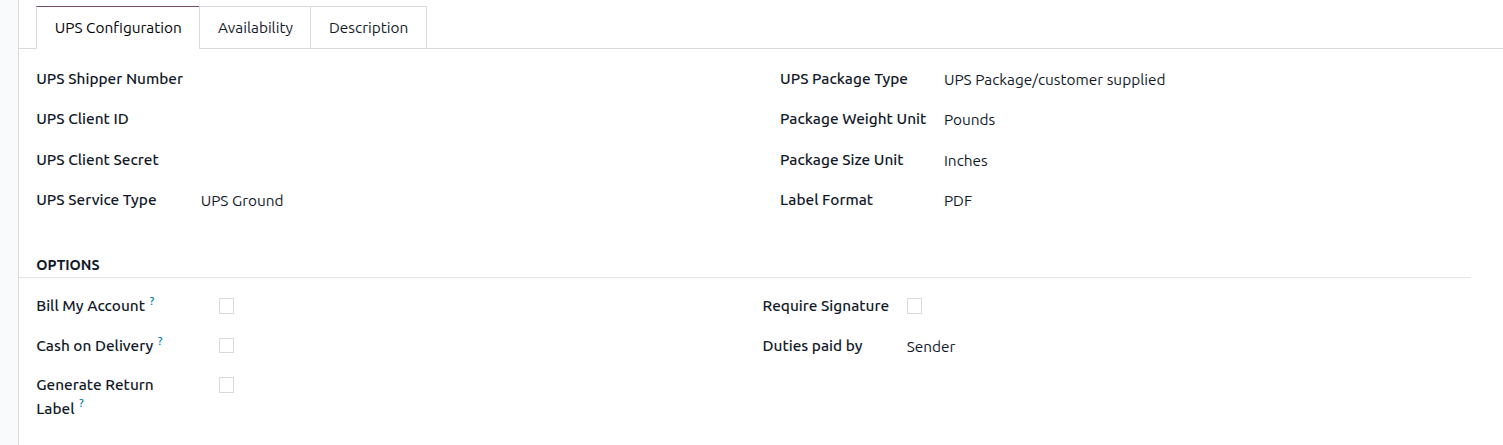

UPS Service Type and Package Type

You have to create a new delivery method for every combination of Service and Package type you use. This can be simplified by doing an import with all the relevant information.

Example: your company uses the package types UPS Letter, UPS Tube, and UPS Pak. They use the service types: UPS Ground, Standard, and Next Day. You would have to create a combination for  Ground + Letter, Ground + Tube, Ground + Pak, etc...

Generate Return Label: Enabling this automatically creates a return label when the shipping labels are created. 

Note: Sometimes you might get an error when trying to generate labels: "Only one package is allowed for this movement." This error is caused by having the return label enabled; unchecking it will remove the error. 

Shipping Label generation: 

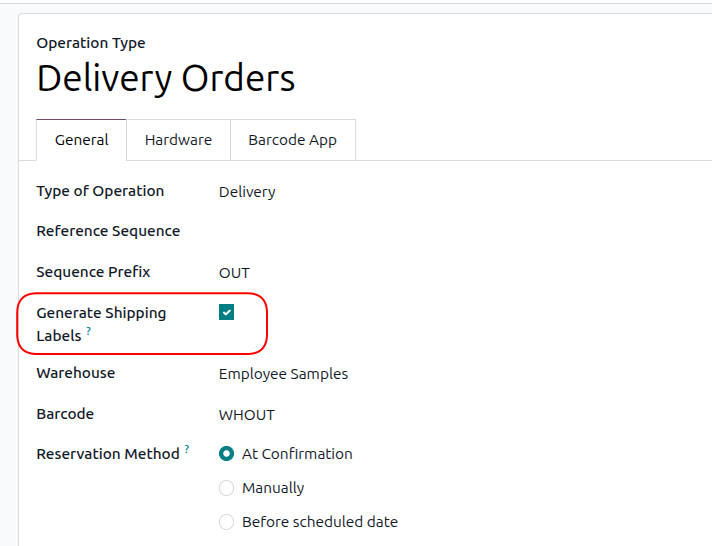
Depending on what shipment operation you selected for your warehouse (1 step, 2 step, or 3 step), you can set up when you'd like to have your shipping labels created. By default, shipping labels are created on the operation type: Delivery Orders (regardless of what step delivery) for a warehouse. You can modify these settings in Inventory > Configuration > Operation Types, then select the operation step you'd like to have them generated on. Make sure you only enable this on a SINGULAR/ONE operation step!

Shipping Estimate added to Sales Quote:

When getting the rate for shipping, you will get a quote based on the package's weight/dimensions. However, there is a limitation: you cannot get a quote for multiple packages/boxes. 

Example: If you know your products ship out in 2 boxes, the shipping quote will not accurately reflect that, as it only gets the rate for 1 of your packages with a combined weight of the products (unless you change it).


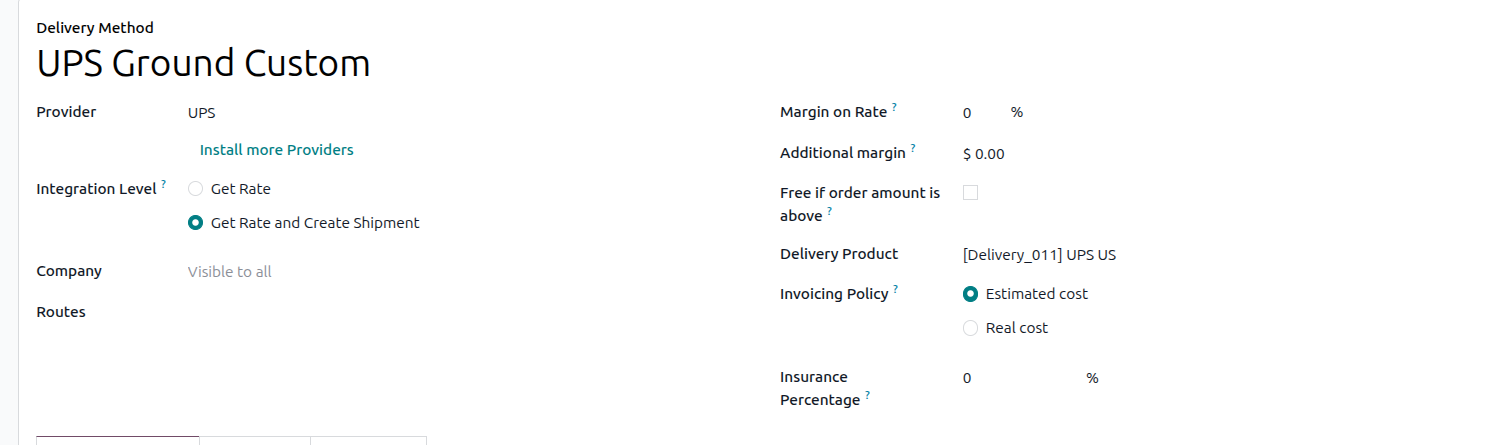
Note that the shipping estimate value will only appear on the quote if "Estimated Cost" was selected during the delivery method setup. If you did select this option, the real cost will be shown in the chatter at the time of label generation. 

Generating Multiple Shipping Labels: During any of your stages, you will have the option to put the products into packages. Once you put the products into multiple packages (on or before the step you set to generate labels), you can click the validate button to generate the number of labels equal to the number of packages you created.

3
अवतार
खारिज करें
Enjoying the discussion? Don't just read, join in!

Create an account today to enjoy exclusive features and engage with our awesome community!

साइन अप करें
Related Posts Replies डेटा देखने का तरीका ऐक्टिविटी
UPS delivery - getting a signature
delivery UPS
अवतार
अवतार
1
अप्रैल 25
4190
How can I use the delivery signature with the Point of Sales? Solved
pos delivery shipping signature quickstart
अवतार
1
फ़र॰ 22
3958
Adding delivery method not working on website
delivery shipping
अवतार
अवतार
3
जुल॰ 19
7935
How to use delivery methods
delivery shipping
अवतार
0
मार्च 15
7046
Setting up UPS in v17 Solved
shipping UPS odoo v17
अवतार
अवतार
अवतार
2
अग॰ 25
1991
कम्यूनिटी
  • ट्यूटोरियल्स
  • दस्तावेज़
  • फ़ोरम
ओपन सोर्स
  • डाउनलोड
  • Github
  • रनबॉट
  • अनुवाद
सेवाएं
  • Odoo.sh Hosting
  • सहायता
  • अपग्रेड
  • कस्टम डेवलपमेंट्स
  • शिक्षा
  • अकाउंटेंट खोजें
  • पार्टनर ढूंढें
  • पार्टनर बनें
हमारे बारे में
  • हमारी कंपनी
  • ब्रांड ऐसेट
  • संपर्क करें
  • नौकरियां
  • इवेंट
  • पॉडकास्ट
  • ब्लॉग
  • ग्राहक
  • लीगल • गोपनीयता
  • सुरक्षा
الْعَرَبيّة Català 简体中文 繁體中文 (台灣) Čeština Dansk Nederlands English Suomi Français Deutsch हिंदी Bahasa Indonesia Italiano 日本語 한국어 (KR) Lietuvių kalba Język polski Português (BR) română русский язык Slovenský jazyk Slovenščina Español (América Latina) Español Svenska ภาษาไทย Türkçe українська Tiếng Việt

Odoo, बिज़नेस से जुड़े ऐप्लिकेशन का एक कलेक्शन है जो ओपन सोर्स पर आधारित है. इसमें आपकी कंपनी की हर ज़रूरत के लिए ऐप्लिकेशन हैं. जैसे, सीआरएम, ई-कॉमर्स, अकाउंटिंग, इन्वेंट्री, पॉइंट ऑफ़ सेल, प्रोजेक्ट मैनेजमेंट वगैरह.

Odoo की सबसे बड़ी खासियत है कि यह इस्तेमाल करने में बहुत आसान है और यह पूरी तरह से इंटिग्रेट किया हुआ है.

Website made with

Odoo Experience on YouTube

1. Use the live chat to ask your questions.
2. The operator answers within a few minutes.

Live support on Youtube
Watch now
