Hoppa till innehåll
Odoo Meny
  • Logga in
  • Prova gratis
  • Appar
    Ekonomi
    • Bokföring
    • Faktura
    • Utgifter
    • Kalkylark (Affärsanalyser)
    • Dokument
    • Underskrifter
    Försäljning
    • CRM
    • Försäljning
    • Kassasystem Butik
    • Kassasystem Restaurang
    • Prenumerationer
    • Uthyrning
    Hemsida
    • Hemsidesverktyg
    • E-handel
    • Blogg
    • Forum
    • Livechatt
    • Utbildning
    Försörjningskedja
    • Lager
    • Produktion
    • Produktens livscykel (PLM)
    • Inköp
    • Underhåll
    • Kvalitet
    HR
    • Anställda
    • Rekrytering
    • Ledighet
    • Utvärderingar
    • Rekommendationer
    • Fordon
    Marknadsföring
    • Sociala medier
    • E-postmarknadsföring
    • Sms-marknadsföring
    • Evenemang
    • Automatiserad marknadsföring
    • Enkäter
    Tjänster
    • Projekt
    • Tidrapporter
    • Fältservice
    • Kundtjänst
    • Planering
    • Tidsbokningar
    Produktivitet
    • Diskutera
    • AI
    • IoT
    • VoIP
    • Kunskap
    • WhatsApp
    Community-appar Odoo Studio Odoo Cloud
  • Branscher
    Butiker
    • Bokaffärer
    • Klädbutiker
    • Möbelaffärer
    • Mataffärer
    • Byggvaruhus
    • Leksaksaffärer
    Restaurang & Hotell
    • Barer och pubar
    • Restauranger
    • Snabbmatsrestauranger
    • Gästhus
    • Dryckesdistributörer
    • Hotell
    Fastigheter
    • Fastighetsbyråer
    • Arkitektfirmor
    • Byggföretag
    • Fastighetsägare
    • Trädgårdsmästare
    • Bostadsrättsföreningar
    Hitta en konsult
    • Redovisningsbyrå
    • Odoo Partner
    • Reklambyråer
    • Advokatbyråer
    • Rekrytering
    • Revisioner och certifieringar
    Produktion
    • Textilproduktion
    • Metallproduktion
    • Möbelproduktion
    • Livsmedelsproduktion
    • Bryggerier
    • Företagsgåvor
    Hälsa och fitness
    • Sportklubbar
    • Optiker
    • Träningscenter
    • Friskvård
    • Apotek
    • Frisörsalonger
    Hantverk
    • Hantverkare
    • IT-utrustning och kundtjänst
    • Solceller, solpaneler och solenergi
    • Skomakare
    • Städföretag
    • VVS-tjänster
    Övrigt
    • Ideella föreningar
    • Miljöförvaltningar
    • Uthyrning av reklamtavlor
    • Fotografer
    • Cykeluthyrning
    • Återförsäljare av mjukvara
    Upptäck alla Branscher
  • Community
    Utbildning
    • Instruktionsvideor
    • Dokumentation
    • Certifiering
    • Utbildningar
    • Blogg
    • Podcast
    Lär dig med oss
    • Workshops
    • Företagsspelet Scale Up!
    • Studiebesök hos Odoo
    Mjukvaran
    • Ladda ner
    • Jämför utgåvor
    • Versionsinformation
    Samverkan
    • GitHub
    • Forum
    • Evenemang
    • Översättningar
    • Bli en partner
    • Partnertjänster
    • Registrera din redovisningsbyrå
    Våra tjänster
    • Partners
    • Revisorer
    • Träffa en rådgivare
    • Implementering
    • Kundrecensioner
    • Kundtjänst
    • Uppgraderingar
    GitHub Youtube Twitter Linkedin Instagram Facebook Spotify
    +1 (650) 691-3277
    Boka en demo
  • Priser
  • Hjälp
Du måste vara registrerad för att kunna interagera med communityn.
Alla inlägg Personer Utmärkelser
Etiketter (Visa alla)
odoo accounting v14 pos v15
Om detta forum
Du måste vara registrerad för att kunna interagera med communityn.
Alla inlägg Personer Utmärkelser
Etiketter (Visa alla)
odoo accounting v14 pos v15
Om detta forum
Hjälp

Stuck at Odoo database manager

Prenumerera

Få ett meddelande när det finns aktivitet på detta inlägg

Denna fråga har flaggats
installodoo
3 Svar
9472 Vyer
Avatar
Harold Anderson

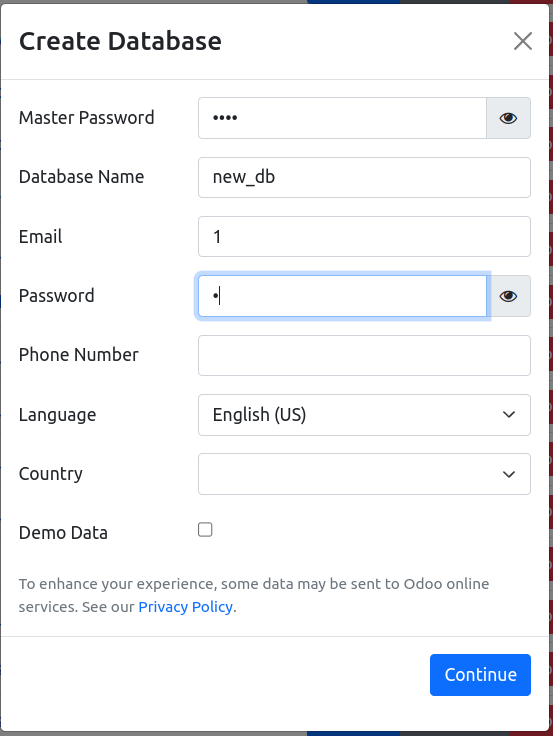
Hi!  So I installed the Odoo community edition version 17.0 on my Windows desktop, and it dumps me at a screen that says it has generated a master password.  Then it asks for another master password, a database name, an email address, yet another password, a phone number, language, country, and a checkbox for demo data.  Then there is a big blue Create Database button.


Before I even got to this screen, I installed Postgres.  This created a database called Postgres.  I then created another user called odoo with create database permissions and login permissions.  I know Postgres is running because I can do stuff in pgAdmin.   I'm not sure what to fill in at the Odoo screen for Master password, database name, email, password, phone number, language, country, and demo data.  I've tried a lot of combinations of things, and I always get an error message saying 


Database creation error: connection to server at "localhost" (::1), port 5432 failed: FATAL: password authentication failed for user "openpg"

So I created another user called openpg with the same permissions, but I'm still getting the same error message.   What is the purpose of the screen I am at, and what should I fill in? 

0
Avatar
Avbryt
Avatar
Cybrosys Techno Solutions Pvt.Ltd
Bästa svar

Hi,

The below image will be shown in your screen to create a new database. A database is required to run odoo in your system


1) Master Password : Enter the admin password that you provided while installing odoo. you can find the admin_password from your odoo conf file

2)Database Name : Provide a name for your database. Use _ instead of space while creating database name

3)Email: Provide a login credential this will be taken as your login ID to your db

4)Password: Provide a password, and this will be taken as your login Password to your DB

5)Demo Data: If you need some demo data in your DB while creating , then you can enable it else leave it

Click on continue to create DB


Hope it helps

-1
Avatar
Avbryt
Avatar
Harold Anderson
Författare Bästa svar

@cybrosys That is not the screen that was shown.  I said above, this is the screen that was shown when installing Odoo, whereas you have stated that your screen is shown after creating a master password.  The question again:

1.  What is the purpose of the master password?  Is this a password in Postgres, or something that Odoo keeps internally for some purpose?  If so, what purpose?

2. Why is Odoo giving me a master password on the installation screen, then immediately giving me a blank to enter that password and/or change it?  Am I supposed to enter the master password they have shown me, or am I supposed to enter a new master password?  In any event, an entry is mandatory.

3. What is the database you are referring to in #2?  Is this the postgres database that the postgres installer created when Postgres was installed?  In that case, wouldn't Odoo know that the name is postgres?   If Odoo needs another database, wouldn't the install docs say that I should have created that database in Postgres first?  If Odoo is going to create another Postgres database and is asking for the name of the new Postgres database, why wouldn't they make that clear?   In any event, it is very unclear what is going on.

4. Email will be login to my db?  Again, the install docs do say that I need to create a new Postgres db, and that odoo cannot use the postgres db.   I also think that I was supposed to create another Postgres user called odoo because odoo is not allowed to use the main postgres user, which is also called postgres, not openpg.  It is a real mystery where openpg came from.

5.  You can probably see that if I don't know the answers to the above four questions, I have no idea what password they are asking for in the blank between email and Phone number.

I don't know what or where the odoo conf file you refer to is.  The install instructions say merely to download the nightly exe file and run it. I don't have enough karma to post the link, but it is at www dot odoo dot com slash documentation slash 17.0 slash administration slash on_premise slash packages.html then scroll down to Windows.

I would unmark your answer as the correct answer, but I do not have enough karma to do that.  Not sure who marked the answer as correct, because it isn't.


0
Avatar
Avbryt
Avatar
RAGESH KUMAR G
Bästa svar

Hi Harold Anderson  ,

  • You can Change the pg_hba.conf file below,
host    all             all             0.0.0.0/0            trust

It was worked for me.

Thanks

0
Avatar
Avbryt
Njuter du av diskussionen? Läs inte bara, delta också!

Skapa ett konto idag för att ta del av exklusiva funktioner och engagera dig i vår fantastiska community!

Registrera dig
Relaterade inlägg Svar Vyer Verksamhet
Odoo 10.0 manual install modules Löst
modules install odoo
Avatar
Avatar
Avatar
Avatar
5
apr. 17
21596
Where can I download odoo for Ubuntu? Löst
install packing odoo
Avatar
Avatar
2
mars 15
6320
I need to install Odoo on Centos 5.10
install vps odoo
Avatar
Avatar
2
mars 15
8238
The Field be configured to show the currently logged-in user in real-time?
odoo
Avatar
0
juni 26
5
[United^%~Salvador] ¿Cómo puedo llamar a United Airlines desde El Salvador? 
odoo
Avatar
1
juni 26
2152
Community
  • Instruktionsvideor
  • Dokumentation
  • Forum
Öppen källkod
  • Ladda ner
  • GitHub
  • Runbot
  • Översättningar
Tjänster
  • Odoo.sh Hosting
  • Kundtjänst
  • Uppgradera
  • Anpassningsbara modifikationer
  • Utbildning
  • Revisorer
  • Partners
  • Bli en partner
Om oss
  • Vårt företag
  • Varumärkestillgångar
  • Kontakta oss
  • Jobb
  • Evenemang
  • Podcast
  • Blogg
  • Kunder
  • Juridiskt • Integritet
  • Säkerhet
الْعَرَبيّة Català 简体中文 繁體中文 (台灣) Čeština Dansk Nederlands English Suomi Français Deutsch हिंदी Bahasa Indonesia Italiano 日本語 한국어 (KR) Lietuvių kalba Język polski Português (BR) română русский язык Slovenský jazyk Slovenščina Español (América Latina) Español Svenska ภาษาไทย Türkçe українська Tiếng Việt

Odoo är ett affärssystem med öppen källkod som täcker alla dina företagsbehov: CRM, e-handel, bokföring, lager, kassasystem, projektledning, och så vidare.

Odoos unika värdeförslag är att samtidigt vara väldigt enkel att använda men också helt integrerad.

Website made with

Odoo Experience on YouTube

1. Use the live chat to ask your questions.
2. The operator answers within a few minutes.

Live support on Youtube
Watch now