Hoppa till innehåll
Odoo Meny
  • Logga in
  • Prova gratis
  • Appar
    Ekonomi
    • Bokföring
    • Fakturering
    • Utgifter
    • Kalkylark (Affärsanalyser)
    • Dokument
    • Underskrifter
    Försäljning
    • CRM
    • Försäljning
    • Kassasystem Butik
    • Kassasystem Restaurang
    • Prenumerationer
    • Uthyrning
    Hemsida
    • Hemsidesverktyg
    • E-handel
    • Blogg
    • Forum
    • Livechatt
    • Utbildning
    Försörjningskedja
    • Lager
    • Produktion
    • Produktens livscykel (PLM)
    • Inköp
    • Underhåll
    • Kvalitet
    HR
    • Anställda
    • Rekrytering
    • Ledighet
    • Utvärderingar
    • Rekommendationer
    • Fordon
    Marknadsföring
    • Sociala medier
    • E-postmarknadsföring
    • Sms-marknadsföring
    • Evenemang
    • Automatiserad marknadsföring
    • Enkäter
    Tjänster
    • Projekt
    • Tidrapporter
    • Fältservice
    • Kundtjänst
    • Planering
    • Tidsbokningar
    Produktivitet
    • Diskutera
    • AI
    • IoT
    • VoIP
    • Kunskap
    • WhatsApp
    Community-appar Odoo Studio Odoo Cloud
  • Branscher
    Butiker
    • Bokaffärer
    • Klädbutiker
    • Möbelaffärer
    • Mataffärer
    • Byggvaruhus
    • Leksaksaffärer
    Restaurang & Hotell
    • Barer och pubar
    • Restauranger
    • Snabbmatsrestauranger
    • Gästhus
    • Dryckesdistributörer
    • Hotell
    Fastigheter
    • Fastighetsbyråer
    • Arkitektfirmor
    • Byggföretag
    • Fastighetsägare
    • Trädgårdsmästare
    • Bostadsrättsföreningar
    Hitta en konsult
    • Redovisningsbyrå
    • Odoo Partner
    • Reklambyråer
    • Advokatbyråer
    • Rekrytering
    • Revisioner och certifieringar
    Produktion
    • Textilproduktion
    • Metallproduktion
    • Möbelproduktion
    • Livsmedelsproduktion
    • Bryggerier
    • Företagsgåvor
    Hälsa och fitness
    • Sportklubbar
    • Optiker
    • Träningscenter
    • Friskvård
    • Apotek
    • Frisörsalonger
    Hantverk
    • Hantverkare
    • IT-utrustning och kundtjänst
    • Solceller, solpaneler och solenergi
    • Skomakare
    • Städföretag
    • VVS-tjänster
    Övrigt
    • Ideella föreningar
    • Miljöförvaltningar
    • Uthyrning av reklamtavlor
    • Fotografer
    • Cykeluthyrning
    • Återförsäljare av mjukvara
    Upptäck alla Branscher
  • Community
    Utbildning
    • Instruktionsvideor
    • Dokumentation
    • Certifiering
    • Utbildningar
    • Blogg
    • Podcast
    Lär dig med oss
    • Workshops
    • Företagsspelet Scale Up!
    • Studiebesök hos Odoo
    Mjukvaran
    • Ladda ner
    • Jämför utgåvor
    • Versionsinformation
    Samverkan
    • GitHub
    • Forum
    • Evenemang
    • Översättningar
    • Bli en partner
    • Partnertjänster
    • Registrera din redovisningsbyrå
    Våra tjänster
    • Partners
    • Revisorer
    • Träffa en rådgivare
    • Implementering
    • Kundrecensioner
    • Kundtjänst
    • Uppgraderingar
    GitHub Youtube Twitter Linkedin Instagram Facebook Spotify
    +1 (650) 691-3277
    Boka en demo
  • Priser
  • Hjälp
Du måste vara registrerad för att kunna interagera med communityn.
Alla inlägg Personer Utmärkelser
Etiketter (Visa alla)
odoo accounting v14 pos v15
Om detta forum
Du måste vara registrerad för att kunna interagera med communityn.
Alla inlägg Personer Utmärkelser
Etiketter (Visa alla)
odoo accounting v14 pos v15
Om detta forum
Hjälp

payment appointment

Prenumerera

Få ett meddelande när det finns aktivitet på detta inlägg

Denna fråga har flaggats
paymentappointmentsappointmentPaid
4 Svar
6299 Vyer
Avatar
Tilty, NAVATTE Fanny

I want to require online payment to confirm appointment on my website. How can I do ? Thanks

0
Avatar
Avbryt
Avatar
Vimal Rughani
Bästa svar

Hello NAVATTE Fanny,

On Odoo 17 its very easy and straightforward to achieve that. Please follow below steps for making payment mandatory on your website:

  1. Go to the Appointments module.
  2. Set the schedule for the appointment.
  3. Go to the Options tab.
  4. Select the option for up-front payment.
  5. Choose the product or service for which you want to require payment.
  6. Go to your website settings.
  7. Publish the changes.


This will ensure that online payment is required to confirm appointment.

I hope this will help you !

Thanks,
Vimal Rughani (Founder and CTO)
Himanjali Intelligent Automation Pvt Ltd
Contact:
 +91- 972-606-7737
Email: hello@himanjali.com 
Newsletter: The Odoo Scoop
Website: www.himanjali.co  

0
Avatar
Avbryt
Avatar
Cybrosys Techno Solutions Pvt.Ltd
Bästa svar

Hi, Please check how to set up online payments

Setting Up Online Payments:

Choose a Payment Gateway: Odoo integrates with several popular payment gateways like Stripe, Paypal, Adyen, etc. Consider transaction fees, supported currencies, and desired features when choosing one.


Configure the Gateway: Follow Odoo's guide for your chosen gateway. This will involve adding credentials, setting up accounts, and defining product/service details.
Create Payment Products: In Odoo, create product(s) for your appointment bookings. Include details like type (service), name (e.g., "Appointment Fee"), and price.

Setting Up Online Payments in Odoo: https://youtu.be/gXJ8aSY5bXo?si=4Afh1gWYtstEbI6l

Documentation: https://www.odoo.com/documentation/17.0/applications/finance/payment_providers.html


Hope it helps

0
Avatar
Avbryt
Avatar
Wan Buffer Services, Wan Buffer Services
Bästa svar

Hello, You can follow the below steps to archive Payment in Appointment :


Set Up 10-Minute Gap Appointments:

  1. Go to Appointment Slots:
    • Click on "Website" in the main menu.
    • Select "Appointments" from the dropdown menu.
    • Choose "Appointment Slots."
  2. Edit or Create a Service:
    • If you have existing services, click on one to edit. Otherwise, create a new service.
    • Look for the "Duration" field and set it to 60 minutes (1 hour).
    • Look for the "Appointment Time" section.
    • Manually set specific time slots like 8:00, 8:10, 8:20, etc
  3. Set 10-Minute Slot Duration:
    • Find the "Slot Duration" field and set it to 10 minutes.
    • Make sure to save your changes.
  4. Check Working Hours:
    • Go to "Settings" in the main menu.
    • Select "Users & Companies" and then "Users."
    • Confirm that your working hours are correctly configured.

Associate Service Price with Appointments:

  1. Enable Pricing in Appointment Services:
    • Click on "Website" in the main menu.
    • Select "Appointments" from the dropdown menu.
    • Choose "Services."
    • Edit the service for which you want to associate a price.
    • In the "Payment" section, enable the "Ask for Payment" option.
  2. Set Service Price:
    • In the same service edit page, set the service price in the "Price" field.
  3. Configure Tax (Optional):
    • If applicable, scroll down to the "Taxes" section to configure taxes for the service.
0
Avatar
Avbryt
Avatar
Ammar Mahmood Ali Abdullatif
Bästa svar

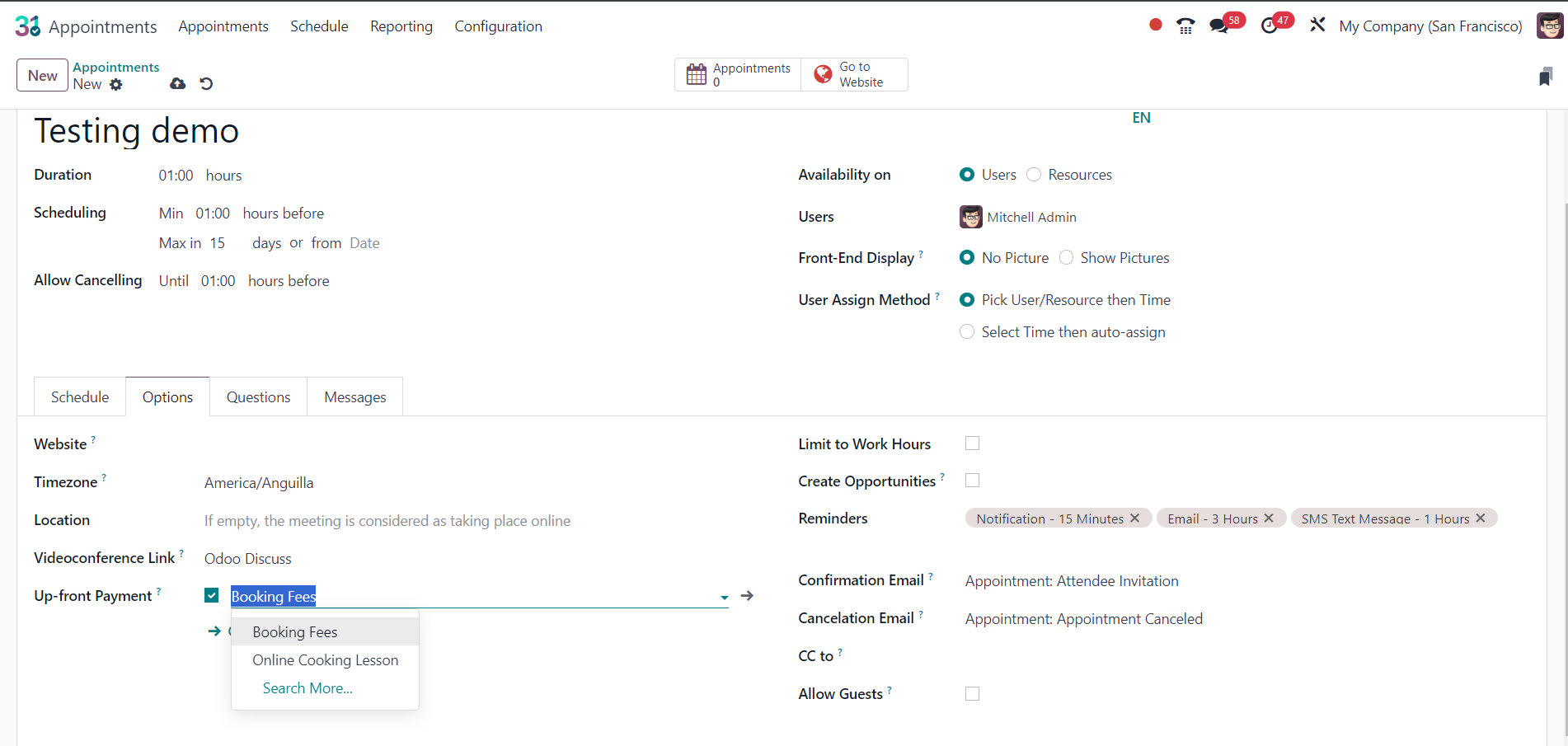
In the appointment, there is an option called  Up-front Payment where you can add a booking fee product.

0
Avatar
Avbryt
Njuter du av diskussionen? Läs inte bara, delta också!

Skapa ett konto idag för att ta del av exklusiva funktioner och engagera dig i vår fantastiska community!

Registrera dig
Relaterade inlägg Svar Vyer Verksamhet
How I change the appointment price based on People Booked? (Odoo 17)
appointments appointment
Avatar
0
feb. 24
2738
FIXED: Post install configuration error for s2u_online_appointment on Odoo 12 "psycopg2.ProgrammingError: column "user_specific" of relation "s2u_appointment_option" does not exist" Löst
appointments appointment
Avatar
Avatar
2
nov. 20
4625
How do I publish Appointments to the Website in Odoo 19? The publish button is not available Löst
appointments appointment Appointments
Avatar
Avatar
1
nov. 25
1597
Appointment Filter
filter appointments appointment Filter
Avatar
0
mars 24
1978
How can I Schedule an appoitment on Odoo Appointments?
appointments appointment rpcjson RPC Appointments
Avatar
Avatar
1
maj 25
2241
Community
  • Instruktionsvideor
  • Dokumentation
  • Forum
Öppen källkod
  • Ladda ner
  • GitHub
  • Runbot
  • Översättningar
Tjänster
  • Odoo.sh Hosting
  • Kundtjänst
  • Uppgradera
  • Anpassningsbara modifikationer
  • Utbildning
  • Revisorer
  • Partners
  • Bli en partner
Om oss
  • Vårt företag
  • Varumärkestillgångar
  • Kontakta oss
  • Jobb
  • Evenemang
  • Podcast
  • Blogg
  • Kunder
  • Juridiskt • Integritet
  • Säkerhet
الْعَرَبيّة Català 简体中文 繁體中文 (台灣) Čeština Dansk Nederlands English Suomi Français Deutsch हिंदी Bahasa Indonesia Italiano 日本語 한국어 (KR) Lietuvių kalba Język polski Português (BR) română русский язык Slovenský jazyk Slovenščina Español (América Latina) Español Svenska ภาษาไทย Türkçe українська Tiếng Việt

Odoo är ett affärssystem med öppen källkod som täcker alla dina företagsbehov: CRM, e-handel, bokföring, lager, kassasystem, projektledning, och så vidare.

Odoos unika värdeförslag är att samtidigt vara väldigt enkel att använda men också helt integrerad.

Website made with

Odoo Experience on YouTube

1. Use the live chat to ask your questions.
2. The operator answers within a few minutes.

Live support on Youtube
Watch now