Перейти к содержимому
Odoo Меню
  • Войти
  • Попробовать бесплатно
  • Модули
    Финансы
    • Бухгалтерия
    • Выставление счетов
    • Расходы
    • Таблицы
    • Документооборот
    • Подпись
    Продажи
    • CRM
    • Продажи
    • POS Магазин
    • POS Ресторан
    • Подписки
    • Аренда
    Вебсайты
    • Конструктор вебсайтов
    • eCommerce
    • Блог
    • Форум
    • Онлайн-чат
    • Электронное обучение
    Логистика
    • Склад
    • Производство
    • PLM
    • Закупки
    • Обслуживание
    • Качество
    Отдел кадров
    • Сотрудники
    • Подбор персонала
    • Отпуска
    • Оценка персонала
    • Реферальная программа
    • Автопарк
    Маркетинг
    • SMM
    • E-mail рассылки
    • СМС рассылки
    • Мероприятия
    • Автоматизация маркетинга
    • Опросы
    Услуги
    • Проекты
    • Табели
    • Выездной сервис
    • Поддержка
    • Планирование
    • Встречи
    Продуктивность
    • Обсуждения
    • Искусственный интеллект
    • IoT
    • VoIP-телефония
    • Knowledge
    • WhatsApp
    Сторонние приложения Модуль Студия Odoo Платформа Odoo Cloud
  • Индустрии
    Розничная торговля
    • Книжный магазин
    • Магазин одежды
    • Мебельный магазин
    • Продуктовый магазин
    • Строительный магазин
    • Магазин игрушек
    Гостинично-ресторанный бизнес
    • Бар и паб
    • Ресторан
    • Фастфуд
    • Гостевой дом
    • Дистрибьютор напитков
    • Отель
    Недвижимость
    • Агентство недвижимости
    • Архитектурное бюро
    • Строительство
    • Управление недвижимостью
    • Ландшафтный дизайн
    • Товарищество собственников жилья
    Консалтинг
    • Бухгалтерская фирма
    • Партнер Odoo
    • Маркетинговое агентство
    • Юридическая фирма
    • Подбор персонала
    • Аудиторское бюро
    Производство
    • Текстиль
    • Металл
    • Мебель
    • Продукты питания
    • Пивоварня
    • Корпоративные сувениры
    Здоровье и фитнес
    • Спортивный комплекс
    • Магазин оптики
    • Фитнес-клуб
    • Велнес-центр
    • Аптека
    • Салон красоты
    Услуги
    • Специалист по бытовым услугам
    • Продажа и обслуживание IT-оборудования
    • Солнечные энергосистемы
    • Производство обуви
    • Клининг
    • Системы ОВКВ
    Прочее
    • Некоммерческая организация
    • Консалтинг в сфере устойчивого развития
    • Аренда рекламных щитов
    • Бизнес по фотосъемке
    • Прокат велосипедов
    • Реселлер программного обеспечения
    Все индустрии
  • Community
    Обучение
    • Видео уроки
    • Документация
    • Сертификация
    • Тренинг
    • Блог
    • Подкаст
    Образование и развитие
    • Образовательная программа
    • Деловая игра Scale Up!
    • Экскурсия в офис Odoo
    ПО
    • Скачать
    • Сравнить версии
    • Релизы
    Сотрудничество
    • Github
    • Форум
    • Мероприятия
    • Перевод
    • Стать партнером
    • Услуги для партнеров
    • Зарегистрировать бухгалтерскую фирму
    Услуги
    • Найти партнера
    • Найти бухгалтера
    • Встреча с экспертом
    • Услуги по внедрению
    • Отзывы клиентов
    • Поддержка
    • Обновления
    Github Youtube Twitter Linkedin Instagram Facebook Spotify
    +1 (650) 691-3277
    Заказать демонстрацию
  • Цены
  • Поддержка
Чтобы взаимодействовать с сообществом, необходимо зарегистрироваться.
Все посты Люди Значки
Теги (Смотреть все)
odoo accounting v14 pos v15
Об этом форуме
Чтобы взаимодействовать с сообществом, необходимо зарегистрироваться.
Все посты Люди Значки
Теги (Смотреть все)
odoo accounting v14 pos v15
Об этом форуме
Помощь

Multi-step subcontracting process

Подписаться

Получайте уведомления о появлении активности в этом посте

Этот вопрос был отмечен
QuickstartSF-Experts
1 Ответить
5500 Представления
Аватар
Harishankar Unnikrishnan (hun)

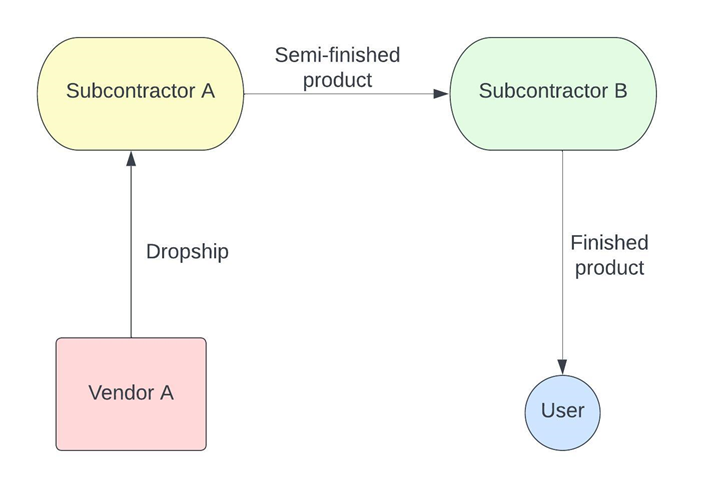
Our product goes through a lifecycle of 2 manufacturing processes done by separate subcontractors. We do not send the components for subcontracting, instead a vendor dropships it directly to the first subcontractor.


A good example of this would be subcontracting a T-shirt printing process. Let’s assume that Vendor A sells blank T-shirts that need printing. We need them to dropship the blank Tee to Subcontractor A, who does the black-and-white printing. Following this process, they should directly send it to Subcontractor B, who prints the colors on the T-shirt. Finally, the T-shirt is received into our inventory. 


At no point during the process do we receive any other semi-finished products. How do you configure this?
0
Аватар
Отменить
Аватар
Harishankar Unnikrishnan (hun)
Автор Лучший ответ

The process flow is as follows - 

Configurations

Since the process involves a multi-step process, we need to setup multiple products that represent the different stages of the product lifecycle. Apart from having the components (raw materials) and the finished product, we also need to have a semi-finished product because the product is essentially subcontracted twice. In this example, let us assume the raw material is a Blank T-shirt. After subcontractor A works on the black & white printing, let’s call it Semi-printed T-shirt. Finally, the finished product is called Graphic T-shirt. Lets take a look at how each of these products are configured in Odoo to ensure the correct route.

Firstly, make sure you have Subcontracting, Locations, Multi-step routes and Dropship turned on, without which we will not be able to configure these products.

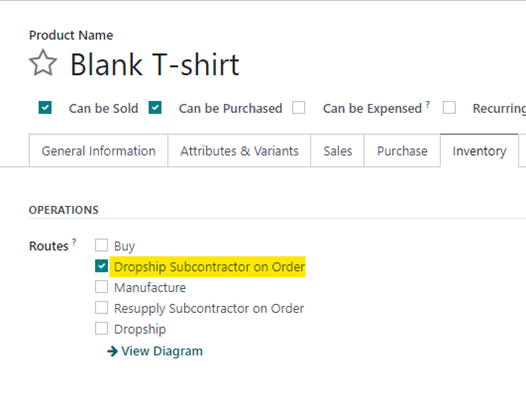
Blank T-shirt

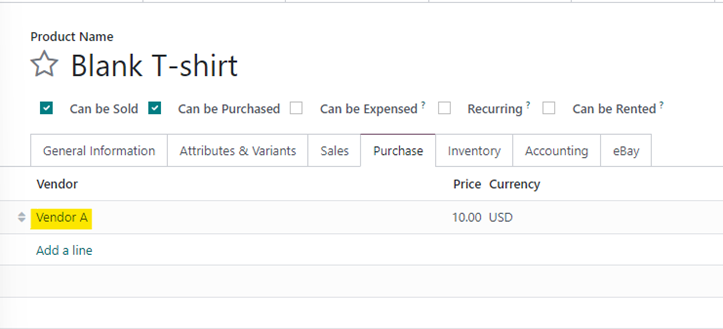
The Blank T-shirt will need to have “Dropship subcontractor on Order” set as the route, since it is being drop shipped from Vendor A to Subcontractor A.


To ensure that a PO is created for the right vendor, we also need to ensure that ‘Vendor A’ is set on the Purchase Tab.


Semi-Printed T-shirt

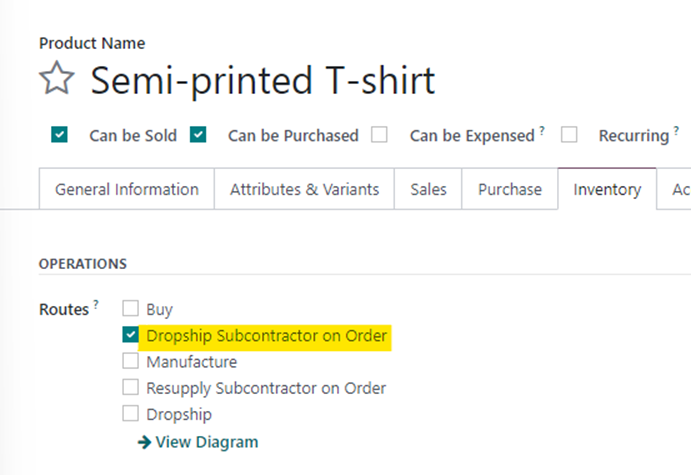
The semi-printed T-shirt will essentially be the finished product for subcontractor A. Since this product is then shipped to subcontractor B, we need to also set the route as “Dropship Subcontractor on Order”. 


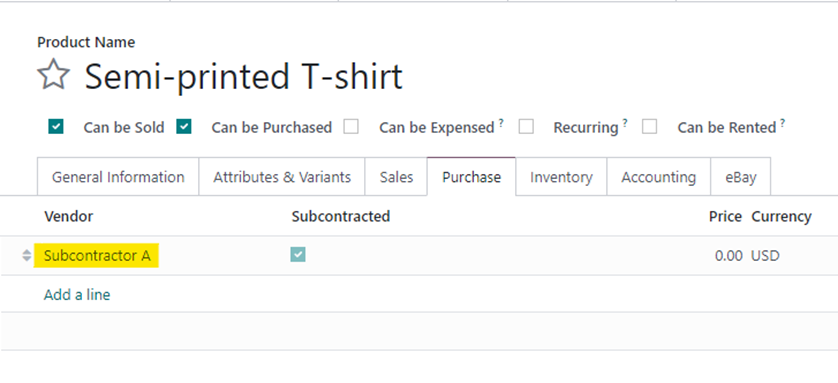
However, on the purchase Tab, the Vendor will be set as Subcontractor A.

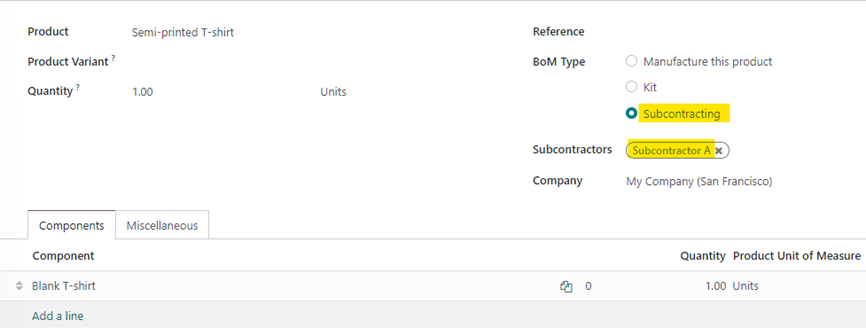
We also need to create a Bill of Material for this product since it is subcontracted. The BOM will need to be set to “Subcontracted” with the subcontractor being Subcontractor A. The component will be Blank T-shirt.

Graphic T-shirt

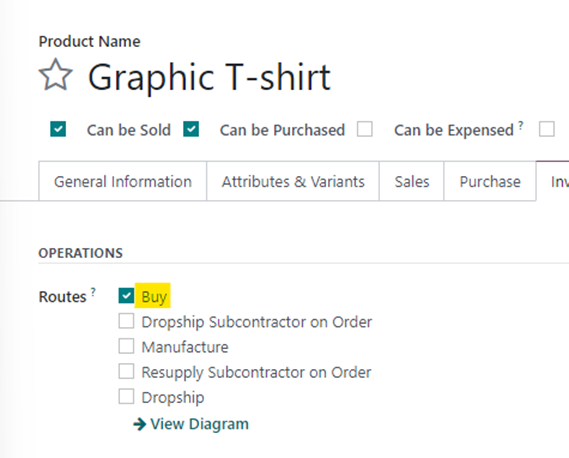
The Graphic T-shirt is the finished product that needs to be received by the user. This product needs to be set as “Buy” since we are simply buying it.


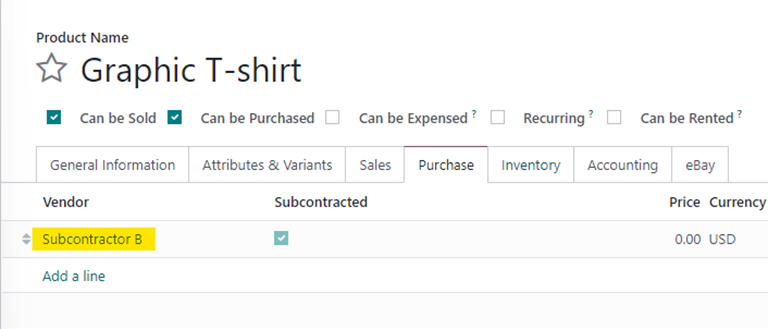
The Vendor will be set as Subcontractor B.


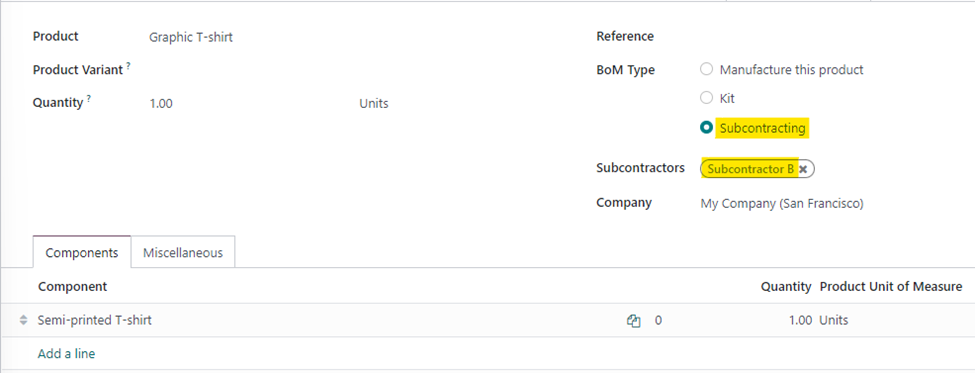
We will also need to setup a Bill of Material for the Graphic T-shirt since it is going through a second printing process with Subcontractor B. This time, the component will be semi-finished.

With this, all the product configurations and BOMs are setup to ensure that the user will only have to create a PO for the Graphic T-shirt. Let’s look at the process.

Process

  1. Create a Purchase Order for Graphic T-shirt from Subcontractor B and confirm it. This will generate a receipt of the Graphic T-shirt.
  2. This will trigger an RFQ for the Semi-printed T-shirt from Subcontractor A. The user will need to confirm this PO, which will generate a Dropship transfer.
  3. A new RFQ will be generated for Vendor A for Blank T-shirt, which, upon confirming will generate a dropship to Subcontractor A.
  4. The user processes the dropship of Blank T-shirt to subcontractor A and then processes the dropship from subcontractor A to subcontractor B.
  5. Finally, the Graphic T-shirt is received from subcontractor B.

Points to note

  1. By default, Odoo uses the generic “Physical Locations/Subcontracting Location” for both subcontractors. There’s nothing wrong with using this, but this means that both the dropship transfers will have the destination as the above-mentioned location, even though they are different vendors. It is recommended to create a separate subcontracting location for each subcontractor to ensure that you know exactly where the product is at any given point in time. To configure subcontracting locations, you can go into the subcontractor contact and view the Subcontractor Location field under the Sales/Purchase tab (ensure you are in debug mode).
  2. If any of the above configurations are missed, the flow could break and hence with increasing number of subcontractors, you must ensure that both the product and BOM configurations are setup correctly.


3
Аватар
Отменить
Hemal Kamdar

Hi Harishankar,
Its a "wow" moment for me. By this 'so very well written and screenshots' I just got THE [almost] EXACT answer for my question. Thank you posting this.

I am looking for something more to this:

i.e.
Vendor A - Dropship Fabric to Subcontractor 1
|
Cutting
|
Stitching
|
Dropship to Subcontractor 2
|
Washing
|
Printing
|
Dropship to Subcontractor 1
|
Trimming & Finishing
|
Packing
|
Dropship Dispatch to Customer

As subcontracting doesn't allow us to add operations in BOM of finished goods, how to track work center like environment for subcontracting?

Harishankar Unnikrishnan (hun)
Автор

Hey Hemal,

Thanks for your feedback.

As a follow-up question, why would you want to track work centers and operations for subcontracting? The whole idea of subcontracting is to outsource the manufacturing process so you are not involved in the actual manufacturing, apart from providing the components required.

Не оставайтесь в стороне – присоединяйтесь к обсуждению!

Создайте аккаунт сегодня, чтобы получить доступ к эксклюзивным функциям и стать частью нашего замечательного сообщества!

Регистрация
Похожие посты Ответы Просмотры Активность
How to configure customizable BOMs in Odoo? Решено
Quickstart SF-Experts
Аватар
Аватар
3
апр. 26
8499
Using Cost per employee and Employee capacity correctly Решено
Quickstart SF-Experts
Аватар
Аватар
2
мая 25
8465
Why is there an Invoicing App Legacy Banner on my Invoice? Решено
Quickstart SF-Experts
Аватар
1
апр. 25
3943
Manufacturing using the barcode app Решено
Quickstart SF-Experts
Аватар
1
сент. 24
9716
[V17] Attribute value default extra price and pricelist use case. Решено
Quickstart SF-Experts
Аватар
1
февр. 24
5204
Сообщество
  • Видео уроки
  • Документация
  • Форум
Открытый исходный код
  • Скачать
  • Github
  • Runbot
  • Перевод
Услуги
  • Хостинг Odoo.sh
  • Поддержка
  • Обновление
  • Индивидуальные решения по доработке
  • Образование
  • Найти бухгалтера
  • Найти партнера
  • Стать партнером
О нас
  • Наша компания
  • Активы бренда
  • Cвяжитесь с нами
  • Вакансии
  • Мероприятия
  • Подкаст
  • Блог
  • Клиенты
  • Правовые документы • Конфиденциальность
  • Безопасность
الْعَرَبيّة Català 简体中文 繁體中文 (台灣) Čeština Dansk Nederlands English Suomi Français Deutsch हिंदी Bahasa Indonesia Italiano 日本語 한국어 (KR) Lietuvių kalba Język polski Português (BR) română русский язык Slovenský jazyk Slovenščina Español (América Latina) Español Svenska ภาษาไทย Türkçe українська Tiếng Việt

Odoo – это набор бизнес-модулей с открытым исходным кодом, который закроет все потребности вашей компании: CRM, E-commerce, Бухгалтерия, Склад, POS, управление проектами и др.

Odoo сочетает в себе простоту использования и полную интеграцию всех бизнес-процессов в одной системе.

Website made with

Odoo Experience on YouTube

1. Use the live chat to ask your questions.
2. The operator answers within a few minutes.

Live support on Youtube
Watch now