Overslaan naar inhoud
Odoo Menu
  • Aanmelden
  • Probeer het gratis
  • Apps
    Financiën
    • Boekhouding
    • Facturatie
    • Onkosten
    • Spreadsheet (BI)
    • Documenten
    • Ondertekenen
    Verkoop
    • CRM
    • Verkoop
    • Kassasysteem winkel
    • Kassasysteem Restaurant
    • Abonnementen
    • Verhuur
    Websites
    • Websitebouwer
    • E-commerce
    • Blog
    • Forum
    • Live Chat
    • E-learning
    Bevoorradingsketen
    • Voorraad
    • Productie
    • PLM
    • Inkoop
    • Onderhoud
    • Kwaliteit
    Personeelsbeheer
    • Werknemers
    • Werving & Selectie
    • Verlof
    • Evaluaties
    • Aanbevelingen
    • Wagenpark
    Marketing
    • Sociale media-marketing
    • E-mailmarketing
    • Sms-marketing
    • Evenementen
    • Marketingautomatisering
    • Enquêtes
    Diensten
    • Project
    • Urenstaten
    • Buitendienst
    • Helpdesk
    • Planning
    • Afspraken
    Productiviteit
    • Chat
    • Artificiële Intelligentie
    • IoT
    • VoIP
    • Kennis
    • WhatsApp
    Apps van derden Odoo Studio Odoo Cloud Platform
  • Bedrijfstakken
    Detailhandel
    • Boekhandel
    • kledingwinkel
    • Meubelwinkel
    • Supermarkt
    • Bouwmarkt
    • Speelgoedwinkel
    Horeca & Hospitality
    • Bar en café
    • Restaurant
    • Fastfood
    • Gastenverblijf
    • Drankenhandelaar
    • Hotel
    Vastgoed
    • Makelaarskantoor
    • Architectenbureau
    • Bouw
    • Vastgoedbeheer
    • Tuinieren
    • Vereniging van mede-eigenaren
    Consulting
    • Accountantskantoor
    • Odoo Partner
    • Marketingbureau
    • Advocatenkantoor
    • Talentenwerving
    • Audit & Certificering
    Productie
    • Textiel
    • Metaal
    • Meubels
    • Eten
    • Brouwerij
    • Relatiegeschenken
    Gezondheid & Fitness
    • Sportclub
    • Opticien
    • Fitnesscentrum
    • Wellness-medewerkers
    • Apotheek
    • Kapper
    Diensten
    • Klusjesman
    • IT-hardware & ondersteuning
    • Zonne-energiesystemen
    • Schoenmaker
    • Schoonmaakdiensten
    • HVAC-diensten
    Andere
    • Non-profitorganisatie
    • Milieuagentschap
    • Verhuur van Billboards
    • Fotograaf
    • Fietsleasing
    • Softwareverkoper
    Alle bedrijfstakken bekijken
  • Community
    Leren
    • Tutorials
    • Documentatie
    • Certificeringen
    • Training
    • Blog
    • Podcast
    Versterk het onderwijs
    • Onderwijsprogramma
    • Scale Up! Business Game
    • Odoo bezoeken
    Download de Software
    • Downloaden
    • Vergelijk edities
    • Releases
    Werk samen
    • Github
    • Forum
    • Evenementen
    • Vertalingen
    • Partner worden
    • Diensten voor partners
    • Registreer je accountantskantoor
    Diensten
    • Vind een partner
    • Vind een boekhouder
    • Een adviseur ontmoeten
    • Implementatiediensten
    • Klantreferenties
    • Ondersteuning
    • Upgrades
    Github Youtube Twitter Linkedin Instagram Facebook Spotify
    +1 (650) 691-3277
    Vraag een demo aan
  • Prijzen
  • Help
Je moet geregistreerd zijn om te kunnen communiceren met de community.
Alle posts Personen Badges
Labels (Bekijk alle)
odoo accounting v14 pos v15
Over dit forum
Je moet geregistreerd zijn om te kunnen communiceren met de community.
Alle posts Personen Badges
Labels (Bekijk alle)
odoo accounting v14 pos v15
Over dit forum
Help

Linking payment to Sales order

Inschrijven

Ontvang een bericht wanneer er activiteit is op deze post

Deze vraag is gerapporteerd
accountingbank_statementsales.order
3 Antwoorden
1223 Weergaven
Avatar
Hristo Chankov

Hello everyone,

I am wondering how can solve this case, which I think is very common. Customer is making an order, we are sending him proforma invoice. Customer is paying the proforma invoice, accounting team see that payment is into our bank account /bank account is synchonized with ODOO journals and transactions are fetched there/. 

Question is - how sales person can see that a customer has paid upon proforma invoice and payment is received. Right now, accountant is calling us and telling - Hey, we have received payment upon this SO, please give me an invoice. But - imagine that there are 50 proforma invoices paid per day - we can not call all the time with accountant. There should be easy way to link received payment in Accounting module to Saler order.

Have someone solved this?


Regards

Hristo

0
Avatar
Annuleer
Hristo Chankov
Auteur

I don't want to create payment. I just somehow sales person to be notified that payment upon sales order is received. 

Chris TRINGHAM

Using the downpayment invoice for payment is the simplest standard solution in Odoo. If the customer makes payment against the proforma it becomes much more manual.

Codesphere Tech

Hello
You’re right from a business flow perspective - but technically in Odoo, payments cannot be linked directly to a Sale Order, only to an invoice. So this exact behavior is not available out-of-the-box.
It required small customization which link payment to SO reference or ID.
Thanks

Hristo Chankov
Auteur

Dear Chris,

From my point of view - this is not normal. What I mean - We are using invoicing methos after delivery of the goods. Every day we are sending 10-15 proforma invoices to customers. They are paying and comming on the same day to receive the products. Here are the bottlenecks:

  • Only account has access to bank accounts and can see payment
  • Accountant is not creating invoices
  • There is no reason to create invoice for downpayment, when customer will come in 1-2 hour to receive the good and then will have to receive another invoice
  • Nobody in sales office got notification, that payment is received.


My questions are simple:

  • is there a way, when accountant see in bank account that payment is received upon SOXXXX to link this payment to Sales order? Then, when customer arrives in the office to recieve the products, sales team will see that this SO is already paid. Now - we have to call to accountant everytime to check it.
  • Is there a way above to be automated. For example - if in bank is received payment for 120 EUR upon SO01234 and in ODOO there is SO01234 for 120EUR - this sales order to have a flag or something else - PAID.

Regards,

Hristo

Chris TRINGHAM

Hi Hristo,

It might be possible using Automation Rules (Automated Actions) if there was enough information on the payment to identify the sales order. I don't have any direct experience of that in Odoo, so I can't comment on how difficult it would be.

Avatar
Chris TRINGHAM
Beste antwoord

The problem is that a Proforma Invoice isn't a financial invoice.  Your customer can make a payment to you but it can't be against the proforma.

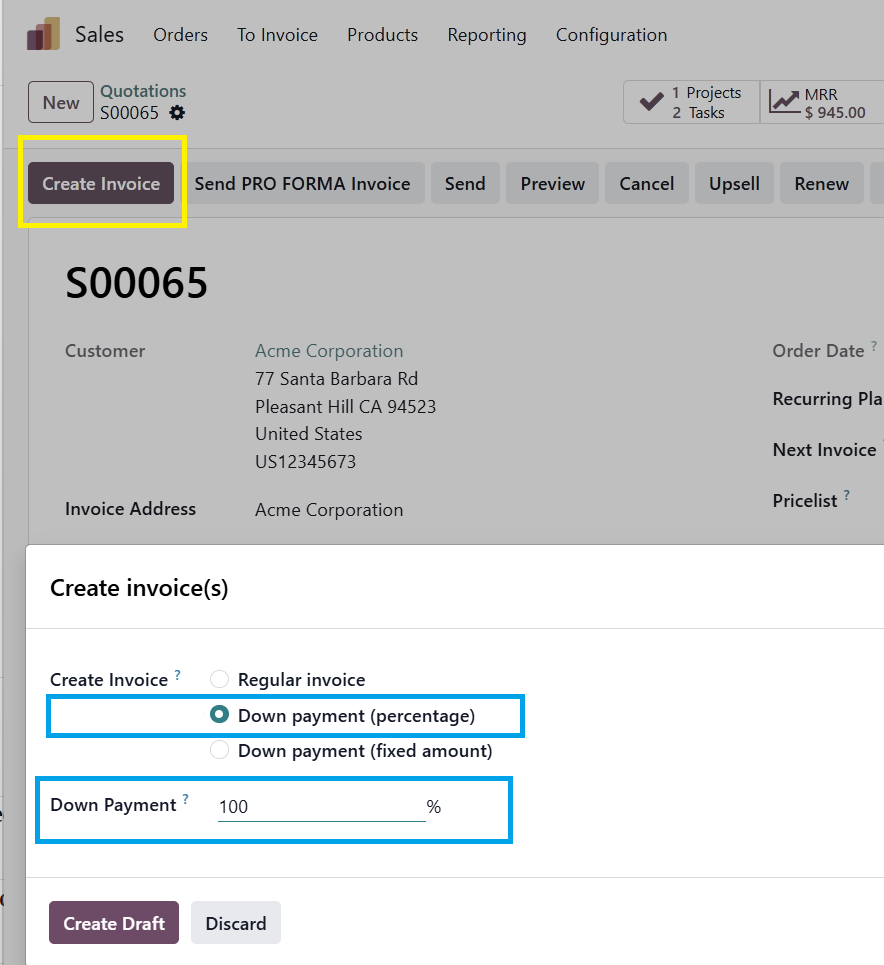
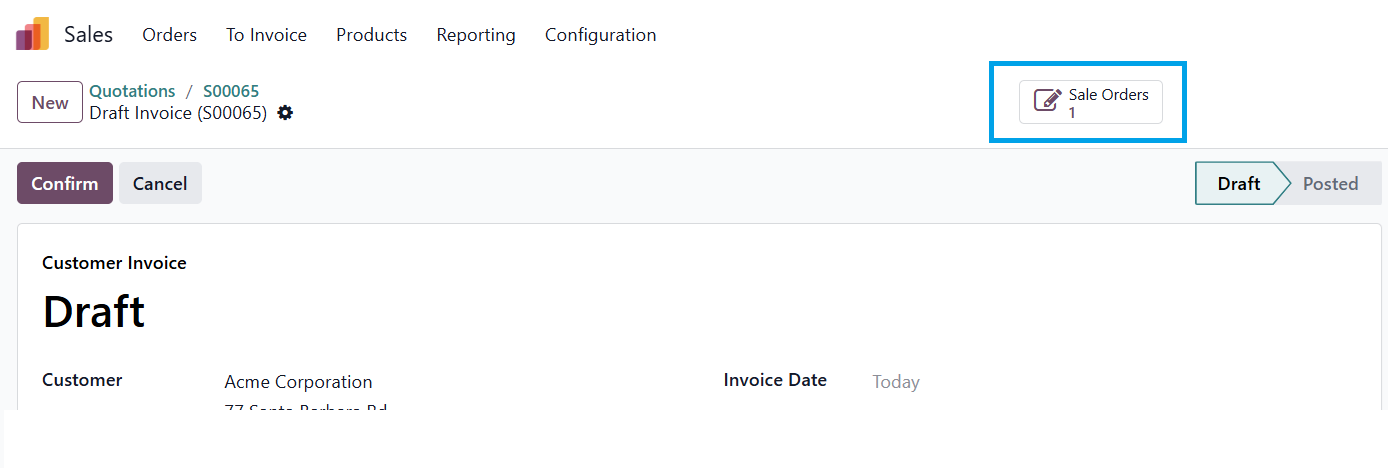
If you want the customer to pay before delivery, and to be able to record the payment you need a downpayment invoice.  This is linked to the sales order and amount will be deducted from the "final" invoice (so if 100% is prepaid this invoice has zero outstanding).

Down payment invoice:

You could use Automation Rules (Automated Action in older versions) to alert the salesperson when the customer pays.

0
Avatar
Annuleer
Avatar
Bloopark systems GmbH & Co. KG, Bloopark systems GmbH & Co. KG
Beste antwoord

Hello Hristo,

Please go to Settings → Technical → Automation → Automated Actions:
Name:           Notify Salesperson on Payment Received

Model:          Account Payment (account.payment)
Trigger:        When a record is updated
Before Update Filter: state != 'posted'
Filter:         state = 'posted'
Action:         Execute Python code

# Python code for the automated actionfor payment in records:# Find related SO via partner and amount    sale_orders = env['sale.order'].search([('partner_id','=', payment.partner_id.id),('state','in',['sale','done']),('invoice_status','!=','invoiced'),])for so in sale_orders:        so.message_post(            body=f"""
                <p>💰 <strong>Payment Received!</strong></p>
                <p>Amount: <strong>{payment.amount}{payment.currency_id.name}</strong></p>
                <p>Payment Reference: {payment.ref or'N/A'}</p>
                <p>Payment Date: {payment.date}</p>
        
            """,            subject=f'Payment received for {so.name}',            message_type='comment',            subtype_xmlid='mail.mt_note',            partner_ids=[so.user_id.partner_id.id],# notify salesperson)
Hope it helps


-1
Avatar
Annuleer
Avatar
Zehntech Technologies Inc.
Beste antwoord

Hello Hristo,

This is a common scenario in Odoo.

By default, payments are linked to Invoices, not directly to Sales Orders, and since a proforma invoice is not an accounting document, Odoo cannot automatically track payment against it.

A practical approach would be:

  • Create a draft invoice from the Sales Order instead of relying only on proforma
  • Once the bank transaction is synced, the accountant can reconcile the payment with the invoice
  • The invoice status will update to “Paid”, which is visible from the Sales Order as well

For your requirement (automatic notification to sales team), you can:

  • Use Activities or automated actions to notify the salesperson when an invoice is marked as paid
  • Or implement a small customization to reflect payment status directly on the Sales Order

Hope this works for you! If you need any help implementing this or want a more optimized approach, feel free to reach out for further discussion

Regards,

Zehntech Technologies Inc.

santosh.sekwadia@zehntech.com

-1
Avatar
Annuleer
Geniet je van het gesprek? Blijf niet alleen lezen, doe ook mee!

Maak vandaag nog een account aan om te profiteren van exclusieve functies en deel uit te maken van onze geweldige community!

Aanmelden
Gerelateerde posts Antwoorden Weergaven Activiteit
bank statement correction
accounting bank_statement
Avatar
Avatar
Avatar
2
mei 26
739
No Create Statement on Bank
accounting bank_statement
Avatar
Avatar
Avatar
2
okt. 22
5834
Odoo 13 Community Version: Import Bank statement Opgelost
accounting bank_statement
Avatar
Avatar
2
nov. 20
9498
New Accounting User Group - Access Rights for Bank Reconciliation Models
accounting reconciliation bank_statement
Avatar
Avatar
1
sep. 25
2425
Set Default Journal not working from Sales Order Opgelost
accounting sales.order journals
Avatar
Avatar
1
jun. 25
2897
Community
  • Tutorials
  • Documentatie
  • Forum
Open Source
  • Downloaden
  • Github
  • Runbot
  • Vertalingen
Diensten
  • Odoo.sh Hosting
  • Ondersteuning
  • Upgrade
  • Gepersonaliseerde ontwikkelingen
  • Onderwijs
  • Vind een boekhouder
  • Vind een partner
  • Partner worden
Over ons
  • Ons bedrijf
  • Merkelementen
  • Neem contact met ons op
  • Vacatures
  • Evenementen
  • Podcast
  • Blog
  • Klanten
  • Juridisch • Privacy
  • Beveiliging
الْعَرَبيّة Català 简体中文 繁體中文 (台灣) Čeština Dansk Nederlands English Suomi Français Deutsch हिंदी Bahasa Indonesia Italiano 日本語 한국어 (KR) Lietuvių kalba Język polski Português (BR) română русский язык Slovenský jazyk Slovenščina Español (América Latina) Español Svenska ภาษาไทย Türkçe українська Tiếng Việt

Odoo is een suite van open source zakelijke apps die aan al je bedrijfsbehoeften voldoet: CRM, E-commerce, boekhouding, inventaris, kassasysteem, projectbeheer, enz.

Odoo's unieke waardepropositie is om tegelijkertijd zeer gebruiksvriendelijk en volledig geïntegreerd te zijn.

Website made with

Odoo Experience on YouTube

1. Use the live chat to ask your questions.
2. The operator answers within a few minutes.

Live support on Youtube
Watch now