콘텐츠로 건너뛰기
Odoo 메뉴
  • 로그인
  • 무료 체험하기
  • 앱
    재무 관리
    • 회계
    • 청구서 관리
    • 비용 관리
    • 스프레드시트 (BI)
    • 문서
    • 전자 서명
    판매
    • CRM
    • 판매
    • POS 스토어
    • POS 레스토랑
    • 구독
    • 렌탈
    웹사이트
    • 웹사이트 빌더
    • 이커머스
    • 블로그
    • 포럼
    • 실시간 채팅
    • 온라인 학습 관리
    공급망
    • 재고 관리
    • 제조 관리
    • 제품 수명주기 관리 (PLM)
    • 매입
    • 유지관리
    • 품질
    인적자원 관리
    • 인사 관리
    • 채용
    • 휴가 관리
    • 인사 평가
    • 인재 추천
    • 차량 관리
    마케팅
    • 소셜 마케팅
    • 이메일 마케팅
    • SMS 마케팅
    • 행사
    • 마케팅 자동화
    • 설문 조사
    서비스
    • 프로젝트
    • 작업 기록
    • 현장 서비스
    • 헬프데스크
    • 일정 관리
    • 일정 예약
    생산성
    • 메일 및 채팅
    • 인공지능
    • IoT
    • VoIP
    • 지식 센터
    • WhatsApp
    타사 앱 Odoo 스튜디오 Odoo 클라우드 플랫폼
  • 업종 분류
    리테일
    • 서점
    • 의류 매장
    • 가구점
    • 식료품점
    • 철물점
    • 장난감 가게
    식음료 & 숙박업
    • 바 & 펍
    • 레스토랑
    • 패스트푸드
    • 게스트 하우스
    • 음료 유통업체
    • 호텔
    부동산
    • 부동산 중개업체
    • 건축 회사
    • 건설
    • 부동산 관리
    • 가드닝
    • 부동산 소유자 협회
    컨설팅
    • 회계 법인
    • Odoo 파트너
    • 마케팅 대행사
    • 법률 사무소
    • 인재 영입
    • 감사 및 인증
    제조 관리
    • 텍스타일
    • 메탈
    • 가구
    • 푸드
    • 양조장
    • 기업용 선물
    건강 & 피트니스
    • 스포츠 클럽
    • 안경점
    • 피트니스 센터
    • 웰니스 전문가
    • 약국
    • 미용실
    사업
    • 핸디맨
    • IT 하드웨어 및 지원 서비스
    • 태양 에너지 시스템
    • 제화업체
    • 클리닝 서비스
    • HVAC 서비스
    기타
    • 비영리 단체
    • 환경 에이전시
    • 광고판 임대
    • 사진
    • 자전거 임대
    • 소프트웨어 리셀러
    전체 업종 검색하기
  • 커뮤니티
    학습
    • 튜토리얼
    • 문서
    • 인증
    • 훈련
    • 블로그
    • 팟캐스트
    교육 역량 강화
    • 교육 프로그램
    • Scale-Up! 경영관리 게임
    • Odoo에 방문해보세요
    소프트웨어 신청
    • 다운로드
    • 버전 살펴보기
    • 릴리스 내역
    협업
    • Github
    • 포럼
    • 행사
    • 번역
    • 파트너 등록
    • 파트너 대상 서비스
    • 회계 법인 정보 등록
    서비스 신청
    • 파트너 검색
    • 회계사 검색
    • 전문 상담 예약
    • 구현 서비스
    • 고객 정보
    • 고객 지원
    • 업그레이드
    Github 유튜브 트위터 링크드인 인스타그램 페이스북 스포티파이
    +1 (650) 691-3277
    데모 예약하기
  • 요금제
  • 고객 지원
커뮤니티에 참여하려면 회원 가입을 하시기 바랍니다.
모든 게시물 사용자 배지
태그 (모두 보기)
odoo accounting v14 pos v15
게시판 정보
커뮤니티에 참여하려면 회원 가입을 하시기 바랍니다.
모든 게시물 사용자 배지
태그 (모두 보기)
odoo accounting v14 pos v15
게시판 정보
도움말

Price list by packaging

구독

이 게시물에 활동이 있으면 알림 받기

신고된 질문입니다
configurationshopproduct
2 답글
1488 화면
아바타
KESU GOURMET

I am really impressed of the lack of puntual information about the use of packaging and its relation to measure units.

I buy my products in boxes.

I wlll mainly sell them in boxes but ALSO willl sell them in individual units.

  1. Is it possible to issue a prices list in boxes and a different one in units?
  2. In the product information should i put the price in boxes or units
  3. In the product information should I put the cost in boxes or units.


Please help

0
아바타
취소
KESU GOURMET
작성자

It is very close, I see the two price lists and they BOTH have in the UOM column the label "Units".
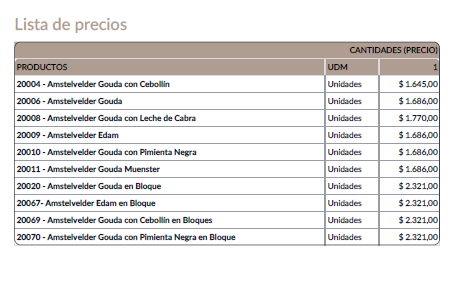
My last question is if you can not reflect the packing name so in the Box Price List appears Boxes instead oh Units.

Is that possible? It should!


아바타
Roger A. Lopez P.
베스트 답변

Hola Kesu!

Lamentablemente lo que requieres hacer tal cual como lo planteas, odoo no lo maneja para ventas. Te explico un poco:

1. Para la parte de compras, tu puedes establecer directamente en el maestro de materiales un precio, en diferente unidades de medida, para un mismo o varios proveedores, esto odoo lo maneja asi bajo la premisa de; puede que un proveedor me de mejor precio si le compro mas cantidades.

2. Lo que se maneja como Unidades de medida o paqueteria es solamente para trazabilidad a nivel de inventario, si por ejemplo tu configuraste tu producto en unidades y paquete de 6 unidades, realizaste una venta de 6 paquetes de 6, odoo automaticamente del inventario descuenta 36 unidades.

3. Con el ejemplo anterior tambien funciona la lista de precio, si en tu maestro de materiales configuraste precio base de 2$ por unidad, y vendiste 6 paquetes de 6, el multiplicara las 36 unidades por los 2$ y eso es lo que te aparecera en el total.

Lo que puedes hacer es trabajar bajo el pensamiento de odoo, tienes un precio digamos "minorista" de 2$ y un precio "mayorista" de 1.5$ independientemente de la undiad de medida, velo por la cantidad de articulos que vendes y no en la presentacion.

Saludos!

0
아바타
취소
아바타
Cybrosys Techno Solutions Pvt.Ltd
베스트 답변

Hi,

Yes, it is absolutely possible to have different pricelists for boxes and individual units in Odoo. Here's how:

1. Go to Sales > Products > Pricelists.

2. Create two pricelists: one for "Boxes" and one for "Units".

In each pricelist, add the product and specify the price.Crucially, use the "Compute Price" option and select "Based on another Pricelist".For the "Boxes" pricelist, set the price directly (e.g., the price for one box).For the "Units" pricelist, select the "Boxes" pricelist as the base pricelist and then define a formula to calculate the unit price based on the box price.


Hope it helps


0
아바타
취소
토론이 재미있으신가요? 직접 참여해보세요!

지금 바로 가입하여 독점 서비스를 이용해보고 특별한 커뮤니티와 소통하세요!

가입
관련 게시물 답글 화면 활동
Configurable product price calculation
configuration shop product price
아바타
0
11월 25
2645
Select products with 3 shops on the same database (V18)
shop product
아바타
0
10월 25
1478
How Do I Configure Odoo?
configuration product
아바타
아바타
2
6월 24
5668
Shop by Cities or Countries on Webpage
shop product
아바타
0
4월 16
4658
Multi-company products in v7 (not global but many2one company field)?
configuration product
아바타
0
3월 15
4273
커뮤니티
  • 튜토리얼
  • 문서
  • 포럼
오픈 소스
  • 다운로드
  • Github
  • Runbot
  • 번역
서비스
  • Odoo.sh 호스팅
  • 고객 지원
  • 업그레이드
  • 맞춤 개발
  • 학습
  • 회계사 검색
  • 파트너 검색
  • 파트너 등록
회사 소개
  • 회사 소개
  • 브랜드 자산
  • 상담 문의
  • 인재 채용
  • 행사
  • 팟캐스트
  • 블로그
  • 고객 사례
  • 법적고지 • 개인정보
  • 보안
الْعَرَبيّة Català 简体中文 繁體中文 (台灣) Čeština Dansk Nederlands English Suomi Français Deutsch हिंदी Bahasa Indonesia Italiano 日本語 한국어 (KR) Lietuvių kalba Język polski Português (BR) română русский язык Slovenský jazyk Slovenščina Español (América Latina) Español Svenska ภาษาไทย Türkçe українська Tiếng Việt

Odoo는 CRM, 이커머스, 회계, 재고, POS, 프로젝트 관리 등 기업의 모든 요구 사항을 충족하도록 설계된 오픈 소스 기반의 통합 비즈니스 앱 제품군입니다.

Odoo의 간편한 UI와 완벽하게 통합된 기능을 직접 확인해 보세요.

Website made with

Odoo Experience on YouTube

1. Use the live chat to ask your questions.
2. The operator answers within a few minutes.

Live support on Youtube
Watch now
