
- In basic salary rule, I need to access total wage in employee contract:
- I used contract.wage but it gives error as name object is not defined.
- I need to access the total unpaid days in payslip object


Hello,
In earlier Odoo versions, hr.contract was replaced by hr.version.
You can try using:
version.wage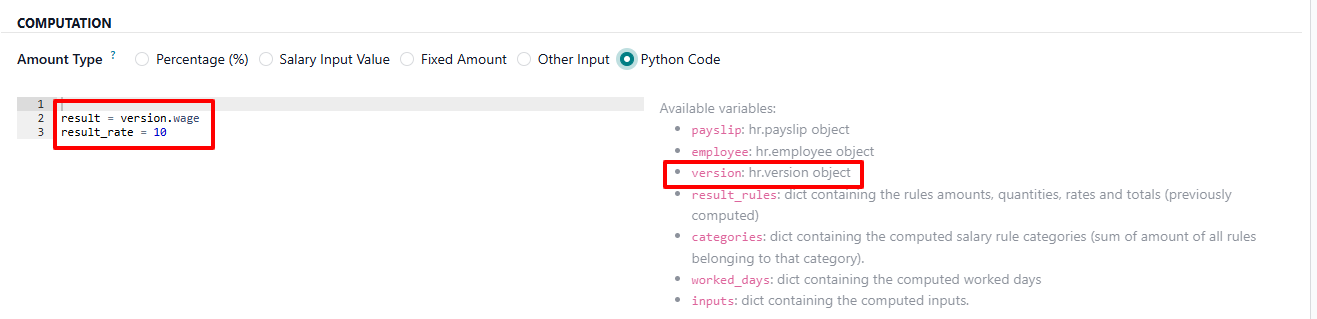 Hope this helps.
Thanks.

Great question! In Odoo Payroll salary rules, the available objects are predefined. Here's how to correctly access contract wage and unpaid days:
Available Objects in Salary Rule Python Code:
result = contract.wagecontract won't be in scope.unpaid_days = payslip.worked_days_line_ids.filtered(lambda x: x.code == 'UNPAID')result = unpaid_days[0].number_of_days if unpaid_days else 0
Great question! In Odoo Payroll, salary rule Python code runs in a specific context with predefined variables.
Available variables in salary rule code:
result = contract.wageunpaid = worked_days.UNPAID.number_of_days if worked_days.UNPAID else 0.0
Great question! In Odoo payroll salary rules, the available objects in the Python code context are predefined.
Available objects in Salary Rule Python Code:
result = contract.wage
unpaid = worked_days.UNPAID.number_of_days if hasattr(worked_days, 'UNPAID') else 0.0

result = unpaid
Great question! In Odoo payroll salary rules, the available predefined variables are limited — you cannot use arbitrary Python variable names directly.
To access Contract Wage:
Use contract.wage — but make sure your rule's Condition and Python Code fields are set correctly. The correct syntax is:
result = contract.wagecontract — employee contractpayslip — current payslip objectemployee — employee recordworked_days — worked days linesinputs — input linesworked_days.UNPAID and worked_days.UNPAID.number_of_days or 0
| 관련 게시물 | 답글 | 화면 | 활동 | |
|---|---|---|---|---|

|
1
5월 26
|
508 | ||


|
1
5월 26
|
614 | ||


|
1
4월 23
|
7686 | ||

|
0
6월 21
|
3555 | ||


|
1
3월 17
|
10337 |
1. Use the live chat to ask your questions.
2. The operator answers within a few minutes.
