콘텐츠로 건너뛰기
Odoo 메뉴
  • 로그인
  • 무료 체험하기
  • 앱
    재무 관리
    • 회계
    • 청구서 관리
    • 비용 관리
    • 스프레드시트 (BI)
    • 문서
    • 전자 서명
    판매
    • CRM
    • 판매
    • POS 스토어
    • POS 레스토랑
    • 구독
    • 렌탈
    웹사이트
    • 웹사이트 빌더
    • 이커머스
    • 블로그
    • 포럼
    • 실시간 채팅
    • 온라인 학습 관리
    공급망
    • 재고 관리
    • 제조 관리
    • 제품 수명주기 관리 (PLM)
    • 매입
    • 유지관리
    • 품질
    인적자원 관리
    • 인사 관리
    • 채용
    • 휴가 관리
    • 인사 평가
    • 인재 추천
    • 차량 관리
    마케팅
    • 소셜 마케팅
    • 이메일 마케팅
    • SMS 마케팅
    • 행사
    • 마케팅 자동화
    • 설문 조사
    서비스
    • 프로젝트
    • 작업 기록
    • 현장 서비스
    • 헬프데스크
    • 일정 관리
    • 일정 예약
    생산성
    • 메일 및 채팅
    • 인공지능
    • IoT
    • VoIP
    • 지식 센터
    • WhatsApp
    타사 앱 Odoo 스튜디오 Odoo 클라우드 플랫폼
  • 업종 분류
    리테일
    • 서점
    • 의류 매장
    • 가구점
    • 식료품점
    • 철물점
    • 장난감 가게
    식음료 & 숙박업
    • 바 & 펍
    • 레스토랑
    • 패스트푸드
    • 게스트 하우스
    • 음료 유통업체
    • 호텔
    부동산
    • 부동산 중개업체
    • 건축 회사
    • 건설
    • 부동산 관리
    • 가드닝
    • 부동산 소유자 협회
    컨설팅
    • 회계 법인
    • Odoo 파트너
    • 마케팅 대행사
    • 법률 사무소
    • 인재 영입
    • 감사 및 인증
    제조 관리
    • 텍스타일
    • 메탈
    • 가구
    • 푸드
    • 양조장
    • 기업용 선물
    건강 & 피트니스
    • 스포츠 클럽
    • 안경점
    • 피트니스 센터
    • 웰니스 전문가
    • 약국
    • 미용실
    사업
    • 핸디맨
    • IT 하드웨어 및 지원 서비스
    • 태양 에너지 시스템
    • 제화업체
    • 클리닝 서비스
    • HVAC 서비스
    기타
    • 비영리 단체
    • 환경 에이전시
    • 광고판 임대
    • 사진
    • 자전거 임대
    • 소프트웨어 리셀러
    전체 업종 검색하기
  • 커뮤니티
    학습
    • 튜토리얼
    • 문서
    • 인증
    • 훈련
    • 블로그
    • 팟캐스트
    교육 역량 강화
    • 교육 프로그램
    • Scale-Up! 경영관리 게임
    • Odoo에 방문해보세요
    소프트웨어 신청
    • 다운로드
    • 버전 살펴보기
    • 릴리스 내역
    협업
    • Github
    • 포럼
    • 행사
    • 번역
    • 파트너 등록
    • 파트너 대상 서비스
    • 회계 법인 정보 등록
    • Referral Program
    서비스 신청
    • 파트너 검색
    • 회계사 검색
    • 전문 상담 예약
    • 구현 서비스
    • 고객 정보
    • 고객 지원
    • 업그레이드
    Github 유튜브 트위터 링크드인 인스타그램 페이스북 스포티파이
    +1 (650) 691-3277
    데모 예약하기
  • 요금제
  • 고객 지원
커뮤니티에 참여하려면 회원 가입을 하시기 바랍니다.
모든 게시물 사용자 배지
태그 (모두 보기)
odoo accounting v14 pos v15
게시판 정보
커뮤니티에 참여하려면 회원 가입을 하시기 바랍니다.
모든 게시물 사용자 배지
태그 (모두 보기)
odoo accounting v14 pos v15
게시판 정보
도움말

Linking payment to Sales order

구독

이 게시물에 활동이 있으면 알림 받기

신고된 질문입니다
accountingbank_statementsales.order
3 답글
1291 화면
아바타
Hristo Chankov

Hello everyone,

I am wondering how can solve this case, which I think is very common. Customer is making an order, we are sending him proforma invoice. Customer is paying the proforma invoice, accounting team see that payment is into our bank account /bank account is synchonized with ODOO journals and transactions are fetched there/. 

Question is - how sales person can see that a customer has paid upon proforma invoice and payment is received. Right now, accountant is calling us and telling - Hey, we have received payment upon this SO, please give me an invoice. But - imagine that there are 50 proforma invoices paid per day - we can not call all the time with accountant. There should be easy way to link received payment in Accounting module to Saler order.

Have someone solved this?


Regards

Hristo

0
아바타
취소
Hristo Chankov
작성자

I don't want to create payment. I just somehow sales person to be notified that payment upon sales order is received. 

Chris TRINGHAM

Using the downpayment invoice for payment is the simplest standard solution in Odoo. If the customer makes payment against the proforma it becomes much more manual.

Codesphere Tech

Hello
You’re right from a business flow perspective - but technically in Odoo, payments cannot be linked directly to a Sale Order, only to an invoice. So this exact behavior is not available out-of-the-box.
It required small customization which link payment to SO reference or ID.
Thanks

Hristo Chankov
작성자

Dear Chris,

From my point of view - this is not normal. What I mean - We are using invoicing methos after delivery of the goods. Every day we are sending 10-15 proforma invoices to customers. They are paying and comming on the same day to receive the products. Here are the bottlenecks:

  • Only account has access to bank accounts and can see payment
  • Accountant is not creating invoices
  • There is no reason to create invoice for downpayment, when customer will come in 1-2 hour to receive the good and then will have to receive another invoice
  • Nobody in sales office got notification, that payment is received.


My questions are simple:

  • is there a way, when accountant see in bank account that payment is received upon SOXXXX to link this payment to Sales order? Then, when customer arrives in the office to recieve the products, sales team will see that this SO is already paid. Now - we have to call to accountant everytime to check it.
  • Is there a way above to be automated. For example - if in bank is received payment for 120 EUR upon SO01234 and in ODOO there is SO01234 for 120EUR - this sales order to have a flag or something else - PAID.

Regards,

Hristo

Chris TRINGHAM

Hi Hristo,

It might be possible using Automation Rules (Automated Actions) if there was enough information on the payment to identify the sales order. I don't have any direct experience of that in Odoo, so I can't comment on how difficult it would be.

아바타
Chris TRINGHAM
베스트 답변

The problem is that a Proforma Invoice isn't a financial invoice.  Your customer can make a payment to you but it can't be against the proforma.

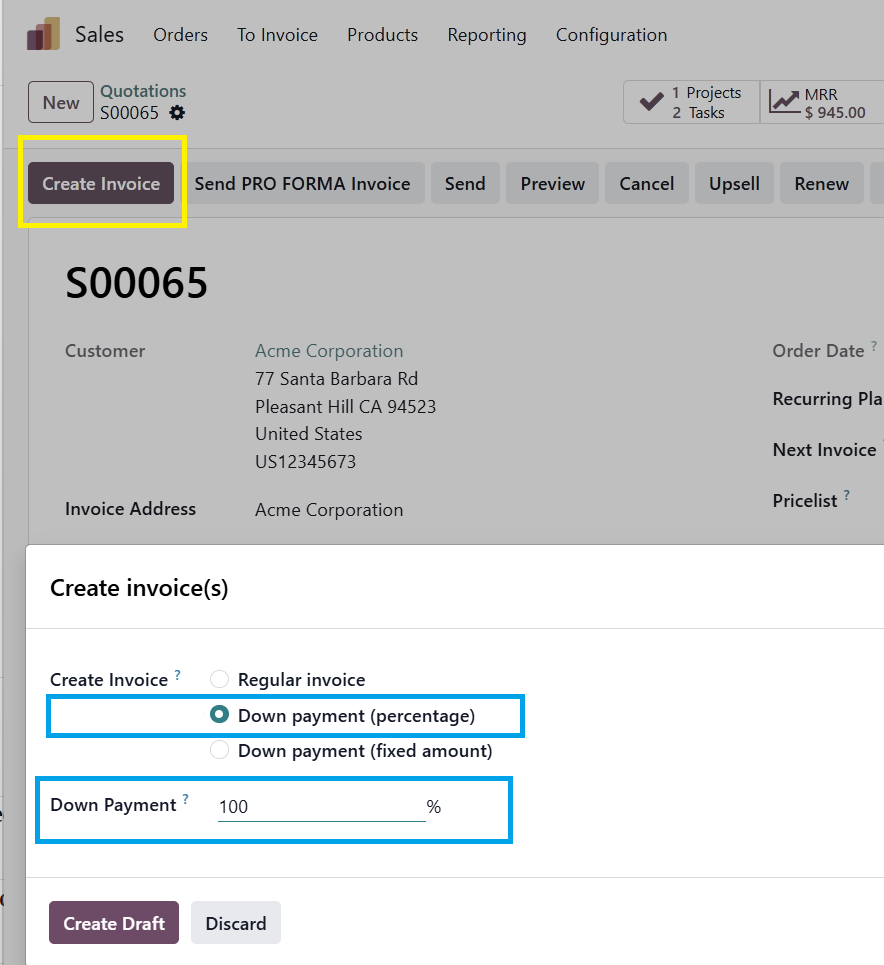
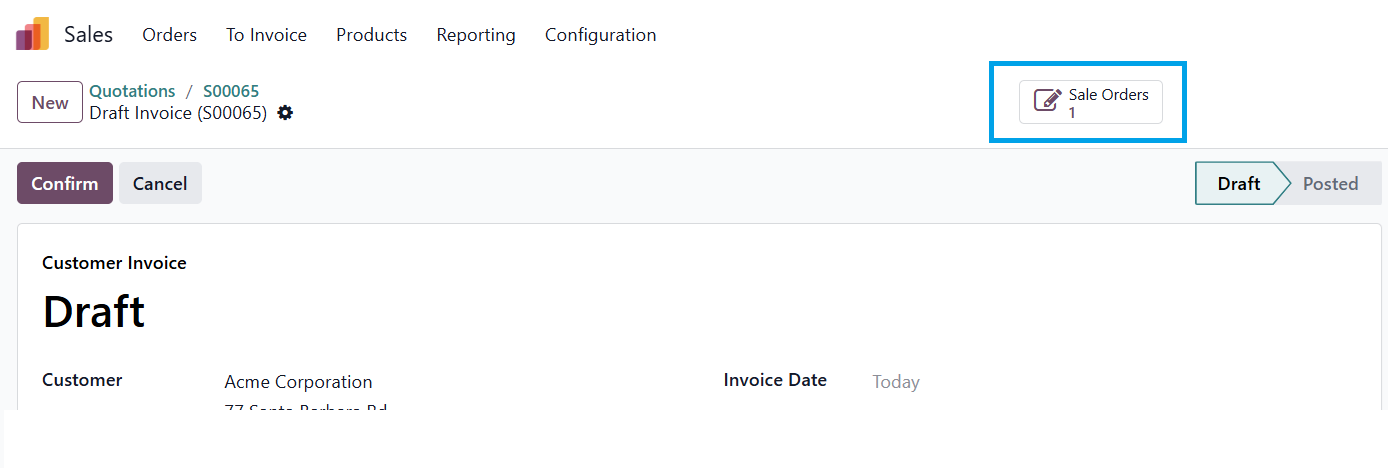
If you want the customer to pay before delivery, and to be able to record the payment you need a downpayment invoice.  This is linked to the sales order and amount will be deducted from the "final" invoice (so if 100% is prepaid this invoice has zero outstanding).

Down payment invoice:

You could use Automation Rules (Automated Action in older versions) to alert the salesperson when the customer pays.

0
아바타
취소
아바타
Bloopark systems GmbH & Co. KG, Bloopark systems GmbH & Co. KG
베스트 답변

Hello Hristo,

Please go to Settings → Technical → Automation → Automated Actions:
Name:           Notify Salesperson on Payment Received

Model:          Account Payment (account.payment)
Trigger:        When a record is updated
Before Update Filter: state != 'posted'
Filter:         state = 'posted'
Action:         Execute Python code

# Python code for the automated actionfor payment in records:# Find related SO via partner and amount    sale_orders = env['sale.order'].search([('partner_id','=', payment.partner_id.id),('state','in',['sale','done']),('invoice_status','!=','invoiced'),])for so in sale_orders:        so.message_post(            body=f"""
                <p>💰 <strong>Payment Received!</strong></p>
                <p>Amount: <strong>{payment.amount}{payment.currency_id.name}</strong></p>
                <p>Payment Reference: {payment.ref or'N/A'}</p>
                <p>Payment Date: {payment.date}</p>
        
            """,            subject=f'Payment received for {so.name}',            message_type='comment',            subtype_xmlid='mail.mt_note',            partner_ids=[so.user_id.partner_id.id],# notify salesperson)
Hope it helps


-1
아바타
취소
아바타
Zehntech Technologies Inc.
베스트 답변

Hello Hristo,

This is a common scenario in Odoo.

By default, payments are linked to Invoices, not directly to Sales Orders, and since a proforma invoice is not an accounting document, Odoo cannot automatically track payment against it.

A practical approach would be:

  • Create a draft invoice from the Sales Order instead of relying only on proforma
  • Once the bank transaction is synced, the accountant can reconcile the payment with the invoice
  • The invoice status will update to “Paid”, which is visible from the Sales Order as well

For your requirement (automatic notification to sales team), you can:

  • Use Activities or automated actions to notify the salesperson when an invoice is marked as paid
  • Or implement a small customization to reflect payment status directly on the Sales Order

Hope this works for you! If you need any help implementing this or want a more optimized approach, feel free to reach out for further discussion

Regards,

Zehntech Technologies Inc.

santosh.sekwadia@zehntech.com

-1
아바타
취소
토론이 재미있으신가요? 직접 참여해보세요!

지금 바로 가입하여 독점 서비스를 이용해보고 특별한 커뮤니티와 소통하세요!

가입
관련 게시물 답글 화면 활동
bank statement correction
accounting bank_statement
아바타
아바타
아바타
2
5월 26
811
No Create Statement on Bank
accounting bank_statement
아바타
아바타
아바타
2
10월 22
5894
Odoo 13 Community Version: Import Bank statement 해결 완료
accounting bank_statement
아바타
아바타
2
11월 20
9580
New Accounting User Group - Access Rights for Bank Reconciliation Models
accounting reconciliation bank_statement
아바타
아바타
1
9월 25
2475
Set Default Journal not working from Sales Order 해결 완료
accounting sales.order journals
아바타
아바타
1
6월 25
2978
커뮤니티
  • 튜토리얼
  • 문서
  • 포럼
오픈 소스
  • 다운로드
  • Github
  • Runbot
  • 번역
서비스
  • Odoo.sh 호스팅
  • 고객 지원
  • 업그레이드
  • 맞춤 개발
  • 학습
  • 회계사 검색
  • 파트너 검색
  • 파트너 등록
회사 소개
  • 회사 소개
  • 브랜드 자산
  • 상담 문의
  • 인재 채용
  • 행사
  • 팟캐스트
  • 블로그
  • 고객 사례
  • 법적고지 • 개인정보
  • 보안
الْعَرَبيّة Català 简体中文 繁體中文 (台灣) Čeština Dansk Nederlands English Suomi Français Deutsch हिंदी Bahasa Indonesia Italiano 日本語 한국어 (KR) Lietuvių kalba Język polski Português (BR) română русский язык Slovenský jazyk Slovenščina Español (América Latina) Español Svenska ภาษาไทย Türkçe українська Tiếng Việt

Odoo는 CRM, 이커머스, 회계, 재고, POS, 프로젝트 관리 등 기업의 모든 요구 사항을 충족하도록 설계된 오픈 소스 기반의 통합 비즈니스 앱 제품군입니다.

Odoo의 간편한 UI와 완벽하게 통합된 기능을 직접 확인해 보세요.

Website made with

Odoo Experience on YouTube

1. Use the live chat to ask your questions.
2. The operator answers within a few minutes.

Live support on Youtube
Watch now