์ฝ˜ํ…์ธ ๋กœ ๊ฑด๋„ˆ๋›ฐ๊ธฐ
Odoo ๋ฉ”๋‰ด
  • ๋กœ๊ทธ์ธ
  • ๋ฌด๋ฃŒ ์ฒดํ—˜ํ•˜๊ธฐ
  • ์•ฑ
    ์žฌ๋ฌด ๊ด€๋ฆฌ
    • ํšŒ๊ณ„
    • ์ฒญ๊ตฌ์„œ ๊ด€๋ฆฌ
    • ๋น„์šฉ ๊ด€๋ฆฌ
    • ์Šคํ”„๋ ˆ๋“œ์‹œํŠธ (BI)
    • ๋ฌธ์„œ
    • ์ „์ž ์„œ๋ช…
    ํŒ๋งค
    • CRM
    • ํŒ๋งค
    • POS ์Šคํ† ์–ด
    • POS ๋ ˆ์Šคํ† ๋ž‘
    • ๊ตฌ๋…
    • ๋ Œํƒˆ
    ์›น์‚ฌ์ดํŠธ
    • ์›น์‚ฌ์ดํŠธ ๋นŒ๋”
    • ์ด์ปค๋จธ์Šค
    • ๋ธ”๋กœ๊ทธ
    • ํฌ๋Ÿผ
    • ์‹ค์‹œ๊ฐ„ ์ฑ„ํŒ…
    • ์˜จ๋ผ์ธ ํ•™์Šต ๊ด€๋ฆฌ
    ๊ณต๊ธ‰๋ง
    • ์žฌ๊ณ  ๊ด€๋ฆฌ
    • ์ œ์กฐ ๊ด€๋ฆฌ
    • ์ œํ’ˆ ์ˆ˜๋ช…์ฃผ๊ธฐ ๊ด€๋ฆฌ (PLM)
    • ๋งค์ž…
    • ์œ ์ง€๊ด€๋ฆฌ
    • ํ’ˆ์งˆ
    ์ธ์ ์ž์› ๊ด€๋ฆฌ
    • ์ธ์‚ฌ ๊ด€๋ฆฌ
    • ์ฑ„์šฉ
    • ํœด๊ฐ€ ๊ด€๋ฆฌ
    • ์ธ์‚ฌ ํ‰๊ฐ€
    • ์ธ์žฌ ์ถ”์ฒœ
    • ์ฐจ๋Ÿ‰ ๊ด€๋ฆฌ
    ๋งˆ์ผ€ํŒ…
    • ์†Œ์…œ ๋งˆ์ผ€ํŒ…
    • ์ด๋ฉ”์ผ ๋งˆ์ผ€ํŒ…
    • SMS ๋งˆ์ผ€ํŒ…
    • ํ–‰์‚ฌ
    • ๋งˆ์ผ€ํŒ… ์ž๋™ํ™”
    • ์„ค๋ฌธ ์กฐ์‚ฌ
    ์„œ๋น„์Šค
    • ํ”„๋กœ์ ํŠธ
    • ์ž‘์—… ๊ธฐ๋ก
    • ํ˜„์žฅ ์„œ๋น„์Šค
    • ํ—ฌํ”„๋ฐ์Šคํฌ
    • ์ผ์ • ๊ด€๋ฆฌ
    • ์ผ์ • ์˜ˆ์•ฝ
    ์ƒ์‚ฐ์„ฑ
    • ๋ฉ”์ผ ๋ฐ ์ฑ„ํŒ…
    • ์ธ๊ณต์ง€๋Šฅ
    • IoT
    • VoIP
    • ์ง€์‹ ์„ผํ„ฐ
    • WhatsApp
    ํƒ€์‚ฌ ์•ฑ Odoo ์ŠคํŠœ๋””์˜ค Odoo ํด๋ผ์šฐ๋“œ ํ”Œ๋žซํผ
  • ์—…์ข… ๋ถ„๋ฅ˜
    ๋ฆฌํ…Œ์ผ
    • ์„œ์ 
    • ์˜๋ฅ˜ ๋งค์žฅ
    • ๊ฐ€๊ตฌ์ 
    • ์‹๋ฃŒํ’ˆ์ 
    • ์ฒ ๋ฌผ์ 
    • ์žฅ๋‚œ๊ฐ ๊ฐ€๊ฒŒ
    ์‹์Œ๋ฃŒ & ์ˆ™๋ฐ•์—…
    • ๋ฐ” & ํŽ
    • ๋ ˆ์Šคํ† ๋ž‘
    • ํŒจ์ŠคํŠธํ‘ธ๋“œ
    • ๊ฒŒ์ŠคํŠธ ํ•˜์šฐ์Šค
    • ์Œ๋ฃŒ ์œ ํ†ต์—…์ฒด
    • ํ˜ธํ…”
    ๋ถ€๋™์‚ฐ
    • ๋ถ€๋™์‚ฐ ์ค‘๊ฐœ์—…์ฒด
    • ๊ฑด์ถ• ํšŒ์‚ฌ
    • ๊ฑด์„ค
    • ๋ถ€๋™์‚ฐ ๊ด€๋ฆฌ
    • ๊ฐ€๋“œ๋‹
    • ๋ถ€๋™์‚ฐ ์†Œ์œ ์ž ํ˜‘ํšŒ
    ์ปจ์„คํŒ…
    • ํšŒ๊ณ„ ๋ฒ•์ธ
    • Odoo ํŒŒํŠธ๋„ˆ
    • ๋งˆ์ผ€ํŒ… ๋Œ€ํ–‰์‚ฌ
    • ๋ฒ•๋ฅ  ์‚ฌ๋ฌด์†Œ
    • ์ธ์žฌ ์˜์ž…
    • ๊ฐ์‚ฌ ๋ฐ ์ธ์ฆ
    ์ œ์กฐ ๊ด€๋ฆฌ
    • ํ…์Šคํƒ€์ผ
    • ๋ฉ”ํƒˆ
    • ๊ฐ€๊ตฌ
    • ํ‘ธ๋“œ
    • ์–‘์กฐ์žฅ
    • ๊ธฐ์—…์šฉ ์„ ๋ฌผ
    ๊ฑด๊ฐ• & ํ”ผํŠธ๋‹ˆ์Šค
    • ์Šคํฌ์ธ  ํด๋Ÿฝ
    • ์•ˆ๊ฒฝ์ 
    • ํ”ผํŠธ๋‹ˆ์Šค ์„ผํ„ฐ
    • ์›ฐ๋‹ˆ์Šค ์ „๋ฌธ๊ฐ€
    • ์•ฝ๊ตญ
    • ๋ฏธ์šฉ์‹ค
    ์‚ฌ์—…
    • ํ•ธ๋””๋งจ
    • IT ํ•˜๋“œ์›จ์–ด ๋ฐ ์ง€์› ์„œ๋น„์Šค
    • ํƒœ์–‘ ์—๋„ˆ์ง€ ์‹œ์Šคํ…œ
    • ์ œํ™”์—…์ฒด
    • ํด๋ฆฌ๋‹ ์„œ๋น„์Šค
    • HVAC ์„œ๋น„์Šค
    ๊ธฐํƒ€
    • ๋น„์˜๋ฆฌ ๋‹จ์ฒด
    • ํ™˜๊ฒฝ ์—์ด์ „์‹œ
    • ๊ด‘๊ณ ํŒ ์ž„๋Œ€
    • ์‚ฌ์ง„
    • ์ž์ „๊ฑฐ ์ž„๋Œ€
    • ์†Œํ”„ํŠธ์›จ์–ด ๋ฆฌ์…€๋Ÿฌ
    ์ „์ฒด ์—…์ข… ๊ฒ€์ƒ‰ํ•˜๊ธฐ
  • ์ปค๋ฎค๋‹ˆํ‹ฐ
    ํ•™์Šต
    • ํŠœํ† ๋ฆฌ์–ผ
    • ๋ฌธ์„œ
    • ์ธ์ฆ
    • ํ›ˆ๋ จ
    • ๋ธ”๋กœ๊ทธ
    • ํŒŸ์บ์ŠคํŠธ
    ๊ต์œก ์—ญ๋Ÿ‰ ๊ฐ•ํ™”
    • ๊ต์œก ํ”„๋กœ๊ทธ๋žจ
    • Scale-Up! ๊ฒฝ์˜๊ด€๋ฆฌ ๊ฒŒ์ž„
    • Odoo์— ๋ฐฉ๋ฌธํ•ด๋ณด์„ธ์š”
    ์†Œํ”„ํŠธ์›จ์–ด ์‹ ์ฒญ
    • ๋‹ค์šด๋กœ๋“œ
    • ๋ฒ„์ „ ์‚ดํŽด๋ณด๊ธฐ
    • ๋ฆด๋ฆฌ์Šค ๋‚ด์—ญ
    ํ˜‘์—…
    • Github
    • ํฌ๋Ÿผ
    • ํ–‰์‚ฌ
    • ๋ฒˆ์—ญ
    • ํŒŒํŠธ๋„ˆ ๋“ฑ๋ก
    • ํŒŒํŠธ๋„ˆ ๋Œ€์ƒ ์„œ๋น„์Šค
    • ํšŒ๊ณ„ ๋ฒ•์ธ ์ •๋ณด ๋“ฑ๋ก
    ์„œ๋น„์Šค ์‹ ์ฒญ
    • ํŒŒํŠธ๋„ˆ ๊ฒ€์ƒ‰
    • ํšŒ๊ณ„์‚ฌ ๊ฒ€์ƒ‰
    • ์ „๋ฌธ ์ƒ๋‹ด ์˜ˆ์•ฝ
    • ๊ตฌํ˜„ ์„œ๋น„์Šค
    • ๊ณ ๊ฐ ์ •๋ณด
    • ๊ณ ๊ฐ ์ง€์›
    • ์—…๊ทธ๋ ˆ์ด๋“œ
    Github ์œ ํŠœ๋ธŒ ํŠธ์œ„ํ„ฐ ๋งํฌ๋“œ์ธ ์ธ์Šคํƒ€๊ทธ๋žจ ํŽ˜์ด์Šค๋ถ ์Šคํฌํ‹ฐํŒŒ์ด
    +1 (650) 691-3277
    ๋ฐ๋ชจ ์˜ˆ์•ฝํ•˜๊ธฐ
  • ์š”๊ธˆ์ œ
  • ๊ณ ๊ฐ ์ง€์›
์ปค๋ฎค๋‹ˆํ‹ฐ์— ์ฐธ์—ฌํ•˜๋ ค๋ฉด ํšŒ์› ๊ฐ€์ž…์„ ํ•˜์‹œ๊ธฐ ๋ฐ”๋ž๋‹ˆ๋‹ค.
๋ชจ๋“  ๊ฒŒ์‹œ๋ฌผ ์‚ฌ์šฉ์ž ๋ฐฐ์ง€
ํƒœ๊ทธ (๋ชจ๋‘ ๋ณด๊ธฐ)
odoo accounting v14 pos v15
๊ฒŒ์‹œํŒ ์ •๋ณด
์ปค๋ฎค๋‹ˆํ‹ฐ์— ์ฐธ์—ฌํ•˜๋ ค๋ฉด ํšŒ์› ๊ฐ€์ž…์„ ํ•˜์‹œ๊ธฐ ๋ฐ”๋ž๋‹ˆ๋‹ค.
๋ชจ๋“  ๊ฒŒ์‹œ๋ฌผ ์‚ฌ์šฉ์ž ๋ฐฐ์ง€
ํƒœ๊ทธ (๋ชจ๋‘ ๋ณด๊ธฐ)
odoo accounting v14 pos v15
๊ฒŒ์‹œํŒ ์ •๋ณด
๋„์›€๋ง

Combo Tax

๊ตฌ๋…

์ด ๊ฒŒ์‹œ๋ฌผ์— ํ™œ๋™์ด ์žˆ์œผ๋ฉด ์•Œ๋ฆผ ๋ฐ›๊ธฐ

์‹ ๊ณ ๋œ ์งˆ๋ฌธ์ž…๋‹ˆ๋‹ค
comboeCommerce
3 ๋‹ต๊ธ€
1333 ํ™”๋ฉด
์•„๋ฐ”ํƒ€
george

Hello everyone,

I would like to understand the expected behavior of Odoo regarding taxes on combo products (product bundles).

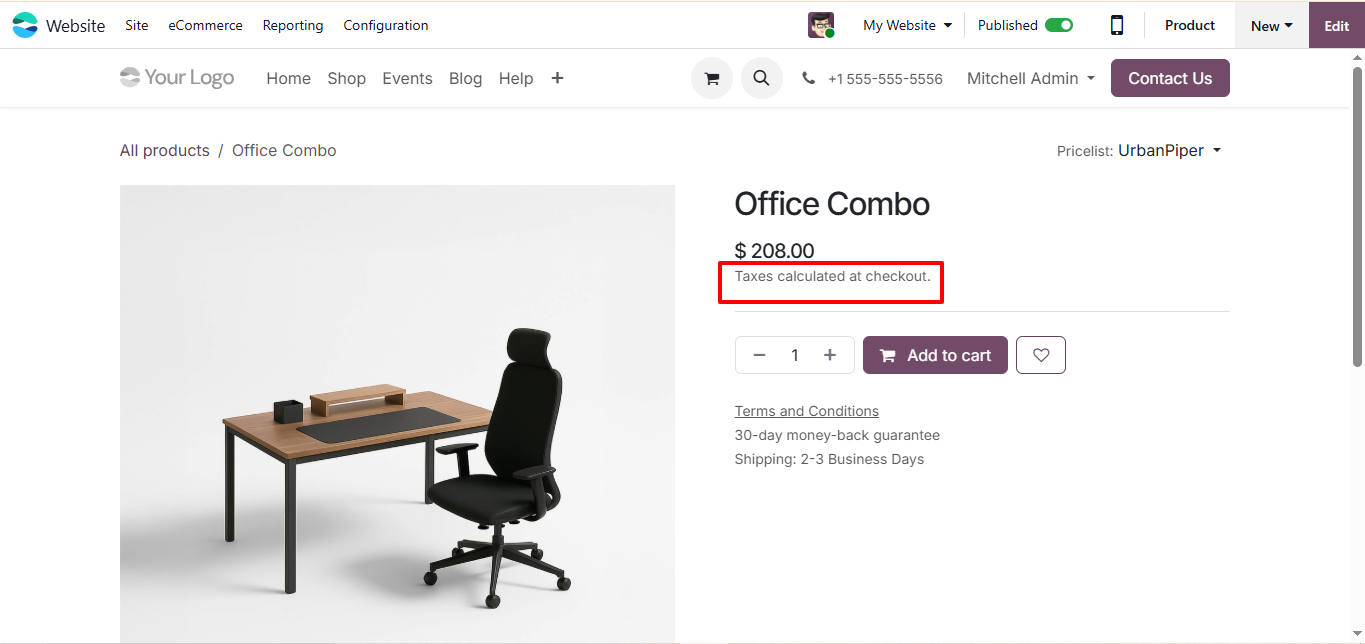
When I enable โ€œPrices Include Tax (Website)โ€, all regular products show the tax-included price correctly. But for combo products, the website still shows the price without tax, and the tax is only added later during checkout.

Before I assume anything, I wanted to ask:

๐Ÿ‘‰ Is this how Odoo is designed to work for combo products?

In other words, is Odoo intentionally showing combo prices without tax even when tax-included pricing is enabled?


Thanks

1
์•„๋ฐ”ํƒ€
์ทจ์†Œ
kavanagh adrian

Hello everyone,ย 

I have had the same issue, been through set tings again and again. Am I missing something with regards combo setting to add the tax


Thanks

์•„๋ฐ”ํƒ€
Codesphere Tech
๋ฒ ์ŠคํŠธ ๋‹ต๋ณ€
Hello
Even with "Tax Included" enabled in the website settings, combo products will still display the tax-excluded price on the product page.(see image)
โ†’ย This is because a combo can contain multiple items with different tax rates (e.g., food at 5% and drinks at 18%). Odoo waits until the specific components are added to the cart to accurately apply fiscal positions and calculate the final tax.
โ†’ย To change this display behavior, a technical customization would be required.

Hope this information helps you
Thanks

1
์•„๋ฐ”ํƒ€
์ทจ์†Œ
์•„๋ฐ”ํƒ€
Vivek Kundaliya
๋ฒ ์ŠคํŠธ ๋‹ต๋ณ€

Hi George and Adrian,

Yes, this is intentional Odoo behavior for Combo products โ€” not a bug.

Why Combo products show tax-excluded prices even when "Prices Include Tax" is enabled:

Odoo's Combo product (introduced in v17/v18 for POS and eCommerce) is a container where customers select specific items from groups at checkout. Because the final price depends on which items are selected (each potentially having different tax rates), Odoo delays the tax calculation until the customer completes their selection in the cart.

This is by design. The reasoning:

  • A combo can include items from multiple categories with different tax rates
  • Odoo cannot show a single "tax-included" price on the product page when the tax rate may vary per selection
  • The correct tax is calculated and shown at cart/checkout once the specific items are confirmed

Workaround (if all combo items share the same tax rate):

  1. Ensure all combo components use the same tax and tax rate
  2. On the Combo product form, go to the Sales tab and set the price to be tax-inclusive
  3. The product page will then show the tax-included base price of the combo itself

If your combo has variable component selection with different tax rates, showing a fully tax-included price on the product page requires frontend customization.

Hope that clarifies the behavior!

0
์•„๋ฐ”ํƒ€
์ทจ์†Œ
์•„๋ฐ”ํƒ€
Cybrosys Techno Solutions Pvt.Ltd
๋ฒ ์ŠคํŠธ ๋‹ต๋ณ€

Hi,


Odoo should display prices inclusive of tax for all products, including combo products, when "Prices Include Tax" is enabled on the website. The behavior of showing combo product prices without tax until checkout is not the intended behavior. Potential causes include incorrect tax configuration on the combo product or its components, conflicting pricelist settings, theme or customization conflicts, JavaScript issues, or a bug in the Odoo version.

To troubleshoot, verify the tax configuration on the combo product and its components, check pricelists, inspect the website theme for overrides, disable custom modules, and check for JavaScript errors. Testing with a standard theme can help isolate theme-related issues. By systematically checking these areas, you should be able to identify and resolve the incorrect price display.

Reference:-

*ย https://www.odoo.com/documentation/19.0/applications/sales/point_of_sale/combos.html

*ย https://www.youtube.com/watch?v=bwlRvBiG8mg


Hope itย helps

0
์•„๋ฐ”ํƒ€
์ทจ์†Œ
ํ† ๋ก ์ด ์žฌ๋ฏธ์žˆ์œผ์‹ ๊ฐ€์š”? ์ง์ ‘ ์ฐธ์—ฌํ•ด๋ณด์„ธ์š”!

์ง€๊ธˆ ๋ฐ”๋กœ ๊ฐ€์ž…ํ•˜์—ฌ ๋…์  ์„œ๋น„์Šค๋ฅผ ์ด์šฉํ•ด๋ณด๊ณ  ํŠน๋ณ„ํ•œ ์ปค๋ฎค๋‹ˆํ‹ฐ์™€ ์†Œํ†ตํ•˜์„ธ์š”!

๊ฐ€์ž…
๊ด€๋ จ ๊ฒŒ์‹œ๋ฌผ ๋‹ต๊ธ€ ํ™”๋ฉด ํ™œ๋™
how can i sell digital products like templates with instant delivery after confirming the payment
eCommerce
์•„๋ฐ”ํƒ€
์•„๋ฐ”ํƒ€
1
8์›” 24
3113
Mega menu changes made not saved by Odoo 17 ???
eCommerce
์•„๋ฐ”ํƒ€
์•„๋ฐ”ํƒ€
1
5์›” 25
3754
How to display several attribute values of a product? ํ•ด๊ฒฐ ์™„๋ฃŒ
eCommerce
์•„๋ฐ”ํƒ€
์•„๋ฐ”ํƒ€
2
4์›” 24
2970
Adding Weight To A Product
eCommerce
์•„๋ฐ”ํƒ€
0
8์›” 25
3122
How can I apply taxes at the parent combo product level in POS instead of the combo items?
pos combo
์•„๋ฐ”ํƒ€
์•„๋ฐ”ํƒ€
์•„๋ฐ”ํƒ€
2
6์›” 26
588
์ปค๋ฎค๋‹ˆํ‹ฐ
  • ํŠœํ† ๋ฆฌ์–ผ
  • ๋ฌธ์„œ
  • ํฌ๋Ÿผ
์˜คํ”ˆ ์†Œ์Šค
  • ๋‹ค์šด๋กœ๋“œ
  • Github
  • Runbot
  • ๋ฒˆ์—ญ
์„œ๋น„์Šค
  • Odoo.sh ํ˜ธ์ŠคํŒ…
  • ๊ณ ๊ฐ ์ง€์›
  • ์—…๊ทธ๋ ˆ์ด๋“œ
  • ๋งž์ถค ๊ฐœ๋ฐœ
  • ํ•™์Šต
  • ํšŒ๊ณ„์‚ฌ ๊ฒ€์ƒ‰
  • ํŒŒํŠธ๋„ˆ ๊ฒ€์ƒ‰
  • ํŒŒํŠธ๋„ˆ ๋“ฑ๋ก
ํšŒ์‚ฌ ์†Œ๊ฐœ
  • ํšŒ์‚ฌ ์†Œ๊ฐœ
  • ๋ธŒ๋žœ๋“œ ์ž์‚ฐ
  • ์ƒ๋‹ด ๋ฌธ์˜
  • ์ธ์žฌ ์ฑ„์šฉ
  • ํ–‰์‚ฌ
  • ํŒŸ์บ์ŠคํŠธ
  • ๋ธ”๋กœ๊ทธ
  • ๊ณ ๊ฐ ์‚ฌ๋ก€
  • ๋ฒ•์ ๊ณ ์ง€ โ€ข ๊ฐœ์ธ์ •๋ณด
  • ๋ณด์•ˆ
ุงู„ู’ุนูŽุฑูŽุจูŠู‘ุฉ Catalร  ็ฎ€ไฝ“ไธญๆ–‡ ็น้ซ”ไธญๆ–‡ (ๅฐ็ฃ) ฤŒeลกtina Dansk Nederlands English Suomi Franรงais Deutsch เคนเคฟเค‚เคฆเฅ€ Bahasa Indonesia Italiano ๆ—ฅๆœฌ่ชž ํ•œ๊ตญ์–ด (KR) Lietuviลณ kalba Jฤ™zyk polski Portuguรชs (BR) romรขnฤƒ ั€ัƒััะบะธะน ัะทั‹ะบ Slovenskรฝ jazyk Slovenลกฤina Espaรฑol (Amรฉrica Latina) Espaรฑol Svenska เธ เธฒเธฉเธฒเน„เธ—เธข Tรผrkรงe ัƒะบั€ะฐั—ะฝััŒะบะฐ Tiแบฟng Viแป‡t

Odoo๋Š” CRM, ์ด์ปค๋จธ์Šค, ํšŒ๊ณ„, ์žฌ๊ณ , POS, ํ”„๋กœ์ ํŠธ ๊ด€๋ฆฌ ๋“ฑ ๊ธฐ์—…์˜ ๋ชจ๋“  ์š”๊ตฌ ์‚ฌํ•ญ์„ ์ถฉ์กฑํ•˜๋„๋ก ์„ค๊ณ„๋œ ์˜คํ”ˆ ์†Œ์Šค ๊ธฐ๋ฐ˜์˜ ํ†ตํ•ฉ ๋น„์ฆˆ๋‹ˆ์Šค ์•ฑ ์ œํ’ˆ๊ตฐ์ž…๋‹ˆ๋‹ค.

Odoo์˜ ๊ฐ„ํŽธํ•œ UI์™€ ์™„๋ฒฝํ•˜๊ฒŒ ํ†ตํ•ฉ๋œ ๊ธฐ๋Šฅ์„ ์ง์ ‘ ํ™•์ธํ•ด ๋ณด์„ธ์š”.

Website made with

Odoo Experience on YouTube

1. Use the live chat to ask your questions.
2. The operator answers within a few minutes.

Live support on Youtube
Watch now