Skip to Content
Odoo मेन्यू
  • साइन इन करें
  • मुफ़्त में आज़माएं
  • ऐप्लिकेशन
    फ़ाइनेंस
    • अकाउंटिंग
    • इनवॉइसिंग
    • एक्सपेंस
    • स्प्रेडशीट (बीआई)
    • डॉक्यूमेंट्स
    • साइन
    सेल्स
    • सीआरएम
    • सेल्स
    • पीओएस शॉप
    • पीओएस रेस्टोरेंट
    • सब्सक्रिप्शन
    • रेंटल
    वेबसाइट
    • वेबसाइट बिल्डर
    • ई-कॉमर्स
    • ब्लॉग
    • फ़ोरम
    • लाइव चैट
    • ई-लर्निंग
    सप्लाई चेन
    • इन्वेंट्री
    • मैन्युफ़ैक्चरिंग
    • पीएलएम
    • परचेज़
    • मेंटेनेंस
    • क्वालिटी
    मानव संसाधन
    • कर्मचारी
    • रिक्रूटमेंट
    • टाइम ऑफ़
    • अप्रेज़ल
    • रेफ़रल
    • फ़्लीट
    मार्केटिंग
    • सोशल मार्केटिंग
    • ईमेल मार्केटिंग
    • एसएमएस मार्केटिंग
    • इवेंट
    • मार्केटिंग ऑटोमेशन
    • सर्वे
    सेवाएं
    • प्रोजेक्ट
    • टाइमशीट
    • फ़ील्ड सर्विस
    • हेल्पडेस्क
    • प्लानिंग
    • अपॉइंटमेंट
    प्रॉडक्टिविटी
    • डिस्कस
    • आर्टिफ़िशियल इंटेलिजेंस
    • आईओटी
    • वीओआईपी
    • नॉलेज
    • WhatsApp
    तीसरे पक्ष के ऐप्लिकेशन Odoo स्टूडियो Odoo क्लाउड प्लेटफ़ॉर्म
  • इंडस्ट्री
    रीटेल
    • बुक स्टोर
    • क्लोदिंग स्टोर
    • फ़र्नीचर स्टोर
    • ग्रॉसरी स्टोर
    • हार्डवेयर स्टोर
    • टॉय स्टोर
    Food & Hospitality
    • बार और पब
    • रेस्टोरेंट
    • फ़ास्ट फ़ूड
    • Guest House
    • बेवरिज डिस्ट्रीब्यूटर
    • होटल
    रियल एस्टेट
    • Real Estate Agency
    • आर्किटेक्चर फ़र्म
    • कंसट्रक्शन
    • Property Management
    • गार्ड्निंग
    • प्रॉपर्टी ओनर असोसिएशन
    कंसल्टिंग
    • अकाउंटिंग फ़र्म
    • Odoo पार्टनर
    • मार्केटिंग एजेंसी
    • लॉ फ़र्म
    • टैलेंट ऐक्विज़िशन
    • ऑडिट & सर्टिफ़िकेशन
    मैन्युफ़ैक्चरिंग
    • टेक्सटाइल
    • Metal
    • फ़र्नीचर
    • फ़ूड
    • ब्रुअरी
    • कॉर्पोरेट गिफ़्ट
    हेल्थ & फिटनेस
    • स्पोर्ट्स क्लब
    • आईवियर स्टोर
    • फिटनेस सेंटर
    • वेलनेस प्रैक्टिशनर
    • फॉर्मेसी
    • हेयर सैलून
    Trades
    • Handyman
    • आईटी हॉर्डवेयर और सपोर्ट
    • Solar Energy Systems
    • Shoe Maker
    • साफ-सफाई से जुड़ी सेवाएं
    • HVAC Services
    अन्य
    • Nonprofit Organization
    • एन्वायरमेंटल एजेंसी
    • बिलबोर्ड रेंटल
    • फ़ोटोग्राफी
    • बाइक लीजिंग
    • सॉफ़्टवेयर रीसेलर
    सभी इंडस्ट्री को ब्राउज़ करें
  • कम्यूनिटी
    सीखें
    • ट्यूटोरियल्स
    • दस्तावेज़
    • सर्टिफ़िकेशन
    • ट्रेनिंग
    • ब्लॉग
    • पॉडकास्ट
    शिक्षा को बढ़ावा दें
    • एजुकेशन प्रोग्राम
    • स्केल अप! बिजनेस गेम
    • Odoo के ऑफ़िस में आएं
    सॉफ़्टवेयर पाएं
    • डाउनलोड
    • वर्शन की तुलना करें
    • रिलीज़
    साथ मिलकर काम करें
    • Github
    • फ़ोरम
    • इवेंट
    • अनुवाद
    • पार्टनर बनें
    • Services for Partners
    • अपना अकाउंटिंग फ़र्म रजिस्टर करें
    सेवाएं पाएं
    • पार्टनर ढूंढें
    • अकाउंटेंट खोजें
    • सलाहकार की मदद लें
    • इम्प्लिमेंटेशन सेवाएं
    • कस्टमर रेफ़रेंस
    • सहायता
    • अपग्रेड
    Github Youtube Twitter Linkedin Instagram Facebook Spotify
    +1 (650) 691-3277
    डेमो देखें
  • कीमत
  • सहायता
You need to be registered to interact with the community.
All Posts People Badges
टैग (View all)
odoo accounting v14 pos v15
About this forum
You need to be registered to interact with the community.
All Posts People Badges
टैग (View all)
odoo accounting v14 pos v15
About this forum
सहायता

Remove Empty Space Between Widget

Subscribe

Get notified when there's activity on this post

This question has been flagged
width
1 Reply
290 डेटा देखने का तरीका
अवतार
Ashilkrishna

Hi,

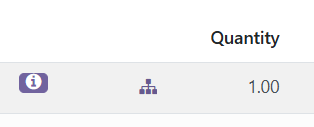
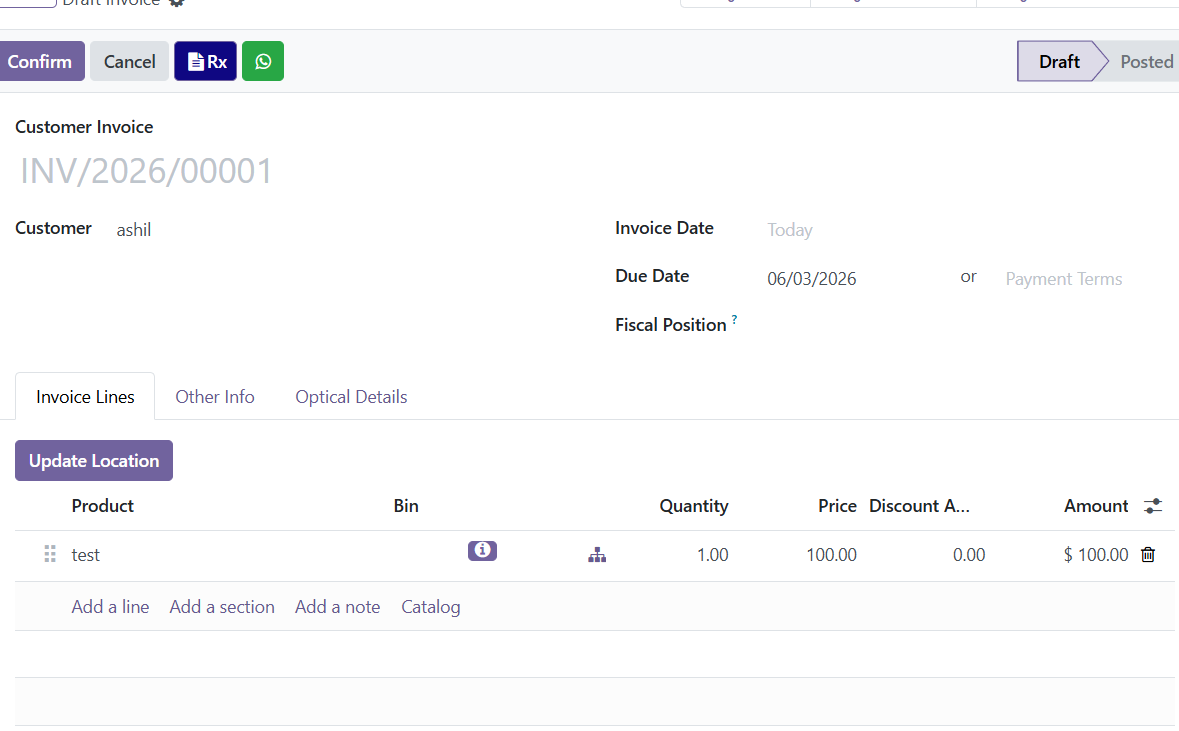
I added a custom widget field in the invoice_line_ids  view. The widget displays correctly, but it creates a  empty space between the widget , making the layout look uneven.

Screenshot attached.

How can I remove this extra space

<?xml version="1.0" encoding="UTF-8" ?>
<odoo>
<data>
<record id="inherit_invoice_line" model="ir.ui.view">
<field name="name">inherit.invoice.line</field>
<field name="model">account.move</field>
<field name="inherit_id" ref="account.view_move_form"/>
<field name="arch" type="xml">
<xpath expr="//field[@name='invoice_line_ids']/list/field[@name='quantity']" position="after">
<field name="current_on_hand_average_cost" optional="hide" groups="zl_account_base.groups_cost_group_manager"/>
<field name="cost" optional="hide" sum="Cost" groups="zl_account_base.groups_cost_group_manager"/>
<field name="product_type" column_invisible="1"/>
<!-- This button opens a wizard to update the cost of the invoice line -->
<button name="%(zl_product_report.action_update_cost_wizard)d"
type="action"
icon="fa-pencil"
aria-label="Update Cost"
title="Update Cost"
groups="zl_account_base.group_management"
invisible="not product_id"/>
<field name="is_cost_updated" column_invisible="1"/>
<field name="total_cost" optional="hide" sum="Total Cost" groups="zl_account_base.groups_cost_group_manager"/>
<field name="margin" optional="hide" sum="Margin" groups="zl_account_base.groups_cost_group_manager"/>
</xpath>

<!-- ONE XPATH - both icons together, right after product_id -->
<xpath expr="//field[@name='invoice_line_ids']/list/field[@name='product_id']" position="after">
<button data-hotkey="w"
name="action_open_product_transactions_wizard" type="object"
class="fa fa-info-circle btn-primary"
/>
<field name="company_stock_info" widget="company_stock_widget" nolabel="1" width="10px"/>
</xpath>
<xpath expr="//field[@name='invoice_line_ids']/list/field[@name='account_id']" position="attributes">
<attribute name="optional">hide</attribute>
</xpath>
<!-- <xpath expr="//field[@name='invoice_line_ids']/list/field[@name='tax_ids']" position="after">-->
<!-- <field name="line_tax_amount" optional="show" sum="Total Tax Amount"/>-->
<!-- </xpath>-->

</field>
</record>

<record id="view_move_form_margin_recompute" model="ir.ui.view">
<field name="name">account.move.form.margin.recompute</field>
<field name="model">account.move</field>
<field name="inherit_id" ref="account.view_move_form"/>
<field name="arch" type="xml">
<xpath expr="//header" position="inside">
<!-- Button for Customer Invoices -->
<button name="button_recompute_margins" type="object" string="Recompute Margins"
class="oe_highlight"
groups="zl_account_base.group_management" invisible="move_type not in ['out_invoice','out_refund']"/>

<!-- Button for Vendor Bills -->
<button name="recompute_margins_on_related_invoices" type="object" string="Update Sales Margins"
class="oe_highlight"
groups="zl_account_base.groups_cost_group_manager" invisible="move_type != 'in_invoice' or state != 'posted'"/>
help="Manually triggers the recalculation of margins on all sales invoices affected by this bill."/>
</xpath>
</field>
</record>

<!-- 2. Custom List View -->
<record id="view_invoice_line_analysis_tree" model="ir.ui.view">
<field name="name">account.move.line.analysis.tree</field>
<field name="model">account.move.line</field>
<field name="arch" type="xml">
<list string="Invoice Lines" create="false" edit="false" delete="false">
<field name="invoice_date" optional="show"/>
<field name="move_id"/>
<field name="partner_id" optional="show"/>
<field name="product_id"/>
<field name="quantity"/>
<field name="price_unit"/>
<field name="cost" optional="show"/>
<field name="margin" optional="show"/>
<field name="price_subtotal" sum="Total"/>
<field name="line_tax_amount" sum="Total Tax" optional="hide"/>
<button name="button_update_line_cost" type="object" icon="fa-refresh" help="Update Cost &amp; Margin for this line"/>
</list>
</field>
</record>


<!-- 1. Main Action Window -->
<record id="action_invoice_line_analysis" model="ir.actions.act_window">
<field name="name">Invoice Lines</field>
<field name="res_model">account.move.line</field>
<field name="view_mode">list,form</field>
<field name="view_id" ref="view_invoice_line_analysis_tree"/>
<field name="domain">[('display_type', '=', 'product'), ('move_id.state', '=', 'posted')]</field>
<field name="context">{
'search_default_sales_invoices': 1,
'create': False,
'edit': False,
'delete':False
}</field>
<field name="help" type="html">
<p class="o_view_nocontent_smiling_face">
No invoice lines found. Let's create one!
</p>
</field>
</record>

<!-- 3. Custom Search View with Filters -->
<record id="view_invoice_line_analysis_search" model="ir.ui.view">
<field name="name">account.move.line.analysis.search</field>
<field name="model">account.move.line</field>
<field name="arch" type="xml">
<search string="Search Invoice Lines">
<field name="product_id"/>
<field name="partner_id"/>
<field name="move_id"/>
<separator/>
<filter string="Sales Invoices" name="sales_invoices" domain="[('move_id.move_type', '=', 'out_invoice')]"/>
<filter string="Purchase Bills" name="purchase_bills" domain="[('move_id.move_type', '=', 'in_invoice')]"/>
<filter string="Credit Notes" name="credit_notes" domain="[('move_id.move_type', '=', 'out_refund')]"/>
<filter string="Refunds" name="refunds" domain="[('move_id.move_type', '=', 'in_refund')]"/>
<group expand="0" string="Group By">
<filter string="Invoice/Bill" name="groupby_move" context="{'group_by': 'move_id'}"/>
<filter string="Product" name="groupby_product" context="{'group_by': 'product_id'}"/>
<filter string="Partner" name="groupby_partner" context="{'group_by': 'partner_id'}"/>
</group>
</search>
</field>
</record>

<!-- 4. Server Action for Mass Update -->
<record id="action_server_update_line_cost" model="ir.actions.server">
<field name="name">Update Cost &amp; Margin</field>
<field name="model_id" ref="account.model_account_move_line"/>
<field name="binding_model_id" ref="account.model_account_move_line"/>
<field name="binding_view_types">list</field>
<field name="state">code</field>
<field name="code">
if records:
records.button_update_line_cost()
</field>
</record>

<record id="account_move_list_view_inherited" model="ir.ui.view">
<field name="name">account.move.list.view</field>
<field name="model">account.move</field>
<field name="inherit_id" ref="account.view_out_invoice_tree"/>
<field name="arch" type="xml">
<xpath expr="//field[@name='amount_total_in_currency_signed']" position="after">
<field name="total_margin" sum="Total Margin"/>
</xpath>
</field>
</record>

<!-- 5. Menu Item -->
<menuitem
id="menu_invoice_line_analysis"
name="Invoice Lines"
parent="account.menu_finance_reports"
groups="zl_account_base.groups_cost_group_manager"
action="action_invoice_line_analysis"
sequence="100"/>
</data>
</odoo>

Any guidance would be appreciated.

Thanks.
0
अवतार
खारिज करें
अवतार
Muhammad Farooq Iqbal
Best Answer

Below is a clean updated version. The main change is: remove width="10px" from the XML and control the widget column using a CSS/SCSS class.

1. Updated XML

<?xml version="1.0" encoding="UTF-8"?>
<odoo>
    <data>

        <record id="inherit_invoice_line" model="ir.ui.view">
            <field name="name">inherit.invoice.line</field>
            <field name="model">account.move</field>
            <field name="inherit_id" ref="account.view_move_form"/>
            <field name="arch" type="xml">

                <!-- Add icon button + custom widget after product -->
                <xpath expr="//field[@name='invoice_line_ids']/list/field[@name='product_id']" position="after">

                    <button data-hotkey="w"
                            name="action_open_product_transactions_wizard"
                            type="object"
                            icon="fa-info-circle"
                            title="Product Info"
                            class="btn-link o_invoice_line_icon_btn"/>

                    <field name="company_stock_info"
                           widget="company_stock_widget"
                           nolabel="1"
                           class="o_company_stock_widget_col"/>

                </xpath>

                <!-- Add cost/margin fields after quantity -->
                <xpath expr="//field[@name='invoice_line_ids']/list/field[@name='quantity']" position="after">

                    <field name="current_on_hand_average_cost"
                           optional="hide"
                           groups="zl_account_base.groups_cost_group_manager"/>

                    <field name="cost"
                           optional="hide"
                           sum="Cost"
                           groups="zl_account_base.groups_cost_group_manager"/>

                    <field name="product_type"
                           column_invisible="1"/>

                    <button name="%(zl_product_report.action_update_cost_wizard)d"
                            type="action"
                            icon="fa-pencil"
                            aria-label="Update Cost"
                            title="Update Cost"
                            class="btn-link o_invoice_line_icon_btn"
                            groups="zl_account_base.group_management"
                            invisible="not product_id"/>

                    <field name="is_cost_updated"
                           column_invisible="1"/>

                    <field name="total_cost"
                           optional="hide"
                           sum="Total Cost"
                           groups="zl_account_base.groups_cost_group_manager"/>

                    <field name="margin"
                           optional="hide"
                           sum="Margin"
                           groups="zl_account_base.groups_cost_group_manager"/>

                </xpath>

                <!-- Hide account field by default -->
                <xpath expr="//field[@name='invoice_line_ids']/list/field[@name='account_id']" position="attributes">
                    <attribute name="optional">hide</attribute>
                </xpath>

            </field>
        </record>

    </data>
</odoo>

2. Add SCSS/CSS file

Create this file:

your_module/static/src/scss/invoice_line_widget.scss

Add this:

/* Reduce spacing for custom invoice line icons/widgets */

.o_field_x2many_list_row_add,
.o_list_view {
    .o_invoice_line_icon_btn {
        padding-left: 2px !important;
        padding-right: 2px !important;
        margin-left: 0 !important;
        margin-right: 0 !important;
        min-width: 24px !important;
        width: 24px !important;
        text-align: center;
    }

    .o_company_stock_widget_col {
        width: 28px !important;
        min-width: 28px !important;
        max-width: 28px !important;
        padding-left: 2px !important;
        padding-right: 2px !important;
        text-align: center;
        white-space: nowrap;
    }

    .o_company_stock_widget_col > * {
        margin-left: 0 !important;
        margin-right: 0 !important;
        padding-left: 0 !important;
        padding-right: 0 !important;
    }
}
0
अवतार
खारिज करें
Enjoying the discussion? Don't just read, join in!

Create an account today to enjoy exclusive features and engage with our awesome community!

साइन अप करें
Related Posts Replies डेटा देखने का तरीका ऐक्टिविटी
Increase the width of the product description
column width
अवतार
अवतार
2
मई 24
3102
Fields [width & height]
width Height
अवतार
0
जून 22
3680
How to register width and length of each item in a sale order? Solved
sale.order.line width
अवतार
अवतार
1
मार्च 18
5092
Width of selection field Solved
selection width
अवतार
अवतार
अवतार
3
अग॰ 17
7607
Kanban cards on 2 columns
kanban width
अवतार
0
मई 17
5951
कम्यूनिटी
  • ट्यूटोरियल्स
  • दस्तावेज़
  • फ़ोरम
ओपन सोर्स
  • डाउनलोड
  • Github
  • रनबॉट
  • अनुवाद
सेवाएं
  • Odoo.sh Hosting
  • सहायता
  • अपग्रेड
  • कस्टम डेवलपमेंट्स
  • शिक्षा
  • अकाउंटेंट खोजें
  • पार्टनर ढूंढें
  • पार्टनर बनें
हमारे बारे में
  • हमारी कंपनी
  • ब्रांड ऐसेट
  • संपर्क करें
  • नौकरियां
  • इवेंट
  • पॉडकास्ट
  • ब्लॉग
  • ग्राहक
  • लीगल • गोपनीयता
  • सुरक्षा
الْعَرَبيّة Català 简体中文 繁體中文 (台灣) Čeština Dansk Nederlands English Suomi Français Deutsch हिंदी Bahasa Indonesia Italiano 日本語 한국어 (KR) Lietuvių kalba Język polski Português (BR) română русский язык Slovenský jazyk Slovenščina Español (América Latina) Español Svenska ภาษาไทย Türkçe українська Tiếng Việt

Odoo, बिज़नेस से जुड़े ऐप्लिकेशन का एक कलेक्शन है जो ओपन सोर्स पर आधारित है. इसमें आपकी कंपनी की हर ज़रूरत के लिए ऐप्लिकेशन हैं. जैसे, सीआरएम, ई-कॉमर्स, अकाउंटिंग, इन्वेंट्री, पॉइंट ऑफ़ सेल, प्रोजेक्ट मैनेजमेंट वगैरह.

Odoo की सबसे बड़ी खासियत है कि यह इस्तेमाल करने में बहुत आसान है और यह पूरी तरह से इंटिग्रेट किया हुआ है.

Website made with

Odoo Experience on YouTube

1. Use the live chat to ask your questions.
2. The operator answers within a few minutes.

Live support on Youtube
Watch now