Skip to Content
Odoo मेन्यू
  • साइन इन करें
  • मुफ़्त में आज़माएं
  • ऐप्लिकेशन
    फ़ाइनेंस
    • अकाउंटिंग
    • इनवॉइसिंग
    • एक्सपेंस
    • स्प्रेडशीट (बीआई)
    • डॉक्यूमेंट्स
    • साइन
    सेल्स
    • सीआरएम
    • सेल्स
    • पीओएस शॉप
    • पीओएस रेस्टोरेंट
    • सब्सक्रिप्शन
    • रेंटल
    वेबसाइट
    • वेबसाइट बिल्डर
    • ई-कॉमर्स
    • ब्लॉग
    • फ़ोरम
    • लाइव चैट
    • ई-लर्निंग
    सप्लाई चेन
    • इन्वेंट्री
    • मैन्युफ़ैक्चरिंग
    • पीएलएम
    • परचेज़
    • मेंटेनेंस
    • क्वालिटी
    मानव संसाधन
    • कर्मचारी
    • रिक्रूटमेंट
    • टाइम ऑफ़
    • अप्रेज़ल
    • रेफ़रल
    • फ़्लीट
    मार्केटिंग
    • सोशल मार्केटिंग
    • ईमेल मार्केटिंग
    • एसएमएस मार्केटिंग
    • इवेंट
    • मार्केटिंग ऑटोमेशन
    • सर्वे
    सेवाएं
    • प्रोजेक्ट
    • टाइमशीट
    • फ़ील्ड सर्विस
    • हेल्पडेस्क
    • प्लानिंग
    • अपॉइंटमेंट
    प्रॉडक्टिविटी
    • डिस्कस
    • आर्टिफ़िशियल इंटेलिजेंस
    • आईओटी
    • वीओआईपी
    • नॉलेज
    • WhatsApp
    तीसरे पक्ष के ऐप्लिकेशन Odoo स्टूडियो Odoo क्लाउड प्लेटफ़ॉर्म
  • इंडस्ट्री
    रीटेल
    • बुक स्टोर
    • क्लोदिंग स्टोर
    • फ़र्नीचर स्टोर
    • ग्रॉसरी स्टोर
    • हार्डवेयर स्टोर
    • टॉय स्टोर
    फ़ूड & हॉस्पिटैलिटी
    • बार और पब
    • रेस्टोरेंट
    • फ़ास्ट फ़ूड
    • गेस्ट हाउस
    • बेवरिज डिस्ट्रीब्यूटर
    • होटल
    रियल एस्टेट
    • रियल एस्टेट एजेंसी
    • आर्किटेक्चर फ़र्म
    • कंसट्रक्शन
    • प्रॉपर्टी मैनेजमेंट
    • गार्ड्निंग
    • प्रॉपर्टी ओनर असोसिएशन
    कंसल्टिंग
    • अकाउंटिंग फ़र्म
    • Odoo पार्टनर
    • मार्केटिंग एजेंसी
    • लॉ फ़र्म
    • टैलेंट ऐक्विज़िशन
    • ऑडिट & सर्टिफ़िकेशन
    मैन्युफ़ैक्चरिंग
    • टेक्सटाइल
    • धातु
    • फ़र्नीचर
    • फ़ूड
    • ब्रुअरी
    • कॉर्पोरेट गिफ़्ट
    हेल्थ & फिटनेस
    • स्पोर्ट्स क्लब
    • आईवियर स्टोर
    • फिटनेस सेंटर
    • वेलनेस प्रैक्टिशनर
    • फॉर्मेसी
    • हेयर सैलून
    व्यापार
    • Handyman
    • आईटी हार्डवेयर & सपोर्ट
    • सोलर एनर्जी सिस्टम
    • शू मेकर
    • साफ-सफाई से जुड़ी सेवाएं
    • HVAC सर्विस
    अन्य
    • गैर-लाभकारी संगठन
    • एन्वायरमेंटल एजेंसी
    • बिलबोर्ड रेंटल
    • फ़ोटोग्राफी
    • बाइक लीजिंग
    • सॉफ़्टवेयर रीसेलर
    सभी इंडस्ट्री को ब्राउज़ करें
  • कम्यूनिटी
    सीखें
    • ट्यूटोरियल्स
    • दस्तावेज़
    • सर्टिफ़िकेशन
    • ट्रेनिंग
    • ब्लॉग
    • पॉडकास्ट
    शिक्षा को बढ़ावा दें
    • एजुकेशन प्रोग्राम
    • स्केल अप! बिजनेस गेम
    • Odoo के ऑफ़िस में आएं
    सॉफ़्टवेयर पाएं
    • डाउनलोड
    • वर्शन की तुलना करें
    • रिलीज़
    साथ मिलकर काम करें
    • Github
    • फ़ोरम
    • इवेंट
    • अनुवाद
    • पार्टनर बनें
    • पार्टनर के लिए सेवाएं
    • अपना अकाउंटिंग फ़र्म रजिस्टर करें
    सेवाएं पाएं
    • पार्टनर ढूंढें
    • अकाउंटेंट खोजें
    • सलाहकार की मदद लें
    • इम्प्लिमेंटेशन सेवाएं
    • कस्टमर रेफ़रेंस
    • सहायता
    • अपग्रेड
    Github Youtube Twitter Linkedin Instagram Facebook Spotify
    +1 (650) 691-3277
    डेमो देखें
  • कीमत
  • सहायता
You need to be registered to interact with the community.
All Posts People Badges
टैग (View all)
odoo accounting v14 pos v15
About this forum
You need to be registered to interact with the community.
All Posts People Badges
टैग (View all)
odoo accounting v14 pos v15
About this forum
सहायता

How to make an internal transfer in Odoo version 18?

Subscribe

Get notified when there's activity on this post

This question has been flagged
accountinginternal-transfer
4 Replies
15073 डेटा देखने का तरीका
अवतार
Brandon Basurto Mercado (brbm)

.

0
अवतार
खारिज करें
Safaa BOUCHERIT

How can we manage internal transfers if account_accountant module is not installed please ?

अवतार
Brandon Basurto Mercado (brbm)
लेखक Best Answer

Internal Transfers


What is an internal transfer?


An internal transfer is a move of funds between accounts within the same company.


Example: 


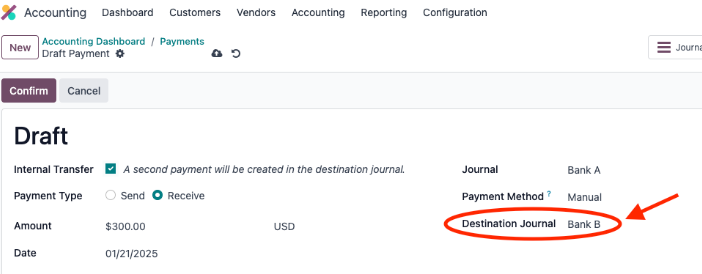
The customer has two bank accounts from two different journals Bank A and Bank B, and he wants to transfer $300 from Bank A to Bank B.


Bank A sends - 300 To Bank B + 300


How does it work in Odoo through different versions?


In version 17 You were able to make an internal transfer by accessing the accounting dashboard, selecting the three dots and clicking on payments.
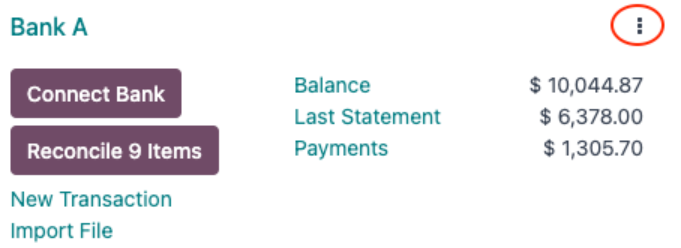
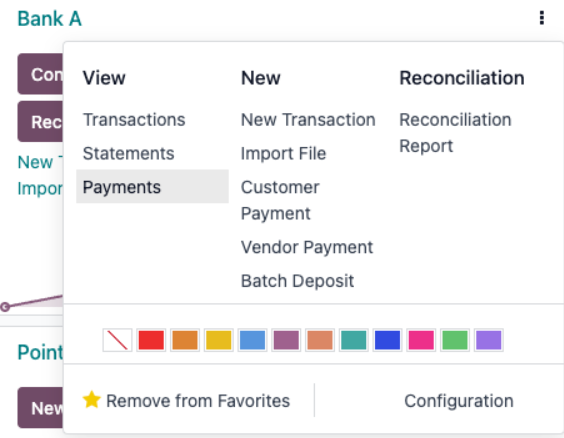


Once you press the button to create a new payment, you will type the amount and mark the checkbox named Internal Transfer which will activate the field named Destination Journal where you, to follow the example we will select the journal named Bank B.
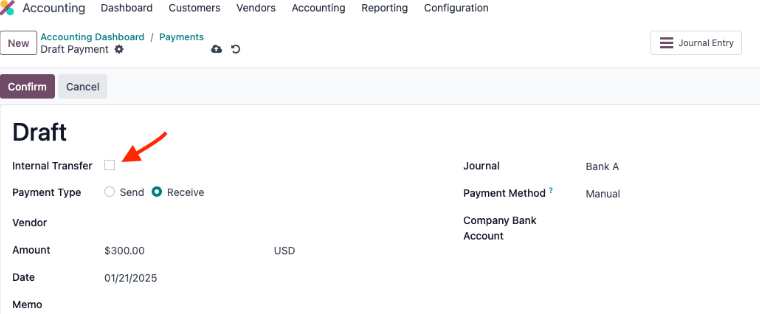


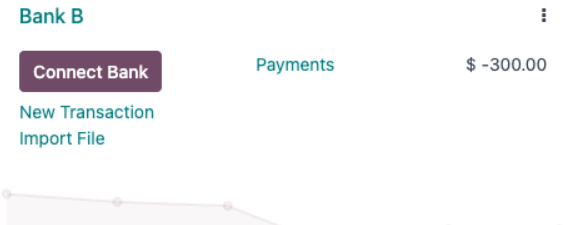
When you confirm it, you will be able to see it in the dashboard of Bank B journal.


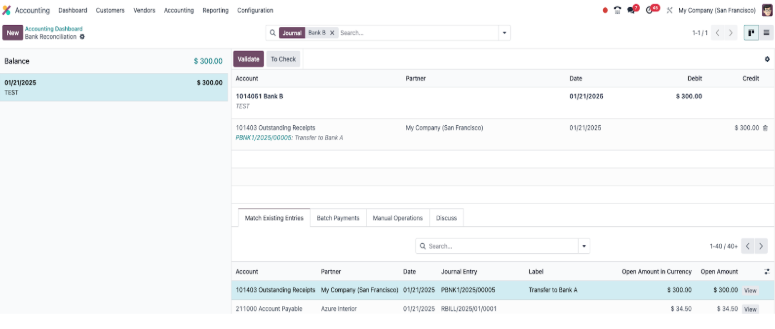
Then you proceed to create the transactions to reconcile them in their respective journals.


Odoo Version 18 


Differences between version 17 and 18.


  1. The biggest difference between versions is that in version 18 the checkbox named Internal Transfer is no longer available. 
  2. The process to create an internal transfer is different, you can see it below. 


To create an internal transfer in Odoo 18 we will avoid the step to first create a payment, then reconcile it, since we will manually create the transfer from the bank reconciliation view.


1. Generate the transaction from the journal which is sending the money (Bank A in our example). The amount has to be negative since we are taking away money from this bank.



2. Click on the match button, then click on the Internal Transfers Button and Validate.



3. Go to the journal of Bank B and also generate the transaction there. (This time the amount has to be positive).



4. Click on the match button, then Internal Transfers and then Validate.
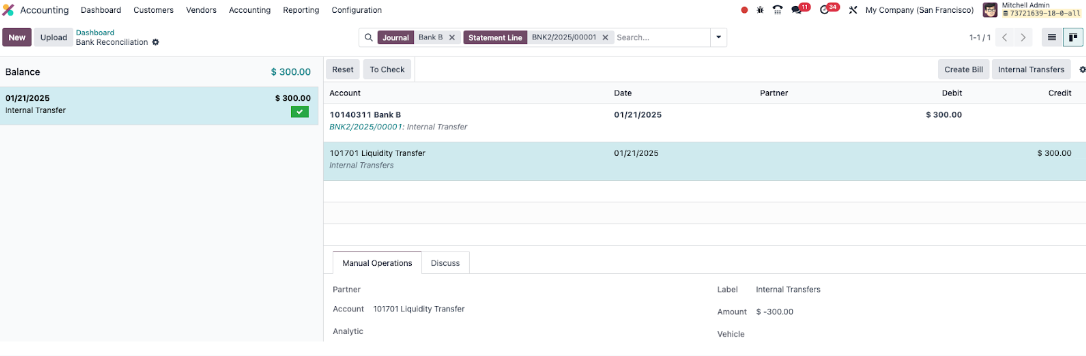


This will complete the transaction.


Internal transfer without bank reconciliation Odoo 18


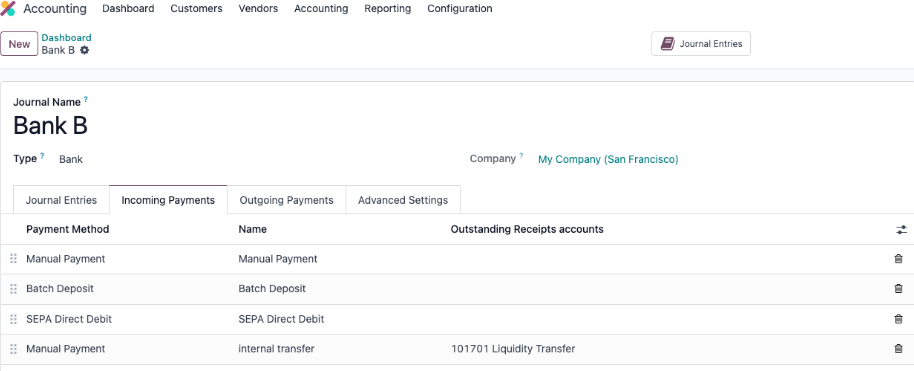
If you want to avoid bank reconciliation, you need to set a new payment method in the bank journals, a manual payment with the name “Internal Transfers” and use as outstanding receipts/payments account the 101701 Liquidity Transfer which is the one that Odoo uses by default for internal transfers. 

After everything is configured, simply choose the appropriate payment method when entering a payment manually.


Example of the configuration below:


If you require assistance, please contact us through a Support Ticket.


Task-4459135

9
अवतार
खारिज करें
अवतार
Ray Carnes (ray)
Best Answer

It is not necessary to create an Internal Transfer or any other Payment in Odoo in advance of confirmation of the payment via the bank statement (so you can let your bank do the work instead!). 

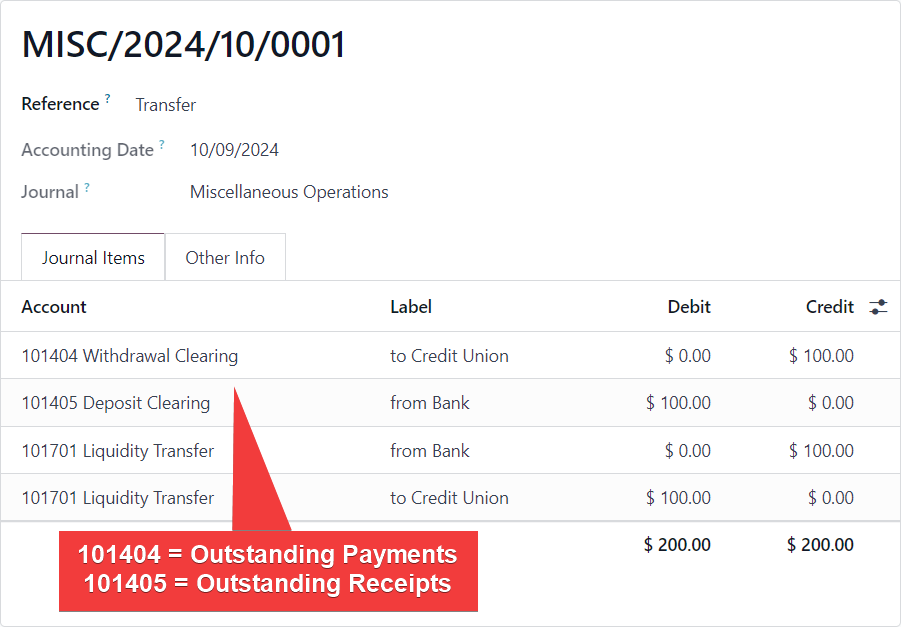
However if you want to see your internal transfer in the general ledger before you reconcile it with the bank statement, and also therefore see it during bank reconciliation (this means you have configured Outstanding Accounts on your Bank Journals) because you are entering all payments into Odoo in advance:

You can enter a two sided Journal Entry posting to those accounts that results in the payment showing in MATCH EXISTING ENTRIES during bank reconcilation:


Example:
 

1
अवतार
खारिज करें
अवतार
Cybrosys Techno Solutions Pvt.Ltd
Best Answer

Hi,

Please refer to the following links:

1. https://www.odoo.com/documentation/18.0/applications/finance/accounting/bank/internal_transfers.html

2.  Solved Forum: https://www.odoo.com/sl_SI/forum/pomoc-1/internal-transfer-between-banks-v17-and-v18-265438


Hope it helps.

0
अवतार
खारिज करें
अवतार
MD Sharful Alam
Best Answer

There

There is no internal transfer check box!! did not find the internal transfer option in the reconciliation as well. 

0
अवतार
खारिज करें
Enjoying the discussion? Don't just read, join in!

Create an account today to enjoy exclusive features and engage with our awesome community!

साइन अप करें
Related Posts Replies डेटा देखने का तरीका ऐक्टिविटी
How to do internal Bank Transfer with Yodlee reconcile?
accounting internal-transfer v14
अवतार
0
जुल॰ 21
5039
Odoo Community PA (Plateforme Agréée) France
accounting
अवतार
अवतार
1
जून 26
566
Bank line unreconciled after suspense account workaround — blocks year-end closing (Odoo 19 Enterprise)
accounting
अवतार
अवतार
अवतार
2
जून 26
561
Clarification on Accounting for Opening Stock and Inventory Adjustments in Odoo Solved
accounting
अवतार
अवतार
अवतार
अवतार
3
जून 26
814
Prevent auto-validation of bank journal transaction to vendor bill matching
accounting
अवतार
अवतार
अवतार
अवतार
अवतार
6
जून 26
1788
कम्यूनिटी
  • ट्यूटोरियल्स
  • दस्तावेज़
  • फ़ोरम
ओपन सोर्स
  • डाउनलोड
  • Github
  • रनबॉट
  • अनुवाद
सेवाएं
  • Odoo.sh Hosting
  • सहायता
  • अपग्रेड
  • कस्टम डेवलपमेंट्स
  • शिक्षा
  • अकाउंटेंट खोजें
  • पार्टनर ढूंढें
  • पार्टनर बनें
हमारे बारे में
  • हमारी कंपनी
  • ब्रांड ऐसेट
  • संपर्क करें
  • नौकरियां
  • इवेंट
  • पॉडकास्ट
  • ब्लॉग
  • ग्राहक
  • लीगल • गोपनीयता
  • सुरक्षा
الْعَرَبيّة Català 简体中文 繁體中文 (台灣) Čeština Dansk Nederlands English Suomi Français Deutsch हिंदी Bahasa Indonesia Italiano 日本語 한국어 (KR) Lietuvių kalba Język polski Português (BR) română русский язык Slovenský jazyk Slovenščina Español (América Latina) Español Svenska ภาษาไทย Türkçe українська Tiếng Việt

Odoo, बिज़नेस से जुड़े ऐप्लिकेशन का एक कलेक्शन है जो ओपन सोर्स पर आधारित है. इसमें आपकी कंपनी की हर ज़रूरत के लिए ऐप्लिकेशन हैं. जैसे, सीआरएम, ई-कॉमर्स, अकाउंटिंग, इन्वेंट्री, पॉइंट ऑफ़ सेल, प्रोजेक्ट मैनेजमेंट वगैरह.

Odoo की सबसे बड़ी खासियत है कि यह इस्तेमाल करने में बहुत आसान है और यह पूरी तरह से इंटिग्रेट किया हुआ है.

Website made with

Odoo Experience on YouTube

1. Use the live chat to ask your questions.
2. The operator answers within a few minutes.

Live support on Youtube
Watch now