Skip to Content
Odoo मेन्यू
  • साइन इन करें
  • मुफ़्त में आज़माएं
  • ऐप्लिकेशन
    फ़ाइनेंस
    • अकाउंटिंग
    • इनवॉइसिंग
    • एक्सपेंस
    • स्प्रेडशीट (बीआई)
    • डॉक्यूमेंट्स
    • साइन
    सेल्स
    • सीआरएम
    • सेल्स
    • पीओएस शॉप
    • पीओएस रेस्टोरेंट
    • सब्सक्रिप्शन
    • रेंटल
    वेबसाइट
    • वेबसाइट बिल्डर
    • ई-कॉमर्स
    • ब्लॉग
    • फ़ोरम
    • लाइव चैट
    • ई-लर्निंग
    सप्लाई चेन
    • इन्वेंट्री
    • मैन्युफ़ैक्चरिंग
    • पीएलएम
    • परचेज़
    • मेंटेनेंस
    • क्वालिटी
    मानव संसाधन
    • कर्मचारी
    • रिक्रूटमेंट
    • टाइम ऑफ़
    • अप्रेज़ल
    • रेफ़रल
    • फ़्लीट
    मार्केटिंग
    • सोशल मार्केटिंग
    • ईमेल मार्केटिंग
    • एसएमएस मार्केटिंग
    • इवेंट
    • मार्केटिंग ऑटोमेशन
    • सर्वे
    सेवाएं
    • प्रोजेक्ट
    • टाइमशीट
    • फ़ील्ड सर्विस
    • हेल्पडेस्क
    • प्लानिंग
    • अपॉइंटमेंट
    प्रॉडक्टिविटी
    • डिस्कस
    • आर्टिफ़िशियल इंटेलिजेंस
    • आईओटी
    • वीओआईपी
    • नॉलेज
    • WhatsApp
    तीसरे पक्ष के ऐप्लिकेशन Odoo स्टूडियो Odoo क्लाउड प्लेटफ़ॉर्म
  • इंडस्ट्री
    रीटेल
    • बुक स्टोर
    • क्लोदिंग स्टोर
    • फ़र्नीचर स्टोर
    • ग्रॉसरी स्टोर
    • हार्डवेयर स्टोर
    • टॉय स्टोर
    फ़ूड & हॉस्पिटैलिटी
    • बार और पब
    • रेस्टोरेंट
    • फ़ास्ट फ़ूड
    • गेस्ट हाउस
    • बेवरिज डिस्ट्रीब्यूटर
    • होटल
    रियल एस्टेट
    • रियल एस्टेट एजेंसी
    • आर्किटेक्चर फ़र्म
    • कंसट्रक्शन
    • प्रॉपर्टी मैनेजमेंट
    • गार्ड्निंग
    • प्रॉपर्टी ओनर असोसिएशन
    कंसल्टिंग
    • अकाउंटिंग फ़र्म
    • Odoo पार्टनर
    • मार्केटिंग एजेंसी
    • लॉ फ़र्म
    • टैलेंट ऐक्विज़िशन
    • ऑडिट & सर्टिफ़िकेशन
    मैन्युफ़ैक्चरिंग
    • टेक्सटाइल
    • धातु
    • फ़र्नीचर
    • फ़ूड
    • ब्रुअरी
    • कॉर्पोरेट गिफ़्ट
    हेल्थ & फिटनेस
    • स्पोर्ट्स क्लब
    • आईवियर स्टोर
    • फिटनेस सेंटर
    • वेलनेस प्रैक्टिशनर
    • फॉर्मेसी
    • हेयर सैलून
    Trades
    • Handyman
    • आईटी हार्डवेयर & सपोर्ट
    • Solar Energy Systems
    • Shoe Maker
    • साफ-सफाई से जुड़ी सेवाएं
    • HVAC सर्विस
    अन्य
    • गैर-लाभकारी संगठन
    • एन्वायरमेंटल एजेंसी
    • बिलबोर्ड रेंटल
    • फ़ोटोग्राफी
    • बाइक लीजिंग
    • सॉफ़्टवेयर रीसेलर
    सभी इंडस्ट्री को ब्राउज़ करें
  • कम्यूनिटी
    सीखें
    • ट्यूटोरियल्स
    • दस्तावेज़
    • सर्टिफ़िकेशन
    • ट्रेनिंग
    • ब्लॉग
    • पॉडकास्ट
    शिक्षा को बढ़ावा दें
    • एजुकेशन प्रोग्राम
    • स्केल अप! बिजनेस गेम
    • Odoo के ऑफ़िस में आएं
    सॉफ़्टवेयर पाएं
    • डाउनलोड
    • वर्शन की तुलना करें
    • रिलीज़
    साथ मिलकर काम करें
    • Github
    • फ़ोरम
    • इवेंट
    • अनुवाद
    • पार्टनर बनें
    • पार्टनर के लिए सेवाएं
    • अपना अकाउंटिंग फ़र्म रजिस्टर करें
    सेवाएं पाएं
    • पार्टनर ढूंढें
    • अकाउंटेंट खोजें
    • सलाहकार की मदद लें
    • इम्प्लिमेंटेशन सेवाएं
    • कस्टमर रेफ़रेंस
    • सहायता
    • अपग्रेड
    Github Youtube Twitter Linkedin Instagram Facebook Spotify
    +1 (650) 691-3277
    डेमो देखें
  • कीमत
  • सहायता
You need to be registered to interact with the community.
All Posts People Badges
टैग (View all)
odoo accounting v14 pos v15
About this forum
You need to be registered to interact with the community.
All Posts People Badges
टैग (View all)
odoo accounting v14 pos v15
About this forum
सहायता

Automatic coupon email

Subscribe

Get notified when there's activity on this post

This question has been flagged
shopdiscountecommercecouponodoo16features
2 Replies
3913 डेटा देखने का तरीका
अवतार
edu-MyOffice Inc., Anthony

Hello,

I'd like to turn off automatic coupon emails because they are the only way to assign automatic discounts to trade portal users, and i'm not giving discounts based on quantity. 

However whenever I add a contact it sends them an automatic ODOO email that looks quite janky and I need to turn that off. Let me know how I can do this, 

Odoo 16 Saas

thanks!
0
अवतार
खारिज करें
edu-MyOffice Inc., Anthony
लेखक

anyone have any ideas? this is urgent

अवतार
edu-MyOffice Inc., Anthony
लेखक Best Answer

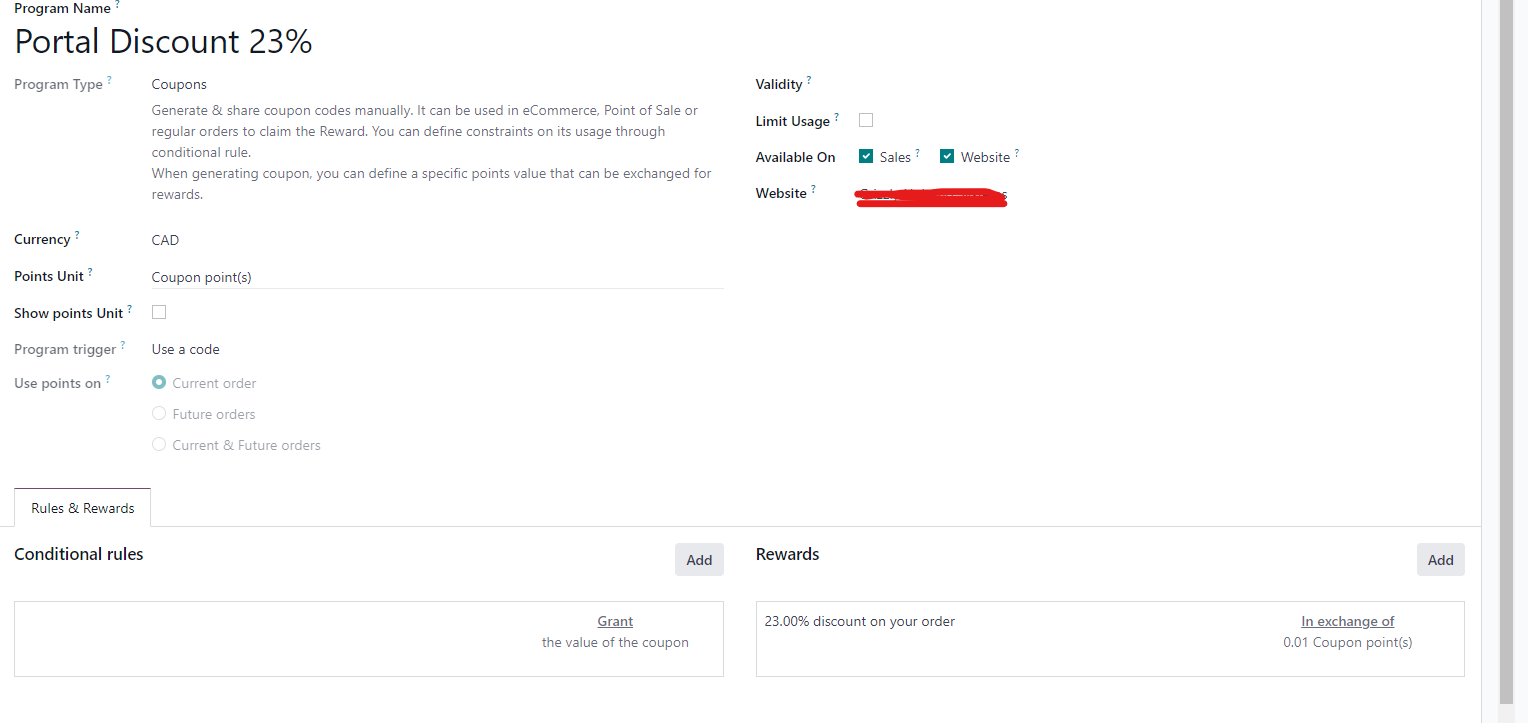
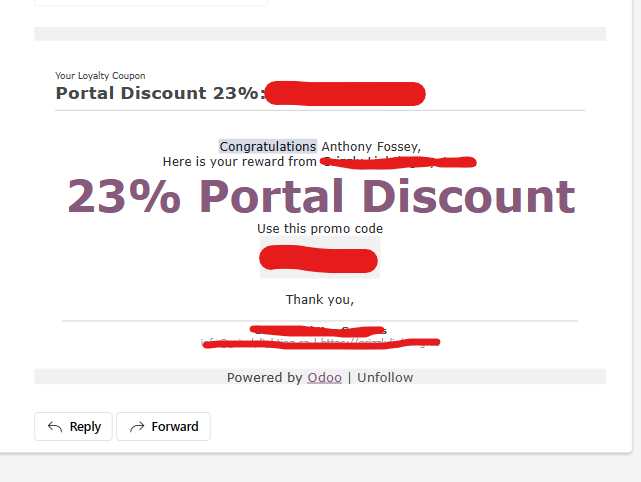
Here is what got sent to a test account when I assigned a coupon to that contact


Here is what I see


0
अवतार
खारिज करें
अवतार
Jaideep
Best Answer

Don’t believe any coupon email is sent on creation of new contact in standard Odoo. 

Is there any marketing automation campaign or automated action defined?

========

Updated with screenshot


0
अवतार
खारिज करें
edu-MyOffice Inc., Anthony
लेखक

No there is not. Whenever I add a "partner" to a new generated coupon code, it send an automatic email to the contacts email.

Jaideep

Thanks for clarifying, please ignore my understanding in my answer.

I would look in these areas..

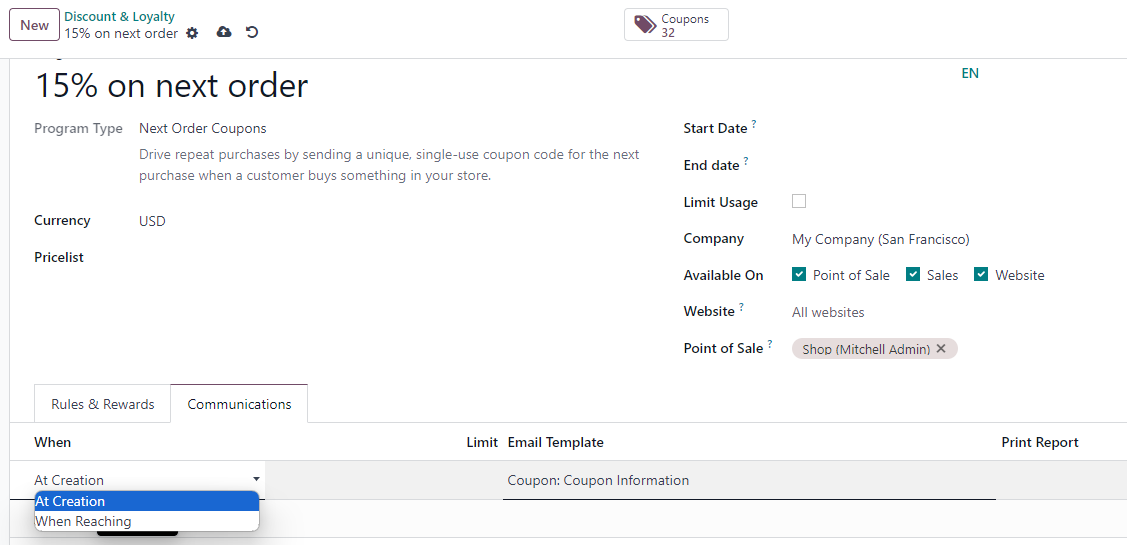
1. Communication setting - on the coupon program's communications tab, communication timing and email template can be set.

2. The specific email template you are referring to is Coupon: Coupon Information

Settings > Technical > email templates --> Coupon: Coupon Information

you could probably modify it.

edu-MyOffice Inc., Anthony
लेखक

Hello,

Thanks for the reply, where do I see the coupons communications tab?

Jaideep

Navigate to the loyalty program Sales > Products > Discount & Loyalty

Select the program for which coupons are being generated, you would find the communications tab adjacent to the rule and rewards tab

edu-MyOffice Inc., Anthony
लेखक

Oh! ok now we are getting somewhere.

The only problem is that I don't see that communications tab, is it possible there is a setting to show that?

Jaideep

Don't believe there is any setting to enable the tab. It seems already enabled for Sales Admin access.

Maybe you could check by enabling developer mode.

Jaideep

Not sure why it isn’t visible, Since you are on SaaS, would suggest to open a ticket with helpdesk.

You could also try to upgrade if you that option exists

https://www.odoo.com/help

Jaideep

On further analysis found that the communications tab is only visible when the program type is "Next Order Coupon" or 'Loyalty cards".
From your screenshot the type set is 'coupon; hence the communications tab isn't visible
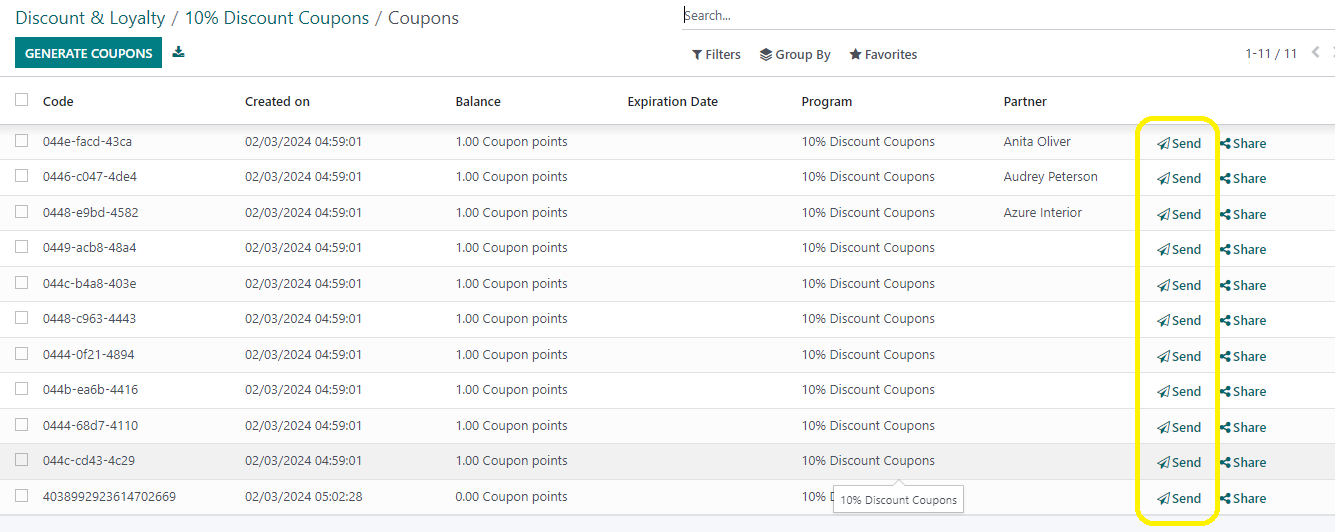
Also, see that when a new coupon is generated the emails aren't sent out automatically but need to sent manually by clicking on send option from the coupon list

Enjoying the discussion? Don't just read, join in!

Create an account today to enjoy exclusive features and engage with our awesome community!

साइन अप करें
Related Posts Replies डेटा देखने का तरीका ऐक्टिविटी
Ecommerce Grid is 4 columns by default. how can we change it in odoo 16? I have purpuse that for screen size between 992px and 1200px 4 columns  and screen size grether than 1200px 8 columns in page
shop grid ecommerce odoo16features
अवतार
0
अप्रैल 23
3131
How to configure ecommerce shop coupons? Solved
shop promotion ecommerce coupon
अवतार
अवतार
अवतार
अवतार
अवतार
6
दिस॰ 23
24521
Multiple price lists for one website not working!?
discount ecommerce pricelist website_builder odoo16features
अवतार
अवतार
1
दिस॰ 23
3079
How to disable ecommerce for one website in multi website enviroment Solved
shop ecommerce website websites odoo16features
अवतार
अवतार
अवतार
अवतार
अवतार
4
दिस॰ 23
9573
E-Commerce Product Review Solved
ecommerce odoo16features
अवतार
अवतार
1
जून 24
6453
कम्यूनिटी
  • ट्यूटोरियल्स
  • दस्तावेज़
  • फ़ोरम
ओपन सोर्स
  • डाउनलोड
  • Github
  • रनबॉट
  • अनुवाद
सेवाएं
  • Odoo.sh Hosting
  • सहायता
  • अपग्रेड
  • कस्टम डेवलपमेंट्स
  • शिक्षा
  • अकाउंटेंट खोजें
  • पार्टनर ढूंढें
  • पार्टनर बनें
हमारे बारे में
  • हमारी कंपनी
  • ब्रांड ऐसेट
  • संपर्क करें
  • नौकरियां
  • इवेंट
  • पॉडकास्ट
  • ब्लॉग
  • ग्राहक
  • लीगल • गोपनीयता
  • सुरक्षा
الْعَرَبيّة Català 简体中文 繁體中文 (台灣) Čeština Dansk Nederlands English Suomi Français Deutsch हिंदी Bahasa Indonesia Italiano 日本語 한국어 (KR) Lietuvių kalba Język polski Português (BR) română русский язык Slovenský jazyk Slovenščina Español (América Latina) Español Svenska ภาษาไทย Türkçe українська Tiếng Việt

Odoo, बिज़नेस से जुड़े ऐप्लिकेशन का एक कलेक्शन है जो ओपन सोर्स पर आधारित है. इसमें आपकी कंपनी की हर ज़रूरत के लिए ऐप्लिकेशन हैं. जैसे, सीआरएम, ई-कॉमर्स, अकाउंटिंग, इन्वेंट्री, पॉइंट ऑफ़ सेल, प्रोजेक्ट मैनेजमेंट वगैरह.

Odoo की सबसे बड़ी खासियत है कि यह इस्तेमाल करने में बहुत आसान है और यह पूरी तरह से इंटिग्रेट किया हुआ है.

Website made with

Odoo Experience on YouTube

1. Use the live chat to ask your questions.
2. The operator answers within a few minutes.

Live support on Youtube
Watch now