Skip to Content
Odoo मेन्यू
  • साइन इन करें
  • मुफ़्त में आज़माएं
  • ऐप्लिकेशन
    फ़ाइनेंस
    • अकाउंटिंग
    • इनवॉइसिंग
    • एक्सपेंस
    • स्प्रेडशीट (बीआई)
    • डॉक्यूमेंट्स
    • साइन
    सेल्स
    • सीआरएम
    • सेल्स
    • पीओएस शॉप
    • पीओएस रेस्टोरेंट
    • सब्सक्रिप्शन
    • रेंटल
    वेबसाइट
    • वेबसाइट बिल्डर
    • ई-कॉमर्स
    • ब्लॉग
    • फ़ोरम
    • लाइव चैट
    • ई-लर्निंग
    सप्लाई चेन
    • इन्वेंट्री
    • मैन्युफ़ैक्चरिंग
    • पीएलएम
    • परचेज़
    • मेंटेनेंस
    • क्वालिटी
    मानव संसाधन
    • कर्मचारी
    • रिक्रूटमेंट
    • टाइम ऑफ़
    • अप्रेज़ल
    • रेफ़रल
    • फ़्लीट
    मार्केटिंग
    • सोशल मार्केटिंग
    • ईमेल मार्केटिंग
    • एसएमएस मार्केटिंग
    • इवेंट
    • मार्केटिंग ऑटोमेशन
    • सर्वे
    सेवाएं
    • प्रोजेक्ट
    • टाइमशीट
    • फ़ील्ड सर्विस
    • हेल्पडेस्क
    • प्लानिंग
    • अपॉइंटमेंट
    प्रॉडक्टिविटी
    • डिस्कस
    • आर्टिफ़िशियल इंटेलिजेंस
    • आईओटी
    • वीओआईपी
    • नॉलेज
    • WhatsApp
    तीसरे पक्ष के ऐप्लिकेशन Odoo स्टूडियो Odoo क्लाउड प्लेटफ़ॉर्म
  • इंडस्ट्री
    रीटेल
    • बुक स्टोर
    • क्लोदिंग स्टोर
    • फ़र्नीचर स्टोर
    • ग्रॉसरी स्टोर
    • हार्डवेयर स्टोर
    • टॉय स्टोर
    फ़ूड & हॉस्पिटैलिटी
    • बार और पब
    • रेस्टोरेंट
    • फ़ास्ट फ़ूड
    • गेस्ट हाउस
    • बेवरिज डिस्ट्रीब्यूटर
    • होटल
    रियल एस्टेट
    • रियल एस्टेट एजेंसी
    • आर्किटेक्चर फ़र्म
    • कंसट्रक्शन
    • प्रॉपर्टी मैनेजमेंट
    • गार्ड्निंग
    • प्रॉपर्टी ओनर असोसिएशन
    कंसल्टिंग
    • अकाउंटिंग फ़र्म
    • Odoo पार्टनर
    • मार्केटिंग एजेंसी
    • लॉ फ़र्म
    • टैलेंट ऐक्विज़िशन
    • ऑडिट & सर्टिफ़िकेशन
    मैन्युफ़ैक्चरिंग
    • टेक्सटाइल
    • धातु
    • फ़र्नीचर
    • फ़ूड
    • ब्रुअरी
    • कॉर्पोरेट गिफ़्ट
    हेल्थ & फिटनेस
    • स्पोर्ट्स क्लब
    • आईवियर स्टोर
    • फिटनेस सेंटर
    • वेलनेस प्रैक्टिशनर
    • फॉर्मेसी
    • हेयर सैलून
    व्यापार
    • Handyman
    • आईटी हार्डवेयर & सपोर्ट
    • सोलर एनर्जी सिस्टम
    • शू मेकर
    • साफ-सफाई से जुड़ी सेवाएं
    • HVAC सर्विस
    अन्य
    • गैर-लाभकारी संगठन
    • एन्वायरमेंटल एजेंसी
    • बिलबोर्ड रेंटल
    • फ़ोटोग्राफी
    • बाइक लीजिंग
    • सॉफ़्टवेयर रीसेलर
    सभी इंडस्ट्री को ब्राउज़ करें
  • कम्यूनिटी
    सीखें
    • ट्यूटोरियल्स
    • दस्तावेज़
    • सर्टिफ़िकेशन
    • ट्रेनिंग
    • ब्लॉग
    • पॉडकास्ट
    शिक्षा को बढ़ावा दें
    • एजुकेशन प्रोग्राम
    • स्केल अप! बिजनेस गेम
    • Odoo के ऑफ़िस में आएं
    सॉफ़्टवेयर पाएं
    • डाउनलोड
    • वर्शन की तुलना करें
    • रिलीज़
    साथ मिलकर काम करें
    • Github
    • फ़ोरम
    • इवेंट
    • अनुवाद
    • पार्टनर बनें
    • पार्टनर के लिए सेवाएं
    • अपना अकाउंटिंग फ़र्म रजिस्टर करें
    सेवाएं पाएं
    • पार्टनर ढूंढें
    • अकाउंटेंट खोजें
    • सलाहकार की मदद लें
    • इम्प्लिमेंटेशन सेवाएं
    • कस्टमर रेफ़रेंस
    • सहायता
    • अपग्रेड
    Github Youtube Twitter Linkedin Instagram Facebook Spotify
    +1 (650) 691-3277
    डेमो देखें
  • कीमत
  • सहायता
You need to be registered to interact with the community.
All Posts People Badges
टैग (View all)
odoo accounting v14 pos v15
About this forum
You need to be registered to interact with the community.
All Posts People Badges
टैग (View all)
odoo accounting v14 pos v15
About this forum
सहायता

About Total Discount

Subscribe

Get notified when there's activity on this post

This question has been flagged
salesdiscount
2 Replies
2707 डेटा देखने का तरीका
अवतार
Ferdi SEVER

First of all, hello everyone. I am new to forums and Odoo software. I try to do my best to research the forums before asking a question. I also searched for the question I was going to ask but could not find an answer, if I missed it, please excuse me. 

If a discount is applied as a % on an order, there is no problem, but I think it is not possible to apply a discount as a line by line amount. 

When I apply a discount as a total price while applying a discount to an order, it causes confusion in the reports. It also reflects the discount amount in the reports as if it were a product. 

Is there an easy solution to this? For example, if there are 10 items in the order and I discount the total order by 5 USD, it is reflected in the reports as a total of 11 products.

0
अवतार
खारिज करें
अवतार
Ferdi SEVER
लेखक Best Answer

Hello All,

I have fixed this issue with this addon "Sales Fixed Discount" app. I wanted to share it for those who need help with the same issue.

Thanks..

0
अवतार
खारिज करें
अवतार
Christoph Farnleitner
Best Answer

You're correct, by default you can not apply and display a Discount amount on a Sale Order Line directly.

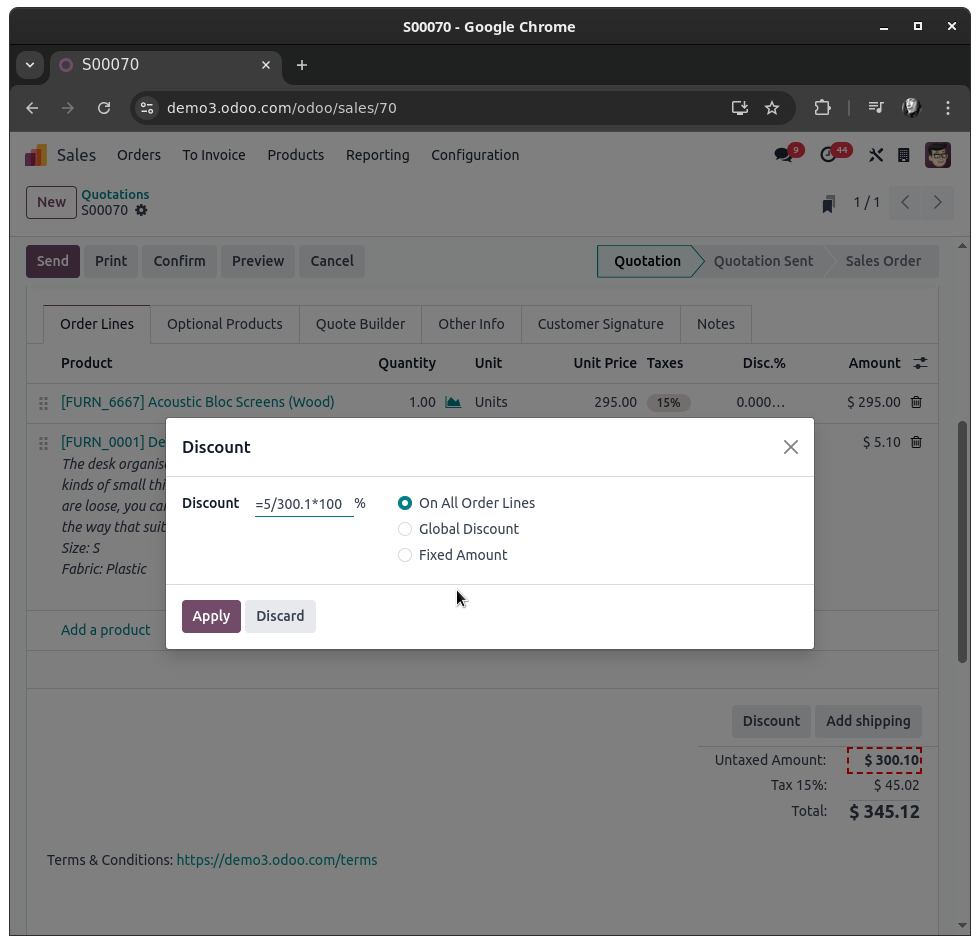
However, what you can do is using a formula - similar to what you know from any spreadsheet tool such as MS Excel.

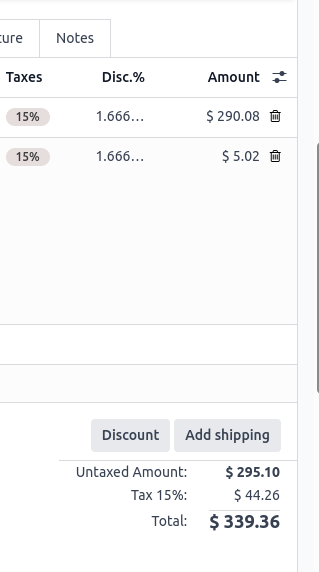
You can define the Discount On All Order Lines as "equals discount amount divided by untaxed amount times 100" for a 5 dollar discount split onto all order lines, e.g. =5/300.1*100:


Which will result into:


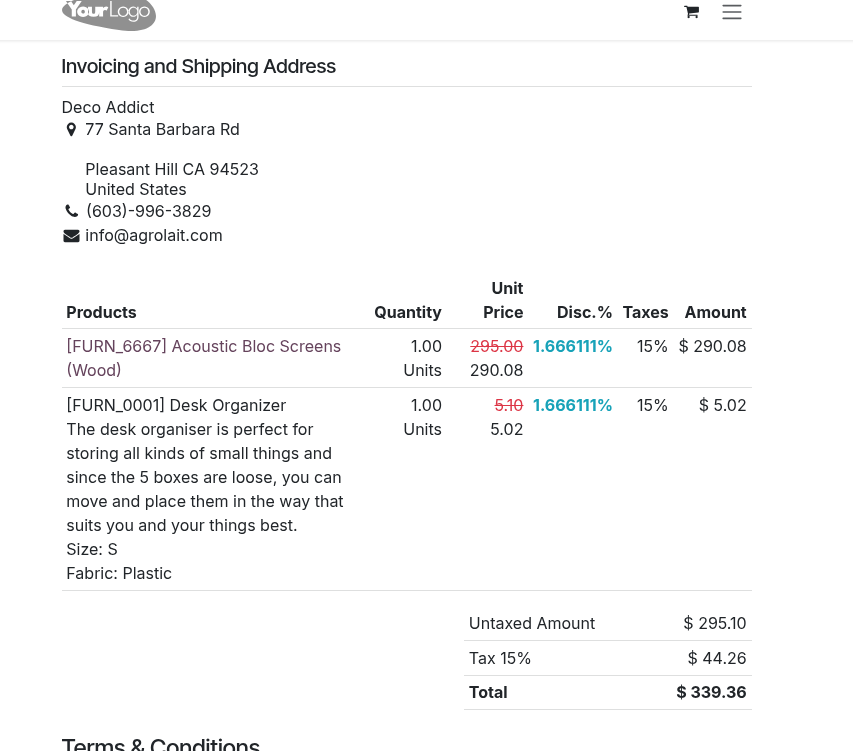
The preview for your customer will look like this:


While this does not display a 5 dollar discount directly (this will require certain modification depending on your needs, which may can be done using studio and certainly can be done via custom development) you will end up with the confirmed discount amount.

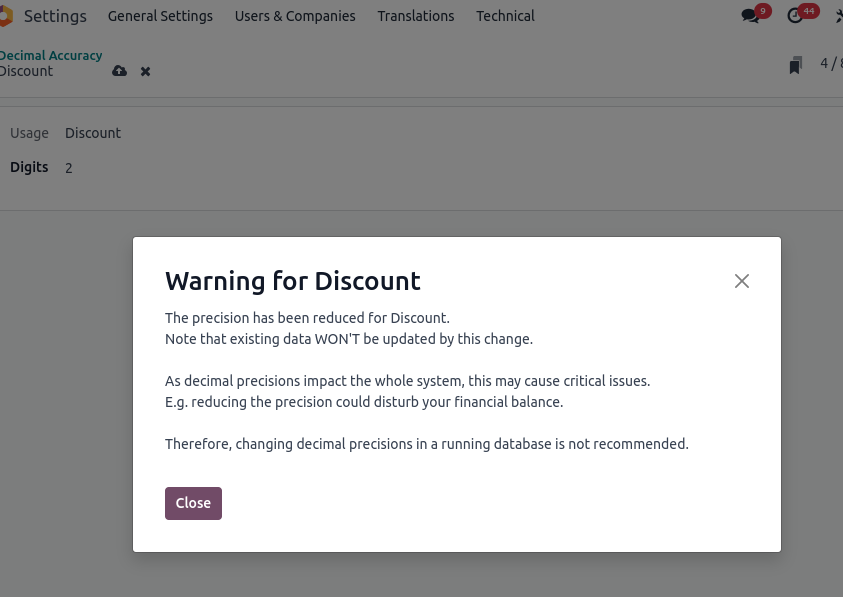
Now, I should mention in addition, that by default you will most likely NOT get the same result in your database. This is due to the fact that the rounding precision (aka Decimal Accuracy which can be found under Settings -> Technical) by default is set to two digits.
In above example this has been changed to six digits. 

To change the Decimal Accuracy you need to enable the Developer Mode (see https://www.odoo.com/documentation/master/applications/general/developer_mode.html)

Note: Please be aware about the fact that you SHOULD NOT set a number lower than what has been stored once in this field once a discount has been applied (i.e. if you choose to change the precision from 2 to let's say 3 for testing, make sure you do this in a test environment first to see whether the outcome is what you want!). In other words:


0
अवतार
खारिज करें
Enjoying the discussion? Don't just read, join in!

Create an account today to enjoy exclusive features and engage with our awesome community!

साइन अप करें
Related Posts Replies डेटा देखने का तरीका ऐक्टिविटी
Order Level Discount Based On Dollar Amount or Weight Of Items
sales discount
अवतार
अवतार
अवतार
2
मई 25
2638
V18: Discount resets to 0 when changing quantity on sales order line Solved
sales discount V18
अवतार
अवतार
अवतार
अवतार
3
मार्च 26
1683
Discount rules
sales discount sale.order
अवतार
0
नव॰ 25
3
Discount if paid on time Solved
sales discount skonto
अवतार
अवतार
1
सित॰ 25
1424
discount if payment is made within 15 days, but only on certain sales lines Solved
sales discount delivery
अवतार
अवतार
अवतार
3
मई 24
4171
कम्यूनिटी
  • ट्यूटोरियल्स
  • दस्तावेज़
  • फ़ोरम
ओपन सोर्स
  • डाउनलोड
  • Github
  • रनबॉट
  • अनुवाद
सेवाएं
  • Odoo.sh Hosting
  • सहायता
  • अपग्रेड
  • कस्टम डेवलपमेंट्स
  • शिक्षा
  • अकाउंटेंट खोजें
  • पार्टनर ढूंढें
  • पार्टनर बनें
हमारे बारे में
  • हमारी कंपनी
  • ब्रांड ऐसेट
  • संपर्क करें
  • नौकरियां
  • इवेंट
  • पॉडकास्ट
  • ब्लॉग
  • ग्राहक
  • लीगल • गोपनीयता
  • सुरक्षा
الْعَرَبيّة Català 简体中文 繁體中文 (台灣) Čeština Dansk Nederlands English Suomi Français Deutsch हिंदी Bahasa Indonesia Italiano 日本語 한국어 (KR) Lietuvių kalba Język polski Português (BR) română русский язык Slovenský jazyk Slovenščina Español (América Latina) Español Svenska ภาษาไทย Türkçe українська Tiếng Việt

Odoo, बिज़नेस से जुड़े ऐप्लिकेशन का एक कलेक्शन है जो ओपन सोर्स पर आधारित है. इसमें आपकी कंपनी की हर ज़रूरत के लिए ऐप्लिकेशन हैं. जैसे, सीआरएम, ई-कॉमर्स, अकाउंटिंग, इन्वेंट्री, पॉइंट ऑफ़ सेल, प्रोजेक्ट मैनेजमेंट वगैरह.

Odoo की सबसे बड़ी खासियत है कि यह इस्तेमाल करने में बहुत आसान है और यह पूरी तरह से इंटिग्रेट किया हुआ है.

Website made with

Odoo Experience on YouTube

1. Use the live chat to ask your questions.
2. The operator answers within a few minutes.

Live support on Youtube
Watch now