Se rendre au contenu
Odoo Menu
  • Se connecter
  • Essai gratuit
  • Applications
    Finance
    • Comptabilité
    • Facturation
    • Notes de frais
    • Feuilles de calcul (BI)
    • Documents
    • Signature
    Ventes
    • CRM
    • Ventes
    • PdV Boutique
    • PdV Restaurant
    • Abonnements
    • Location
    Sites web
    • Site Web
    • eCommerce
    • Blog
    • Forum
    • Live Chat
    • eLearning
    Chaîne d'approvisionnement
    • Inventaire
    • Fabrication
    • PLM
    • Achats
    • Maintenance
    • Qualité
    Ressources Humaines
    • Employés
    • Recrutement
    • Congés
    • Évaluations
    • Recommandations
    • Parc automobile
    Marketing
    • Marketing Social
    • E-mail Marketing
    • SMS Marketing
    • Événements
    • Marketing Automation
    • Sondages
    Services
    • Projet
    • Feuilles de temps
    • Services sur Site
    • Assistance
    • Planification
    • Rendez-vous
    Productivité
    • Discussion
    • Intelligence artificielle
    • Internet des Objets
    • VoIP
    • Connaissances
    • WhatsApp
    Applications tierces Odoo Studio Plateforme Cloud d'Odoo
  • Industries
    Commerce de détail
    • Librairie
    • Magasin de vêtements
    • Magasin de meubles
    • Supermarché
    • Quincaillerie
    • Magasin de jouets
    Restauration & Hôtellerie
    • Bar et Pub
    • Restaurant
    • Fast-food
    • Maison d’hôtes
    • Distributeur de boissons
    • Hôtel
    Immobilier
    • Agence immobilière
    • Cabinet d'architecture
    • Construction
    • Gestion immobilière
    • Jardinage
    • Association de copropriétaires
    Consultance
    • Cabinet d'expertise comptable
    • Partenaire Odoo
    • Agence Marketing
    • Cabinet d'avocats
    • Aquisition de talents
    • Audit & Certification
    Fabrication
    • Textile
    • Métal
    • Meubles
    • Alimentation
    • Brasserie
    • Cadeaux d'entreprise
    Santé & Fitness
    • Club de sports
    • Opticien
    • Salle de fitness
    • Praticiens bien-être
    • Pharmacie
    • Salon de coiffure
    Commerce
    • Homme à tout faire
    • Matériel informatique & support
    • Systèmes photovoltaïques
    • Cordonnier
    • Services de nettoyage
    • Services CVC
    Autres
    • Organisation à but non lucratif
    • Agence environnementale
    • Location de panneaux d'affichage
    • Photographie
    • Leasing de vélos
    • Revendeur de logiciel
    Parcourir toutes les industries
  • Communauté
    Apprenez
    • Tutoriels
    • Documentation
    • Certifications
    • Formation
    • Blog
    • Podcast
    Renforcer l'éducation
    • Programme éducatif
    • Business Game Scale-Up!
    • Rendez-nous visite
    Obtenir le logiciel
    • Téléchargement
    • Comparez les éditions
    • Versions
    Collaborer
    • Github
    • Forum
    • Événements
    • Traductions
    • Devenir partenaire
    • Services pour partenaires
    • Enregistrer votre cabinet comptable
    Nos Services
    • Trouver un partenaire
    • Trouver un comptable
    • Rencontrer un conseiller
    • Services de mise en œuvre
    • Références clients
    • Assistance
    • Mises à niveau
    Github Youtube Twitter Linkedin Instagram Facebook Spotify
    +1 (650) 691-3277
    Obtenir une démonstration
  • Tarification
  • Aide
Vous devez être inscrit pour interagir avec la communauté.
Toutes les publications Personnes Badges
Étiquettes (Voir toutl)
odoo accounting v14 pos v15
À propos de ce forum
Vous devez être inscrit pour interagir avec la communauté.
Toutes les publications Personnes Badges
Étiquettes (Voir toutl)
odoo accounting v14 pos v15
À propos de ce forum
Aide

Tax_id field many2many

S'inscrire

Recevez une notification lorsqu'il y a de l'activité sur ce poste

Cette question a été signalée
developmentproductmany2manystudio
4 Réponses
1384 Vues
Avatar
passionfruit, Ingrid Revenu

Hello, I am new here and trying to customise a product sheet on Odoo online, however I am running into an issue to extract the price without tax as my main price is tax included. 

I am unable to find a way to extract either the price without tax, either the tax rate (taxes_id) as it is not a float but a many2many field, anyone could help me ? 


The idea behind is that I added a extra field with ooo studio and need to calculate the value of the field using the price without tax.


Thanks

2
Avatar
Ignorer
CandidRoot Solutions

In Odoo Online, the product form does not store a “price without tax”.
Even if your sale price is tax-included, Odoo calculates the untaxed value only on documents like Quotations, Sales Orders, and Invoices (Subtotal / Untaxed Amount).

That’s why you won’t find an untaxed price field on the product page.
Showing it there would require backend customization, which is not possible on Odoo Online (SAAS) But Yes, this requirement can be handled on Odoo.sh or On-Premise.
We can add a small backend customization that uses Odoo’s tax engine to calculate the price without tax correctly, even when the product price is tax-included and multiple taxes are applied.

passionfruit, Ingrid Revenu
Auteur

Thank you for your answer, I am not looking to have multiple tax id, I am only looking for a way to extract the tax % of the product, so I can use it for a calculation. Do you know how I could extract the tax % out of the product page ? 

Thank you in advance

Avatar
CandidRoot Solutions
Meilleure réponse

Hello Ingrid,

This is expected behavior in Odoo Online, especially when working with tax-included prices and Odoo Studio.

In Odoo, product taxes are stored in the taxes_id field, which is a many2many field because multiple taxes can apply to a single product. The actual tax computation (including extracting price without tax) is handled by Odoo’s internal tax engine using server-side Python logic (compute_all).

However, Odoo Studio formulas do not support iterating over many2many fields or applying tax engine logic. Because of this limitation:

  • You cannot reliably calculate price excluding tax in Studio when the product price is tax-included.

  • Accessing the tax rate directly from taxes_id for calculation is not possible in Studio.

Available approaches:
  1. Use Odoo’s standard untaxed values

    Odoo already calculates untaxed amounts correctly on documents like quotations, sales orders, and reports.

  2. Single fixed tax workaround (limited use case)

    If only one fixed tax is always applied, you may use a manual formula (e.g. price / 1.18).

    Please note this is only an approximation and not recommended for flexible or multi-tax scenarios.

  3. Recommended (accurate) solution

    A proper and scalable solution requires a small server-side Python customization using Odoo’s tax computation methods. This is only possible on Odoo.sh or On-Premise, not on Odoo Online.

So this is not a bug, but a functional limitation of Odoo Studio in Odoo Online.

If you would like help implementing a robust solution or exploring alternative approaches, CandidRoot would be happy to assist.

 If this solution helped you, kindly upvote this answer.

Best regards,


CandidRoot Solutions Pvt. Ltd.
Mobile: (+91) 8849036209
Whatapp: (+91) 8849036209

Email: info@candidroot.com
Web: https://www.candidroot.com

3
Avatar
Ignorer
passionfruit, Ingrid Revenu
Auteur

Thanks, do you know how I can have the untaxed value as you mentioned in option 1 ? As my product price is tax included, I cannot find a field without tax on the product page. Thanks in advance

Avatar
Chris TRINGHAM
Meilleure réponse

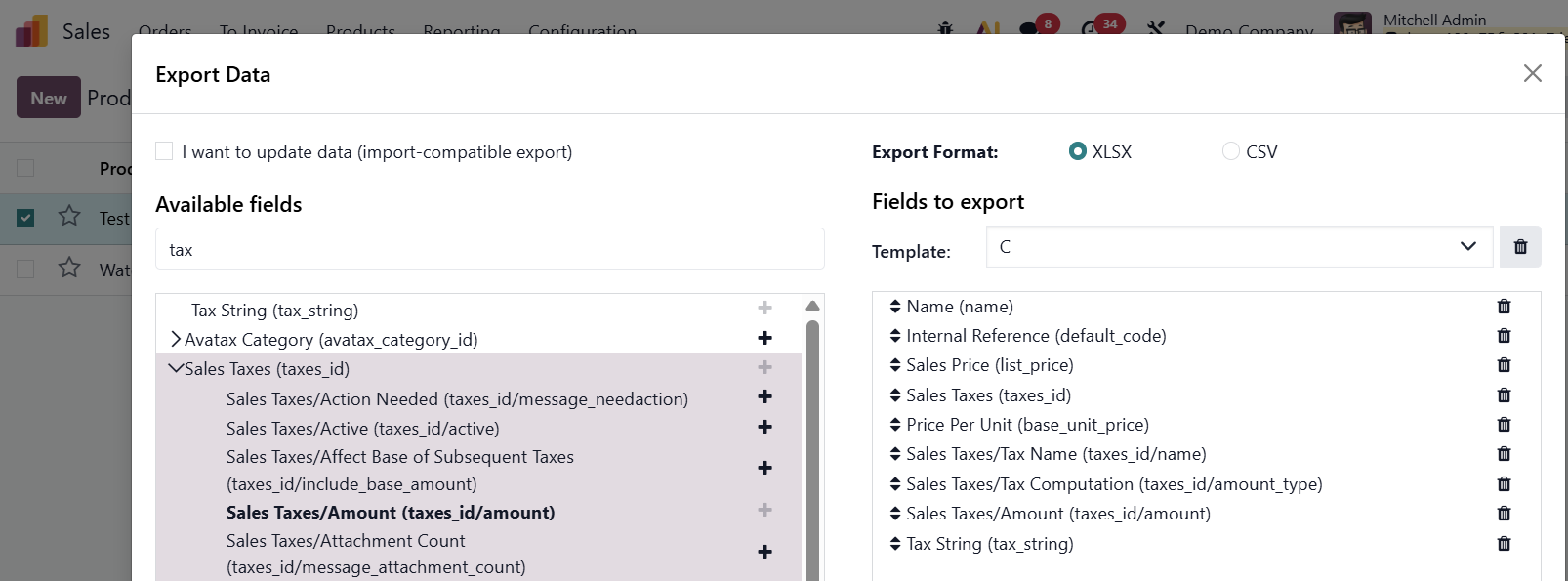
Maybe I'm missing something here, but you can extract the tax percentage from the sales tax (and the tax string)


0
Avatar
Ignorer
Avatar
Jose
Meilleure réponse

Use the unit price field (price_unit) to obtain the sales price without added taxes.

-1
Avatar
Ignorer
Avatar
Cybrosys Techno Solutions Pvt.Ltd
Meilleure réponse

Hi,

In Odoo, the built-in Tax ID field is a single value field on the partner model, not a many2many field. That means Odoo lets you store only one Tax/VAT number per contact by default.

If you need to associate multiple tax identifiers with a partner, you must model it differently:

    Create a custom model to store tax ID records.

    Add a many2many or one2many field on the partner pointing to that model.

    In that custom model, include fields such as Tax Type, Country, and Tax Number.

This way, the partner can hold multiple tax identifiers.

Odoo doesn’t provide a many2many tax ID field by default, so extending the model with a custom related table is the standard way to handle it.


Hope it helps

-2
Avatar
Ignorer
Vous appréciez la discussion ? Ne vous contentez pas de lire, rejoignez-nous !

Créez un compte dès aujourd'hui pour profiter de fonctionnalités exclusives et échanger avec notre formidable communauté !

S'inscrire
Publications associées Réponses Vues Activité
What is the best practice of using Odoo Studio? Résolu
development studio
Avatar
Avatar
Avatar
2
oct. 25
2454
Obtener edad desde fecha de nacimiento / Get age from date of birth Résolu
development studio V18.1
Avatar
Avatar
2
mars 25
2637
How to add Text field from products onto Quote/Sales PDF Résolu
sales product studio
Avatar
Avatar
Avatar
Avatar
3
juil. 24
5923
Copy Many2Many from Parent to Child Many2Many field Résolu
many2many studio server_actions
Avatar
1
juil. 23
8464
How to use self.env.cr.execute get my data? Résolu
development many2many sql
Avatar
Avatar
Avatar
2
déc. 23
33807
Communauté
  • Tutoriels
  • Documentation
  • Forum
Open Source
  • Téléchargement
  • Github
  • Runbot
  • Traductions
Services
  • Hébergement Odoo.sh
  • Assistance
  • Migration
  • Développements personnalisés
  • Éducation
  • Trouver un comptable
  • Trouver un partenaire
  • Devenir partenaire
À propos
  • Notre société
  • Actifs de la marque
  • Contactez-nous
  • Emplois
  • Événements
  • Podcast
  • Blog
  • Clients
  • Informations légales • Confidentialité
  • Sécurité.
الْعَرَبيّة Català 简体中文 繁體中文 (台灣) Čeština Dansk Nederlands English Suomi Français Deutsch हिंदी Bahasa Indonesia Italiano 日本語 한국어 (KR) Lietuvių kalba Język polski Português (BR) română русский язык Slovenský jazyk Slovenščina Español (América Latina) Español Svenska ภาษาไทย Türkçe українська Tiếng Việt

Odoo est une suite d'applications open source couvrant tous les besoins de votre entreprise : CRM, eCommerce, Comptabilité, Inventaire, Point de Vente, Gestion de Projet, etc.

Le positionnement unique d'Odoo est d'être à la fois très facile à utiliser et totalement intégré.

Website made with

Odoo Experience on YouTube

1. Use the live chat to ask your questions.
2. The operator answers within a few minutes.

Live support on Youtube
Watch now