Siirry sisältöön
Odoo Menu
  • Kirjaudu sisään
  • Kokeile ilmaiseksi
  • Sovellukset
    Talous
    • Kirjanpito
    • Laskutus
    • Kulut
    • Datataulukot (BI)
    • Asiakirjat
    • Allekirjoita
    Myynti
    • CRM
    • Myynti
    • Kassajärjestelmä myymälään
    • Kassajärjestelmä ravintolaan
    • Tilaukset
    • Vuokraus
    Verkkosivut
    • Verkkosivun Rakennustyökalu
    • Verkkokauppa
    • Blogi
    • Foorumi
    • Livechat
    • Verkko-oppiminen
    Toimitusketju
    • Varastointi
    • Tuotanto
    • Tuotteen elinkaaren hallinta (PLM)
    • Ostot
    • Huolto
    • Laatu
    Henkilöstöhallinto
    • Työntekijät
    • Rekrytointi
    • Vapaat
    • Arvioinnit
    • Suositukset
    • Kuljetuskalusto
    Markkinointi
    • Somemarkkinointi
    • Sähköpostimarkkinointi
    • Tekstiviestimarkkinointi
    • Tapahtumat
    • Markkinoinnin automaatio
    • Kyselyt
    Palvelut
    • Projekti
    • Työaikakirjaukset
    • Kenttähuolto
    • Asiakaspalvelu
    • Suunnittelu
    • Ajanvaraukset
    Tuottavuus
    • Viestintä
    • Tekoäly
    • IoT
    • IP-puhe
    • Tietokirjasto
    • WhatsApp
    Kolmannen osapuolen sovellukset Odoo-Studio Odoo-Pilvialusta
  • Toimialat
    Vähittäiskauppa
    • Kirjakauppa
    • Vaatekauppa
    • Huonekaluliike
    • Ruokakauppa
    • Laitteistokauppa
    • Lelukauppa
    Ruoka & Majoitus
    • Baari ja Pubi
    • Ravintola
    • Pikaruoka
    • Majatalo
    • Juomien jakelija
    • Hotelli
    Kiinteistöt
    • Kiinteistönvälitystoimisto
    • Arkkitehtitoimisto
    • Rakentaminen
    • Kiinteistönhallinto
    • Puutarhanhoito
    • Kiinteistönomistajien yhdistys
    Konsultointi
    • Tilitoimisto
    • Odoo-kumppani
    • Markkinointitoimisto
    • Lakitoimisto
    • Osaajahankinta
    • Tilintarkastus & sertifiointi
    Tuotanto
    • Tekstiili
    • Metalli
    • Huonekalut
    • Ruoka
    • Panimo
    • Yrityslahjat
    Terveys & Liikunta
    • Urheiluseura
    • Silmälasiliike
    • Kuntokeskus
    • Hyvinvointialan ammattilaiset
    • Apteekki
    • Kampaamo
    Kaupat
    • Yleismies
    • IT-laitteisto & Tuki
    • Aurinkoenergiajärjestelmät
    • Suutari
    • Siivouspalvelut
    • LVI-palvelut
    Muut
    • Voittoa tavoittelematon järjestö
    • Ympäristötoimisto
    • Mainostaulujen vuokraus  
    • Valokuvaus
    • Leasing-pyörät
    • Ohjelmistojen jälleenmyyjä
    Selaa kaikkia toimialoja
  • Yhteisö
    Opi
    • Kurssit
    • Dokumentaatio
    • Todistukset
    • Koulutus
    • Blogi
    • Podcast
    Kannusta kouluttautumaan
    • Koulutusohjelmat
    • Scale Up! Liiketoimintapeli
    • Vieraile Odoolla
    Hanki ohjelmisto
    • Lataa
    • Vertaile versioita
    • Julkaisut
    Tee yhteistyötä
    • Github
    • Foorumi
    • Tapahtumat
    • Käännökset
    • Ryhdy kumppaniksi
    • Kumppanipalvelut
    • Rekisteröi tilitoimistosi
    • Referral Program
    Hanki palveluja
    • Löydä kumppani
    • Löydä kirjanpitäjä
    • Varaa asiantuntijatapaaminen
    • Implementaatiopalvelut
    • Asiakasreferenssit
    • Tuki
    • Versionkorotukset
    Github Youtube Twitter Linkedin Instagram Facebook Spotify
    +1 (650) 691-3277
    Varaa demo
  • Hinnoittelu
  • Asiakaspalvelu
Sinun on rekisteröidyttävä, jotta voit olla vuorovaikutuksessa yhteisön kanssa.
Kaikki kirjoitukset Ihmiset Merkit
Tunnisteet (Näytä kaikki)
odoo accounting v14 pos v15
Tietoa tästä foorumista
Sinun on rekisteröidyttävä, jotta voit olla vuorovaikutuksessa yhteisön kanssa.
Kaikki kirjoitukset Ihmiset Merkit
Tunnisteet (Näytä kaikki)
odoo accounting v14 pos v15
Tietoa tästä foorumista
Apua

Quote with alternative products Version Enterprise 19

Tilaa

Saat ilmoituksen, kun tähän viestiin ilmaantuu aktiviteettia

Tämä kysymys on merkitty
salesquotealternative
6 Vastaukset
3113 Näkymät
Avatar
DYSE SOLUCIONES EN TECNOLOGIAS DE LA INFORMACION

Hello good day, I am trying to make a quote with two or more alternative products but I can't find the way, I explain the case in an example, you want to buy a computer, I offer you 3 alternatives, a Dell, a Lenovo and a Mac, when I make the quote it gives me the total for the three, and the payment window shows me the charge for all three, but you are only interested in one computer, I am not interested in taking it to the web, I am only trying to make a quote in PDF

0
Avatar
Hylkää
Avatar
Sakshi Bhindora (sabh)
Paras vastaus

Hello,

I would like to inform you that starting from Odoo 19, the feature for adding optional products in sales orders has been improved. To add or create optional products, you can now create a new section in the quotation and set it as optional.

For more details, please refer to the video link below:

https://drive.google.com/file/d/1pcgF2EpKxO-Z0U7zEXLylCjHHteg1iNy/view?usp=sharing

You can also check the release notes for additional information:

https://www.odoo.com/odoo-19-release-notes

I hope this helps.

Thank you, and have a great day!

1
Avatar
Hylkää
Avatar
Deepak Dwivedi
Paras vastaus

When creating an RFQ for your customer, add a subsection and include all three products. Then, click on the three dots next to the subsection line and mark the products as optional.
This way, all the product prices will initially appear as zero. Send the RFQ to your customer—they will be able to select which product(s) they want and specify the quantity for each.
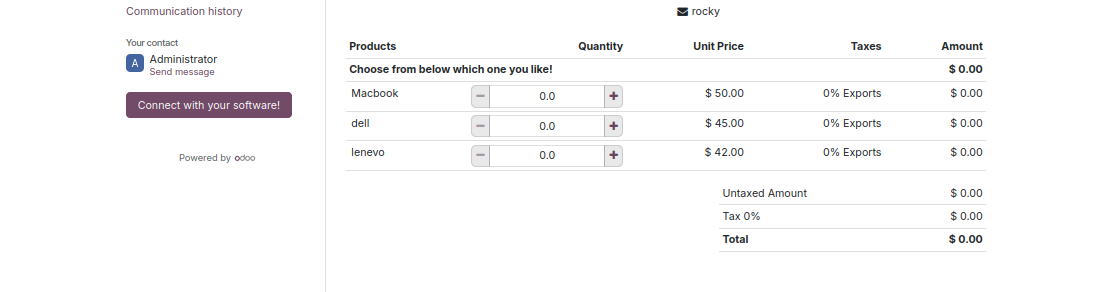
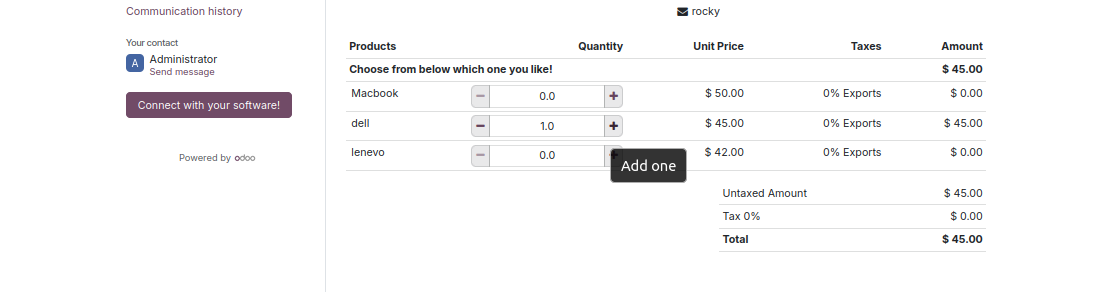
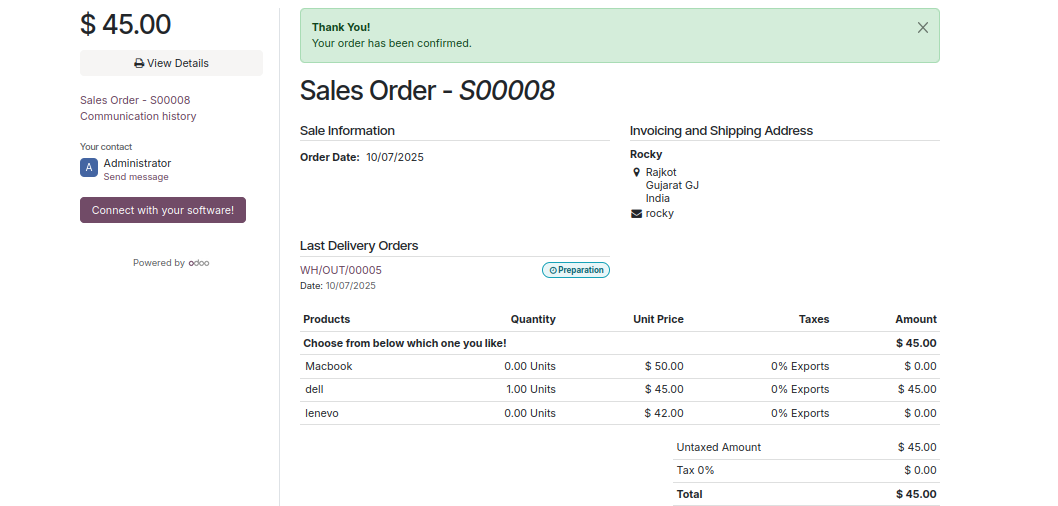

After the customer confirms the quote, it will be converted into a Sales Order (SO) with the selected products, their chosen quantities, and the corresponding product prices.

When you print the SO, only the selected products will show their quantities and prices. The remaining products (not selected) will display zero quantity and zero price.

You can manage it this way. I’ve also attached a screenshot for your reference.

I hope this helps!

0
Avatar
Hylkää
Avatar
Cybrosys Techno Solutions Pvt.Ltd
Paras vastaus

Hi,


Odoo 19 Enterprise doesn’t provide a built-in option to add alternative products directly in quotations. However, this can be done easily through a small custom development in the Sales module.


You can extend the sale.order.line model with a field for alternative products and show it in the quotation view or PDF. This way, sales reps can list multiple options for customers within a single quote and quickly replace the main product if needed.


If you prefer not to customize, you can also check third-party modules.


Hope it helps

0
Avatar
Hylkää
Avatar
AlloCodePromo.Fr, AlloCodePromo.Fr
Paras vastaus

You can use optional products or set the alternatives as separate lines with zero quantity. Make sure each product line has taxes properly set to display the correct total when selected.

0
Avatar
Hylkää
Avatar
DYSE SOLUCIONES EN TECNOLOGIAS DE LA INFORMACION
Tekijä Paras vastaus

Hi, 

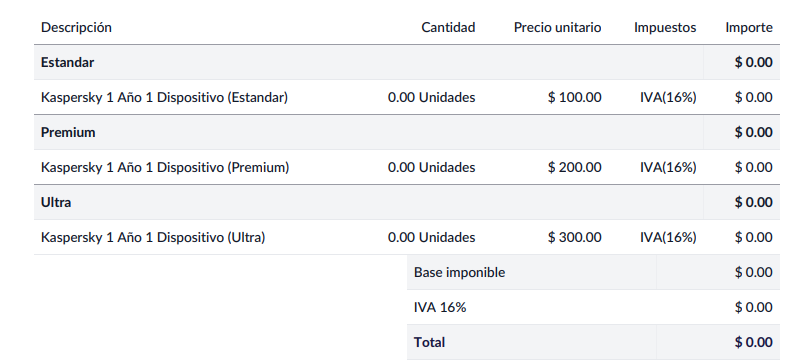
Hello, thank you very much for your response. I have already tried it, and this is what I got. In the end, it does not show me the total amount with taxes for the product.  Did I forget to do something else?
0
Avatar
Hylkää
Avatar
Christoph Farnleitner
Paras vastaus

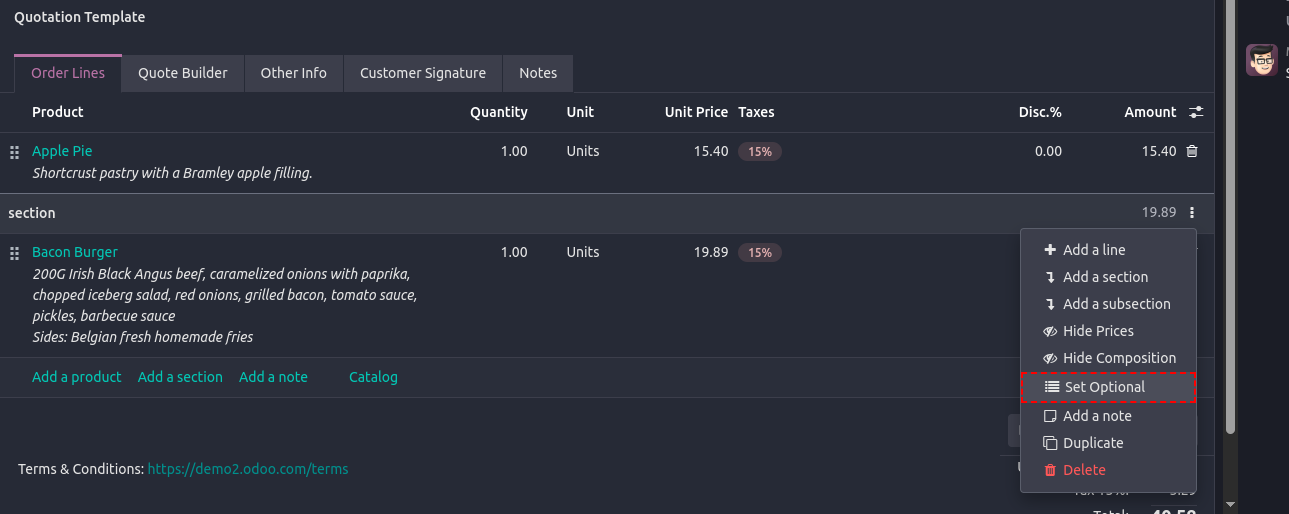
To create a Sale Order with Optional Products in Odoo 19, add a Section above the Products you wish to be optional and Set [it] Optional.
0
Avatar
Hylkää
Nautitko keskustelusta? Älä vain lue, vaan osallistu!

Luo tili jo tänään nauttiaksesi yksinoikeusominaisuuksista ja osallistuaksesi mahtavaan yhteisöömme!

Rekisteröidy
Aiheeseen liittyviä artikkeleita Vastaukset Näkymät Toimenpide
Add Product Documents as Footer and not Header Ratkaistu
sales quote
Avatar
Avatar
1
tammik. 26
1330
Multi language product documents
sales documentation quote
Avatar
Avatar
2
syysk. 25
2498
Manually give sales order reference or edit automatically given one Ratkaistu
sales quote order
Avatar
Avatar
1
tammik. 25
14161
Has the html quote builder disappeared in Odoo 17 ?
sales quote builder
Avatar
0
elok. 24
2940
Lock Price/Cost on confirmed quotations? (odoo.sh v13)
sales quote cost_price
Avatar
0
toukok. 20
4879
Yhteisö
  • Kurssit
  • Dokumentaatio
  • Foorumi
Avoin lähdekoodi
  • Lataa
  • Github
  • Runbot
  • Käännökset
Palvelut
  • Odoo.sh hosting
  • Tuki
  • Versionkorotus
  • Räätälöidyt kehitykset
  • Koulutus
  • Löydä kirjanpitäjä
  • Löydä kumppani
  • Ryhdy kumppaniksi
Meistä
  • Yrityksemme
  • Brändimateriaalit
  • Ota yhteyttä
  • Työpaikat
  • Tapahtumat
  • Podcast
  • Blogi
  • Asiakkaat
  • Oikeudelliset tiedot • Yksityisyys
  • Tietoturva
الْعَرَبيّة Català 简体中文 繁體中文 (台灣) Čeština Dansk Nederlands English Suomi Français Deutsch हिंदी Bahasa Indonesia Italiano 日本語 한국어 (KR) Lietuvių kalba Język polski Português (BR) română русский язык Slovenský jazyk Slovenščina Español (América Latina) Español Svenska ภาษาไทย Türkçe українська Tiếng Việt

Odoo on kokoelma avoimen lähdekoodin yrityssovelluksia, jotka kattavat kaikki yrityksesi tarpeet: asiakkuudenhallinta eli CRM, verkkokauppa, kirjanpito, varastointi, kassajärjestelmä, projektinhallinta, jne.

Odoon ainutlaatuinen arvolupaus on olla samanaikaisesti erittäin helppokäyttöinen ja täysin integroitu.

Website made with

Odoo Experience on YouTube

1. Use the live chat to ask your questions.
2. The operator answers within a few minutes.

Live support on Youtube
Watch now