Siirry sisältöön
Odoo Menu
  • Kirjaudu sisään
  • Kokeile ilmaiseksi
  • Sovellukset
    Talous
    • Kirjanpito
    • Laskutus
    • Kulut
    • Datataulukot (BI)
    • Asiakirjat
    • Allekirjoita
    Myynti
    • CRM
    • Myynti
    • Kassajärjestelmä myymälään
    • Kassajärjestelmä ravintolaan
    • Tilaukset
    • Vuokraus
    Verkkosivut
    • Verkkosivun Rakennustyökalu
    • Verkkokauppa
    • Blogi
    • Foorumi
    • Livechat
    • Verkko-oppiminen
    Toimitusketju
    • Varastointi
    • Tuotanto
    • Tuotteen elinkaaren hallinta (PLM)
    • Ostot
    • Huolto
    • Laatu
    Henkilöstöhallinto
    • Työntekijät
    • Rekrytointi
    • Vapaat
    • Arvioinnit
    • Suositukset
    • Kuljetuskalusto
    Markkinointi
    • Somemarkkinointi
    • Sähköpostimarkkinointi
    • Tekstiviestimarkkinointi
    • Tapahtumat
    • Markkinoinnin automaatio
    • Kyselyt
    Palvelut
    • Projekti
    • Työaikakirjaukset
    • Kenttähuolto
    • Asiakaspalvelu
    • Suunnittelu
    • Ajanvaraukset
    Tuottavuus
    • Viestintä
    • Tekoäly
    • IoT
    • IP-puhe
    • Tietokirjasto
    • WhatsApp
    Kolmannen osapuolen sovellukset Odoo-Studio Odoo-Pilvialusta
  • Toimialat
    Vähittäiskauppa
    • Kirjakauppa
    • Vaatekauppa
    • Huonekaluliike
    • Ruokakauppa
    • Laitteistokauppa
    • Lelukauppa
    Ruoka & Majoitus
    • Baari ja Pubi
    • Ravintola
    • Pikaruoka
    • Majatalo
    • Juomien jakelija
    • Hotelli
    Kiinteistöt
    • Kiinteistönvälitystoimisto
    • Arkkitehtitoimisto
    • Rakentaminen
    • Kiinteistönhallinto
    • Puutarhanhoito
    • Kiinteistönomistajien yhdistys
    Konsultointi
    • Tilitoimisto
    • Odoo-kumppani
    • Markkinointitoimisto
    • Lakitoimisto
    • Osaajahankinta
    • Tilintarkastus & sertifiointi
    Tuotanto
    • Tekstiili
    • Metalli
    • Huonekalut
    • Ruoka
    • Panimo
    • Yrityslahjat
    Terveys & Liikunta
    • Urheiluseura
    • Silmälasiliike
    • Kuntokeskus
    • Hyvinvointialan ammattilaiset
    • Apteekki
    • Kampaamo
    Kaupat
    • Yleismies
    • IT-laitteisto & Tuki
    • Aurinkoenergiajärjestelmät
    • Suutari
    • Siivouspalvelut
    • LVI-palvelut
    Muut
    • Voittoa tavoittelematon järjestö
    • Ympäristötoimisto
    • Mainostaulujen vuokraus  
    • Valokuvaus
    • Leasing-pyörät
    • Ohjelmistojen jälleenmyyjä
    Selaa kaikkia toimialoja
  • Yhteisö
    Opi
    • Kurssit
    • Dokumentaatio
    • Todistukset
    • Koulutus
    • Blogi
    • Podcast
    Kannusta kouluttautumaan
    • Koulutusohjelmat
    • Scale Up! Liiketoimintapeli
    • Vieraile Odoolla
    Hanki ohjelmisto
    • Lataa
    • Vertaile versioita
    • Julkaisut
    Tee yhteistyötä
    • Github
    • Foorumi
    • Tapahtumat
    • Käännökset
    • Ryhdy kumppaniksi
    • Kumppanipalvelut
    • Rekisteröi tilitoimistosi
    Hanki palveluja
    • Löydä kumppani
    • Löydä kirjanpitäjä
    • Varaa asiantuntijatapaaminen
    • Implementaatiopalvelut
    • Asiakasreferenssit
    • Tuki
    • Versionkorotukset
    Github Youtube Twitter Linkedin Instagram Facebook Spotify
    +1 (650) 691-3277
    Varaa demo
  • Hinnoittelu
  • Asiakaspalvelu
Sinun on rekisteröidyttävä, jotta voit olla vuorovaikutuksessa yhteisön kanssa.
Kaikki kirjoitukset Ihmiset Merkit
Tunnisteet (Näytä kaikki)
odoo accounting v14 pos v15
Tietoa tästä foorumista
Sinun on rekisteröidyttävä, jotta voit olla vuorovaikutuksessa yhteisön kanssa.
Kaikki kirjoitukset Ihmiset Merkit
Tunnisteet (Näytä kaikki)
odoo accounting v14 pos v15
Tietoa tästä foorumista
Apua

Import from Winbooks

Tilaa

Saat ilmoituksen, kun tähän viestiin ilmaantuu aktiviteettia

Tämä kysymys on merkitty
import
4 Vastaukset
9175 Näkymät
Avatar
www.ecoledelabas.be, Vincent

We are looking to import data from the accounting software "Winbooks" (in Belgium) to Odoo accounting. We use Winbooks during previous years but doo until 2023. We want to recover old Winbooks data into Odoo.

Any idea on using a Odoo import function or an added module ?

0
Avatar
Hylkää
Avatar
Robin Verlinden (rvn)
Paras vastaus

Hello Vincent,

By default an import module exists for Winbooks in Odoo.
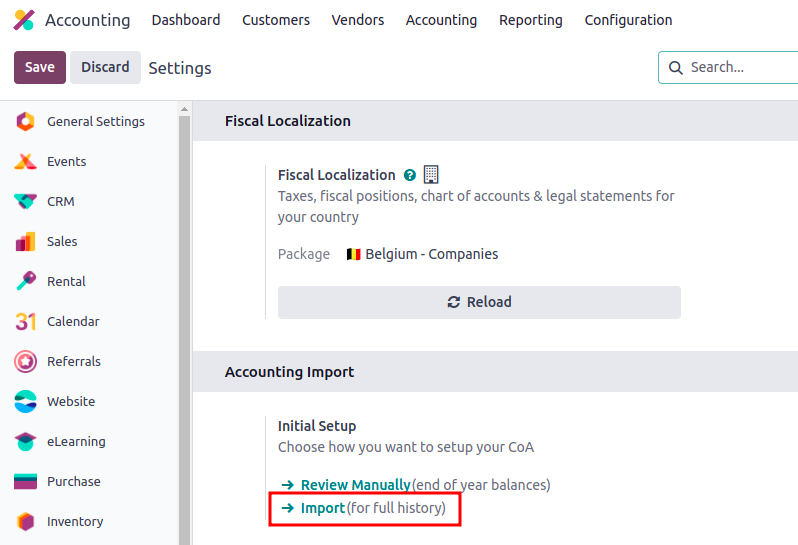
To access it you need to go into the Accounting app > Settings > Accounting Import section.

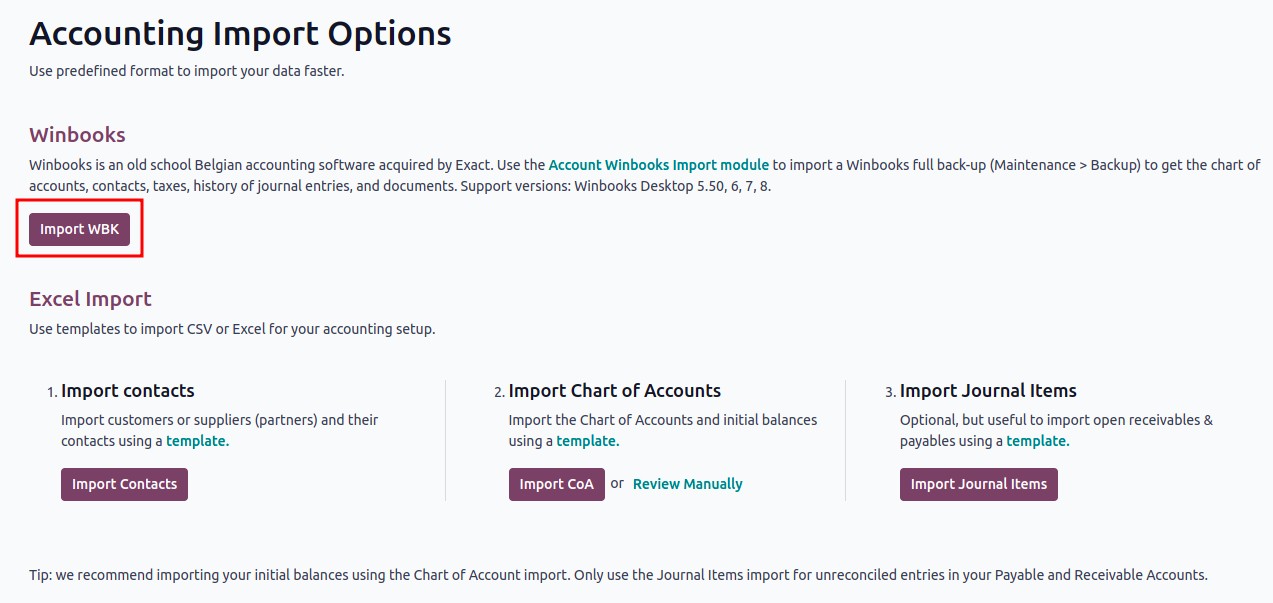
Once you have clicked on that button you will have following view and will be able to upload your data coming from Winbooks.

You will be able to upload your data coming from Winbooks by uploading a full back-up from that software. As explained in the above screenshot you need to go into Maintenance > Back-up of Winbooks to have that file.

If you have any issue regarding the import I invite you to contact odoo.com/help. The colleagues from the support team will make sure to help you get through.

I hope this helps you further and welcome on Odoo.

1
Avatar
Hylkää
A Zesty Solution, Basil Burléon

Hi Robin,

My accountant was using winbooks and I want to shift the accounting in Odoo. He agreed to it and wants to import the winbooks CoA, journals and opening balance.

However, I see 3 problems now :
1) Since January I started creating my invoices in Odoo, my accountant was re encoding everything in winbooks. I have no idea if the journals and accounts used match what he did in winbooks.
2) I also launched an Ecommerce site this month and made a few sales.
3) I imported all my invoices and vendor bills from last year as I wanted to have a starting point.

I guess I have a correct starting balance but it is maybe not in the right accounts for my accountant.
How can I import his Winbooks CoA even though I already used the Odoo standard CoA for Belgium?
Or do I have to delete everything and import the winbooks backup? is it possible? I made a few sales already :/
Do we have to go through everything manually now?

Thank you for your help and this already helpful answer.

Robin Verlinden (rvn)

Hello Basil,

If you only have a few sales and it is easier to take over the data from winbooks, activate the 'Invoicing Switch Threshold' in the accounting settings to clear all the accounting in Odoo. (all accounting entries will be cancelled) Then do the import from Winbooks. It will take all the info from the previous system in Odoo. I trust the accountant knows which journals is needed and which accounts are needed.

Second option: If your accountant did not all the entries since beginning of the year in Winbooks (what I doubt). That would mean that the few entries coming from Winbooks from 01/01/2024 would need to be deleted in order to avoid double entries in Odoo. So after importing the module of Winbooks, delete the entries from 01/01/2024 coming from Winbooks and create all entries again.
This will make it possible to have everything before 01/01/204 linked to Winbooks in Odoo and from 01/01/2024 the accounting in Odoo. However, this means more rework time.

In any case, from 01/01/2024 the accounting will be done completely in Odoo and your accountant will need to verify accordingly.

Note that:
1. All data from winbooks will be imported (contacts, accounting entries and also the CoA)
No need to import the CoA from Winbooks as the module does it.
2. The import from Winbooks is in draft and still needs to be verified and confirmed.
3. If accounts need to be changed, it is possible through the journal items > choose the account > 'Action' button > Change account

Avatar
Antoine Perdaens
Paras vastaus

At the end we used Twinbooks services to import our 12+ years winbooks historical data (attachements, assets, analytical, ...) worked quite well and was super fast.

1
Avatar
Hylkää
Avatar
Aymeric de Bergeyck
Paras vastaus

Hello Robin, Can this option replace an API/SFTP integration or do you advice for integrations to work with a separate API/SFTP integration?

0
Avatar
Hylkää
Avatar
Thuy Ngoc
Paras vastaus

Hi Vincent,

If you can put those data into excel files, the following module can help solve your problem easily: https://www.youtube.com/watch?v=Auaqj6WtdcM&list=PLSKcWRTtEl5qzvRaI-VTGavfReiHS_EEb&index=5

0
Avatar
Hylkää
Nautitko keskustelusta? Älä vain lue, vaan osallistu!

Luo tili jo tänään nauttiaksesi yksinoikeusominaisuuksista ja osallistuaksesi mahtavaan yhteisöömme!

Rekisteröidy
Aiheeseen liittyviä artikkeleita Vastaukset Näkymät Toimenpide
Import Contact Notes (Help! Which is the correct Odoo Field?) Ratkaistu
import
Avatar
Avatar
Avatar
2
jouluk. 25
2052
Importacion de Atributos y Valores
import
Avatar
Avatar
Avatar
Avatar
3
jouluk. 25
4363
Issue with import and comma in Excel File (odoo 19)
import
Avatar
0
syysk. 25
236
can i import journal entries from Excel
import
Avatar
Avatar
1
elok. 24
5051
Odoo 17 Studio
import
Avatar
Avatar
1
helmik. 24
4998
Yhteisö
  • Kurssit
  • Dokumentaatio
  • Foorumi
Avoin lähdekoodi
  • Lataa
  • Github
  • Runbot
  • Käännökset
Palvelut
  • Odoo.sh hosting
  • Tuki
  • Versionkorotus
  • Räätälöidyt kehitykset
  • Koulutus
  • Löydä kirjanpitäjä
  • Löydä kumppani
  • Ryhdy kumppaniksi
Meistä
  • Yrityksemme
  • Brändimateriaalit
  • Ota yhteyttä
  • Työpaikat
  • Tapahtumat
  • Podcast
  • Blogi
  • Asiakkaat
  • Oikeudelliset tiedot • Yksityisyys
  • Tietoturva
الْعَرَبيّة Català 简体中文 繁體中文 (台灣) Čeština Dansk Nederlands English Suomi Français Deutsch हिंदी Bahasa Indonesia Italiano 日本語 한국어 (KR) Lietuvių kalba Język polski Português (BR) română русский язык Slovenský jazyk Slovenščina Español (América Latina) Español Svenska ภาษาไทย Türkçe українська Tiếng Việt

Odoo on kokoelma avoimen lähdekoodin yrityssovelluksia, jotka kattavat kaikki yrityksesi tarpeet: asiakkuudenhallinta eli CRM, verkkokauppa, kirjanpito, varastointi, kassajärjestelmä, projektinhallinta, jne.

Odoon ainutlaatuinen arvolupaus on olla samanaikaisesti erittäin helppokäyttöinen ja täysin integroitu.

Website made with

Odoo Experience on YouTube

1. Use the live chat to ask your questions.
2. The operator answers within a few minutes.

Live support on Youtube
Watch now