
How can I customize the eLearning Certifications?
Esta pregunta ha sido marcada
3
Respuestas
4370
Vistas


While the BACKGROUND of your certificates is not customizable without development, you can remove the certificate badge and change all of the text content and logo that overlay the background.
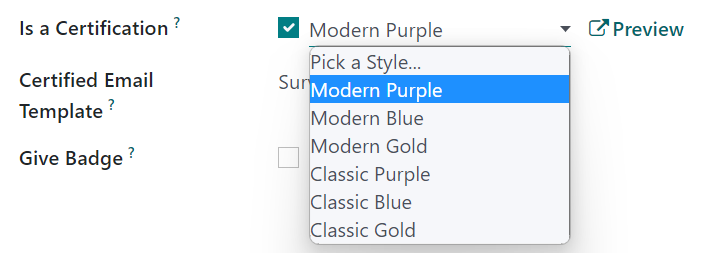
You can change the background to two designs (modern or classic) and three colors (purple, gold and blue) via the Options tab of your Certification Survey:
Via the Reporting Menu (in Developer Mode), you can find the Certifications report, and from there you can click the QWeb Views button to find the certification_report_view_modern and certification_report_view_classic views to change the content overlaying the background.
Inherit and override the relevant view to make your changes. Don't edit the base View or these changes will not survive a database upgrade.
Before:

After:


Can we implement 'certificates and badges' on Odoo 18 Community edition? I'm a beginner!

¿Le interesa esta conversación? ¡Participe en ella!
Cree una cuenta para poder utilizar funciones exclusivas e interactuar con la comunidad.
Inscribirse| Publicaciones relacionadas | Respuestas | Vistas | Actividad | |
|---|---|---|---|---|

|
1
sept 24
|
2939 | ||


|
3
may 26
|
5773 | ||

|
0
abr 26
|
790 | ||
|
Odoo certification
Resuelto
|


|
2
abr 25
|
5304 | |


|
1
ene 25
|
3806 |
