Zum Inhalt springen
Odoo Menü
  • Anmelden
  • Jetzt gratis testen
  • Apps
    Finanzen
    • Buchhaltung
    • Rechnungsstellung
    • Spesenabrechnung
    • Tabellenkalkulation (BI)
    • Dokumente
    • E-Signatur
    Verkauf
    • CRM
    • Verkauf
    • Kassensystem – Shop
    • Kassensystem – Restaurant
    • Abonnements
    • Vermietung
    Websites
    • Website-Builder
    • E-Commerce
    • Blog
    • Forum
    • Livechat
    • E-Learning
    Lieferkette
    • Lager
    • Fertigung
    • PLM
    • Einkauf
    • Wartung
    • Qualität
    Personalwesen
    • Mitarbeiter
    • Personalbeschaffung
    • Abwesenheiten
    • Mitarbeiterbeurteilung
    • Personalempfehlungen
    • Fuhrpark
    Marketing
    • Social Marketing
    • E-Mail-Marketing
    • SMS-Marketing
    • Veranstaltungen
    • Marketing-Automatisierung
    • Umfragen
    Dienstleistungen
    • Projekte
    • Zeiterfassung
    • Außendienst
    • Kundendienst
    • Planung
    • Termine
    Produktivität
    • Dialog
    • Künstliche Intelligenz
    • IoT
    • VoIP
    • Wissensdatenbank
    • WhatsApp
    Apps von Drittanbietern Odoo Studio Odoo Cloud-Plattform
  • Branchen
    Einzelhandel
    • Buchladen
    • Kleidergeschäft
    • Möbelhaus
    • Lebensmittelgeschäft
    • Baumarkt
    • Spielwarengeschäft
    Essen & Gastgewerbe
    • Bar und Kneipe
    • Restaurant
    • Fast Food
    • Gästehaus
    • Getränkehändler
    • Hotel
    Immobilien
    • Immobilienagentur
    • Architekturbüro
    • Baugewerbe
    • Immobilienverwaltung
    • Gartenarbeit
    • Eigentümervereinigung
    Beratung
    • Buchhaltungsfirma
    • Odoo-Partner
    • Marketingagentur
    • Anwaltskanzlei
    • Talentakquise
    • Prüfung & Zertifizierung
    Fertigung
    • Textil
    • Metall
    • Möbel
    • Speisen
    • Brauerei
    • Firmengeschenke
    Gesundheit & Fitness
    • Sportklub
    • Brillengeschäft
    • Fitnessstudio
    • Therapeut
    • Apotheke
    • Friseursalon
    Handel
    • Handyman
    • IT-Hardware & -Support
    • Solarenergiesysteme
    • Schuster
    • Reinigungsdienstleistungen
    • HLK-Dienstleistungen
    Sonstiges
    • Gemeinnützige Organisation
    • Umweltschutzagentur
    • Plakatwandvermietung
    • Fotostudio
    • Fahrrad-Leasing
    • Software-Händler
    Alle Branchen ansehen
  • Community
    Lernen
    • Tutorials
    • Dokumentation
    • Zertifizierungen
    • Schulung
    • Blog
    • Podcast
    Bildung fördern
    • Bildungsprogramm
    • Scale-Up! Planspiel
    • Odoo besuchen
    Software anfragen
    • Herunterladen
    • Editionen vergleichen
    • Releases
    Zusammenarbeiten
    • Github
    • Forum
    • Veranstaltungen
    • Übersetzungen
    • Partner werden
    • Dienstleistungen für Partner
    • Buchhaltungsfirma registrieren
    • Referral Program
    Services anfragen
    • Partner finden
    • Buchhalter finden
    • Einen Experten treffen
    • Implementierungsservices
    • Kundenreferenzen
    • Support
    • Upgrades
    Github Youtube Twitter Linkedin Instagram Facebook Spotify
    +1 (650) 691-3277
    Eine Demo erhalten
  • Preise
  • Hilfe
Sie müssen registriert sein, um mit der Community zu interagieren.
Alle Beiträge Personen Abzeichen
Stichwörter (Alle anzeigen)
odoo accounting v14 pos v15
Über dieses Forum
Sie müssen registriert sein, um mit der Community zu interagieren.
Alle Beiträge Personen Abzeichen
Stichwörter (Alle anzeigen)
odoo accounting v14 pos v15
Über dieses Forum
Hilfe

Limitations in Automation Rules (Odoo 17)

Abonnieren

Erhalten Sie eine Benachrichtigung, wenn es eine Aktivität zu diesem Beitrag gibt

Diese Frage wurde gekennzeichnet
AutomatedActionsAutomationv17
2 Antworten
7864 Ansichten
Avatar
Chris TRINGHAM

In Odoo 16 and previous versions, it was very easy to use Automated Actions to create a record in a linked Model and set fields.  For example, to create an Analytic Account for a Sales Order in Odoo 15:


In Odoo 17, Automation Rules allow you to create a linked record, but do not allow you to set other fields.  So it will fail when trying to create an Analytic Account because it needs some fields to be set (including the Plan).

It is possible to write Python code for some of this, though (not being a Python programmer) I can't figure out how to create an Analytic Account and link it to the sales order.

Similar problem if you want to update multiple fields or use a Python expression rather than set a fixed value.

Also (as discussed elsewhere), only some triggers can be selected, though all of them still seem to be there!

Are these "improvements" because Automated Actions were too powerful or was it overlooked?  Or is there a solution I am missing?  

2
Avatar
Verwerfen
Ricardo Gross

I hope it was only be overlooked and that it will be a solution/fix soon!

Chris TRINGHAM
Autor

For reference: https://github.com/odoo/odoo/pull/114352

Esraa Abu Amer

Hello,

can I ask if you use a execute code , do I have to have the custome plan ? if I am using odoo standard how can I create a new recored 

Tammie Morris

Help - I've been trying to create this but even with Ray's work around we still get an error that a mandatory field isn't being set? What am I missing?

Chris TRINGHAM
Autor

Hi Tammie - it should work if you set a user-defined default for the Plan field: https://odootricks.tips/user-defined-defaults/

Avatar
Ray Carnes (ray)
Beste Antwort

The issue here is that an Analytic Account has two required fields (Name and Plan) and the Automation Rules only allow you to specify a value for the Name.

If you have a User Defined Default setup for Plan, then the following Automation Rule works, updating through the linked field:


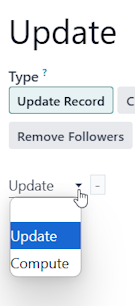
When using the UPDATE Action, you can switch from UPDATE to COMPUTE like this:

1
Avatar
Verwerfen
Ray Carnes (ray)

In Odoo 19.0, we are bringing back "ON CREATE" and "ON CREATE AND EDIT" and removing "ON SAVE".

We are adding DUPLICATE and SEND WHATSAPP Actions.

Chris TRINGHAM
Autor

Thanks @Ray - but I think I'm missing something here. How do you create an action that is "Compute...."

Ray Carnes (ray)

@Chris, see the last part of my updated answer above.

Chris TRINGHAM
Autor

Thanks @Ray - and it's good news that some of the simplification to the UI in v17 is being reverted.

Avatar
Roeland Vandecan
Beste Antwort

Hey Esraa,


try this post:https://www.odoo.com/nl_NL/forum/help-1/server-action-create-record-in-v17-where-to-fill-in-the-target-model-field-values-data-to-write-246871

0
Avatar
Verwerfen
Diskutieren Sie gerne? Treten Sie bei, statt nur zu lesen!

Erstellen Sie heute ein Konto, um exklusive Funktionen zu nutzen und mit unserer tollen Community zu interagieren!

Registrieren
Verknüpfte Beiträge Antworten Ansichten Aktivität
v17: Automation Rules - Trigger is missing?
Automation v17
Avatar
Avatar
Avatar
2
März 24
5616
Odoo 17: Alternative to deprecated "On Creation" for automated actions? Gelöst
Studio AutomatedActions v17
Avatar
Avatar
Avatar
2
Jan. 25
6941
Automated Action on Odoo 17
automated AutomatedActions v17
Avatar
Avatar
1
März 24
6426
Odoo 17 : Automation Rules (base.automation) not working correctly
Rules Automation v17
Avatar
Avatar
1
Feb. 24
5853
automated actions creation using XML file Odoo 17
AutomatedActions Actions v17
Avatar
Avatar
1
Feb. 24
4988
Community
  • Tutorials
  • Dokumentation
  • Forum
Open Source
  • Herunterladen
  • Github
  • Runbot
  • Übersetzungen
Dienstleistungen
  • Odoo.sh-Hosting
  • Support
  • Upgrade
  • Individuelle Entwicklungen
  • Bildung
  • Buchhalter finden
  • Partner finden
  • Partner werden
Über uns
  • Unsere Firma
  • Markenwerte
  • Kontakt
  • Karriere
  • Veranstaltungen
  • Podcast
  • Blog
  • Kunden
  • Rechtliches • Datenschutz
  • Sicherheit
الْعَرَبيّة Català 简体中文 繁體中文 (台灣) Čeština Dansk Nederlands English Suomi Français Deutsch हिंदी Bahasa Indonesia Italiano 日本語 한국어 (KR) Lietuvių kalba Język polski Português (BR) română русский язык Slovenský jazyk Slovenščina Español (América Latina) Español Svenska ภาษาไทย Türkçe українська Tiếng Việt

Odoo ist eine Suite von Open-Source-Betriebsanwendungen, die alle Bedürfnisse Ihres Unternehmens abdecken: CRM, E-Commerce, Buchhaltung, Lager, Kassensystem, Projektmanagement etc.

Das einzigartige Wertversprechen von Odoo ist, dass es gleichzeitig sehr einfach zu bedienen und voll integriert ist.

Website made with

Odoo Experience on YouTube

1. Use the live chat to ask your questions.
2. The operator answers within a few minutes.

Live support on Youtube
Watch now