
Zum Inhalt springen
Odoo Menü
  • Anmelden
  • Jetzt gratis testen
  • Apps
    Finanzen
    • Buchhaltung
    • Rechnungsstellung
    • Spesenabrechnung
    • Tabellenkalkulation (BI)
    • Dokumente
    • E-Signatur
    Verkauf
    • CRM
    • Verkauf
    • Kassensystem – Shop
    • Kassensystem – Restaurant
    • Abonnements
    • Vermietung
    Websites
    • Website-Builder
    • E-Commerce
    • Blog
    • Forum
    • Livechat
    • E-Learning
    Lieferkette
    • Lager
    • Fertigung
    • PLM
    • Einkauf
    • Wartung
    • Qualität
    Personalwesen
    • Mitarbeiter
    • Personalbeschaffung
    • Abwesenheiten
    • Mitarbeiterbeurteilung
    • Personalempfehlungen
    • Fuhrpark
    Marketing
    • Social Marketing
    • E-Mail-Marketing
    • SMS-Marketing
    • Veranstaltungen
    • Marketing-Automatisierung
    • Umfragen
    Dienstleistungen
    • Projekte
    • Zeiterfassung
    • Außendienst
    • Kundendienst
    • Planung
    • Termine
    Produktivität
    • Dialog
    • Künstliche Intelligenz
    • IoT
    • VoIP
    • Wissensdatenbank
    • WhatsApp
    Apps von Drittanbietern Odoo Studio Odoo Cloud-Plattform
  • Branchen
    Einzelhandel
    • Buchladen
    • Kleidergeschäft
    • Möbelhaus
    • Lebensmittelgeschäft
    • Baumarkt
    • Spielwarengeschäft
    Essen & Gastgewerbe
    • Bar und Kneipe
    • Restaurant
    • Fast Food
    • Gästehaus
    • Getränkehändler
    • Hotel
    Immobilien
    • Immobilienagentur
    • Architekturbüro
    • Baugewerbe
    • Immobilienverwaltung
    • Gartenarbeit
    • Eigentümervereinigung
    Beratung
    • Buchhaltungsfirma
    • Odoo-Partner
    • Marketingagentur
    • Anwaltskanzlei
    • Talentakquise
    • Prüfung & Zertifizierung
    Fertigung
    • Textil
    • Metall
    • Möbel
    • Speisen
    • Brauerei
    • Firmengeschenke
    Gesundheit & Fitness
    • Sportklub
    • Brillengeschäft
    • Fitnessstudio
    • Therapeut
    • Apotheke
    • Friseursalon
    Handel
    • Handyman
    • IT-Hardware & -Support
    • Solarenergiesysteme
    • Schuster
    • Reinigungsdienstleistungen
    • HLK-Dienstleistungen
    Sonstiges
    • Gemeinnützige Organisation
    • Umweltschutzagentur
    • Plakatwandvermietung
    • Fotostudio
    • Fahrrad-Leasing
    • Software-Händler
    Alle Branchen ansehen
  • Community
    Lernen
    • Tutorials
    • Dokumentation
    • Zertifizierungen
    • Schulung
    • Blog
    • Podcast
    Bildung fördern
    • Bildungsprogramm
    • Scale-Up! Planspiel
    • Odoo besuchen
    Software anfragen
    • Herunterladen
    • Editionen vergleichen
    • Releases
    Zusammenarbeiten
    • Github
    • Forum
    • Veranstaltungen
    • Übersetzungen
    • Partner werden
    • Dienstleistungen für Partner
    • Buchhaltungsfirma registrieren
    Services anfragen
    • Partner finden
    • Buchhalter finden
    • Einen Experten treffen
    • Implementierungsservices
    • Kundenreferenzen
    • Support
    • Upgrades
    Github Youtube Twitter Linkedin Instagram Facebook Spotify
    +1 (650) 691-3277
    Eine Demo erhalten
  • Preise
  • Hilfe
Sie müssen registriert sein, um mit der Community zu interagieren.
Alle Beiträge Personen Abzeichen
Stichwörter (Alle anzeigen)
odoo accounting v14 pos v15
Über dieses Forum
Sie müssen registriert sein, um mit der Community zu interagieren.
Alle Beiträge Personen Abzeichen
Stichwörter (Alle anzeigen)
odoo accounting v14 pos v15
Über dieses Forum
Hilfe

How to import product images ?

Abonnieren

Erhalten Sie eine Benachrichtigung, wenn es eine Aktivität zu diesem Beitrag gibt

Diese Frage wurde gekennzeichnet
productimportimage
3 Antworten
17507 Ansichten
Avatar
Anais Bodson (abn)

How to import product images in V12 and V13 ?


0
Avatar
Verwerfen
Avatar
Anais Bodson (abn)
Autor Beste Antwort

If a customer wants to import the images associated to their products, here is the best way to import them in Odoo 12.0 or above.

The main purpose of this entry is to explain how to import online hosted images in Odoo. So, the first question is : Are the images currenlty hosted online?


YES : Just put the URL of each image in front of the related product External ID in a spreadsheet and import it !


NO : You will have to host them on your Google Drive and proceed as follow.


1. Copy the following folder to your own Drive : 
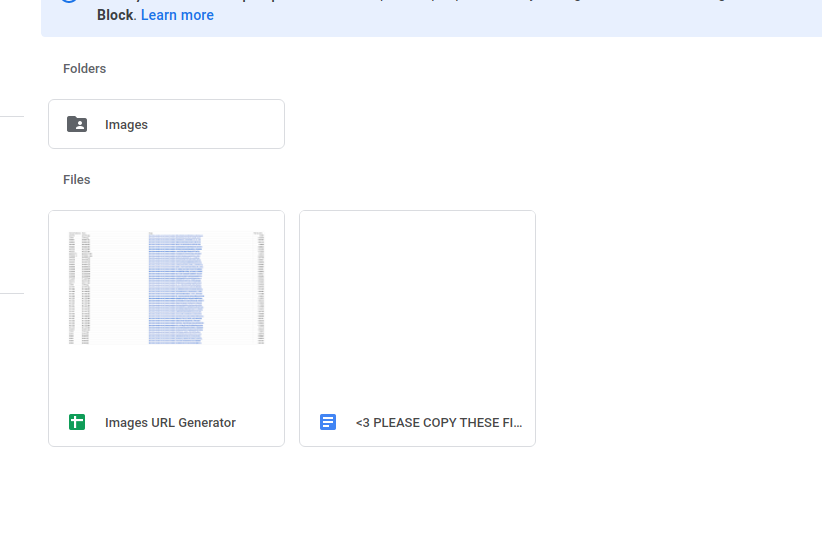

2. Please copy the folder. Example

3. Upload the images to convert in the "Images" subfolder

Note that your customer can upload himself the images...

4. Make sure that the sharing property of the "Images" subfolder is set to "Public on the web"

5. Open the GSheet "Images URL Generator"

6. Launch the conversion by clicking on the menu "Scripts > Images URL Generator"

7. The sheet will contain three columns :

- Internal Reference (tip : rename the images with the Internal Reference or the External ID of the product) 

- Name

- Image

8. Download the GSheet as Excel or CSV

9. Import the file

10. Take a Bertinchamps and relax.


Tips :

- The script works with all files format. For example, you can get the sharing URL of PDF files.

- In version 12.0, it is advised to have a maximum of 100 images per imported file. It could be lower or higher depending the size of the images.

- In version 13.0, you can reduce the size of the imported batch and set maximum 100. Once again, it could be lower or higher depending the size of the images.

Importing error in version 12.x :

1. Check if the module named "saas_base_import" is installed. If yes, update it. If no, install it by following the next steps.

2. Create a server action to execute python code.

3. Paste this code : env.ref('base.module_saas_base_import').sudo().button_immediate_install()

4. Run the server action.

5. Import the images :-). 


1
Avatar
Verwerfen
Avatar
stevebennettt
Beste Antwort

You can use the imghippo tool.

0
Avatar
Verwerfen
Avatar
Pauline Vroonen (pvr)
Beste Antwort

There is an update regarding this entry because Google does not accept this generation of URL's anymore for security reasons. 

If the images have already their URL then you can import them easily via a CSV file. 

If the images don't have the URL but have something in their name that refers to the product you want to link it, then you can ask a Tech to do a script import. 

If the images don't have anything of these options above, then you should upload them in Odoo product per product manually. 

What I did was using this external website : https://postimages.org/nl/ to generate the URL but still you need to generate the links one by one but at least you can import them all together (again in a CSV file).

But it's up to you to decide what's quicker. 


0
Avatar
Verwerfen
Diskutieren Sie gerne? Treten Sie bei, statt nur zu lesen!

Erstellen Sie heute ein Konto, um exklusive Funktionen zu nutzen und mit unserer tollen Community zu interagieren!

Registrieren
Verknüpfte Beiträge Antworten Ansichten Aktivität
How to import images for products in binary to the database? Gelöst
product import image v7
Avatar
Avatar
Avatar
Avatar
Avatar
12
Dez. 23
41995
How to convert & import folder of images?
product import image v10
Avatar
Avatar
3
Juni 17
10639
Product import xslx Gelöst
product import
Avatar
Avatar
Avatar
Avatar
3
Aug. 25
2967
How do I add a large number of photos to products in the website module? Gelöst
import image
Avatar
Avatar
1
Nov. 24
2755
Import Products by SKU Gelöst
product import
Avatar
Avatar
2
März 24
6949
Community
  • Tutorials
  • Dokumentation
  • Forum
Open Source
  • Herunterladen
  • Github
  • Runbot
  • Übersetzungen
Dienstleistungen
  • Odoo.sh-Hosting
  • Support
  • Upgrade
  • Individuelle Entwicklungen
  • Bildung
  • Buchhalter finden
  • Partner finden
  • Partner werden
Über uns
  • Unsere Firma
  • Markenwerte
  • Kontakt
  • Karriere
  • Veranstaltungen
  • Podcast
  • Blog
  • Kunden
  • Rechtliches • Datenschutz
  • Sicherheit
الْعَرَبيّة Català 简体中文 繁體中文 (台灣) Čeština Dansk Nederlands English Suomi Français Deutsch हिंदी Bahasa Indonesia Italiano 日本語 한국어 (KR) Lietuvių kalba Język polski Português (BR) română русский язык Slovenský jazyk Slovenščina Español (América Latina) Español Svenska ภาษาไทย Türkçe українська Tiếng Việt

Odoo ist eine Suite von Open-Source-Betriebsanwendungen, die alle Bedürfnisse Ihres Unternehmens abdecken: CRM, E-Commerce, Buchhaltung, Lager, Kassensystem, Projektmanagement etc.

Das einzigartige Wertversprechen von Odoo ist, dass es gleichzeitig sehr einfach zu bedienen und voll integriert ist.

Website made with

Odoo Experience on YouTube

1. Use the live chat to ask your questions.
2. The operator answers within a few minutes.

Live support on Youtube
Watch now
