Skip to Content
Odoo Menu
  • Log ind
  • Prøv gratis
  • Apps
    Økonomi
    • Bogføring
    • Fakturering
    • Udgifter
    • Regneark (BI)
    • Dokumenter
    • e-Signatur
    Salg
    • CRM
    • Salg
    • POS Butik
    • POS Restaurant
    • Abonnementer
    • Udlejning
    Hjemmeside
    • Hjemmesidebygger
    • e-Handel
    • Blog
    • Forum
    • LiveChat
    • e-Læring
    Forsyningskæde
    • Lagerbeholdning
    • Produktion
    • PLM
    • Indkøb
    • Vedligeholdelse
    • Kvalitet
    HR
    • Medarbejdere
    • Rekruttering
    • Fravær
    • Medarbejdersamtaler
    • Anbefalinger
    • Flåde
    Marketing
    • Markedsføring på sociale medier
    • E-mailmarketing
    • SMS-marketing
    • Arrangementer
    • Automatiseret marketing
    • Spørgeundersøgelser
    Tjenester
    • Projekt
    • Timesedler
    • Udkørende Service
    • Kundeservice
    • Planlægning
    • Aftaler
    Produktivitet
    • Dialog
    • Kunstig intelligens
    • IoT
    • VoIP
    • Vidensdeling
    • WhatsApp
    Tredjepartsapps Odoo Studio Odoo Cloud-platform
  • Brancher
    Detailhandel
    • Boghandel
    • Tøjforretning
    • Møbelforretning
    • Dagligvarebutik
    • Byggemarked
    • Legetøjsforretning
    Mad og værtsskab
    • Bar og pub
    • Restaurant
    • Fastfood
    • Gæstehus
    • Drikkevareforhandler
    • Hotel
    Ejendom
    • Ejendomsmægler
    • Arkitektfirma
    • Byggeri
    • Ejendomsadministration
    • Havearbejde
    • Boligejerforening
    Rådgivning
    • Regnskabsfirma
    • Odoo-partner
    • Marketingbureau
    • Advokatfirma
    • Rekruttering
    • Audit & certificering
    Produktion
    • Tekstil
    • Metal
    • Møbler
    • Fødevareproduktion
    • Bryggeri
    • Firmagave
    Heldbred & Fitness
    • Sportsklub
    • Optiker
    • Fitnesscenter
    • Kosmetolog
    • Apotek
    • Frisør
    Håndværk
    • Handyman
    • IT-hardware og support
    • Solenergisystemer
    • Skomager
    • Rengøringsservicer
    • VVS- og ventilationsservice
    Andet
    • Nonprofitorganisation
    • Miljøagentur
    • Udlejning af billboards
    • Fotografi
    • Cykeludlejning
    • Softwareforhandler
    Gennemse alle brancher
  • Community
    Få mere at vide
    • Tutorials
    • Dokumentation
    • Certificeringer
    • Oplæring
    • Blog
    • Podcast
    Bliv klogere
    • Udannelselsesprogram
    • Scale Up!-forretningsspillet
    • Besøg Odoo
    Få softwaren
    • Download
    • Sammenlign versioner
    • Udgaver
    Samarbejde
    • Github
    • Forum
    • Arrangementer
    • Oversættelser
    • Bliv partner
    • Tjenester til partnere
    • Registrér dit regnskabsfirma
    • Referral Program
    Modtag tjenester
    • Find en partner
    • Find en bogholder
    • Kontakt en rådgiver
    • Implementeringstjenester
    • Kundereferencer
    • Support
    • Opgraderinger
    Github Youtube Twitter LinkedIn Instagram Facebook Spotify
    +1 (650) 691-3277
    Få en demo
  • Prissætning
  • Hjælp
Du skal være registreret for at interagere med fællesskabet.
Alle bidrag Personer Emblemer
Tags (Vis alle)
odoo accounting v14 pos v15
Om dette forum
Du skal være registreret for at interagere med fællesskabet.
Alle bidrag Personer Emblemer
Tags (Vis alle)
odoo accounting v14 pos v15
Om dette forum
Hjælp

Remove Powered by Odoo from Website footer. Instructions. Enjoy.

Tilmeld

Få besked, når der er aktivitet på dette indlæg

Dette spørgsmål er blevet anmeldt
removeodooodooV8
14 Besvarelser
131200 Visninger
Avatar
JA

1. Log in to the Odoo admin as administrator. Activate Technical Features, if not already activated, by going to Settings > Users > Users > Admin > Edit > Usability > Technical Features > check the box (on), click Save.


2. Go to Settings > Technical > User Interface > Views.
In the search box, next to filter icon, type "Footer Copyright", and hit enter to search.


3. It will show: View name: Footer Copyright. Click to open it. Click Edit.


Comment out lines of the code as follows:
<!-- Powered by <a class="label label-danger" href="http://www.odoo.com/page/website-builder">Odoo</a>,
the #1 <a href="http://www.odoo.com/page/e-commerce">Open Source eCommerce</a>. -->
Click Save.


4. Refresh the browser view of your Odoo front end website. Log out and try to logi in again. The previously visible "Powered by" backlinks and text, are gone.

Congrats.

9
Avatar
Kassér
Zahin

How to make it permanent

Ankit Gauri

hello try this it will remove Powered by Odoo from your website footer i have perform this in my project

Copyright © Company name
Tarek Mohamed Ibrahim

I did these steps and didn't find the mentioned view

iWesabe Technologies

Good !! It will be permanent if edit by code.

Odoobot
Hello can anyone assist me here I want to make my website more good

On Thu, Sep 21, 2023 at 5:01 PM yonathan.cardoso@alfred-eyes.ai <notifications@mail.odoo.com> wrote:
Une nouvelle réponse sur Remove Powered by Odoo from Website footer. Instructions. Enjoy. a été publiée. Cliquez ici pour accéder au message : Voir la publication ͏ ​ ͏ ​ ͏ ​ ͏ ​ ͏ ​ ͏ ​ ͏ ​ ͏ ​ ͏ ​ ͏ ​ ͏ ​ ͏ ​ ͏ ​ ͏ ​ ͏ ​ ͏ ​ ͏ ​ ͏ ​ ͏ ​ ͏ ​ ͏ ​ ͏ ​ ͏ ​ ͏ ​ ͏ ​ ͏ ​ ͏ ​ ͏ ​ ͏ ​ ͏ ​ ͏ ​ ͏ ​ ͏ ​ ͏ ​ ͏ ​ ͏ ​ ͏ ​ ͏ ​ ͏ ​ ͏ ​ ͏ ​ ͏ ​ ͏ ​ ͏ ​ ͏ ​ ͏ ​ ͏ ​ ͏ ​ ͏ ​ ͏ ​ ͏ ​ ͏ ​ ͏ ​ ͏ ​ ͏ ​ ͏ ​ ͏ ​ ͏ ​ ͏ ​ ͏ ​ ͏ ​ ͏ ​ ͏ ​ ͏ ​ ͏ ​ ͏ ​ ͏ ​ ͏ ​ ͏ ​ ͏ ​ ͏ ​ ͏ ​ ͏ ​ ͏ ​ ͏ ​ ͏ ​ ͏ ​ ͏ ​ ͏ ​ ͏ ​ ͏ ​ ͏ ​ ͏ ​ ͏ ​ ͏ ​ ͏ ​ ͏ ​ ͏ ​ ͏ ​ ͏ ​ ͏ ​ ͏ ​ ͏ ​ ͏ ​ ͏ ​ ͏ ​ ͏ ​ ͏ ​ ͏ ​ ͏ ​ ͏ ​ ͏ ​ ͏ ​ ͏ ​ ͏ ​ ͏ ​ ͏ ​ ͏ ​ ͏ ​ ͏ ​ ͏ ​ ͏ ​ ͏ ​ ͏ ​ ͏ ​ ͏ ​ ͏ ​ ͏ ​ ͏ ​ ͏ ​ ͏ ​ ͏ ​ ͏ ​ ͏ ​ ͏ ​ ͏ ​ ͏ ​ ͏ ​ ͏ ​ ͏ ​ ͏ ​ ͏ ​ ͏ ​ ͏ ​ ͏ ​ ͏ ​ ͏ ​ ͏ ​ ͏ ​ ͏ ​

Une nouvelle réponse sur Remove Powered by Odoo from Website footer. Instructions. Enjoy. a été publiée. Cliquez ici pour accéder au message :

Voir la publication


Odoo S.A.

+32 81 81 37 00 | info@odoo.com | https://www.odoo.com

Powered by Odoo
Sehrish

Enhance your Odoo experience with the Custom Branding and Copyrights module. This powerful tool allows you to remove default branding messages and personalize your Odoo instance to reflect your company's identity seamlessly.

https://apps.odoo.com/apps/modules/17.0/mh_hide_powered_by_odoo_website

Avatar
INDOTALENT, Ismail Hamzah
Bedste svar

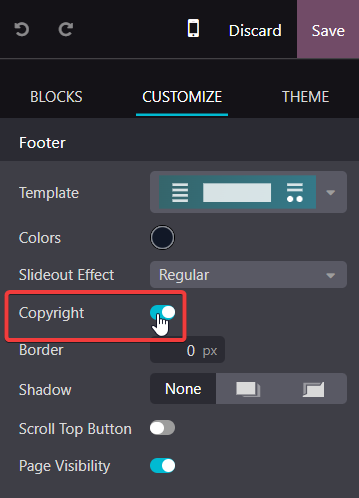
for anyone who did not want to touch any kind of code, can be tried with by disable the "Copyright" at "Footer Block" through website editor mode. Just try it at Odoo 17 EE.

2
Avatar
Kassér
Avatar
shiyi
Bedste svar

odoo 12.0+ 

In the search box type:Brand Promotion Message

View name: Brand Promotion Message. Click to open it. Click Edit

delete:

<t t-set="final_message">Powered by %s%s</t> 

<t t-raw="final_message % (odoo_logo, _message and ('- %s' % _message) or '')"/>

"Save":Congrats.

11
Avatar
Kassér
Rimvydas Kanapka

Worked on Odoo 13.0e. Thanks.

Iñaki

It worked also in Odoo 14. Just go to the web, up right click on "Customize Theme" and then on "HTML/CSS editor" and click on "home" (white bar), then search for "Brand Promotion Message" and delete as Shiyi said.

Ahmed Rashad

Worked on Odoo 14.0e Thank u very much

Avatar
Nazmus Shakib
Bedste svar

This is what worked for me. ODOO 10 and 11.

  1. log in as administrator and "Activate Technical Features", if not activated this is done by going to Settings => Users => Users => ( select your Administrator username by default is Administrator) > Edit > Usability > Technical Features > check the box (active), then Save.

  2. Go to Settings > Technical > User Interface > Views. In the search box, next to "(filter icon) Active", type "Login Layout", and hit enter to search. There will be one search result. (View name: Login Layout. View type: QWeb view.) Click to open it.

  3. Then Click Edit

  4. search for "web.menu_secondary" and edit it as your requirement
  5. Save it
  6. Refresh your browser to get the change otherwise log out and again in to see the change.

       Thanks...

3
Avatar
Kassér
Waterbergh Management e.U., Peter Kayatz

does not work in odoo 12.0e+

Avatar
Emad Akram
Bedste svar

Hello
If you are using odoo16, you can use this module
https://apps.odoo.com/apps/modules/16.0/hide_website_powered_by_odoo/

1
Avatar
Kassér
Avatar
Md Kamrul Hasan
Bedste svar

Remove Powered by odoo from website, you can use this module instead of Saves time compared to manually editing templates: 

https://apps.odoo.com/apps/modules/18.0/ace_remove_website_powered_by_odoo

0
Avatar
Kassér
Avatar
Edgardo L.
Bedste svar

In the search box type:Brand Promotion Message

View name: Brand Promotion Message. Click to open it. ClickEdit

delete:

Powered by %s%s 

"Save":Congratulations.


I followed this and I got a 500: internal server error. :)

0
Avatar
Kassér
Avatar
Boris Meni
Bedste svar

Follow this link https://sortedodoo.com/how-to-remove-powered-by-odoo-from-login-screen-and-website-footer/

0
Avatar
Kassér
Avatar
Viindoo Technology Joint Stock Company
Bedste svar

You need to check "Non Updatable" checkbox so that the change will not be reverted everytime you update (-u all)

0
Avatar
Kassér
TEIMI Yassine

This is a great feature, is it available for every view on Odoo ?

Viindoo Technology Joint Stock Company

yes, it is.

Avatar
OPENSOURCE UNIVERSITY, Thoutmos Sanebankh
Bedste svar

in Odoo 14:
FULL CODE
 Go to the web, up right click on "Customize Theme" and then on "HTML/CSS editor" and click on "home" (white bar), then search for "Brand Promotion Message"  :
 
Comment :  <t t-set="final_message">Powered by %s%s</t>   like  this :

    <?xml version="1.0"?>
<t name="Brand Promotion Message" t-name="web.brand_promotion_message">
        <t t-set="odoo_logo">
            <a target="_blank" t-attf-href="http://www.odoo.com?utm_source=db&amp;utm_medium=#{_utm_medium}" class="badge badge-light">
                <img alt="Odoo" src="/web/static/src/img/odoo_logo_tiny.png" style="height: 1em; vertical-align: baseline;"/>
            </a>
        </t>
       
        <!--  <t t-set="final_message">Powered by %s%s</t>
        <t t-raw="final_message % (odoo_logo, _message and ('- %s' % _message) or '')"/>
        -->
       
    </t>


It works ! Enjoy !

0
Avatar
Kassér
Avatar
Denis Baranov
Bedste svar

Or just install this module: https://apps.odoo.com/apps/modules/8.0/colors_customization/

0
Avatar
Kassér
Avatar
Dr Obx
Bedste svar

It doesn't work ....zachiny ..... which module is required to make it work ?

ParseError: "The ID "website.layout_footer_copyright" refers to an uninstalled m odule" while parsing None:4, near

<data inherit_id="website.layout" name="Footer Copyright">

<xpath expr="//footer" position="inside">

<div class="container mt16 mb8">

<div class="pull-left text-muted">

Copyright <span t-field="res_company.name">Company name</span>

</div>

</div>

</xpath>

</data>

0
Avatar
Kassér
Avatar
Mr.R
Bedste svar

Why not just use odoo debrand from the apps section? Works for me and it'll survive core updates etc  :)

0
Avatar
Kassér
Avatar
Ankit Gauri
Bedste svar

hello try this it will work for sure if you put this code properly bcoz i have perform this in my project and it removes powered by odoo from my website footer


<template id="website.layout_footer_copyright" inherit_id="website.layout" name="Footer Copyright">

<xpath expr="//footer" position="inside">

<div class="container mt16 mb8">

<div class="pull-left text-muted">

Copyright &copy; <span t-field="res_company.name">Company name</span>

</div>

</div>

</xpath>

</template>


Thank You

0
Avatar
Kassér
Avatar
Zahin
Bedste svar


1. Log in to the Odoo admin as administrator. Activate Technical Features, if not already activated, by going to Settings > Users > Users > Admin > Edit > Usability > Technical Features > check the box (on), click Save.

2. Go to Settings > Technical > User Interface > Views.

In the search box, next to filter icon, type "Footer Copyright", and hit enter to search.

3. It will show: View name: Footer Copyright. Click to open it. Click Edit.

Comment out lines of the code as follows:

<!-- Powered by <a class="label label-danger" href="http://www.odoo.com/page/website-builder">Odoo</a>,

the #1 <a href="http://www.odoo.com/page/e-commerce">Open Source eCommerce</a>. -->

Click Save.

4. Refresh the browser view of your Odoo front end website. Log out and try to logi in again. The previously visible "Powered by" backlinks and text, are gone.

Congrats.
-1
Avatar
Kassér
Kan du lide at diskutere? Læs ikke bare med, deltag aktivt i debatten!

Opret en konto i dag for at få glæde af eksklusive funktioner, og bliv en del af vores skønne fællesskab!

Tilmeld dig
Relaterede indlæg Besvarelser Visninger Aktivitet
How to Go Live with Odoo and What Are the Key Benefits?
odoo odooV8
Avatar
Avatar
1
apr. 26
25
Add a button to a ValidationError
odoo odooV8
Avatar
Avatar
1
nov. 22
5934
How to get values of one record of a many2many relation displayed in a tree view when clicking on a button
odoo odooV8
Avatar
0
jun. 21
8267
How to pass string in wizard context
odoo odooV8
Avatar
0
mar. 21
5020
How to create sample sale order and sale order line in odoo? Løst
odoo odooV8
Avatar
Avatar
Avatar
2
jan. 20
25344
Community
  • Tutorials
  • Dokumentation
  • Forum
Open Source
  • Download
  • Github
  • Runbot
  • Oversættelser
Tjenester
  • Odoo.sh-hosting
  • Support
  • Opgradere
  • Individuelt tilpasset udvikling
  • Uddannelse
  • Find en bogholder
  • Find en partner
  • Bliv partner
Om os
  • Vores virksomhed
  • Brandaktiver
  • Kontakt os
  • Stillinger
  • Arrangementer
  • Podcast
  • Blog
  • Kunder
  • Juridiske dokumenter • Privatlivspolitik
  • Sikkerhedspolitik
الْعَرَبيّة Català 简体中文 繁體中文 (台灣) Čeština Dansk Nederlands English Suomi Français Deutsch हिंदी Bahasa Indonesia Italiano 日本語 한국어 (KR) Lietuvių kalba Język polski Português (BR) română русский язык Slovenský jazyk Slovenščina Español (América Latina) Español Svenska ภาษาไทย Türkçe українська Tiếng Việt

Odoo er en samling open source-forretningsapps, der dækker alle dine virksomhedsbehov – lige fra CRM, e-handel og bogføring til lagerstyring, POS, projektledelse og meget mere.

Det unikke ved Odoo er, at systemet både er brugervenligt og fuldt integreret.

Website made with

Odoo Experience on YouTube

1. Use the live chat to ask your questions.
2. The operator answers within a few minutes.

Live support on Youtube
Watch now